Add an action for identifying windows #9523
Conversation


The history of this had gotten way, way too long. It included everything since I started working on this
  WE LIVE IN A MAD WORLD. Teaching tips are exactly the UI we want, but they
  just don't fucking work man. WE want them to light dismiss, but if the window
  is inactive, and you have ILDE=true, then the tip immediately dismisses
  itself. So inactive windows need to not enable light dismiss.

  ALSO we need inactive windows to not focus something when the tip dismisses
  itself. Like, focus was _nowhere_ when we started. We need to toss the focus
  back to _nowhere_.
(cherry picked from commit aa51c07)
(cherry picked from commit fa26f7f)
…dows-3

# Conflicts:
#	src/cascadia/Remoting/FindTargetWindowArgs.h
#	src/cascadia/Remoting/ProposeCommandlineResult.h
add a test, and add liberal comments.
…Windows

# Conflicts:
#	src/cascadia/Remoting/WindowManager.cpp
#	src/cascadia/TerminalApp/Resources/en-US/Resources.resw
 zadjii-msft
added
Area-UserInterface
zadjii-msft
added
Area-UserInterface

| Title="{x:Bind WindowId, Mode=OneWay, Converter={StaticResource WindowIdConverter}}" | ||
| Subtitle="{x:Bind WindowName, Mode=OneWay, Converter={StaticResource WindowNameConverter}}"> |
There was a problem hiding this comment.
Shouldn't we reverse these? Title = Name, subtitle = number? Because the user explicitly assigned a name, so we should present that information first?
There was a problem hiding this comment.
Oh see, I was mostly thinking about the (majority) case where windows aren't named:
<unnamed-window>
Window: 1
vs
Window: 1
<unnamed-window>
 ghost
added
the
Needs-Author-Feedback
ghost
added
the
Needs-Author-Feedback

 DHowett
left a comment
DHowett
left a comment
DHowett
left a comment
There was a problem hiding this comment.
I'm blocking on the whole mostly because of the converters -- I don't see the need to proliferate them; I'd like to reduce their use to "never" as they waste memory by simply existing (they're created as part of xaml resource allocation) -- and perhaps the lazy load dialog thing.
| _timer.Tick([weakThis](auto&&...) { | ||
| if (auto self{ weakThis.lock() }) | ||
| { | ||
| self->_timer.Stop(); | ||
| self->_tip.IsOpen(false); | ||
| } | ||
| }); | ||
| _timer.Start(); |
There was a problem hiding this comment.
does this ensure the timer will not fire twice overlapping?
There was a problem hiding this comment.
It currently doesn't. That's a good point.
ghost
added
the
Needs-Author-Feedback
ghost
removed
the
Needs-Author-Feedback
…Windows

# Conflicts:
#	src/cascadia/TerminalApp/AppLogic.cpp
#	src/cascadia/TerminalApp/TerminalPage.cpp
#	src/cascadia/TerminalApp/TerminalPage.h
This reverts commit 8b6e0bc.
 carlos-zamora
left a comment
carlos-zamora
left a comment
carlos-zamora
left a comment
There was a problem hiding this comment.
This looks great! Just added some suggestions and other thoughts.
| Severity="Warning" | ||
| Message="{x:Bind KeyboardServiceDisabledText, Mode=OneWay}"/> | ||
|
|
||
| <!-- A TeachingTip with IsLightDismissEnabled="True" will immediately |
There was a problem hiding this comment.
Do we need Mode=OneWay here? I guess it's fine for Window ID because that only gets set once per instance, but once renaming goes in, we'll need to make Window Name Mode=OneWay, right?
There was a problem hiding this comment.
I don't think so, since WindowNameForDisplay only has a getter, and I'm using a totally different toast for renaming
There was a problem hiding this comment.
So, OneWay means "listen to PropertyChanged and call the Getter again when it happens"
TwoWay means "this control can call the setter"
The default is OneTime, which is "Call the getter when constructed." 😄
| co_return; | ||
| } | ||
| } | ||
|
|
||
| uint32_t tabIndex{}; | ||
| if (!_tabs.IndexOf(tab, tabIndex)) | ||
| { | ||
| // The tab is already removed | ||
| co_return; | ||
| } | ||
|
|
||
| // We use _removing flag to suppress _OnTabSelectionChanged events | ||
| // that might get triggered while removing | ||
| _removing = true; | ||
| auto unsetRemoving = wil::scope_exit([&]() noexcept { _removing = false; }); | ||
|
|
||
| const auto focusedTabIndex{ _GetFocusedTabIndex() }; | ||
|
|
||
| // Removing the tab from the collection should destroy its control and disconnect its connection, | ||
| // but it doesn't always do so. The UI tree may still be holding the control and preventing its destruction. | ||
| tab.Shutdown(); | ||
|
|
||
| uint32_t mruIndex{}; | ||
| if (_mruTabs.IndexOf(tab, mruIndex)) | ||
| { | ||
| _mruTabs.RemoveAt(mruIndex); | ||
| } | ||
|
|
||
| _tabs.RemoveAt(tabIndex); | ||
| _tabView.TabItems().RemoveAt(tabIndex); | ||
| _UpdateTabIndices(); | ||
|
|
||
| // To close the window here, we need to close the hosting window. | ||
| if (_tabs.Size() == 0) | ||
| { | ||
| _LastTabClosedHandlers(*this, nullptr); | ||
| } | ||
| else if (focusedTabIndex.has_value() && focusedTabIndex.value() == gsl::narrow_cast<uint32_t>(tabIndex)) | ||
| { | ||
| // Manually select the new tab to get focus, rather than relying on TabView since: | ||
| // 1. We want to customize this behavior (e.g., use MRU logic) | ||
| // 2. In fullscreen (GH#5799) and focus (GH#7916) modes the _OnTabItemsChanged is not fired | ||
| // 3. When rearranging tabs (GH#7916) _OnTabItemsChanged is suppressed | ||
| const auto tabSwitchMode = _settings.GlobalSettings().TabSwitcherMode(); | ||
|
|
||
| if (tabSwitchMode == TabSwitcherMode::MostRecentlyUsed) | ||
| { | ||
| const auto newSelectedTab = _mruTabs.GetAt(0); | ||
|
|
||
| uint32_t newSelectedIndex; | ||
| if (_tabs.IndexOf(newSelectedTab, newSelectedIndex)) | ||
| { | ||
| _UpdatedSelectedTab(newSelectedIndex); | ||
| _tabView.SelectedItem(newSelectedTab.TabViewItem()); | ||
| } | ||
| } | ||
| else | ||
| { | ||
| // We can't use | ||
| // auto selectedIndex = _tabView.SelectedIndex(); | ||
| // Because this will always return -1 in this scenario unfortunately. | ||
| // | ||
| // So, what we're going to try to do is move the focus to the tab | ||
| // to the left, within the bounds of how many tabs we have. | ||
| // | ||
| // EX: we have 4 tabs: [A, B, C, D]. If we close: | ||
| // * A (tabIndex=0): We'll want to focus tab B (now in index 0) | ||
| // * B (tabIndex=1): We'll want to focus tab A (now in index 0) | ||
| // * C (tabIndex=2): We'll want to focus tab B (now in index 1) | ||
| // * D (tabIndex=3): We'll want to focus tab C (now in index 2) | ||
| const auto newSelectedIndex = std::clamp<int32_t>(tabIndex - 1, 0, _tabs.Size()); | ||
| // _UpdatedSelectedTab will do the work of setting up the new tab as | ||
| // the focused one, and unfocusing all the others. | ||
| _UpdatedSelectedTab(newSelectedIndex); | ||
|
|
||
| // Also, we need to _manually_ set the SelectedItem of the tabView | ||
| // here. If we don't, then the TabView will technically not have a | ||
| // selected item at all, which can make things like ClosePane not | ||
| // work correctly. | ||
| auto newSelectedTab{ _tabs.GetAt(newSelectedIndex) }; | ||
| _tabView.SelectedItem(newSelectedTab.TabViewItem()); | ||
| } | ||
| } | ||
|
|
||
| // GH#5559 - If we were in the middle of a drag/drop, end it by clearing | ||
| // out our state. | ||
| if (_rearranging) | ||
| { | ||
| _rearranging = false; | ||
| _rearrangeFrom = std::nullopt; | ||
| _rearrangeTo = std::nullopt; | ||
| } | ||
|
|
||
| co_return; | ||
| } | ||
|
|
||
| // Method Description: | ||
| // - Connects event handlers to the TermControl for events that we want to | ||
| // handle. This includes: | ||
| // * the Copy and Paste events, for setting and retrieving clipboard data | ||
| // on the right thread | ||
| // * the TitleChanged event, for changing the text of the tab | ||
| // Arguments: | ||
| // - term: The newly created TermControl to connect the events for | ||
| // - hostingTab: The Tab that's hosting this TermControl instance | ||
| void TerminalPage::_RegisterTerminalEvents(TermControl term, TerminalTab& hostingTab) | ||
| { | ||
| term.RaiseNotice({ this, &TerminalPage::_ControlNoticeRaisedHandler }); | ||
|
|
||
| // Add an event handler when the terminal's selection wants to be copied. | ||
| // When the text buffer data is retrieved, we'll copy the data into the Clipboard | ||
| term.CopyToClipboard({ this, &TerminalPage::_CopyToClipboardHandler }); | ||
|
|
||
| // Add an event handler when the terminal wants to paste data from the Clipboard. | ||
| term.PasteFromClipboard({ this, &TerminalPage::_PasteFromClipboardHandler }); | ||
|
|
||
| term.OpenHyperlink({ this, &TerminalPage::_OpenHyperlinkHandler }); | ||
|
|
||
| // Add an event handler for when the terminal wants to set a progress indicator on the taskbar | ||
| term.SetTaskbarProgress({ this, &TerminalPage::_SetTaskbarProgressHandler }); | ||
|
|
||
| term.HidePointerCursor({ get_weak(), &TerminalPage::_HidePointerCursorHandler }); | ||
| term.RestorePointerCursor({ get_weak(), &TerminalPage::_RestorePointerCursorHandler }); | ||
|
|
||
| // Bind Tab events to the TermControl and the Tab's Pane | ||
| hostingTab.Initialize(term); | ||
|
|
||
| auto weakTab{ hostingTab.get_weak() }; | ||
| auto weakThis{ get_weak() }; | ||
| // PropertyChanged is the generic mechanism by which the Tab | ||
| // communicates changes to any of its observable properties, including | ||
| // the Title | ||
| hostingTab.PropertyChanged([weakTab, weakThis](auto&&, const WUX::Data::PropertyChangedEventArgs& args) { | ||
| auto page{ weakThis.get() }; | ||
| auto tab{ weakTab.get() }; | ||
| if (page && tab) | ||
| { | ||
| if (args.PropertyName() == L"Title") | ||
| { | ||
| page->_UpdateTitle(*tab); | ||
| } | ||
| else if (args.PropertyName() == L"Content") | ||
| { | ||
| if (*tab == page->_GetFocusedTab()) | ||
| { | ||
| page->_tabContent.Children().Clear(); | ||
| page->_tabContent.Children().Append(tab->Content()); | ||
|
|
||
| tab->Focus(FocusState::Programmatic); | ||
| } | ||
| } | ||
| } | ||
| }); | ||
|
|
||
| // react on color changed events | ||
| hostingTab.ColorSelected([weakTab, weakThis](auto&& color) { | ||
| auto page{ weakThis.get() }; | ||
| auto tab{ weakTab.get() }; | ||
|
|
||
| if (page && tab && (tab->FocusState() != FocusState::Unfocused)) | ||
| { | ||
| page->_SetNonClientAreaColors(color); | ||
| } | ||
| }); | ||
|
|
||
| hostingTab.ColorCleared([weakTab, weakThis]() { | ||
| auto page{ weakThis.get() }; | ||
| auto tab{ weakTab.get() }; | ||
|
|
||
| if (page && tab && (tab->FocusState() != FocusState::Unfocused)) | ||
| { | ||
| page->_ClearNonClientAreaColors(); | ||
| } | ||
| }); | ||
|
|
||
| // TODO GH#3327: Once we support colorizing the NewTab button based on | ||
| // the color of the tab, we'll want to make sure to call | ||
| // _ClearNewTabButtonColor here, to reset it to the default (for the | ||
| // newly created tab). | ||
| // remove any colors left by other colored tabs | ||
| // _ClearNewTabButtonColor(); | ||
| } | ||
|
|
||
| // Method Description: | ||
| // - Sets focus to the tab to the right or left the currently selected tab. |
There was a problem hiding this comment.
You could probably set up a PropertyChangedHandler in the ctor and listen for WindowName changed, then fire a WindowNameForDisplay changed event. But like, it probably ends up being the same amount of work as this haha. This is just an option if you really wanted to keep the WINRT_OBSERVABLE_PROPERTY
There was a problem hiding this comment.
Meh, yea, I decided against that b/c I thought at runtime, that would end up being less performant (raise one event, handle it, raise another), rather than just skipping the step.
| </data> | ||
| <data name="CommandPalette_SearchBox.PlaceholderText" xml:space="preserve"> | ||
| <value>Type a command name...</value> | ||
| </data> |
There was a problem hiding this comment.
| <comment>text used to identify when a window hasn't been assigned a name by the user</comment> | |
| <comment>Text used to identify when a window hasn't been assigned a name by the user</comment> |
| auto callback = [](auto&& p, auto&& /*id*/) { | ||
| p.DisplayWindowId(); | ||
| }; |
There was a problem hiding this comment.
Wait... if we're not using id, should we just remove it from the first param in _forAllPeasantsIgnoringTheDead?
There was a problem hiding this comment.
Mike: writes generic function
Reviewers: is it possibly too generic?
There was a problem hiding this comment.
Meh, I presumed a future user of this helper might want it.
zadjii-msft
added
the
AutoMerge

|
Hello @zadjii-msft! Because this pull request has the p.s. you can customize the way I help with merging this pull request, such as holding this pull request until a specific person approves. Simply @mention me (
|
 ghost
merged commit
ghost
merged commit ## Summary of the Pull Request This PR adds support for renaming windows. 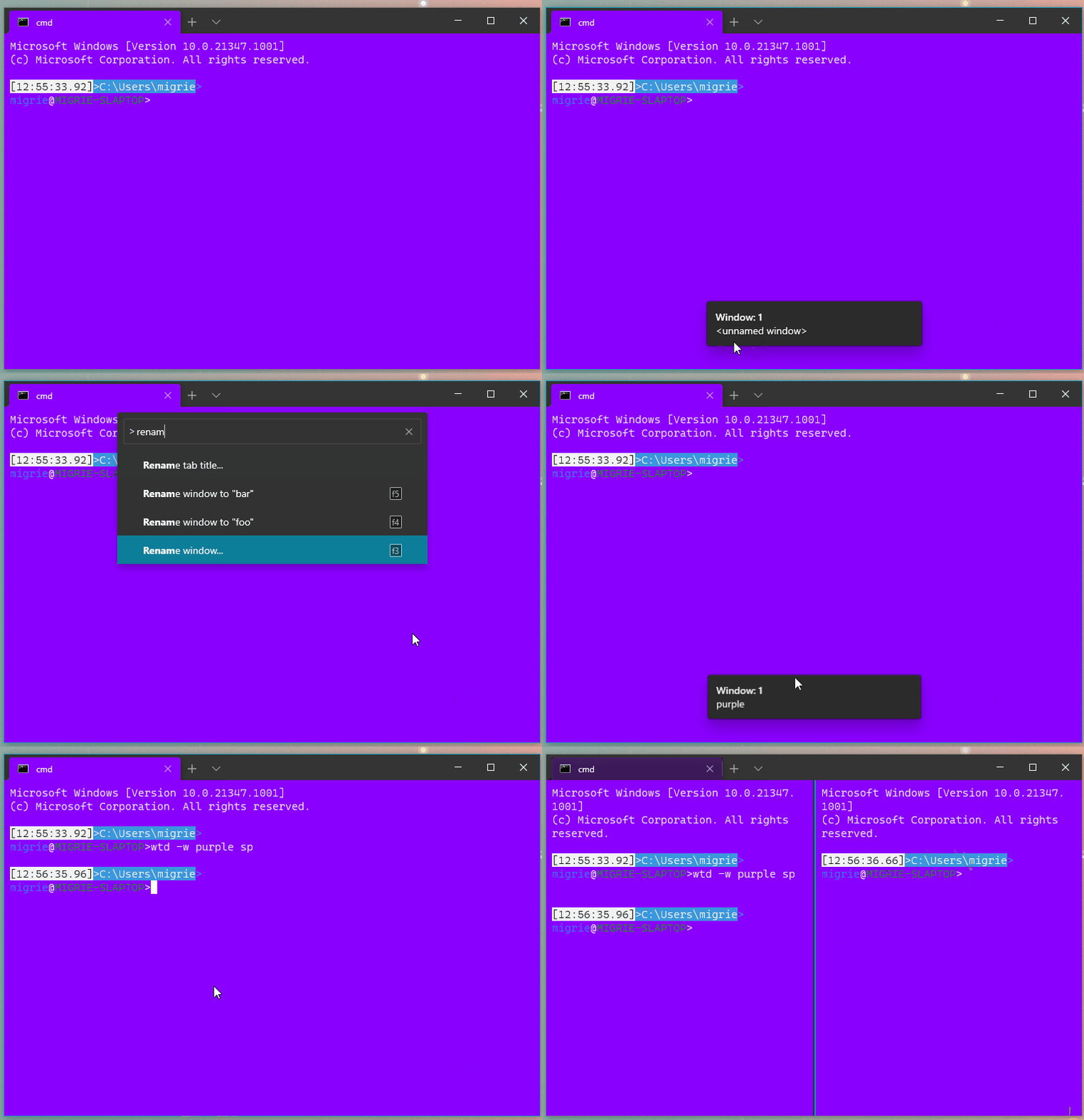 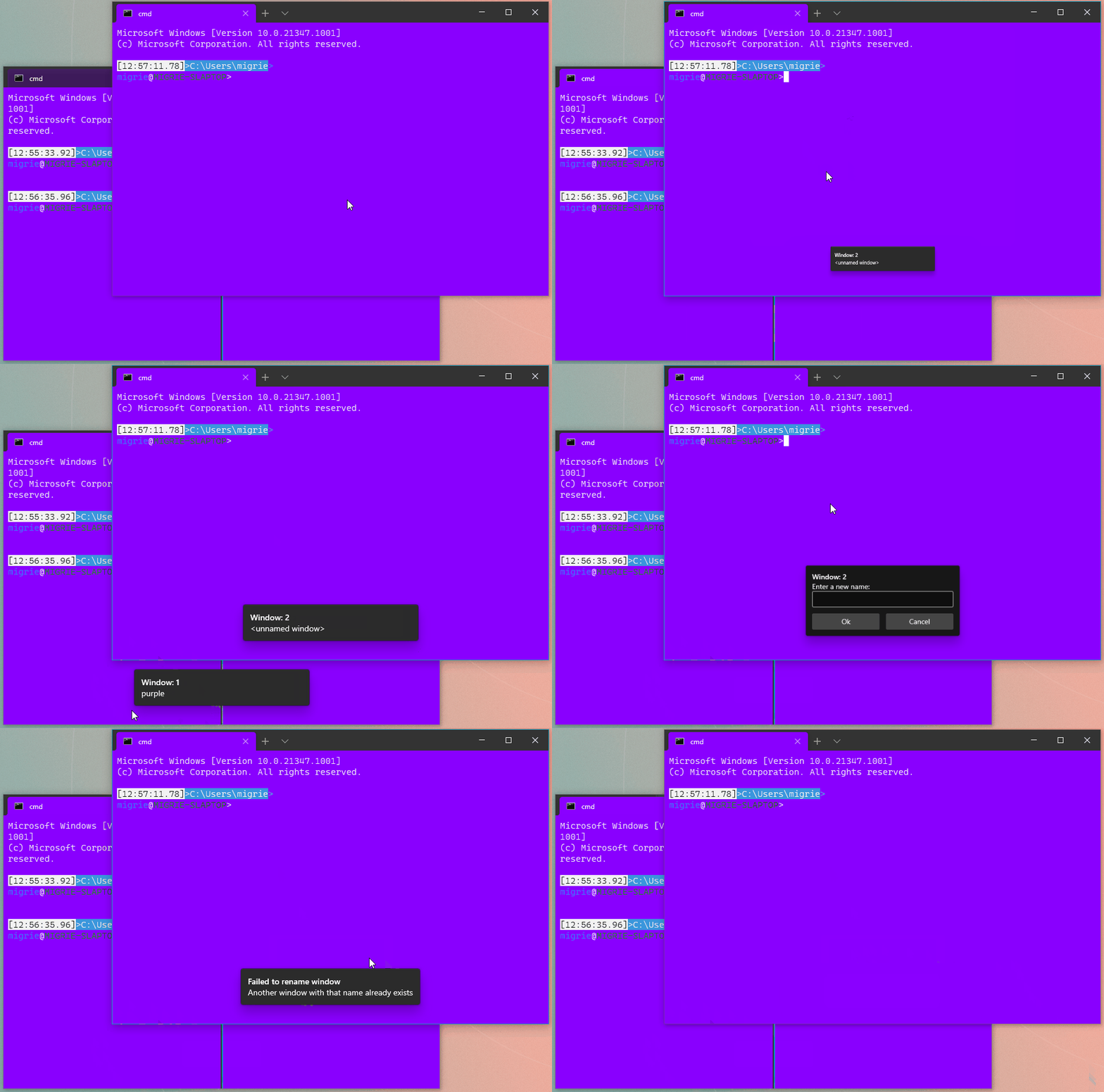 It does so through two new actions: * `renameWindow` takes a `name` parameter, and attempts to set the window's name to the provided name. This is useful if you always want to hit <kbd>F3</kbd> and rename a window to "foo" (READ: probably not that useful) * `openWindowRenamer` is more interesting: it opens a `TeachingTip` with a `TextBox`. When the user hits Ok, it'll request a rename for the provided value. This lets the user pick a new name for the window at runtime. In both cases, if there's already a window with that name, then the monarch will reject the rename, and pop a `Toast` in the window informing the user that the rename failed. Nifty! ## References * Builds on the toasts from #9523 * #5000 - process model megathread ## PR Checklist * [x] Closes https://github.com/microsoft/terminal/projects/5#card-50771747 * [x] I work here * [x] Tests addded (and pass with the help of #9660) * [ ] Requires documentation to be updated ## Detailed Description of the Pull Request / Additional comments I'm sending this PR while finishing up the tests. I figured I'll have time to sneak them in before I get the necessary reviews. > PAIN: We can't immediately focus the textbox in the TeachingTip. It's > not technically focusable until it is opened. However, it doesn't > provide an even tto tell us when it is opened. That's tracked in > microsoft/microsoft-ui-xaml#1607. So for now, the user _needs_ to > click on the text box manually. > We're also not using a ContentDialog for this, because in Xaml > Islands a text box in a ContentDialog won't recieve _any_ keypresses. > Fun! ## Validation Steps Performed I've been playing with ```json { "keys": "f1", "command": "identifyWindow" }, { "keys": "f2", "command": "identifyWindows" }, { "keys": "f3", "command": "openWindowRenamer" }, { "keys": "f4", "command": { "action": "renameWindow", "name": "foo" } }, { "keys": "f5", "command": { "action": "renameWindow", "name": "bar" } }, ``` and they seem to work as expected
## Summary of the Pull Request

Make sure that the window renamer and other toasts follow the requested app theme. We accomplish this by doing something similar to what we do with ContentDialogs. Since TeachingTips aren't in the same XAML root, we have to traverse the entire tree upwards setting RequestedTheme. If we don't, then we'll update the background color of the TeachingTip, but not the text inside it.

## References
* Added in #9662 and #9523

## PR Checklist
* [x] Closes #9717
* [x] I work here
* [n/a] Tests added/passed
* [n/a] Requires documentation to be updated

## Validation Steps Performed
Tested with system theme light & dark, and `theme` set to `light, dark, and unset, and verified that they worked as expected.
|
🎉 Handy links: |




Summary of the Pull Request
This is a follow up to #9300. Now that we have names on our windows, it would be nice to see who is named what. So this adds two actions:
identifyWindow: This action will pop up a little toast ("Toast" notifications #8592) displaying the name and ID of the window, and is bound by default.identifyWindows: This action will request that ALL windows pop up that toast. This is meant to feel like the "Identify" button on the Windows display settings. However, sometimes, it's wonky.That's being tracked upstream on IsLightDismissEnabled TeachingTip in Xaml Islands dismisses itself immediately if the window is unfocused when the Tip is opened microsoft-ui-xaml#4382
Because it's so wonky, we won't bind that by default. Maybe if we get that fixed, then we'll change the default binding from
identifyWindowtoidentifyWindowsReferences
PR Checklist
Detailed Description of the Pull Request / Additional comments
You may note that there are some macros to make interacting with lots and lots of actions easier. There's a lot of boilerplate whenever you need to make a new action, so I thought: "Can we make that easier?"
Turns out you can make it a LOT easier, but that work is still behind another PR after this one. Get excited