[ENH, MRG] Abstract slice browser #10777
Conversation


 alexrockhill
changed the title
alexrockhill
changed the title

|
So I pulled the I moved over the tests that had to do with navigating slices to Here is a minimal script to launch both GUIs: |
alexrockhill
changed the title
|
Does anyone know why |
|
Failures look unrelated, ready for review when someone has a minute. Then I will work on abstracting the GUI. |
|
It looks like there's one issue with I think it's only running on this PR because things were changed? Not sure though, because in other CIs on other PRs it's just skipped. @larsoner, would you happen to know anything about this? See for instance: from here https://github.com/mne-tools/mne-python/runs/6993388950?check_suite_focus=true#step:13:688 |
|
Hey, finally looks like it'll pass all the tests! Ready to merge I think unless anyone wants changes |
|
If anyone has a minute to review, it would be nice to continue on the core deliverables of my GSoC project which depends on this PR so it's a bit of a bottleneck at the moment @agramfort @britta-wstnr @larsoner |

|
@alexrockhill can you rebase or merge with |

 larsoner
left a comment
larsoner
left a comment
larsoner
left a comment
There was a problem hiding this comment.
Other than the conflict, one high-level idea (probably for later), and one question, LGTM!
| return canvas, fig | ||
|
|
||
|
|
||
| class SliceBrowser(QMainWindow): |
There was a problem hiding this comment.
More future compatible perhaps to make this a QWidget? Then it can be embedded in any main window, popup, etc. We could do this in a separate PR, though, if that makes more sense / keeps the diff smaller (which it might, since the iEEG GUI code now just mostly wraps to this)
There was a problem hiding this comment.
Hmmm this is a good point but then it won't pop up in a main window for its own tests. We could easily wrap it though. Conceptually, it does make sense as a widget. Do you mind if I push this to the next PR when I put it in the TFR source space browser? I think also, I've been working on the abstraction code and that might effect it so it might be better to address in parts.
There was a problem hiding this comment.
Yeah a follow-up PR is fine
but then it won't pop up in a main window for its own tests.
Have you tried? IIRC Qt might instantiate a window for you if you do this, and even if it doesn't actually pop up, I think that's okay for tests anyway. We just need to make sure the interactions / signals etc. actually work, which we do non-visually anyway
There was a problem hiding this comment.
... okay at least creating some simple widgets it did not show. But that might end up being okay in testing. If it's not, I agree some simple wrapper (probably a pytest fixture that returns a window -- pytest-qt might even have this already?) would make sense.
There was a problem hiding this comment.
I'm interested to try, also ideally would be a notebook widget too, hopefully soon
| @@ -0,0 +1,483 @@ | |||
| # -*- coding: utf-8 -*- | |||
| """Shared GUI classes and functions.""" | |||
There was a problem hiding this comment.
I did not look at this file much at all because I assume it is 99% copy-paste from the GUI code in main. Is that correct? If not, can you point out which bits of the code are new in this file that I should focus on?
There was a problem hiding this comment.
Yes that is correct, I just tried to copy-paste and move all the code that is specific to slice browsing to the core.py file with a few small changes to make it work.

fix mr vs ct handling [skip ci]

wip

revert qt abstraction changes, finished with slice browser abstraction

integrate with ieeg_locate, add tests

fix flake, fix tests?

fix codespell

test fix again

fix style

fix test

one more try

fix skip tests

another try for skiptest

try again with pyvistaqt in skip

oh, I think I fixed it, just missing a conftest arg

use fixture, hopefully fixes issues
|
Sorry for spamming emails with futile commits. When I try to build the docs locally, I get the following over and over presumably because the process failed and is a zombie, does anyone know how to fix this? |
|
On macOS psutil/memory_profiler are a bit unreliable :( I'm not sure of a good fix or workaround |
|
... actually one workaround would be to set locally it should pop up a plot of memory usage |
|
And thinking about it more +1 for changing |
Ok, I can do a PR. Thanks! |
|
So I guess the warning filters in |
|
Okay to merge? Failures are unrelated |
|
Let's get a full CI build now that they should succeed |
|
I restarted circle, let's merge if that comes back green |
|
Thanks @alexrockhill |

2 participants


The goal is to abstract the slice browsing for the other GUI that does time-frequency viewing on a volumetric source estimates. Here is a working version of the slice browser itself:
Here's what it looks like, which would be inserted into any GUI and then the extra visualization is added on the top/bottom/sides:
I was thinking for the TFR viewer the spectrograms/time courses could either be to the side split 50/50 with a smaller slice-browser as in here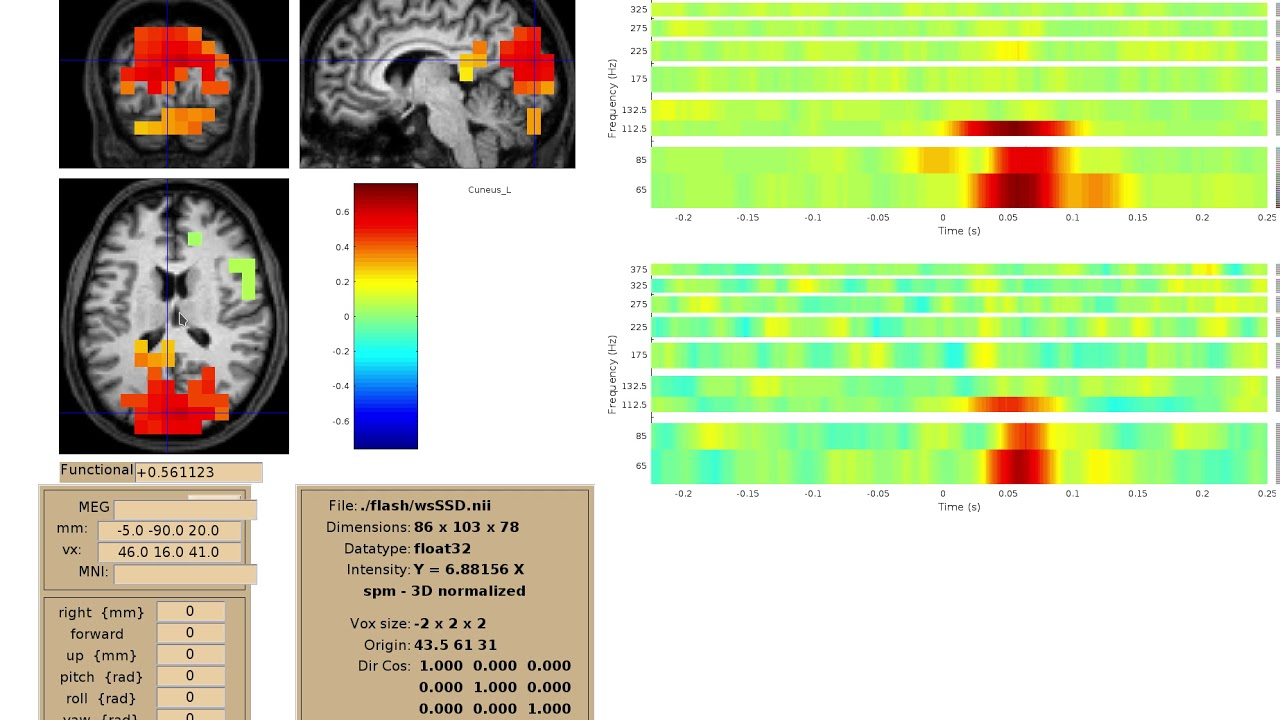 or between the bottom bar and the slices. Testing changing the window size, keeping proportionality handles much better making the slice browser horizontally narrower so I think option 1 will probably look better. Then buttons to change from power to ITC to time course could be in that panel on the right as well as changing vmin/vmax etc.
I need to:
ieeg_locateGUI