Skip to content

Conversation

@GuillaumeFavelier
Copy link
Contributor

@GuillaumeFavelier GuillaumeFavelier commented Nov 27, 2020

This PR is a prototype that represents an alternative to VTK alpha blending. It computes the final brain activation as one 'texture map' which is the result of alpha compositing of the overlays.

The pros:

  • only one mesh/actor/mapper in memory for one Brain (no duplication of vertices/triangles/normals anymore)
  • no visual artifacts or z-fighting caused by overlapped surfaces
  • the list of overlays can be modified and updated on request especially to simulate z-order

The cons:

  • the final result requires blending of all the overlays (which can be expensive). I count on some smart optimization of the _alpha_over function to mitigate this (I might need help here). It's also possible to use intermediate results to speedup the computation.

This is still very early results.

Closes #7599

@larsoner
Copy link
Member

I would much rather let the GPU deal with all of this if possible because this does not scale as well as the GPU will. But if there are no suitable GPU solutions then I CPU is better than wrong GPU

@agramfort
Copy link
Member

would this be helpful too for notebook backend?

@larsoner
Copy link
Member

larsoner commented Dec 1, 2020

But if there are no suitable GPU solutions then I CPU is better than wrong GPU

I'm starting to think there are no suitable GPU solutions. @GuillaumeFavelier before going too far here, maybe try a basic GPU and basic CPU example, totally outside Brain, where you add, say, N overlays both ways (N actors alpha blended for GPU, 1 actor with N values alpha blended in the CPU) to one hemisphere of data? Then we can see what the performance hit is like as N is varied.

Or if this compositing is 90% done anyway, you can do the same thing probably by adding STC data, then parcellation, then labels, etc., and profile directly with some repeated calls to screenshot / Render or so.

I think it's worth going through this exercise even if CPU is our only option at least so we know what we're getting into.

Bonus points if you do GPU without depth peeling, GPU with depth peeling, and CPU (no depth peeling, not needed)...

EDIT: If you're busy with other priorities I can try this benchmarking

@larsoner larsoner added this to the 0.22 milestone Dec 1, 2020
@GuillaumeFavelier
Copy link
Contributor Author

GuillaumeFavelier commented Dec 3, 2020

would this be helpful too for notebook backend?

The artifacts in #7599 (comment) are most likely also present with the notebook 3d backend.

try a basic GPU and basic CPU example

got it 👍

Or if this compositing is 90% done anyway

This version is very early work and limited to Brain. Refactoring is needed to extend to label, annotation, ...

EDIT: I did a gist for the GPU variant

@larsoner
Copy link
Member

larsoner commented Dec 3, 2020

This version is very early work and limited to Brain. Refactoring is needed to extend to label, annotation, ...

Could you create a _LayeredMesh class that has

  1. an __init__ that takes rr, tris args
  2. a method add_overlay(scalars, vertices, smoothing_matrix, cmap, ..., zorder) where scalars is shape (len(vertices), n_time) or (len(rr), n_time) for full-res data or (len(rr), 1) for static data (like an annotation)
  3. a set_index method that changes the data index that is displayed

It makes the implementation at the Brain end very clean, simple, and readable. And if we decide to switch at some point from CPU to GPU compositing, it just requires changing _LayeredMesh to make multiple meshes on the GPU rather than a single mesh with CPU-based alpha blending. WDYT?

You could even start by making this class using the master method, namely by creating multiple meshes rather than doing CPU blending. Then once that works, you only need to change / update the rendering/blending parts in _LayeredMesh rather than anything in _Brain.

EDIT: I am probably missing a lot of necessary arguments like the plotter or plotters, etc., but the idea I think should be to make this layered-mesh behavior a class.

@GuillaumeFavelier
Copy link
Contributor Author

mayavi brain tests fail because there is no option for scalars as rgba texture.

@GuillaumeFavelier
Copy link
Contributor Author

Just my opinion but I somehow find the design more elegant and it feels like less "hacks" are needed.

I updated add_data, add_label and add_annotation.

@GuillaumeFavelier
Copy link
Contributor Author

The implementation is not exactly what you describe in #8576 (comment) but it's flexible @larsoner

Always possible to improve

@larsoner
Copy link
Member

larsoner commented Dec 7, 2020

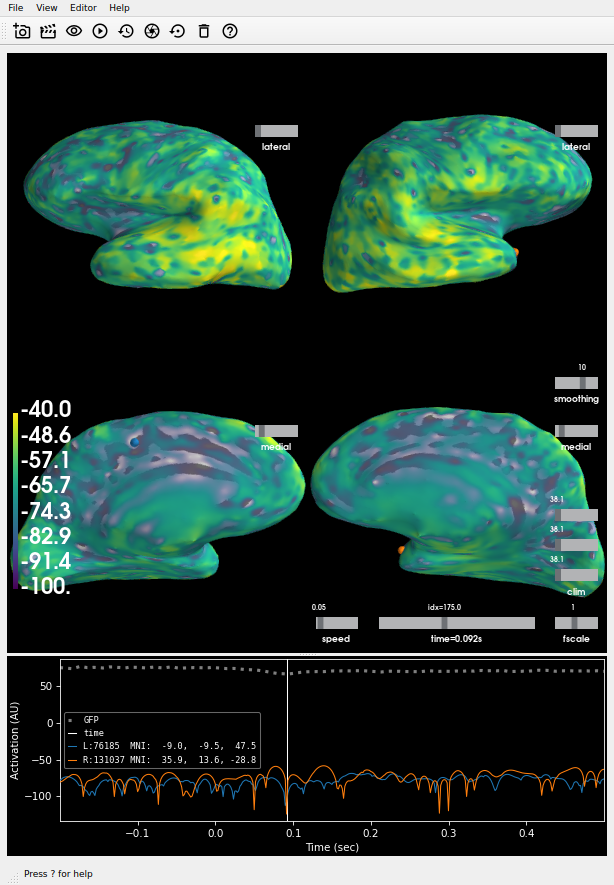
The plot on master:

Looks different from (and more correct than) the one on this PR, and I don't think it's just due to the scale bar difference -- note the odd yellow splotches:

Also there is a difference in the automatic scale bar (should be about -100 to 40 and is on master, in this PR it changes to -70 to 38).

So it seems like there is both a blending-logic bug and a data scaling bug?

@GuillaumeFavelier
Copy link
Contributor Author

So it seems like there is both a blending-logic bug and a data scaling bug

I would say data scaling for now because when I click on Restore scaling, I obtain a more satisfying result:

image

@GuillaumeFavelier
Copy link
Contributor Author

The artifacts are available on:
https://23965-1301584-gh.circle-artifacts.com/0/dev/index.html

I'll work on coverage now

@GuillaumeFavelier GuillaumeFavelier changed the title WIP: Use overlay compositing MRG: Use overlay compositing Dec 7, 2020
@GuillaumeFavelier
Copy link
Contributor Author

This is ready for reviews @agramfort, @larsoner

@larsoner
Copy link
Member

larsoner commented Dec 7, 2020

I guess unsurprisingly, CircleCI renders faster with this PR, which is neat. And even locally doing PATTERN=dspm_source make html_dev-pattern (which makes a movie) on master takes 23 sec and on this PR it's 22 sec, which is great! So it's either a bit faster, or in the noise for speed.

Copy link
Member

@larsoner larsoner left a comment

Choose a reason for hiding this comment

The reason will be displayed to describe this comment to others. Learn more.

LGTM, will merge once CIs are happy. Awesome @GuillaumeFavelier !

@larsoner larsoner merged commit 5274110 into mne-tools:master Dec 7, 2020
@agramfort
Copy link
Member

agramfort commented Dec 7, 2020 via email

Sign up for free to join this conversation on GitHub. Already have an account? Sign in to comment

Labels

Projects

None yet

Development

Successfully merging this pull request may close these issues.

BUG: Bugs with VTK 9

3 participants