Enable experimental HDR on macOS 10.15+#8387
Enable experimental HDR on macOS 10.15+#8387anastasiuspernat wants to merge 0 commit intompv-player:masterfrom
Conversation


 haasn
left a comment
haasn
left a comment
haasn
left a comment
There was a problem hiding this comment.
Overall summery is that this highlights a shortcoming of the mpv tone mapping algorithm (lack of sig_scale), but this is not the way to implement it, IMHO.
video/out/gpu/video.c
Outdated
| // HDR Passthrough - render HDR content based on peak level | ||
| {"hdrpass", TONE_MAPPING_HDR_PASSTHROUGH}, | ||
| // HDR Scale - render HDR content and ignore peak level, this way any content can become exended | ||
| {"hdrscale", TONE_MAPPING_HDR_SCALE})}, |
There was a problem hiding this comment.
These should not be tone mapping curves. Rather, tone mapping should be disabled for true HDR output. (Unless the source peak exceeds the HDR output's target peak, in which case BT.2390 should be used)
There was a problem hiding this comment.
Do you think a new switch should be added then?
video/out/gpu/video.c
Outdated
| if (p->opts.tone_map.curve != TONE_MAPPING_HDR_PASSTHROUGH && p->opts.tone_map.curve != TONE_MAPPING_HDR_SCALE) | ||
| { | ||
| GLSL(color.rgb = clamp(color.rgb, 0.0, 1.0);) | ||
| } |
There was a problem hiding this comment.
Rather than hackily implementing it like this, we could probably just relax the clamp(color.rgb, 0.0, 1.0); to color.rgb = max(color.rgb, 0.0). The clip to positive values is still needed because gamma functions are undefined for negative values.
video/out/gpu/video.c
Outdated
| if (p->opts.tone_map.curve == TONE_MAPPING_HDR_PASSTHROUGH || p->opts.tone_map.curve == TONE_MAPPING_HDR_SCALE) | ||
| { | ||
| // TODO: this value (3.0) must be taken from NSScreen.screen.maximumPotentialExtendedDynamicRangeColorComponentValue | ||
| GLSLF("color.rgb = color.rgb * %f\n;", 3.0); |
There was a problem hiding this comment.
This is almost definitely not the correct way of doing things. I'd need to read into the extended HDR specs that you're trying to implement to know a better way, but if it's implied that you should be stretching SDR gamma functions onto HDR outputs, it might be a case of adding the concept of sig_scale (similar to the same field in libplacebo) to mpv's color space struct as well.

There was a problem hiding this comment.
sry if i misunderstand, but the SDR range should definitely not be stretched to the HDR output but should stay between 0 and 1.0. at least that's how apple wants it.
There was a problem hiding this comment.
So probably color space approach then? Set the extended color space on the target layer and keep values within 0 and 1.0? I tried setting itur_709 and itur_2020 color spaces, both resulted in very weird colors. What kind of color space should I apply?
There was a problem hiding this comment.
it depends entirely on the source and what we output to to the layer. i didn't look intoit but i believe target-trc and/or target-prim need/can be set appropriately.
we probably need an approach similar to #5804
There was a problem hiding this comment.
So far couldn't make it work. I have an .mp4 HDR footage that displays following data in Media Information:
Color primaries: ITU-R BT.2020
Color transfer function: SMPTE ST2084 (PQ)
Color space: ITU-R BT.2020 Range
So I assume it means "BT.2020 color space with PQ gamma curve". I tried assigning CGColorSpace.itur_2020_PQ_EOTF and CGColorSpace.extendedLinearITUR_2020 to layer?.colorspace in updateICCProfile as you pointed out. Here please see the attached results:
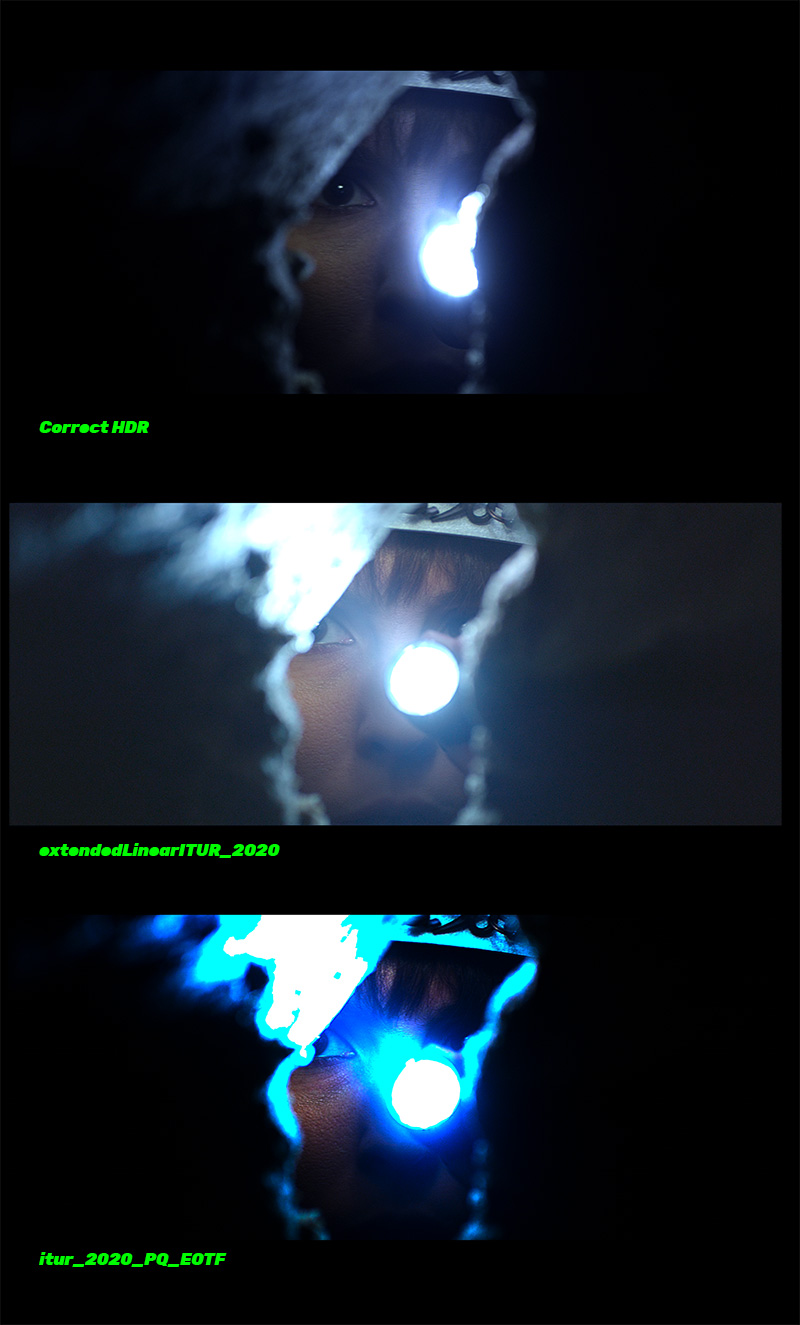
On the top is correct HDR that is reproduced by QuickTime and also using this code from pull request. Both results on the bottom are reproduced in HDR as well but none of them is right.
I suspect the gamma curve has to be adjusted. Can you please point me in the further direction? Thank you!
There was a problem hiding this comment.
Nevermind! I think I made it work, seems it's actually much easier than it seems haha. Will add another pull request later on!
There was a problem hiding this comment.
Unfortunately no. It didn't work.
Here are my findings:
The only target color space that looked HDR is CGColorSpace.itur_2020_PQ_EOTF but it resulted in wrong gamma curve (see image above).
Adding --target-prim=bt.2020 didn't change anything.
Adding --target-trc=pq resulted in non-HDR image.
I still need some support here! Thanks again.
video/out/gpu/video_shaders.c
Outdated
| if (opts->curve == TONE_MAPPING_HDR_PASSTHROUGH && opts->curve == TONE_MAPPING_HDR_SCALE) | ||
| { | ||
| // Disable any clipping on HDR content | ||
| GLSLF("vec3 sig = color.rgb;\n"); |
There was a problem hiding this comment.
Shouldn't you still clip to the new sig_peak of 3.0?
There was a problem hiding this comment.
Yeah, I do that in pass_tone_map.

video/out/cocoa/video_view.m
Outdated
| } | ||
| // Experimental #HDR on #macOS | ||
| // This must be enabled to be able to display HDR content | ||
| self.wantsExtendedDynamicRangeOpenGLSurface = true; |
There was a problem hiding this comment.
you can scrap the changes in this file. it's the old deprecated backend, that is also broken.

i think that is not true. it should neither be 3.0, 5.0 nor NSScreen.maximumPotentialExtendedDynamicRangeColorComponentValue. it should use the actual and current maximum value. the actual maximum we want to render into is not static and can change dynamically based on the light condition etc for example. this can change on the fly and while watching a video and needs to be changeable at any given time. this is how i understand it, but don't quote me on that since i still need to test it: maximumReferenceExtendedDynamicRangeColorComponentValue: this is the current (at the requested time) potential maximum value of the display, which is not determined at creation time of the NSScreen object. this value might differ depending on the display setting and is possibly the same as maximumPotentialExtendedDynamicRangeColorComponentValue. it is not the currently used one. maximumExtendedDynamicRangeColorComponentValue: this is the actual and currently used maximum value that should be used. it changes dynamically and a change notification can be registered. |

|
Great! Thanks a lot for the feedback. I was definitely shooting in the dark. To my surprise it worked out so quickly - you have a really well managed codebase. |
 anastasiuspernat
force-pushed
the
master
branch
from
anastasiuspernat
force-pushed
the
master
branch
from
df2878b to
4029a69
Compare
3 participants


Main discussion:
#7341
Added two new flags
--tone-mapping=hdrpassto enable full HDR range display on supported HDR monitors and--tone-mapping=hdrscaleto enable HDR and maximize brightness.Using either of these flags activates HDR mode, disables clipping in video shader and rescales rgb values to the whole HDR range. I couldn't find a way to pass
NSScreenintopass_draw_to_screeninvideo.c. So using 3.0 as a hard-coded max value. It should be set to 5.0 for Apple XDR Monitor or taken fromNSScreen.maximumPotentialExtendedDynamicRangeColorComponentValue.