many interactions need browser reload to become visible #2347

Description

How to use GitHub
- Please use the 👍 reaction to show that you are affected by the same issue.
- Please don't comment if you have no relevant information to add. It's just extra noise for everyone subscribed to this issue.
- Subscribe to receive notifications on status change and new comments.
Describe the bug
A clear and concise description of what the bug is.
user want to change a card. the change is not
reflected as usual. The card looks like not changed.
( after browser reload the change has happend)
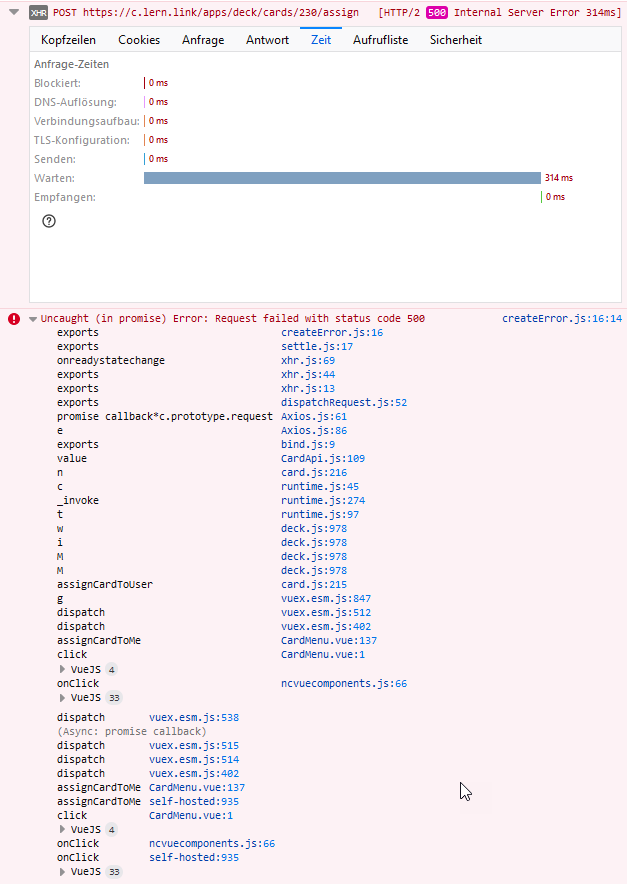
To Reproduce
Steps to reproduce the behavior:
- Go to any card
- Click on any function, like assign to some one, delete,
- reload the browser too see that it happend, but was not shown.
- check error in console (screen shot )
Expected behavior
the change should be shown immediately
Client details:
- OS: Win10
- BrowserFF, Chrome, Edge Chromium
- Version stable release, 19.0.3
- Device: Win 10 desktop
Server details
Operating system:
Ubuntu 18.04.5 LTS (GNU/Linux 4.15.0-101-generic x86_64)
Web server:
Apache, NGINX proxy, also NGINX FPM
Database:
mysql mariadb
PHP version:
7.3.22
Nextcloud version: (see Nextcloud admin page)
19.0.3
Where did you install Nextcloud from:
githib
Signing status:
?
Login as admin user into your Nextcloud and access
http://example.com/index.php/settings/integrity/failed
paste the results here.
No errors have been found.
List of activated apps:
Accessibility 1.5.0 Offiziell
Activity 2.12.0 Offiziell
Audio Player 2.12.0
BigBlueButton Integration 1.1.0
Calendar 2.0.4 Offiziell
Collaborative tags 1.9.0 Offiziell
Comments 1.9.0 Offiziell
Contacts 3.4.0 Offiziell
Contacts Interaction 1.0.0 Offiziell
Deck 1.1.0 Offiziell
Deleted files 1.9.0 Offiziell
External storage support 1.10.0 Offiziell
Federation 1.9.0 Offiziell
File sharing 1.11.0 Offiziell
First run wizard 2.8.0 Offiziell
Full text search 1.4.2
Full text search - Elasticsearch Platform 1.5.2
Full text search - Files 1.4.3
Group folders 7.0.0 Offiziell
Impersonate 1.6.1 Offiziell
Log Reader 2.4.0 Offiziell
Monitoring 1.9.0 Offiziell
Nextcloud announcements 1.8.0 Offiziell
Notifications 2.7.0 Offiziell
ONLYOFFICE 6.0.2 Offiziell
Password policy 1.9.1 Offiziell
Photos 1.1.0 Offiziell
Plain text editor 2.11.0
Polls 1.4.3
Privacy 1.3.0 Offiziell
Reader (ebook reader) 1.4.2
Recommendations 0.7.0 Offiziell
Right click 0.16.0 Offiziell
Share by mail 1.9.0 Offiziell
Social Login 3.3.0
Social sharing via email 2.1.0 Offiziell
Splash 1.1.6
Support 1.2.1 Offiziell
Tasks 0.13.3 Offiziell
Text 3.0.1 Offiziell
Theming 1.10.0 Offiziell
Two-Factor Admin Support 3.0.0
Two-Factor Authentication via Nextcloud notification 2.3.0
Two-Factor Gateway 0.17.0
Two-Factor TOTP Provider 5.0.0 Offiziell
Update notification 1.9.0 Offiziell
Versions 1.12.0 Offiziell
Video player 1.8.0 Offiziell
If you have access to your command line run e.g.:
sudo -u www-data php occ app:list
from within your Nextcloud installation folder
Nextcloud configuration:
If you have access to your command line run e.g.:
sudo -u www-data php occ config:list system
from within your Nextcloud installation folder

or

Insert your config.php content here
Make sure to remove all sensitive content such as passwords. (e.g. database password, passwordsalt, secret, smtp password, …)
Are you using an external user-backend, if yes which one: LDAP/ActiveDirectory/Webdav/...
Logs
Nextcloud log (data/nextcloud.log)
Insert your Nextcloud log here
Browser log
Insert your browser log here, this could for example include:

a) The javascript console log
b) The network log
c) ...