Problem loading page, reloading in 5 seconds #23110

Description

This is an issue that has been going on for years regarding interminent appearance of a message "Problem loading page, reloading in 5 seconds" when logged into the web interface, with an immediate disconnection. This happens for me usually very quickly after login and seems to be related to session termination. The desktop clients are not affected.
This problem has cropped up before [#5274, #3419, #1759, #964], but I decided against necroposting and I hope this one remains open until the issue is properly addressed.
The core issue here seems to be the inability of nextcloud web app to work with sessions when PHP is configured to use anything but "files" as the session handler (in php.ini). I tried both with a perfectly working memcached and redis server, same behavior:
(a) I need to sometimes login in twice via the web login form to actully browse the files.
(b) Once logged in, I being disconnected and dropped out after a few seconds. The message: "Problem loading page, reloading in 5 seconds" appears on the top right.
Workaround
The only method that seems to work is to switch the php.ini configuration back to using session.save_handler=files and session.save_path="/tmp" (which of course is not optimal given a server may be serving other apps that can tremendously benefit by memcached or redis session storage).
Steps to reproduce
- Have a working memcached (v1.6.6) server on 127.0.0.1:11211, PHP-FPM 7.3 (v7.3.22) setup and Apache 2.4 (v2.4.46)
- Edit into php.ini
session.save_handler=memcachedandsession.save_path="127.0.0.1:11211" - Reload the php fpm daemon.
- Login via the nextcloud web form.
- Browse around the files.
Expected behaviour
Should remain logged in.
Actual behaviour
Session is terminated. User has to log in again (only to be disconnected after a few seconds)
Server configuration
Operating system:
up to date Gentoo x64
Web server:
Apache 2.4.46
Database:
MySQL 8.0.20
PHP version:
PHP v7.3.22 (FPM)
Nextcloud version: (see Nextcloud admin page)
19.0.3
Updated from an older Nextcloud/ownCloud or fresh install:
Been updating since maybe v9
Where did you install Nextcloud from:
portage (gentoo package manager)
Login as admin user into your Nextcloud and access
http://example.com/index.php/settings/integrity/failed
paste the results here.
"No errors have been found."
App list
List of activated apps:
Enabled:
- accessibility: 1.5.0
- activity: 2.12.0
- admin_audit: 1.9.0
- cloud_federation_api: 1.2.0
- comments: 1.9.0
- contactsinteraction: 1.0.0
- dav: 1.15.0
- federatedfilesharing: 1.9.0
- federation: 1.9.0
- files: 1.14.0
- files_pdfviewer: 1.8.0
- files_rightclick: 0.16.0
- files_sharing: 1.11.0
- files_trashbin: 1.9.0
- files_versions: 1.12.0
- files_videoplayer: 1.8.0
- firstrunwizard: 2.8.0
- logreader: 2.4.0
- lookup_server_connector: 1.7.0
- notifications: 2.7.0
- oauth2: 1.7.0
- password_policy: 1.9.1
- photos: 1.1.0
- privacy: 1.3.0
- provisioning_api: 1.9.0
- serverinfo: 1.9.0
- settings: 1.1.0
- sharebymail: 1.9.0
- support: 1.2.1
- survey_client: 1.7.0
- systemtags: 1.9.0
- text: 3.0.1
- theming: 1.10.0
- twofactor_backupcodes: 1.8.0
- updatenotification: 1.9.0
- user_ldap: 1.9.0
- viewer: 1.3.0
- workflowengine: 2.1.0
Disabled: - bruteforcesettings
- encryption
- files_external
- nextcloud_announcements
- recommendations
Nextcloud configuration:
Config report
{
    "system": {
        "instanceid": "***REMOVED SENSITIVE VALUE***",
        "passwordsalt": "***REMOVED SENSITIVE VALUE***",
        "trusted_domains": [
            "localhost",
            "***REMOVED SENSITIVE VALUE***"
        ],
        "datadirectory": "***REMOVED SENSITIVE VALUE***",
        "dbtype": "mysql",
        "version": "19.0.3.1",
        "dbname": "***REMOVED SENSITIVE VALUE***",
        "dbhost": "***REMOVED SENSITIVE VALUE***",
        "dbtableprefix": "oc_",
        "dbuser": "***REMOVED SENSITIVE VALUE***",
        "dbpassword": "***REMOVED SENSITIVE VALUE***",
        "installed": true,
        "forcessl": true,
        "log_type": "file",
        "logfile": "\/var\/log\/nextcloud.log",
        "loglevel": 0,
        "syslog_tag": "Nextcloud",
        "theme": "",
        "maintenance": false,
        "tempdirectory": "\/tmp",
        "secret": "***REMOVED SENSITIVE VALUE***",
        "overwrite.cli.url": "***REMOVED SENSITIVE VALUE***",
        "mail_smtpmode": "smtp",
        "mail_smtpauthtype": "LOGIN",
        "mail_from_address": "***REMOVED SENSITIVE VALUE***",
        "mail_domain": "***REMOVED SENSITIVE VALUE***",
        "mail_smtphost": "***REMOVED SENSITIVE VALUE***",
        "mail_smtpport": "25",
        "ldapIgnoreNamingRules": false,
        "ldapProviderFactory": "OCA\\User_LDAP\\LDAPProviderFactory",
        "mysql.utf8mb4": true,
        "redis": {
            "host": "***REMOVED SENSITIVE VALUE***",
            "port": 6379,
            "dbindex": 4
        },
        "memcached_servers": [
            [
                "127.0.0.1",
                11211
            ]
        ],
        "updatechecker": false,
        "updater.release.channel": "stable"
    }
}
Are you using external storage, if yes which one: local/smb/sftp/...
No
Are you using encryption: yes/no
No
Are you using an external user-backend, if yes which one: LDAP/ActiveDirectory/Webdav/...
No
Client configuration
Browser:
Chrome 85
Operating system:
Win 10 Pro
Logs
Web server error log
Web server error log
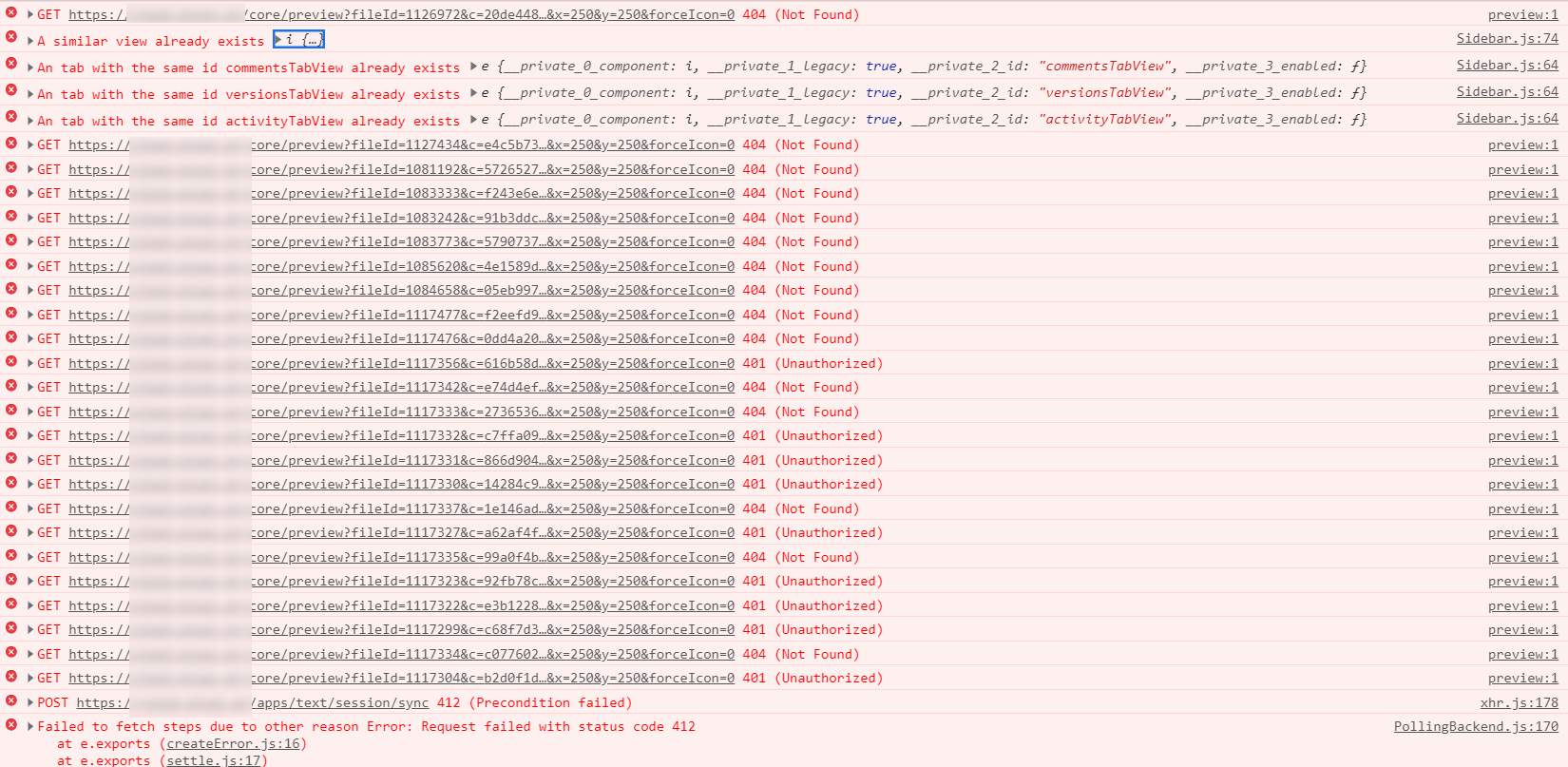
``` There are no errors logged! ```Nextcloud log (data/nextcloud.log)
Nextcloud log
no entries are generated in the nextcloud log either.
Browser log
Browser log