Warn the user if speaking while muted #2016
Conversation


 danxuliu
added
3. to review
enhancement
feature: WebRTC 🚡
danxuliu
added
3. to review
enhancement
feature: WebRTC 🚡


|
Not sure if I would do a browser notification. That sounds too annoying if you are just following a group call with audio without having to participate actively (like our company call). But maybe it's enough if that can be done once per call by clicking away the OC.Notification or the browser notification. |
|
Tested a bit and at least for me the notifcation is shown too shortly.
|
As mentioned in the pull request I would make the dismiss to last until the user unmutes again instead of until the call ends (so if the user dismisses the notification and speaks again while muted the notification would not be shown, but if he then unmutes, mutes and later starts to speak again while muted the notification would be shown again).
Yes, it is inconvenient :-( , but this will be addressed in the future once there is a proper view for the call screen.
It disappears one second after you stop talking. And if you do a quick question it may not show at all, as you need to speak for three seconds before the message is shown; this prevents the notification from being shown on short noises like coughs or laughs, as well as on short phrases, as that is usually not "speaking" (of course in some cases it could be, but in general I think that it is better to show the notification only after there has been sound for a while). Regarding the timeout I used just one second because I think that it should be hidden quickly after you stop speaking (not immediately, but quickly). Although right now the notification is not very noticeable I think that is a problem only while you are not used to the new behaviour; once you realize that a notification is shown when speaking while muted I guess that you will be more prone to take a quick look to that area if you speak and nobody seems to hear you. Therefore hiding it after several seconds could be good at first, but I think that in the long run it would just make the notification annoying and more likely to be dismissed (which could also cause it to not be shown when really needed if the "do not show again once dismissed" behaviour is implemented). Anyway, I would wait for the feedback from the users in our cloud as well as from @nextcloud/designers |

|
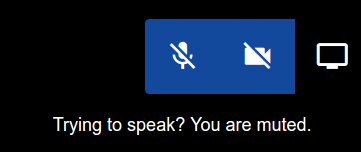
Instead of a disconnected Notification, I would do it as proposed in the issue:
|
Signed-off-by: Daniel Calviño Sánchez <danxuliu@gmail.com>
The LocalMedia helper handles the local streams sent to the other
participants, and analyzes those streams to emit events when the user
starts and stops speaking. However, when the local audio is muted those
streams are disabled, so the audio is silent and it can not be detected
if the user is speaking. In order to properly analyze the streams when
the local audio is muted the streams are cloned and those clones, which
are never disabled, are now the ones analyzed.

Thanks to this now the LocalMedia helper also emits the
"speakingWhileMuted" and "stoppedSpeakingWhileMuted" events while
respecting the previous behaviour for the "speaking" and
"stoppedSpeaking" events; muting and unmuting the audio while speaking
also emits again the events as needed.

Signed-off-by: Daniel Calviño Sánchez <danxuliu@gmail.com>
Signed-off-by: Daniel Calviño Sánchez <danxuliu@gmail.com>
Until now an OC.Notification, which shows an element in the page, was
always used when speaking while muted. Now that is used only if the
browser is visible; if it is not that notification would not be seen by
the user, so in that case now a browser notification is used instead.

Signed-off-by: Daniel Calviño Sánchez <danxuliu@gmail.com>
If the browser notification could not be shown for any reason (for
example, if the user denied permissions to notifications) the
OC.Notification is now shown as a fallback (although in most cases the
user will not see it anyway, but it may be useful if the user switchs
back to the Talk tab while still speaking).

Signed-off-by: Daniel Calviño Sánchez <danxuliu@gmail.com>
Instead of using an OC.Notification the warning is now shown with a
tooltip on the audio button that needs to be used to unmute.

Signed-off-by: Daniel Calviño Sánchez <danxuliu@gmail.com>
danxuliu
force-pushed
the
warn-the-user-if-speaking-while-muted
branch
from
4dba087 to
49cadf4
Compare
Done with a tooltip. |


 nickvergessen
left a comment
nickvergessen
left a comment
nickvergessen
left a comment
There was a problem hiding this comment.
Also like it much more there and with the white tooltip on the black part of the view it's much more obvious.
Speaking of that, in dark mode the tooltip is black on black. Not worth a lot of effort, but it would be nice if it could stay white.
 delete-merged-branch
bot
deleted the
warn-the-user-if-speaking-while-muted
branch
delete-merged-branch
bot
deleted the
warn-the-user-if-speaking-while-muted
branch


Fixes #285
If the user is speaking while muted now an
OC.Notificationis shown (the notification is not immediate, though; it only appears after three seconds of "speech" (not actual speech, but just sounds above some volume threshold)); in the future it could be more integrated with the local video view if needed, but for now I would say that theOC.Notificationis good enough.However, if the browser is hidden the
OC.Notification(or one integrated in the local video view) is not useful, as the user would not be able to see it. In those cases a browser notification is used instead, as it is visible even if the browser is hidden (provided the user grants access to notifications from the site; if not the OC.Notification is shown as a fallback, even if in most cases it will not be seen by the user, but there is nothing else that can be done in that case).Unfortunately, currently there are some issues:
OC.Notificationin Nextcloud 17 is only shown for 7 seconds, instead of being there until the user stops speaking or unmutes; this is a regression in the server and it will be fixed there.setTimeoutto 1000 milliseconds in background tabs; due to this the audio analyzer is called with less frequency than in foreground tabs and the speaking detection is much less reliable (it needs a lot more time to detect that the user is speaking). In order to solve this it will be probably needed to use WebWorkers, so I would defer this fix for later.OC.Notificationis shown instead of the browser notification. I have not found a reliable way to check that scenario; the closest would be to check if the document has focus, but then if the browser window is in the foreground and the user has clicked the browser UI the document would not have focus and a browser notification would be shown, which would be unexpected too. I guess that we can defer this too until some solution is found.Besides those issues there are also some pending enhancements:
Finally, the current volume threshold is the one that was being used until now. It may need some tweaking (probably to make it higher), but I am not sure. Needs testing in different environments ;-)