
A browser UI for jnitrace,
plus a static JNI helper for Android apps.





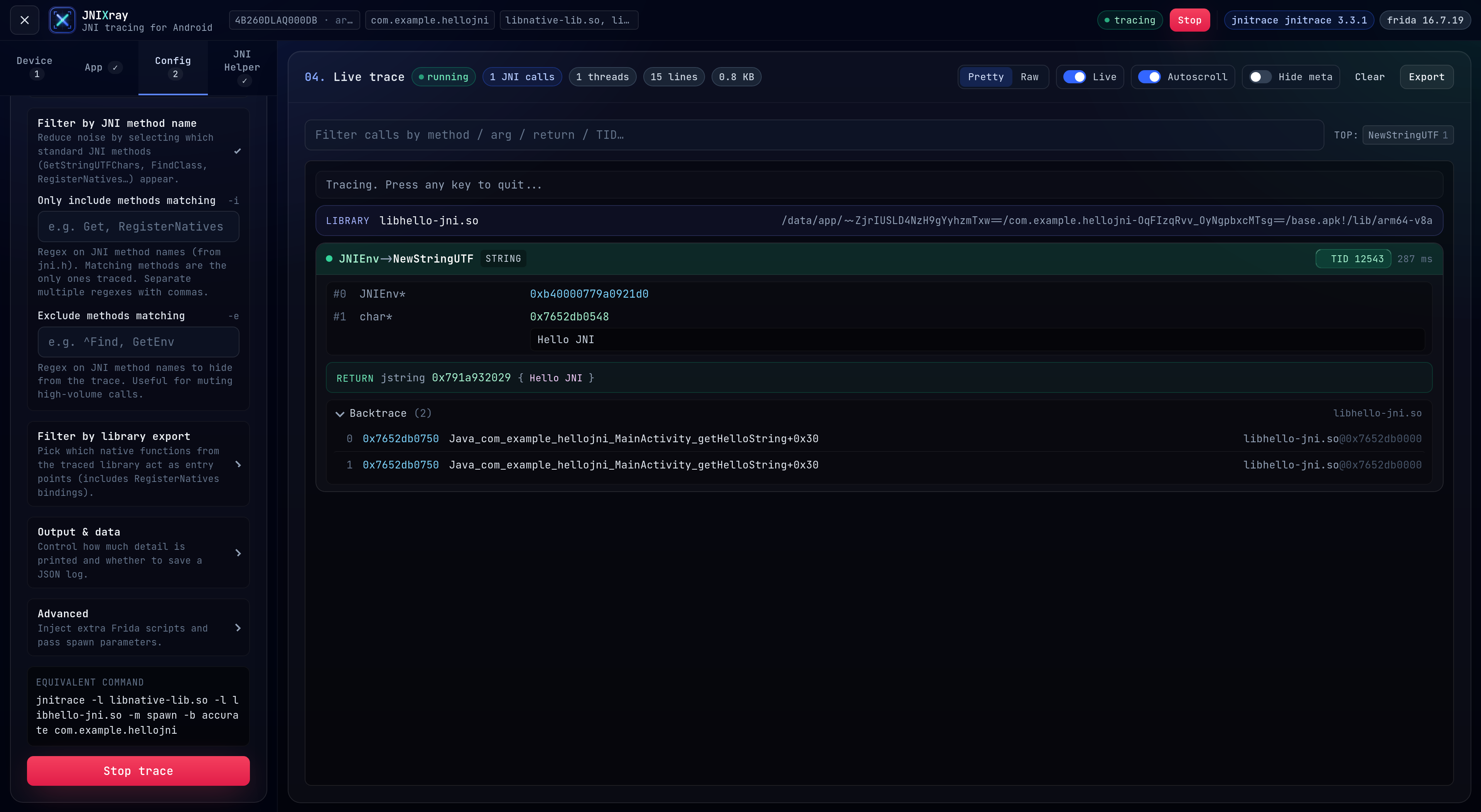
Live trace — color-coded args, thread chips, backtrace, equivalent CLI command preview.
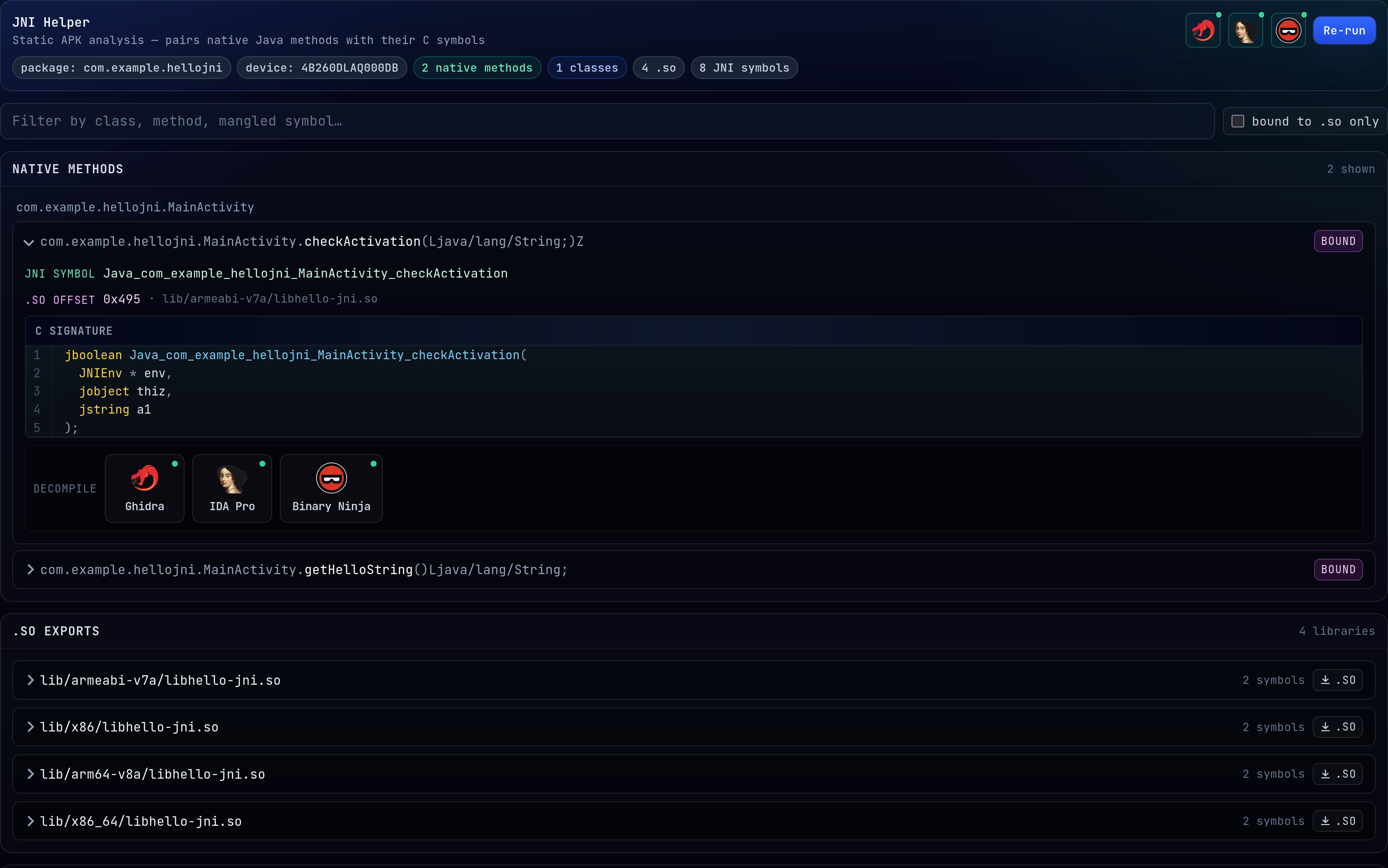
JNI Helper pairs every native Java method with the C symbol that exports it from the .so.
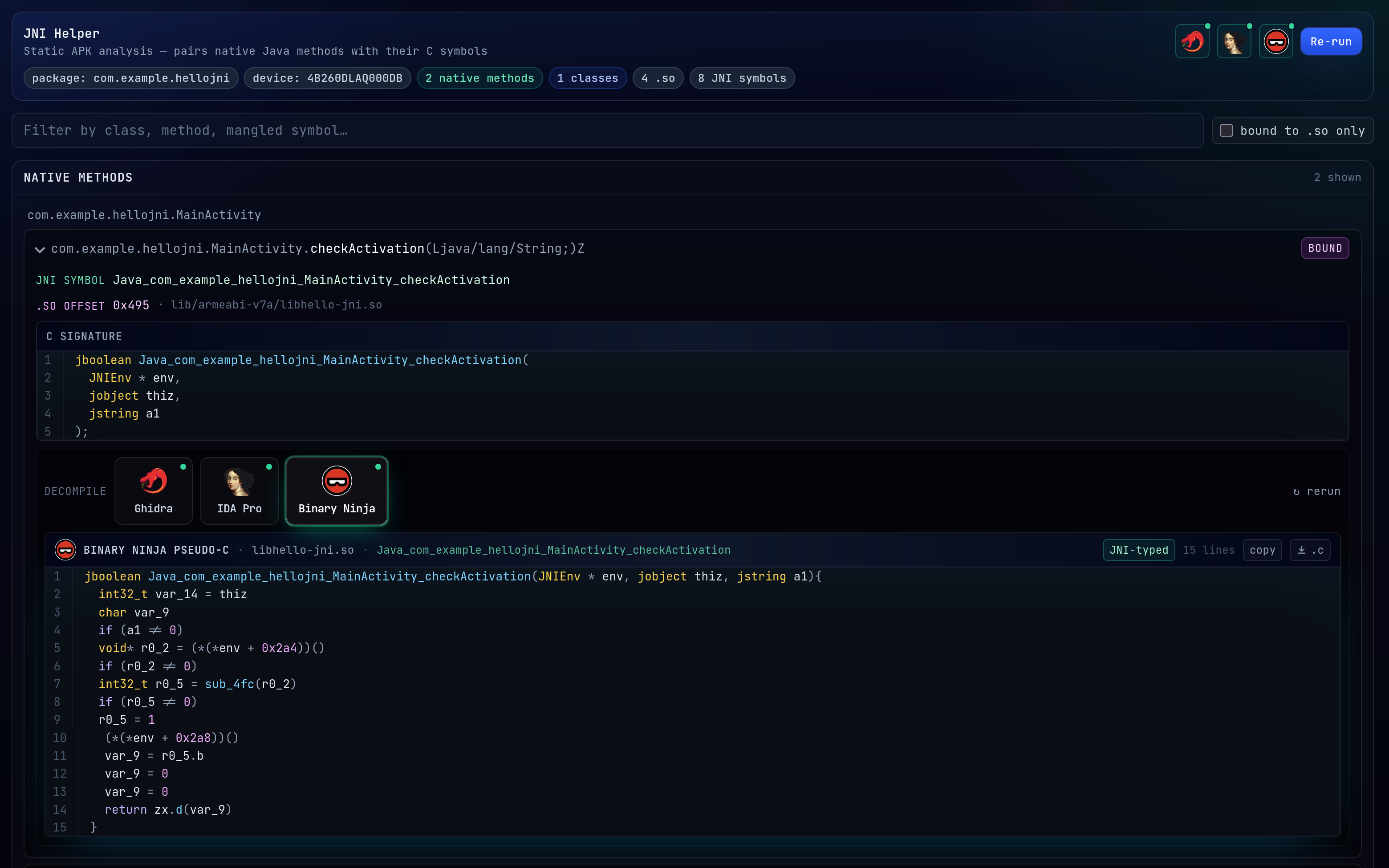
One-click pseudo-C from Ghidra / IDA / Binary Ninja, re-typed with JNI signatures from the DEX.
Pick a device, pick an app, hit Start trace. JNI calls stream in live over
a WebSocket. Every flag jnitrace takes on the command line is also exposed
in the config tab (libraries, method/export include-exclude filters, backtrace
mode, --aux, and so on).
There's also a JNI Helper panel that pulls the APK off the device, parses
the DEX to find every native Java method, and pairs each one with the C
symbol that exports it from whichever .so ships in the APK. If you have
Ghidra, IDA Pro or Binary Ninja installed you can decompile any of those
symbols to pseudo-C with one click, and the output gets re-typed with the JNI
signature so jobjects and friends aren't just void * blobs.
- Live JNI call stream with color-coded args, thread chips, backtraces.
- Method and export include/exclude filters, spawn or attach, three backtrace
modes. Same flags as the
jnitraceCLI. - Static APK analysis:
nativeJava method ↔ exported C symbol pairing. - One-click pseudo-C from Ghidra / IDA / Binary Ninja, re-typed with JNI signatures pulled from the DEX.
- Download the
.soor the pseudo-C straight from the UI. - ANSI-rendered log, substring filter, export to
.log.
The jnitrace CLI is great but the invocation gets long once you start piling
on filters, and you lose scroll position every time you Ctrl-C. Running it
from a UI makes exploration quicker and streaming the output means you can
attach, detach, pause or filter without tearing the session down.
- Python 3.10+
- Node.js 20+, npm 9+
adbonPATH(or setADB_BIN).- A Frida 16.x
frida-serverrunning on the device. Same setup as any other Frida workflow. 17 broke APIsjnitracedepends on so the stack is pinned to 16 for now.
Python deps are in requirements.txt.
git clone https://github.com/nyxFault/JNIXray.git
cd JNIXray

# python side (tracer + static analysis helpers)
python3 -m venv .venv
source .venv/bin/activate
pip install -r requirements.txt

# node side (API + UI)
cd web
npm run install:allcd web
npm run dev- UI: http://127.0.0.1:5173
- API / WS: http://127.0.0.1:4455
Vite proxies /api and /ws to the backend, so you only ever open the
frontend URL. That's it.
For a static build:
npm run build
# output: web/frontend/dist/
# backend is a plain Node ESM app; host it however you likeGrab the latest JNIXray-*-x86_64.AppImage from the
Releases page and run it:
chmod +x JNIXray-*-x86_64.AppImage
./JNIXray-*-x86_64.AppImage
# UI + API on http://127.0.0.1:4455, browser opens automatically
You still need adb on PATH and a Frida 16.x frida-server running on
the device — the AppImage doesn't replace those.
AppImages use FUSE to mount themselves. Some modern distros (Ubuntu 22.04+,
Fedora 36+) ship fuse3 only and the type-2 runtime expects libfuse.so.2.
Two options:
# 1. install the fuse2 compat lib
sudo apt install libfuse2                 # Debian / Ubuntu / Kali
sudo dnf install fuse-libs                # Fedora / RHEL

# 2. or run the AppImage in "extract and run" mode (no FUSE needed)
./JNIXray-*-x86_64.AppImage --appimage-extract-and-runIf you don't have a target app handy, there's a tiny sample APK in
examples/HelloJNI/ — a throwaway Android app I built
specifically to give JNIXray something predictable to trace.
adb install examples/HelloJNI/app-debug.apkThen in the UI: Device → App (com.example.hellojni) → Start trace.
Tap the buttons in the app and the JNI calls will roll in.
The matching source is at https://github.com/nyxFault/HelloJNI, and the prebuilt APK lives on its releases page too if you'd rather grab it from there.
The JNI Helper can shell out to external decompilers. Install whichever you
already own and point JNIXray at them from the gear icons in the top-right of
the JNI Helper panel. Paths are saved in ~/.jnixray/settings.json, never in
the repo.
| Tool | How to hook it up | |
|---|---|---|
 |
Ghidra | Set Ghidra home to the folder containing support/analyzeHeadless. |
 |
IDA Pro | Path to idat64, or to the install dir (it'll find idat64 inside). |
 |
Binary Ninja | Install folder. License key optional if ~/.binaryninja/license.dat is already set up. |
None of these are required to use the live tracer.
.
├── requirements.txt          # python: jnitrace, frida, androguard, ...
├── web/
│   ├── package.json          # dev orchestration
│   ├── scripts/dev.js        # runs backend + frontend together
│   ├── backend/
│   │   ├── src/              # express + ws server (index.js, tracer.js, ...)
│   │   └── py/               # python helpers (jni_helper.py, decomp_*.py)
│   └── frontend/             # vite + react + tailwind
├── examples/HelloJNI/        # tiny sample APK to play with
└── docs/assets/              # logos
GET    /api/health                   jnitrace + frida versions
GET    /api/devices                  adb devices -l, enriched with ABI
GET    /api/apps?serial=ID           frida-ps -Uai on that device
POST   /api/sessions                 body = TraceOptions; starts a trace
DELETE /api/sessions/:id             stops it
WS     /ws/sessions/:id              { type: "log" | "status", payload }

POST   /api/jni-helper                static APK analysis
POST   /api/decompile                 { engine, pkg, lib, symbol }
GET    /api/decomp/settings
POST   /api/decomp/settings
| Var | Default | What |
|---|---|---|
HOST |
127.0.0.1 |
Backend bind host |
PORT |
4455 |
Backend bind port |
ADB_BIN |
adb |
Override the adb executable |
There is no authentication on the backend. Keep it bound to loopback. If you're exposing it on a LAN, put a reverse proxy with some kind of auth in front of it.
Same goes for the decompiler integrations: JNIXray runs whatever binary you point it at, so don't point it at stuff you don't trust.
jnitraceby chame1eon does all the real work on the tracing side.fridafor instrumentation.jni_helperby evilpan inspired the static APK analyzer.androguardfor DEX parsing.