📢
pyllamais a hacked version ofLLaMAbased on original Facebook's implementation but more convenient to run in a Single consumer grade GPU.
🔥 In order to download the checkpoints and tokenizer, use this BitTorrent link: "magnet:?xt=urn:btih:ZXXDAUWYLRUXXBHUYEMS6Q5CE5WA3LVA&dn=LLaMA".
In a conda env with pytorch / cuda available, run
pip install pyllama
🐏 If you have installed llama library from other sources, please uninstall the previous llama library and use
pip install pyllama -Uto install the latest version.
In order to download the checkpoints and tokenizer, fill this google form
Once your request is approved, you will receive links to download the tokenizer and model files.
Edit the download.sh script with the signed url provided in the email to download the model weights and tokenizer.
There is a secret way to download the checkpoints and tokenizers. There are four models(7B,13B,30B,65B) available. To download all of them, run:
python -m llama.downloadTo download only the 7B model files to your current directory, run:
python -m llama.download --model_size 7BTo download only the 7B and 30B model files to folder /tmp/pyllama_data, run:
python -m llama.download --model_size 7B,30B --folder /tmp/pyllama_dataThe help doc is:
$python -m llama.download --help
usage: download.py [-h] [--model_size MODEL_SIZE] [--folder FOLDER]

optional arguments:
  -h, --help            show this help message and exit
  --model_size MODEL_SIZE
                        The size of the models that you want to download. A comma separated string of any of "7B", "13B", "30B", "65B". Totally 219G disk space is needed to download them all. If you only want
                        to download the 7B one, just put "7B" here.
  --folder FOLDER       The target folder for the download files
You need to run
export HUGGING_FACE_HUB_TOKEN=XXXto be able to access Hugging Face's data. You also need to install gptq with commandpip install gptq.
python -m llama.llama_quant --help
usage: llama_quant.py [-h] [--ckpt_dir CKPT_DIR] [--tokenizer_path TOKENIZER_PATH]
                      [--seed SEED] [--nsamples NSAMPLES] [--percdamp PERCDAMP]
                      [--nearest] [--wbits {2,3,4,8,16}] [--groupsize GROUPSIZE]
                      [--save SAVE] [--load LOAD] [--benchmark BENCHMARK] [--check]
                      [--cuda CUDA] [--eval]
                      {wikitext2,ptb,c4}

positional arguments:
  {wikitext2,ptb,c4}    Where to extract calibration data from.

optional arguments:
  -h, --help            show this help message and exit
  --ckpt_dir CKPT_DIR
  --tokenizer_path TOKENIZER_PATH
  --seed SEED           Seed for sampling the calibration data.
  --nsamples NSAMPLES   Number of calibration data samples.
  --percdamp PERCDAMP   Percent of the average Hessian diagonal to use for dampening.
  --nearest             Whether to run the RTN baseline.
  --wbits {2,3,4,8,16}  bits for quauntization
  --groupsize GROUPSIZE
                        Groupsize to use for quantization; default uses full row.
  --save SAVE           Save quantized checkpoint under this name, eg pyllama-7B4b.pt.
  --load LOAD           Load quantized model.
  --benchmark BENCHMARK
                        Number of tokens to use for benchmarking.
  --check               Whether to compute perplexity during benchmarking for verification.
  --cuda CUDA           GPU device string, 'cuda:0' by default.
--eval Evaluate the model with dataset wikitext2, ptb and c4- Quantize to 8-bit
python -m llama.llama_quant decapoda-research/llama-7b-hf c4 --wbits 8 --save pyllama-7B8b.pt- Quantize to 2-bit
python -m llama.llama_quant decapoda-research/llama-7b-hf c4 --wbits 2 --save pyllama-7B2b.ptThe download links for quantized LLaMA files are below:
- 7B
| Quant Type | Size | Link | MD5 | Loss | Password |
|---|---|---|---|---|---|
| 2-bit | 2160484475 | 🔗 | 4c7215d28c1f650218c43fc46402cec5 | - | 8g9d |
| 3-bit | - | - | - | - | - |
| 4-bit | 3779485819 | - | cce9a3b522ddf5c011ee0174b2ff3dfb | - | - |
| 8-bit | 7017493231 | - | 2648b09597cf8f9e0d1a04cb70b71cab | - | - |
| 16-bit | - | - | - | - | - |
| 32-bit | - | - | - | - | - |
Set the environment variables CKPT_DIR as your llamm model folder, for example /llama_data/7B, and TOKENIZER_PATH as your tokenizer's path, such as /llama_data/tokenizer.model.
And then run the following command:
python inference.py --ckpt_dir $CKPT_DIR --tokenizer_path $TOKENIZER_PATHThe following is an example of LLaMA running in a 8GB single GPU.

TODO - stay tuned
-
To load KV cache in CPU, run
export KV_CAHCHE_IN_GPU=0in the shell. -
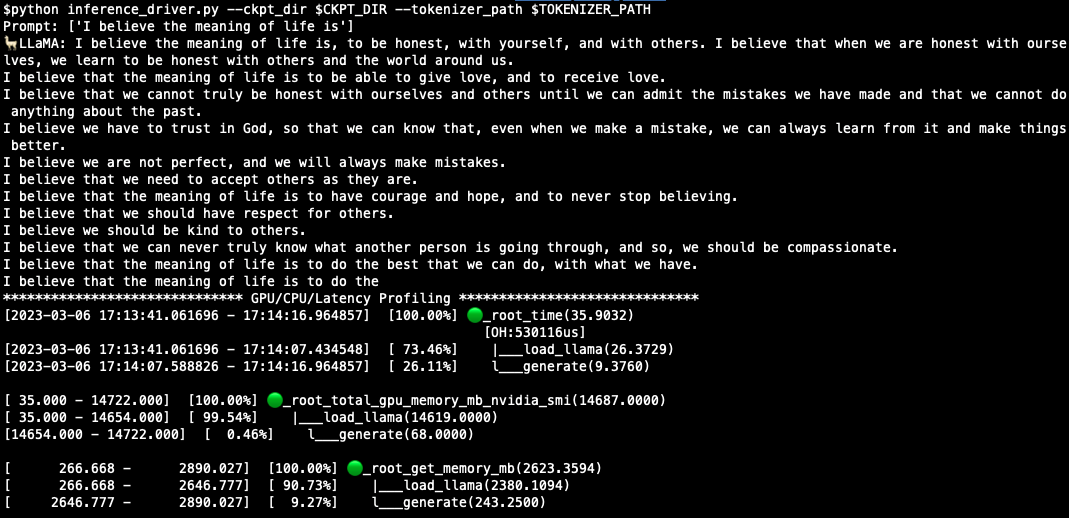
To profile CPU/GPU/Latency, run:
python inference_driver.py --ckpt_dir $CKPT_DIR --tokenizer_path $TOKENIZER_PATHA sample result is like:
- Tune
max_seq_lenandmax_batch_sizeto reduce memory consumption to be able to run in GPU. Refer to: this post!
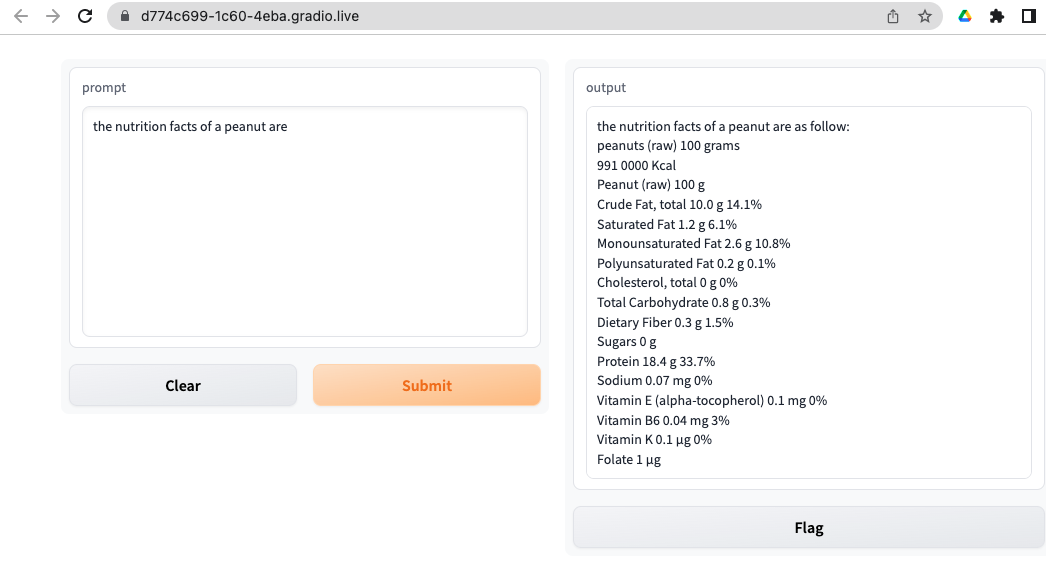
$ cd apps/gradio
$ python webapp_single.py  --ckpt_dir $CKPT_DIR --tokenizer_path $TOKENIZER_PATH
You should see something like this in your browser:
The following command will start a flask web server:
$ cd apps/flask
$ python web_server_single.py --ckpt_dir $CKPT_DIR --tokenizer_path $TOKENIZER_PATHThe provided example.py can be run on a single or multi-gpu node with torchrun and will output completions for two pre-defined prompts. Using TARGET_FOLDER as defined in download.sh:
torchrun --nproc_per_node MP example.py --ckpt_dir $TARGET_FOLDER/model_size --tokenizer_path $TARGET_FOLDER/tokenizer.modelDifferent models require different MP values:
| Model | MP |
|---|---|
| 7B | 1 |
| 13B | 2 |
| 30B | 4 |
| 65B | 8 |
- Meta
- Hugging Face
https://github.com/facebookresearch/llama/blob/main/llama/model.py#LL127C27-L127C27
- TODO
See MODEL_CARD.md
See the LICENSE file.