Skip to content

Conversation

@zomfg
Copy link

@zomfg zomfg commented Jun 26, 2020

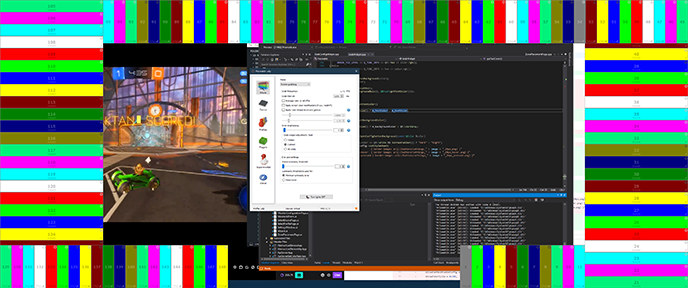
Here I'm trying reduce some confusion around widgets that I saw

  • some people (me included) don't realize that the arrow icon on the widgets is a button, I thought it was to indicate the data direction and was just bugged (all arrows point to the right), so always left it as a low priority visual bug, so I replaced it with a gear icon
  • "Appearance of grab widgets" in settings is weird, replaced with "Grab widget adjustment / test", hopefully more descriptive
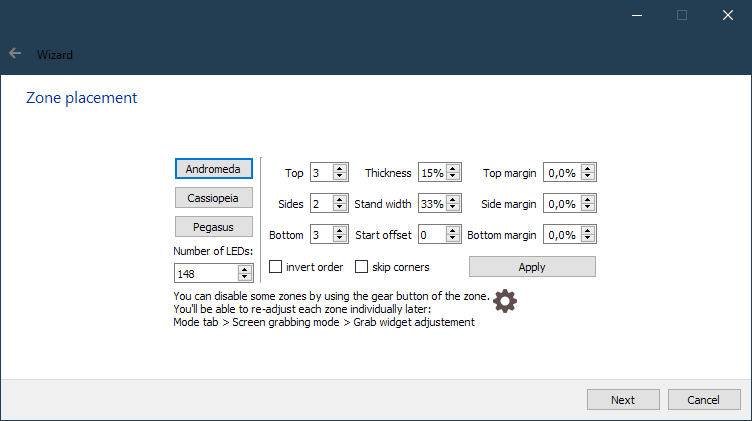
  • changed text in the wizard to indicate where to find ^
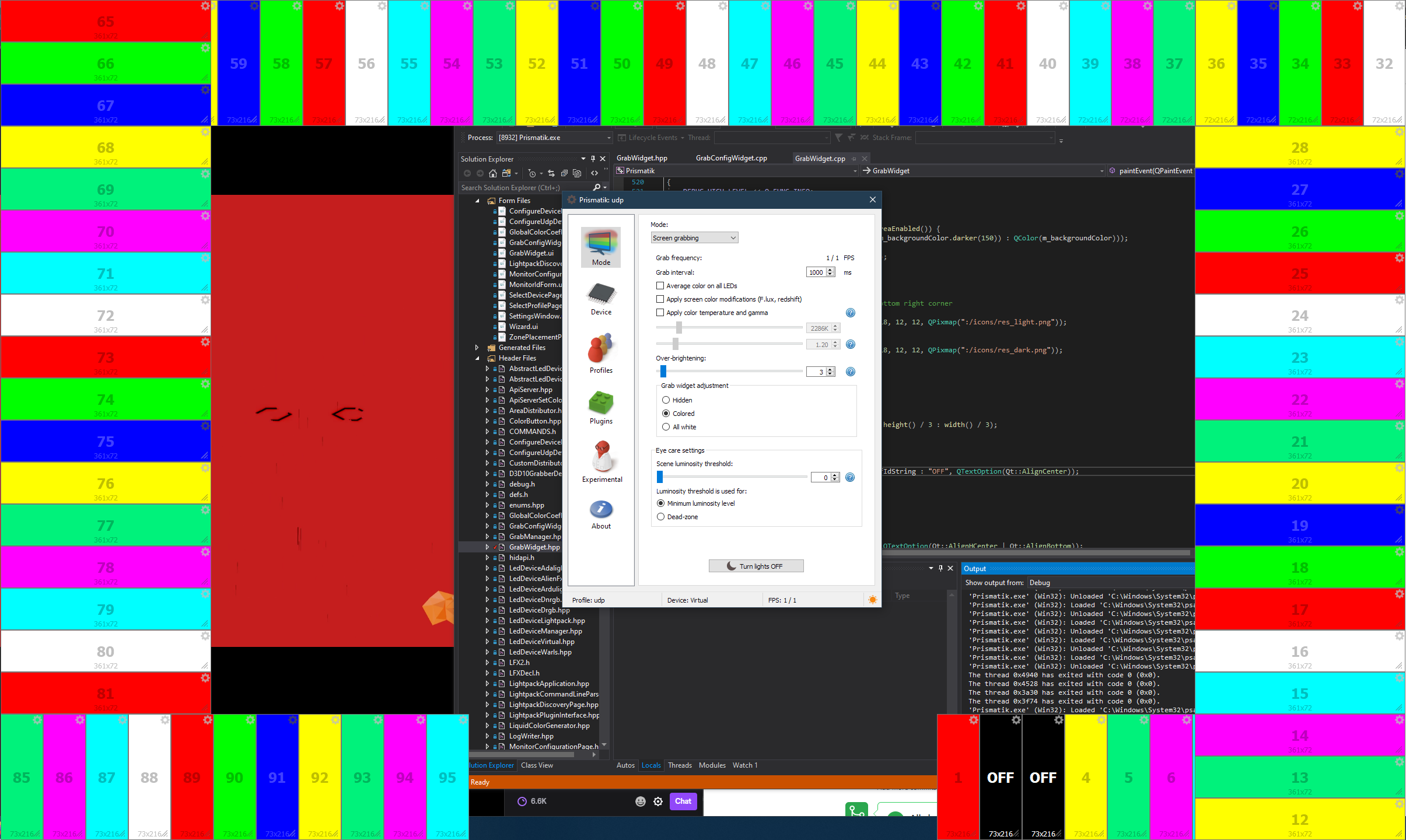
  • changed disabled widgets to black with red text, dark grey was easy to miss among colored widgets
  • in the wizard, preselect current device type
  • in the wizard, changed "Custom" button to "Apply", fits better imo
  • LED layout presets now use parameters from the right side (when you were checking "reverse order" than clicking "Andromeda" and nothing was happening basically... things like that)
  • same page, added the possibility to disable widgets right then and there (gear icon + text)
  • same page, added "skip corners" option
  • same page, added top/side/bottom margins

last two points are liked by Ambibox users

I was also thinking about renaming Experimental tab to Expert (or Advanced) and making it visible like other tabs, some people miss it (Profile tab might not be the best for UI stuff), and I'm not even sure what's experimental there, everything is very much in production use! What do you think?

@psieg
Copy link
Owner

psieg commented Jun 28, 2020

  • some people (me included) don't realize that the arrow icon on the widgets is a button, I thought it was to indicate the data direction and was just bugged (all arrows point to the right), so always left it as a low priority visual bug, so I replaced it with a gear icon

This happened to me too I believe 😅

  • "Appearance of grab widgets" in settings is weird, replaced with "Grab widget adjustment / test", hopefully more descriptive

Yeah, I didn't change the existing names when I forked. There are some weird names/grammar mistakes etc. I would suggest "Grab (widget|zone) configuration", WDYT?

  • changed disabled widgets to black with red text, dark grey was easy to miss among colored widgets

To me, something being grayed out is the consistent definition if disabled. However there's currently a white tone in the colors used for active zones... I'm against red text because it suggests an error. Maybe putting brackets around the number would help?

  • in the wizard, changed "Custom" button to "Apply", fits better imo
  • LED layout presets now use parameters from the right side (when you were checking "reverse order" than clicking "Andromeda" and nothing was happening basically... things like that)

Well the history there is, initially there were only presets, and then I added the custom layout. The side count options only make sense for that. Maybe we should rethink the layout altogether in a way that makes the separation clearer. Like one space for global options (LED count, order), one for the preset selection with a - OR - and a third space for the custom button with its options. Custom could well be a label and then the button would be labeled apply. (Now one might think to press apply after a preset button, which is wrong).

  • same page, added the possibility to disable widgets right then and there (gear icon + text)

I noticed this was disabled in the wizard at some point, but I don't know why this was done. There might be an edge case for this. One I can think of is the per-zone color adjustment, which will be overwritten in the next page currently. Having enable/disable makes sense on this page though, I agree.

@zomfg
Copy link
Author

zomfg commented Jun 28, 2020

Yeah, I didn't change the existing names when I forked. There are some weird names/grammar mistakes etc. I would suggest "Grab (widget|zone) configuration", WDYT?

I don't have strong feelings about words I used, so if you think it's better, I'm ok with changing.
However the reason I did not use "configuration" or "settings" is because you don't get the full feature set from the wizard, so I went with "adjust" (as in post initial setup fine tunning).

To me, something being grayed out is the consistent definition if disabled.

I would agree for a normal UI (or all white widgets), but here it looks drown out especially with small zones (unless you have a bunch of them in one place).
image

Even the black isn't perfect, but at least it means "no light should come from here"

I'm against red text because it suggests an error. Maybe putting brackets around the number would help?

Initially I was thinking of adding "OFF" beside or under the number, but with high density LEDs it'll be cut off. So a different from the rest/bright color helped with that. I'm affraid brackets without an explanation on the same screen might be too cryptic.
How about white (or other) text and one of these intead of the gear?
https://github.com/psieg/Lightpack/blob/master/Software/res/icons/off.png (this one would be familiar from the settings)
https://github.com/psieg/Lightpack/blob/master/Software/res/icons/error.png
and maybe change them (in that place) to the same color as the text

Well the history there is, initially there were only presets, and then I added the custom layout. The side count options only make sense for that. Maybe we should rethink the layout altogether in a way that makes the separation clearer. Like one space for global options (LED count, order), one for the preset selection with a - OR - and a third space for the custom button with its options. Custom could well be a label and then the button would be labeled apply. (Now one might think to press apply after a preset button, which is wrong).

Oh, I see
Here's the PR state (in case you didn't build)
image
It still works mostly the same, the major difference is presets using values from the right and re-fill top/side/bottom distribution fields.
I think this state still makes sense (even more now, but I was the one changing it):

  • presets are still visually separate
  • "Custom" does same thing as before, just the text and place changed
  • but we could wrap these^ in QGroupBoxes (that would satisfy your custom label, but the whole screen is about customizing so I don't know)
  • I don't think preset+apply is confusing in usage because preset itself does the apply now, so there's an instantaneous feedback (on widgets and top/side/bottom fields)
    • you put total leds, "oh whats Andromeda?" click that, "oh it fits but I want 10 px margin on top", change value, apply
    • or total leds, margin, Andromeda (no apply)
  • total LEDs clashes with top/side/bottom, so I wouldn't put those too close together, and only makes sense and used with presets, so keeping those together seems logical
  • and I think presets should be able to use everything from the right except for top/side/bottom (as it is here) which would put that stuff in global options box and leave the custom box with not much in it
  • and the fact that presets change values and (other) values "change" presets makes it seem that both shouldn't be too separated

I don't know, I'm happy as is, maybe try it more :D but maybe I'm not seeing right what you are saying, maybe change in it designer and screenshot

Edit: how about moving total LED number to the device page (previous one), this way we can warn better about the baud rate there and we wouldn't have a conflicting setting (that you don't need to adjust anyway as much as others) on the widget page, and wrap presets and customize in QGroupBoxes

I noticed this was disabled in the wizard at some point, but I don't know why this was done. There might be an edge case for this. One I can think of is the per-zone color adjustment, which will be overwritten in the next page currently. Having enable/disable makes sense on this page though, I agree.

Yeah that's why I split enable and coefs, you can choose either or both in code now.

@psieg
Copy link
Owner

psieg commented Jul 5, 2020

I don't have strong feelings about words I used, so if you think it's better, I'm ok with changing.
However the reason I did not use "configuration" or "settings" is because you don't get the full feature set from the wizard, so I went with "adjust" (as in post initial setup fine tunning).

Well, in terms of color coefficient it's actually more powerful than the wizard. Adjustment is fine with me as well, but I find the test confusing. How do you like just "Grab widget adjustment"?

I would agree for a normal UI (or all white widgets), but here it looks drown out especially with small zones (unless you have a bunch of them in one place).
Even the black isn't perfect, but at least it means "no light should come from here"

I agree with the high density argument. I have few enough zones (and enough screen estate) so it's not an issue in my testing - full black SGTM. We might consider making the dark blue and green colors a bit lighter to amplify the difference.

Initially I was thinking of adding "OFF" beside or under the number, but with high density LEDs it'll be cut off. So a different from the rest/bright color helped with that. I'm affraid brackets without an explanation on the same screen might be too cryptic.
How about white (or other) text and one of these intead of the gear?
https://github.com/psieg/Lightpack/blob/master/Software/res/icons/off.png (this one would be familiar from the settings)
https://github.com/psieg/Lightpack/blob/master/Software/res/icons/error.png
and maybe change them (in that place) to the same color as the text

I'd rather not change the icon, because the meaning of the button doesn't change. Especially in full mode, where the cog also hides the custom color coefficients. Simply replacing the number with OFF is something I could imagine well.

I don't know, I'm happy as is, maybe try it more :D but maybe I'm not seeing right what you are saying, maybe change in it designer and screenshot

I forgot that I implemented the presets as fillers for the custom profile. Most of your arguments make sense, let's keep it this way.
A minor nit, the icon next to the text is too large IMO.

Edit: how about moving total LED number to the device page (previous one), this way we can warn better about the baud rate there and we wouldn't have a conflicting setting (that you don't need to adjust anyway as much as others) on the widget page, and wrap presets and customize in QGroupBoxes

This has something going for it, except that changing the Top/Sides/Bottom will change the total number of LEDs actually used. How would you handle the disagreement there? Currently applying will change the total number, which is a nice way to show it. Not sure.

I noticed this was disabled in the wizard at some point, but I don't know why this was done. There might be an edge case for this. One I can think of is the per-zone color adjustment, which will be overwritten in the next page currently. Having enable/disable makes sense on this page though, I agree.

Yeah that's why I split enable and coefs, you can choose either or both in code now.

Oh right. I missed this in the review. Nice.

@zomfg
Copy link
Author

zomfg commented Jul 5, 2020

Well, in terms of color coefficient it's actually more powerful than the wizard. Adjustment is fine with me as well, but I find the test confusing. How do you like just "Grab widget adjustment"?

"Grab widget adjustment" is fine.
I added "/ test" because that's what's happening by default when you don't adjust anything, but as the accuracy depends on density and resolution, maybe it's better to not advertise it as a test hmm

So how about displaying white widgets with unlocked coefs on coef page? (I don't know if it's hard technically)
Adjusting global coef would override widgets and then you change individually if you wish...

I agree with the high density argument. I have few enough zones (and enough screen estate) so it's not an issue in my testing - full black SGTM. We might consider making the dark blue and green colors a bit lighter to amplify the difference.

but those are just the dark versions of the others so making them lighter will make them closer, maybe only keep the bright ones?

I'd rather not change the icon, because the meaning of the button doesn't change. Especially in full mode, where the cog also hides the custom color coefficients. Simply replacing the number with OFF is something I could imagine well.

ok I'll test

edit:
image
LGTM

the icon next to the text is too large IMO

yeah

This has something going for it, except that changing the Top/Sides/Bottom will change the total number of LEDs actually used. How would you handle the disagreement there? Currently applying will change the total number, which is a nice way to show it. Not sure.

I was hoping that by that point the user is sure about the total number but...
That could be handled in background by overriding the total with the sum of top/sides/bottom, maybe display the calculated total in a label somewhere (under top/sides/bottom I guess), and update on apply
Also getting to that page with a known total will make it possible to prefill somewhat accurately instead of 3,2,...
And I don't know why (yet), but in linux/mac vm redrawing the widgets takes ages (the more the longer), I don't know if it's delete/realloc or drawing itself or both or something else...

I was also thinking about renaming Experimental tab to Expert (or Advanced) and making it visible like other tabs, some people miss it (Profile tab might not be the best for UI stuff), and I'm not even sure what's experimental there, everything is very much in production use! What do you think?

opinion on this?

@psieg
Copy link
Owner

psieg commented Jul 12, 2020

Well, in terms of color coefficient it's actually more powerful than the wizard. Adjustment is fine with me as well, but I find the test confusing. How do you like just "Grab widget adjustment"?

"Grab widget adjustment" is fine.
I added "/ test" because that's what's happening by default when you don't adjust anything, but as the accuracy depends on density and resolution, maybe it's better to not advertise it as a test hmm

So how about displaying white widgets with unlocked coefs on coef page? (I don't know if it's hard technically)
Adjusting global coef would override widgets and then you change individually if you wish...

We can do that, yeah. The small caveat is that clicking once on the global coef can mess up an hour's work of tweaking on each zone (also it might take some wiring work to make the coefs in the widgets show the right numbers, I'm not sure whether that'll be synchronized out of the box, but shouldn't be hard). I could live with either (keep as is or allow on global).

I agree with the high density argument. I have few enough zones (and enough screen estate) so it's not an issue in my testing - full black SGTM. We might consider making the dark blue and green colors a bit lighter to amplify the difference.

but those are just the dark versions of the others so making them lighter will make them closer, maybe only keep the bright ones?

That would reduce the number of colors available. Having at least 10 different colros for the default 10 LEDs per Lightpack would be nice.

This has something going for it, except that changing the Top/Sides/Bottom will change the total number of LEDs actually used. How would you handle the disagreement there? Currently applying will change the total number, which is a nice way to show it. Not sure.

I was hoping that by that point the user is sure about the total number but...
That could be handled in background by overriding the total with the sum of top/sides/bottom, maybe display the calculated total in a label somewhere (under top/sides/bottom I guess), and update on apply
Also getting to that page with a known total will make it possible to prefill somewhat accurately instead of 3,2,...

Yes I would also hope the user is sure by that point :P
What one could do is to have the last one (bottom) auto-adjust based on the other fields and the total number, WDYT?

And I don't know why (yet), but in linux/mac vm redrawing the widgets takes ages (the more the longer), I don't know if it's delete/realloc or drawing itself or both or something else...

I would guess the window manager isn't meant for that many windows, but I think the fact that you're still taking screenshots at the same time makes everything worse.

I was also thinking about renaming Experimental tab to Expert (or Advanced) and making it visible like other tabs, some people miss it (Profile tab might not be the best for UI stuff), and I'm not even sure what's experimental there, everything is very much in production use! What do you think?

opinion on this?

Oh sorry. Yeah sure, that was inherited from the original software, I don't mind. Maybe the defaults should be more explicit here (or a reset button?) to help people pick the recommended option after experimenting with things?

@zomfg zomfg mentioned this pull request Nov 26, 2020
@zomfg
Copy link
Author

zomfg commented Nov 29, 2020

Looks good, but I'm not convinced it works ok. The global page updates the coefs set in the device, but not the config, so I don't see how changing the global value would sync to the widgets. See below.
The code of the page itself updates the settings only on validate, but I believe the widgets are currently wired to automatically propagate all changes to settings (AllowCoefAndEnableConfig)
I think you can either split that into two (allow coef and don't write to config, then the page has to update values to and from widgets) or use Transient Settings like some of the other wizard pages do. Not sure how easy it is to make the widgets use the TransientSettings.

since GrabWidget already had SyncSettings I used that for coefs to settings too, Allow... only shows GrabConfigWidget (configured depending on Allow...s). It works ok.

AbstractLedDevice form master broke for me, almost all uninitialized properties had random values so all color adjustments were random, so I set them all to SettingsDefaults

return true;
}

void GrabWidget::setAreaEanled(const bool enabled)
Copy link
Owner

Choose a reason for hiding this comment

The reason will be displayed to describe this comment to others. Learn more.

*setAreaEnabled

@psieg
Copy link
Owner

psieg commented Dec 2, 2020

I tested on my TV setup with Lightpacks and the coef synchronization worked nicely. I did have some issues with disabled zones however.
I disabled two zones as a test, but they did still show some color in grab mode, but dimmer than the other zones (both Lightpack and virtual device. The last release version has the disabled zone fully black).

Another thing: toggling a disabled zone back on hides the number and resolution label.

@zomfg
Copy link
Author

zomfg commented Dec 3, 2020

That sounds like you have minimum luminosity > 0, which does not care about disabling LEDs (by design I guess).
A related change would be this, but if that affects the result, that means the release does not set all of those in some cases or something

I'm not able to reproduce the toggling issue on either platform, in both wizard and grab

@psieg
Copy link
Owner

psieg commented Dec 3, 2020

You're right, it looks like the luminosity was the issue (although the default is only 3, which is what I have on the desktop I compared to as well...). Can't test right now.

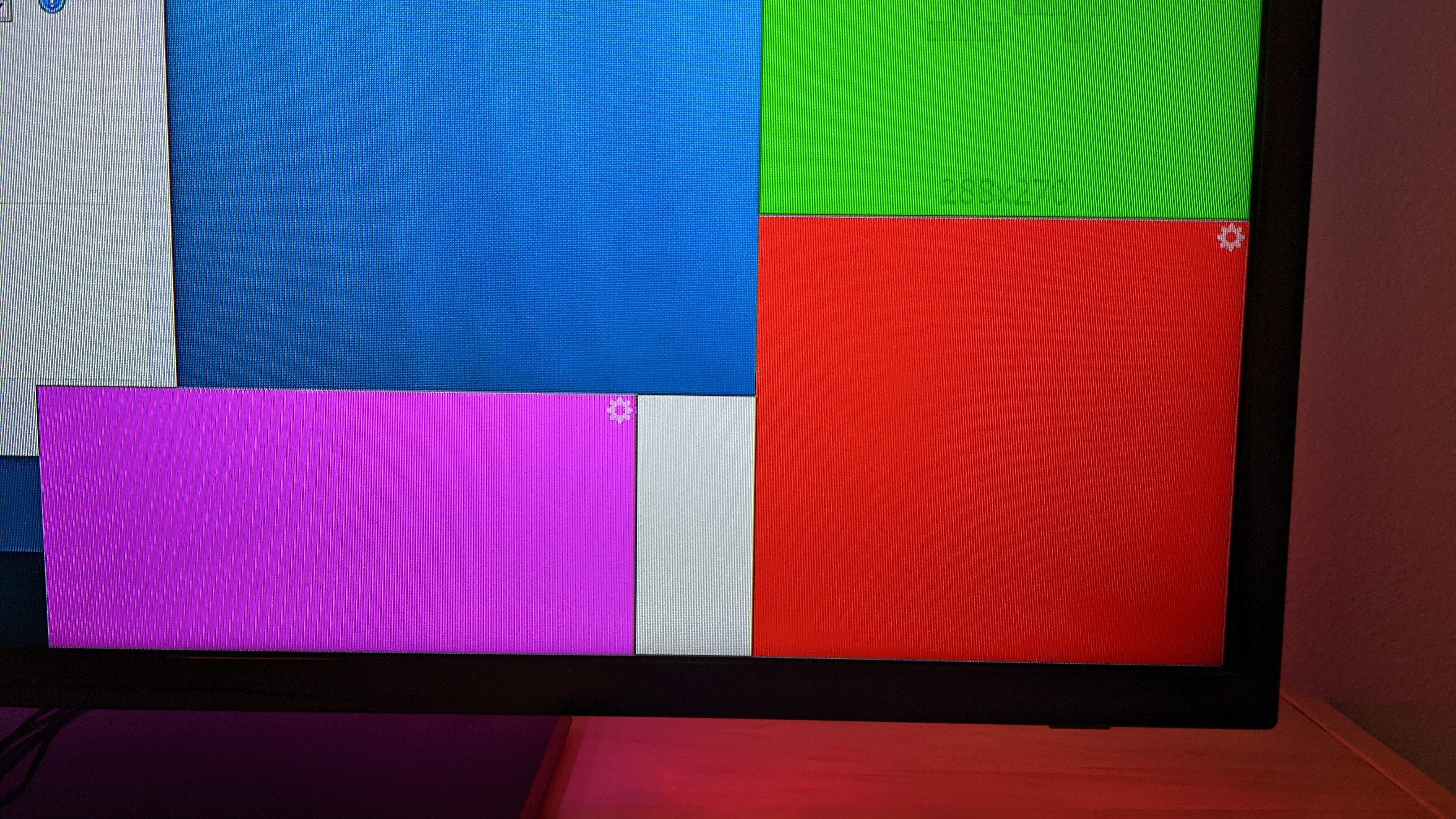
The toggling turned out to be a contrast issue on the TV. The contrast is perfectly fine on my desktop monitor, but take a look at this (without any disabling or toggling):
signal-2020-12-03-175950
It's not even barely visible. Maybe the TV does some post processing or something...

Anyway, after the typo fix this looks good to me :)

@zomfg
Copy link
Author

zomfg commented Dec 4, 2020

(it's very visible even at 3)
I've seen this on some displays yeah... I tried adding an outline to the text, but it was pixely for some reason compared to normal text so I left as is

Last minute addition: being able to configure multiple displays (display select integrated to zone/coef pages)

@psieg
Copy link
Owner

psieg commented Dec 5, 2020

I don't have a multi-monitor setup to test, but the code looks reasonable and I guess you did ;)

Thanks

@psieg psieg merged commit a7f4fb8 into psieg:master Dec 5, 2020
@zomfg zomfg deleted the feature/led-wizard-tweaks branch December 6, 2020 11:27
@zomfg
Copy link
Author

zomfg commented Dec 6, 2020

might fit with #280

Sign up for free to join this conversation on GitHub. Already have an account? Sign in to comment

Labels

None yet

Projects

None yet

Development

Successfully merging this pull request may close these issues.

2 participants