Barcode finder #874
Barcode finder #874
Conversation


and add branch for dev
Limit scanning to specific size
- Add barcodes to static const
- Add custom barcode scan area
- update readme for android / ios

|
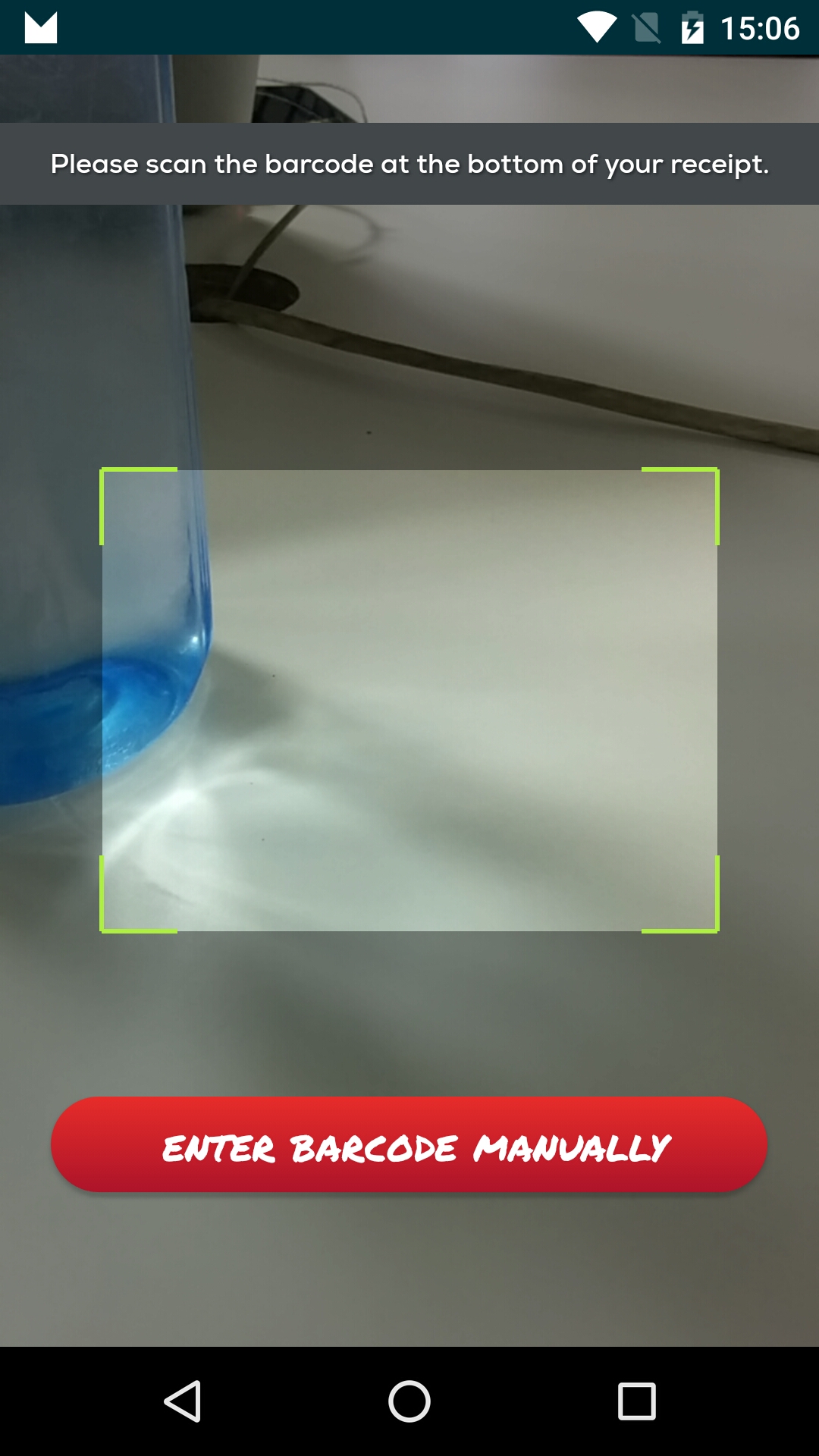
Hey, any news when it's going to merge ? can you please provide your branch link I did not find your branch for npm install. I want to customize react native camera something like this
|

|
https://github.com/fbacker/react-native-camera/tree/barcode-finder until this branch is merged I'm using package.json |
|
Thanks 👍 |

|
I tried your implementation, but I cannot get the expected result. All children node inside Camera component does not appear. Thanks. |
|
@truongthanh1303 you can use topOverlay and bottomOverlay style to appeared all children node inside camera component. for example https://github.com/lwansbrough/react-native-camera/blob/master/Example/Example.js |
Able to create a custom finder on top of camera component. also fixed proptypes deprecation in barcode-finder
|
Try it out. Made it possible to change the default finder design. Having issues starting the package Example so developing against my own project so hope I don't miss anything or f**k up something :)
|
|
@truongthanh1303 @fbacker I implement barcode reader https://github.com/sahir/react-native-barcode-reader successfully but facing this issue #476 I have also tried the solution (bind - unbind lifecycle methods) but no success. I guess you also face this issue let me know if you found any solution. |
|
When attaching the camera display I set an empty array. Then just check if it's been used. |

|
It seems that the viewfinder doesn't properly restrict the barcode scanning area. It looks like the setBarcodeFinderVisible is never invoked in Java. I'm not too familiar with Android development so I might just be missing it (still trying to figure out how to debug java code) EDIT : From what I think I got, it seems there are missing the ViewFinder ReactProp in the RCTCameraViewManager |

|
https://github.com/fbacker/react-native-camera/tree/barcode-finder until this branch is merged, you have to use package.json Use: |
|
I am doing that. The thing is that that in the Java class RTCCameraViewManager, the added properties are never implemented thus the barcodeScannerViewFinderEnabled variable is always false. Without them, you can still get scans from outside the ViewFinder |
|
@GarimaMathur07 if update thru git I've changed the properties also a way to make the viewfinder custom. check the updated readme.md @gablorquet you are absolutely correct. There's so many weird steps. I'll try to fix this. Having some math calculation issues. Will try to fix this tomorrow. |


I noticed that setting barcode types happend 1 time and was triggered before the properties was passed from react. So it was always scanning all possible formats.

Also I've changed the crop size to be based on % size. This because different resolutions on cameras didn't match up with size from react.
There's an commented code section when capture image that can be used to tweak the cropsize, so we know what we actually are looking at.
|
I've made a new commit that should solve android crop size and also a bug in setting barcode types. from commit: I noticed that setting barcode types happend 1 time and was triggered before the properties was passed from react. So it was always scanning all possible formats. Also I've changed the crop size to be based on % size. This because different resolutions on cameras didn't match up with size from react. |

|
@fbacker I'm getting error after latest commit
|

|
@fbacker @wanderSX I think its missing define barcodeFinderPercentageSize on propType https://github.com/fbacker/react-native-camera/blob/barcode-finder/index.js#L77 |
Added missed changes
|
@wanderSX @gvlamadrid yeah, sorry about that. Missed the index.js file in commit. Still haven't figured out how to update npm packages outside a project. So making changes in the project folder and then copy to external git project. Tried npm link and other things. But when running multiple react-native projects it always messes up the package-manager :( |

|
I also got codes scans outside the scanning area in iOS 11 (react v0.47), here is my code: <Camera
ref={(cam) => {
this.camera = cam;
}}
style={styles.preview}
aspect={this.props.camera.aspect}
captureTarget={this.props.camera.captureTarget}
type={this.props.camera.type}
keepAwake={true}
barCodeTypes={ !this.props.NFCReader.pkgMode? ['org.iso.QRCode']:['org.iso.DataMatrix']}
onBarCodeRead={this._onBarCodeRead}
torchMode={this.props.camera.flashMode}
onFocusChanged={() => {}}
defaultTouchToFocus
barcodeFinderVisible={true}
barcodeFinderWidth={160}
barcodeFinderHeight={160}>
</Camera>I used latest branch as described above. |
Try to fix android issue that occures sometimes. When in doubt, try catch.
Change cropping to use % of size (as android) to handle different resolutions correctly.
|
@ploureiro try latest. these commits handles 1. some android devices crash sometimes for some reason and 2. hopefullt an correct crop for ios. |

|
Any progress on this? |

|
@fbacker How to add a black backgroundColor around the rectangle? |

|
@assafb81 Ok. |
|
@fanzkday @assafb81 Guessing that you want the actual scan area to be transparent and a background color around the actual scanning area. To do this. Create this outside the camera component. |

|
@fbacker if i scan a barcode and leave the camera pointing to the barcode, the scanner will continuously scan the barcode. Is there a way to stop the scanning when the scanner successfully scans it the 1st time? |

|
hello @fbacker, what if we have a lot of QR codes on 1 page, I try to catch code that is in the center of Click to see screenshot |

|
I've now run my latest in prod environment, old react-native-camera crash on android no longer exists. Yaay. It's hard for me to keep this PR alive because the repo owners never merges to master. A lot of other stuff gets implemented and keeps breaking my PR. So I'll close this now. Been open since September :( |


|
sorry about this one anybody want to bring only the native parts of this PR? I think the js part can be done in userland this would solve this one #1435 |


|
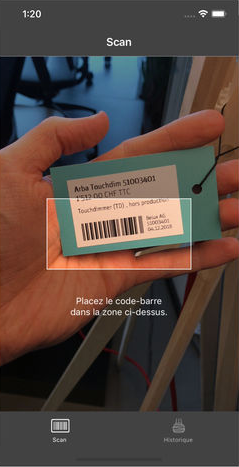
I've started implementing this some months ago for iOS and Android on the latest version of RNCamera based on the work of @fbacker, but never had the time to completely test it as I had to switch to another project at work. But it's used in production in one of our apps for many months now and seems to work fine. The only part I'm not 100% sure about is the adaptation of the bounding rects coordinates when we crop the scanning area. Especially on Android and when rotating the phone, something strange seemed to be going on there. If I find the time soon I will try to finish it and send a pull request. In the meantime you can check it out here : https://github.com/leeroybrun/react-native-camera This adds a new For example The UI part is left to the developer, nothing is displayed on the screen when using this param. Here is an example of what ~ a crop of "90% of the camera width and 25% of its height" represents.
Limiting the area where we need to search for a barcode results in a much faster scan for the user, especially on older phones. |

Bro, is it able to support RN .60.x? I would like to use your fork with that feature. |
|
Can we have something like this #1852 Just define a rect and limit the region to it? |

|
Android #2766 |
|
can we close this? |


There was a problem hiding this comment.
sorry about this one
anybody want to bring only the native parts of this PR?
I think the js part can be done in userland
this would solve this one #1435
I agree, as explained in #2766 the javascript logic should handle the logic for camera orientation and calculation of the parameters, the native code should expose the PlanarYUVLuminanceSource or RGBLuminanceSource parameters so that the user can set the yuv source dataWidth, dataHeight and cropping parameters. Any additional information could be exposed to the react-native developers via the React Native Bridge..
PlanarYUVLuminanceSource(byte[] yuvData, int dataWidth, int dataHeight, int left, int top, int width, int height, boolean reverseHorizontal) | import com.google.zxing.MultiFormatReader; | ||
| import com.google.zxing.PlanarYUVLuminanceSource; | ||
| import com.google.zxing.RGBLuminanceSource; | ||
| import com.google.zxing.Result; |
There was a problem hiding this comment.
In my pull request #2766 for android I expose the PlanarYUVLuminanceSource to the reactnative developer with a method named rectOfInterest.
rectOfInterest allows the user to set the instance variables later then passed to PlanarYUVLuminanceSource constructor.
PlanarYUVLuminanceSource(byte[] yuvData, int dataWidth, int dataHeight, int left, int top, int width, int height, boolean reverseHorizontal) read more here (the linked comment is hidden, be sure to open it).
| rotationIndex = 3; | ||
| break; | ||
| } | ||
| // rotate |
There was a problem hiding this comment.
I believe as discussed in #2766 it is easier to expose the method to the react-native developers to create the PlanarYUVLuminanceSource instead of handling all the different scenarios and orientations... Many users will scan barcodes only in Landscape/FrontCamera or Portrait/FrontCamera... and maybe using com.google.zxing libraries is not the best choice for offering all this functionalities.. so I would be happy to discuss about this, but I will focus on the android side.
Sooner or later this functionality will break and we may not have the manpower to handle the mantainance.
            switch(deviceRotation){
                case 0: // portrait
                    rotationIndex = 6;
                    break;
                case 1: // landscape left
                    rotationIndex = 1;
                    break;
                case 2: // portrait upside down

                    break;
                case 3: // landscape right
                    rotationIndex = 3;
                    break;
            }
            // rotate
            try{
                mutableImage.rotate(rotationIndex);
            } catch (MutableImage.ImageMutationFailedException e) {
                android.util.Log.e("RCTCamera","Rotate temp image",e);
                promise.reject("failed to rotate file", e);
                return;
            }
You can still consider working on your own library and include this functionality, as the issue here is that the owner of the code then mantains it... as other developers may not be as productive handling issues on code they did not write, having a simple api may really help a lot.
| throw new Exception(); | ||
| } | ||
| LuminanceSource source = new RGBLuminanceSource(width, height, intArray); | ||
| BinaryBitmap bbitmap = new BinaryBitmap(new HybridBinarizer(source)); |
There was a problem hiding this comment.
Why not continue using YUV format and PlanarYUVLuminanceSource and switching to RGBLuminanceSource? I was courious understanding this reason. Thanks a lot 😃

|
@fabriziobertoglio1987 are you working to move this forward? I didn't get you on why did you close the other issue related to this one #2766 as you mentioned above? I mean, did you stop the work over there to get this one done? let me know to think how could I help to close this |
|
Thanks @renatobenks currently I am busy trying to solve an issue in another repository, finishing #2766 is in my todo list. I estimate that I will start working on it in June. If you want to continue my work on my branch (this is the example used to test the functionality). The remaining TODO explained from @cristianocca in this comment are:
In my effort to re-write the The previous Javascript API was build based on
I can build the same approach on my branch/functionality:
The changes will basically reflect the fact that we pass parameters like this instead of landscape = {
dataWidth: 1440,
dataHeight: 1080,
left: 250,
top: 300,
width: 950,
height: 600,
}Thanks a lot |
20 participants


I've added a 'barcode finder' rect that can be enabled. When doing this it will also crop the area that is scanned. It will significantly increase the read lag. Possible to set the size, color and border.
Also I've added correct static const for barcodes on android and updated the readme.