Non-admin user viewing the console with developer console perspective #136
Conversation


… perspective

Refers https://jira.coreos.com/browse/ODC-347
The prerequisites for testing this are
export KUBECONFIG=<kubeconfig file>
export OC_LOGIN_PASSWORD=<kubeadmin login password>

Run the script consoledeveloper.sh
It does the following:
1)Replaces the existing openshift console with the talamer console
2)Installs the operator. (Prompts if it already exists)
3)Creates a non-admin user `consoledeveloper` with the password as `developer` with the suitable rolebinding(roleinding being used here is `self-provisioner`)

After this you can login as the `consoledeveloper` user. Create a new project and do `oc get csvs` in the suitable namespace to see the installed operator.

 Avni-Sharma
requested review from
akashshinde,
baijum,
ldimaggi,
sbose78 and
tinakurian
Avni-Sharma
requested review from
akashshinde,
baijum,
ldimaggi,
sbose78 and
tinakurian

 rgarg1
left a comment
rgarg1
left a comment
rgarg1
left a comment
There was a problem hiding this comment.
The script works fine @Avni-Sharma. Good job!
I was able to enable developer console on my OCP4 cluster hosted on AWS using this script. Since I already had the consoledeveloper user crreated prior, the script detected that duly and informed me of the same.
| @@ -0,0 +1,16 @@ | |||
| #!/bin/bash | |||
| set -x | |||
There was a problem hiding this comment.
The script is dumping all commands executed along with passwords on the terminal. May be set +x would be a better option here, even though this is going to be executed by kubeadmins.
|
|
||
| oc apply -f ./yamls/unmanage.yaml | ||
| oc scale --replicas 0 deployment console-operator --namespace openshift-console-operator | ||
| sleep 20s |
There was a problem hiding this comment.
Are we going to let our customers use this script at any point? If yes then we should consider using conditional while loops instead of hard sleeps, as different environments may need different waits.

There was a problem hiding this comment.
Technically, we could have a loop here which checks if the console deployment in openshift-console namespace is updated to use the right image.

|
How about creating a |

|
|
How about creating a |

| #!/bin/bash | ||
| set +x | ||
| OC_LOGIN_USERNAME=kubeadmin | ||
| oc login -u ${OC_LOGIN_USERNAME} -p ${OC_LOGIN_PASSWORD} |

There was a problem hiding this comment.
Why login? Why not use KUBECONFIG?
There was a problem hiding this comment.
We can do this as well.. thanks Baiju :)

install_devconsole/create_user.sh
Outdated
| sleep 10s | ||
| oc create clusterrolebinding ${USERNAME}_role --clusterrole=self-provisioner --user=${USERNAME} | ||
| sleep 15s | ||
| oc login -u ${USERNAME} -p ${USERPASS} |
There was a problem hiding this comment.
Would be wrong to have the script login with a different user than what the user had initially started as. I would suggest that we only print out the command to login with the user.
| do | ||
| sleep 1s | ||
| done | ||
| oc scale --replicas 1 deployment console --namespace openshift-console |
There was a problem hiding this comment.
Could you add a loop which checks if the deploymentconfig/console has got updated with the new image?
There was a problem hiding this comment.
There is no deploymentconfig as such... just the deployment and when we apply that redeploy file then the image is there. (The new-image is already there in the yaml..it is not being replaced)
There was a problem hiding this comment.
I wanted to imply deployment/console :)
You are redeploying the deployment/console-operator not deployment/console. On re-deploying deployment/console-operator, the operator should update deployment/console's image which could take a while.
There was a problem hiding this comment.
After the redeployment the pod for this console-operator comes up. After this step the devconsole.sh script is called. So till the catalogsource and subscription is being applied that pod comes up and these two are kind of independent. so i thought of not putting it there. For pulling the latest image though I have a new commit which changes the imagePullPolicy to Always in the desired yaml and also does some changes in the consoledeveloper.sh
There was a problem hiding this comment.
@Avni-Sharma could you share the link to the workaround please? If there's an issue I would like to point people towards it every time they hit the bug.

|
@Avni-Sharma The scripts work only partially for me on OCP4 cluster hosted on AWS. Here are the logs, please notice the error messages: |
|
Despite the errors, I could login using the developerconsole user and I could also see the perspective. |
…le-operator into install_devconsole
…le-operator into install_devconsole
Removing login through oc command. Instead using kubeconfig file.
Prompting the user with credentials for login as a non admin user, instead of logging in through the script.

Hi Ruchir. |
|
/test lint |
1 similar comment
|
/test lint |

|
New changes are detected. LGTM label has been removed. |
| env: | ||
| - name: IMAGE | ||
| value: quay.io/redhat-developer/console:master-next | ||
| imagePullPolicy: Always |
There was a problem hiding this comment.
Thanks for adding this - this looks mandatory and I had missed it in my review.
| CONSOLE_POD="$(oc get pods -o=name -n openshift-console | cut -d'/' -f2- | cut -f 1 -d "-" | head -n 1)" | ||
| CONSOLE_POD_NAME="$(oc get pods -o=name -n openshift-console | cut -d'/' -f2- | cut -d'-' -f1- | head -n 1)" | ||
| if echo "${CONSOLE_POD}" == "console";then | ||
| oc delete pod ${CONSOLE_POD_NAME} -n openshift-console |
There was a problem hiding this comment.
These would have got deleted when
oc scale --replicas 0 deployment console --namespace openshift-console
was done?
There was a problem hiding this comment.
yeah..but regarding this - If you are already using the quay.io/redhat-developer/console:master-next image and the image has been updated, the deployment doesn't naturally pull the updated image. So to be really sure that it is the new image we can delete the existing one. Because it's a Deployment, Kubernetes will automatically recreate the pod and pull the latest image.
@Avni-Sharma Can you create a |
|
While importing an application as |
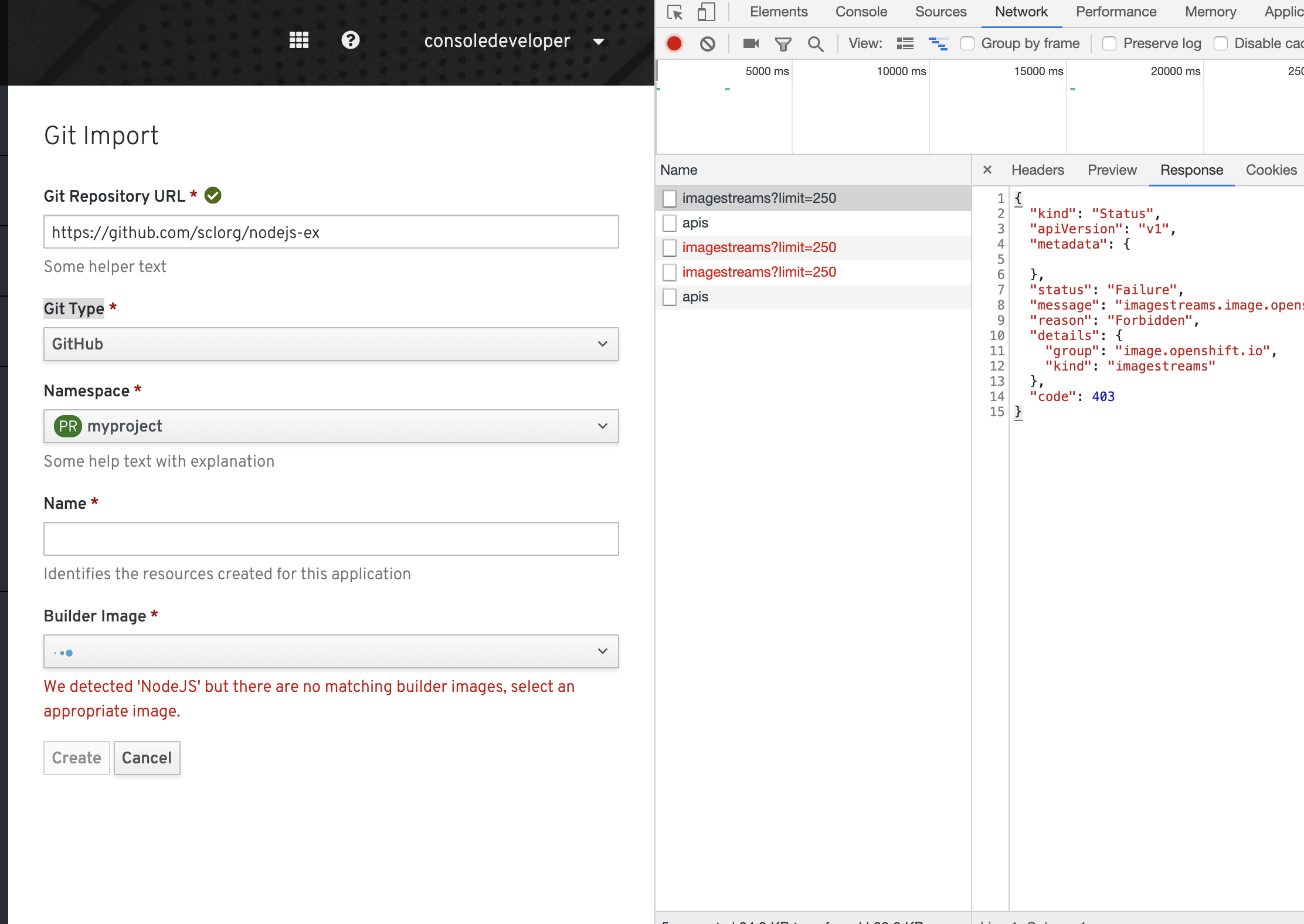
|
The output doesn't get printed properly on my mac terminal |

|
@sbose78 On my mac terminal the output looks fine with colors and all. |
|
/test lint |
install_devconsole/create_user.sh
Outdated
|
|
||
| sleep 10s | ||
| oc create clusterrolebinding ${USERNAME}_role --clusterrole=self-provisioner --user=${USERNAME} | ||
| oc adm policy add-role-to-user view ${USERNAME} |
There was a problem hiding this comment.
Is this view only on the openshift namespace?
There was a problem hiding this comment.
It is in all namespaces
The builder image in the Import Flow will now work.
|
/retest |
|
@Avni-Sharma The command |
|
@rgarg1 This is only for v4. We are just exporting the kubeconfig for logging in(mentioned in the description above)) instead of the command oc login which is only possible in v4. so it is assumed that it is for the latest one..However, we can add it as well :) |
|
Please add a |
|
@Avni-Sharma (nitpick) Can you format the |
|
Let's merge this. |
|
[APPROVALNOTIFIER] This PR is APPROVED This pull-request has been approved by: baijum, sbose78 The full list of commands accepted by this bot can be found here. The pull request process is described here DetailsNeeds approval from an approver in each of these files:
Approvers can indicate their approval by writing |
|
I had some changes to README: https://paste.gnome.org/pv37d2syt |


* upstream/master:
  Set registry log (redhat-developer#176)
  Non-admin user viewing the console with developer console perspective (redhat-developer#136)
  Use the base image available in the OpenShift CI (redhat-developer#175)
6 participants


Refers https://jira.coreos.com/browse/ODC-347
This PR provides a script to install
The prerequisites for testing this are
export KUBECONFIG=kubeconfig file
Run the script consoledeveloper.sh
It does the following:
1)Replaces the existing openshift console with the talamer console
2)Installs the operator. (Prompts if it already exists)
3)Creates a non-admin user
consoledeveloperwith the password asdeveloperwith the suitable rolebinding(rolebinding being used here is self-provisioner and view)Steps to test this
sh consoledeveloper.shoc login -u consoledeveloper -p developerconsoledeveloperuser, you can now create a new project and dooc get csvsin the suitable namespace to see the installed operator.Expected Output-
On the UI you can now see a consoledeveloper user under the kubeadmin.
You can enter the username as consoledeveloper and the password as developer here