A lightweight static site generator with built-in CMS that creates microblog-style content feeds. Ideal for personal blogs and knowledge collections.
Blogging is one of the most valuable practices for developing ideas and sharing knowledge. While there are many platforms available, most are either too complex (WordPress), too limiting (Medium), or require too much setup (static site generators).
I wanted something simpler: A lightweight engine with a built-in editor that makes publishing frictionless and focuses on readability. A tool for maintaining a digital garden that grows over time. But also a tool that includes deep analytics integration and a framework for AI-assisted content optimization — turning your blog into a data-driven content engine.
That's why I built Flow - a minimalist intelligent blogging engine that gets out of your way and lets you focus on what matters: writing and sharing ideas. Flow is Powering samim.io
- ⚡ Python + FastAPI: Built on modern, high-performance Python web frameworks
- 🚀 Lightning Fast: Generates static pages with intelligent caching
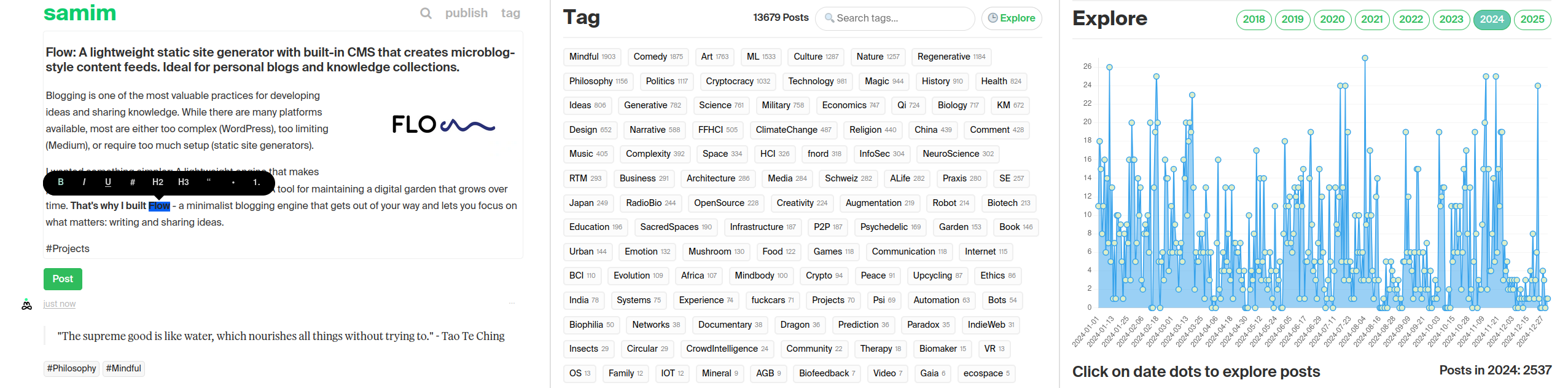
- 💅 Beautiful Editor: Medium-style WYSIWYG editing experience
- 🖼️ Image Management: Drag-and-drop image uploads with gallery support
- 🏷️ Tagging: Supports hashtag and tag page generation
- 📱 Mobile-First: Responsive design that works seamlessly across devices
- 🔍 Full-Text Search: Search across all posts, works on both editor and published site
- 📊 Content Explorer: Visual timeline view of your content
- 🔗 Related Posts: Discover and link to related content while writing
- 📅 Post Scheduling: Queue posts for future dates to maintain consistent publishing
- 📧 Newsletter Integration: Optional subscribe button with Mailchimp support
- 📡 FTP & rsync: One-click deployments via FTP or lightning-fast rsync over SSH
- 📰 RSS with Images: Full RSS feed support including image enclosures
- 🔄 Incremental Builds: Only rebuilds what changed
- 🎯 Minimal Configuration: Works out of the box with sensible defaults
- 🎨 Customizable: Easy to modify templates and styling
- 📊 Deep Analytics: Matomo integration with dashboard, experiments, and goal tracking
- 🤖 AI Content Agent: Framework for AI-assisted content optimization with persistent world model
- 🎲 Smart Sidebar: Welcome back message, popular posts (with editorial control), random post discovery
git clone https://github.com/samim23/flow.git
cd flow
pip install -r requirements.txt- Setup environment variables:
cp .env.sample .env
vim .env (or use your favorite text editor to adjust site config)
source .env- Run the server:
python3 flow.py- Visit
http://127.0.0.1:2323/to start creating content
Flow supports two deployment methods: FTP (traditional) and rsync (faster, recommended if you have SSH access).
rsync is 10-100x faster than FTP for incremental updates. Requires SSH access to your server.
# In app/settings.py
upload_method: str = "rsync"
rsync_host: str = "yourserver.com"
rsync_user: str = "ssh_username"
rsync_remote_path: str = "/var/www/html/"
rsync_ssh_key: str = "~/.ssh/id_ed25519"  # Optional
Note: The static/upload/ folder (media uploads) is automatically excluded from rsync delete operations to protect your uploaded images.
Traditional FTP upload, works with any hosting provider.
# In app/settings.py or .env
upload_method: str = "ftp"  # Default
server_ftp_enabled: bool = True
server_ftp_server: str = "ftp.yourhost.com"
server_ftp_username: str = "your_username"
server_ftp_password: str = "your_password"
server_ftp_path: str = "/public_html/"Flow can run directly as a live web application instead of generating static files. This is useful if you want to skip the build/FTP workflow and just run Flow on your server.
- Set an admin password in
app/settings.py:
admin_password: str = "your-secure-password"
session_secret: str = "change-this-random-string"- Run with a production server:
pip install gunicorn uvicorn
gunicorn -w 4 -k uvicorn.workers.UvicornWorker -b 0.0.0.0:8000 app.main:app- Set up nginx as a reverse proxy (recommended):
server {
    listen 80;
    server_name yourdomain.com;

    location / {
        proxy_pass http://127.0.0.1:8000;
        proxy_set_header Host $host;
        proxy_set_header X-Real-IP $remote_addr;
    }

    location /static {
        alias /path/to/flow/app/static;
    }

    location /upload {
        alias /path/to/flow/upload;
    }
}- No password set: Editor is always accessible (local development mode)
- Password set: Public users see read-only site, login required for editing
- Visit
/loginto authenticate and access the editor - All write operations (post, upload, delete) require authentication
In live mode, search uses server-side filtering instead of Pagefind. For the static site deployment, Pagefind provides faster client-side search.
Create a post in the UI and then rename the file in your /content/p/ folder to about.md
To add a "Subscribe" button to your navigation, set the newsletter_url in your settings:
# In app/settings.py
newsletter_url: str = "https://mailchi.mp/xxx/yourlist"
Leave empty or remove to hide the subscribe button. Works with any newsletter service (Mailchimp, Buttondown, etc.).
While editing, click the Related button (or press Cmd+Shift+R) to open a sidebar showing posts related to your current draft. Click "Insert" to add a rich backlink.
Backlinks use the <flow-embed> tag which renders as a Twitter-style quote card:
<flow-embed url="https://yoursite.com/p/your-post/"></flow-embed>The card content is fetched dynamically, so links always show fresh data.
Post detail pages automatically display a content discovery section at the bottom, inspired by The Verge:
- "More in #Tag": Shows related posts from the same tags as the current post
- "Top Stories": Shows your most recent posts from RSS
This section loads asynchronously (doesn't block page render) and helps keep readers engaged with your content. Works on both the static site and live server mode.
Flow uses intelligent caching to minimize build times by only regenerating changed content. If you need to manually clear the cache, here are the available commands:
# Clear specific caches
python flow.py clear-cache --tags            # Clear tag pages
python flow.py clear-cache --archives        # Clear archive pages
python flow.py clear-cache --tag-archives    # Clear tag archive pages
python flow.py clear-cache --posts           # Clear post pages

# Clear multiple caches
python flow.py clear-cache --tags --archives # Clear tags and archives
python flow.py clear-cache --all # Clear everythingAdd ?freeze=1 to any URL to preview how it will look when published.
Flow supports special frontmatter fields in your Markdown (.md) files to customize how individual posts are rendered and styled:
By default, content in .md files is treated as HTML. To enable server-side Markdown parsing (which supports standard Markdown syntax, tables, math rendering with MathJax, etc.), add the following to your post's frontmatter:
render_as_markdown: trueWhen this is set, the content of your post (after the --- frontmatter block) will be processed as Markdown.
Flow's Markdown processor supports the full range of standard Markdown syntax, including:
- Text Formatting: Bold with
**double asterisks**or__double underscores__, italic with*single asterisks*or_single underscores_ - Headers: Created with
#at the beginning of a line - Lists: Both ordered (numbered) and unordered (bullet) lists
- Links:
[Link text](URL) - Images:
 - Tables: Standard Markdown table format
- Code Blocks: Both inline with backticks and fenced code blocks
- Math: LaTeX-style math expressions with MathJax
- HTML: You can mix HTML with Markdown when needed
To apply a custom CSS class to the main content wrapper of a specific post, allowing for unique styling (e.g., a different font), add the following to the frontmatter:
custom_css_class: "your-custom-class-name"For example:
custom_css_class: "text-serif"This class will be added to the div that wraps your post's content, which you can then target in your CSS files.
If you need to deploy this application in a subdirectory on your server (e.g., https://yourdomain.com/blog/ instead of https://yourdomain.com/), you can use the site_path_prefix setting in your .env file (or app/settings.py).
SITE_URL: Set this to your main domain, e.g.,SITE_URL="https://yourdomain.com".SITE_PATH_PREFIX: Set this to the subdirectory path, e.g.,SITE_PATH_PREFIX="/blog/". Ensure it starts and ends with a slash, or is just/if deploying at the root.
The application will then correctly generate all URLs (for static assets, internal links, RSS feeds, etc.) to include this prefix.
Note for Live Server (FastAPI):
When running the live FastAPI server (e.g., via python app/main.py), the root_path for the FastAPI application is automatically configured based on SITE_PATH_PREFIX. This ensures that the live server also operates correctly from the specified subdirectory.
Important Note for Windows Users:
If you're using Windows, especially with Git Bash, be aware that site_path_prefix may sometimes be affected by your environment's path formatting. The application includes safeguards to prevent Windows-specific paths (like C:/Program Files/Git/blog/) from appearing in URLs. If you notice any paths like this in your generated HTML, please ensure your .env file uses simple, web-style paths like /blog/ rather than Windows paths.
Flow includes a comprehensive analytics module that integrates with Matomo, plus a framework for AI-assisted content optimization. Together, these turn your blog into a data-driven content engine where an AI agent can analyze performance, form hypotheses, run experiments, and continuously improve your content strategy.
Add these settings to your .env file:
ENABLE_ANALYTICS=true
MATOMO_URL=https://yoursite.com/matomo/
MATOMO_SITE_ID=1
MATOMO_TOKEN=your_matomo_auth_token # Matomo → Settings → Personal → Security → Auth TokensAccess the analytics dashboard at /analytics/ when running the local server. Features include:
| Section | Description |
|---|---|
| 📈 Quick Stats | Visits, pageviews, bounce rate, avg duration (7d/30d/90d/1y) |
| 🧪 Experiments | Track A/B tests with results and winner indicators |
| 🎯 Goals | Monitor progress toward traffic/engagement targets with progress bars |
| ⚡ Recommended Actions | Prioritized actions (HIGH/MEDIUM/LOW) for content optimization |
| 🔥 Top Posts | Best performing content with per-post detail links |
| 🏷️ Top Tags | Which topics drive the most traffic |
| 🔗 Traffic Sources | Referrers, social networks, direct traffic breakdown |
| 📈 12-Month Trend | Historical traffic chart |
| 🎯 Success Patterns | What makes posts successful (title length, tags, etc.) |
| 🕐 Best Times | Optimal days to publish based on performance data |
Track content experiments using simple markdown files in app/analytics/data/experiments/.
Getting started: Copy the template file and rename it:
cp app/analytics/data/experiments/_template.md app/analytics/data/experiments/my-experiment.mdExample format:
---
title: Provocative Titles Test
hypothesis: Question-based titles get 2x more pageviews
status: running  # running | completed | cancelled
start_date: 2026-01-01
end_date: 2026-01-15
posts:
  - 2026-01-05-example-question-title
  - 2026-01-06-another-question-post
track_metrics:
  - pageviews
  - bounce_rate
baseline:
  avg_pageviews: 50
---

## Notes
Testing question-based vs declarative titles.

## Results
<!-- AI fills this in when experiment completes -->Track traffic and engagement goals in app/analytics/data/goals/.
Getting started: Copy the template file and rename it:
cp app/analytics/data/goals/_template.md app/analytics/data/goals/q1-2026-traffic.mdExample format:
---
title: Q1 2026 Traffic Growth
target_metric: monthly_visits
target_value: 100000
current_value: 78973
deadline: 2026-03-31
status: in_progress  # in_progress | achieved | missed
priority: high
---

## Strategy
1. Focus on ML/AI content
2. Publish 3x per weekClick the 📊 icon next to any post in the dashboard to see:
- Total pageviews, unique visitors, time on page
- Traffic sources for that specific post
- Historical performance trend
- Comparison to median benchmarks
Or access directly: /analytics/post/{post-path}
| Endpoint | Description |
|---|---|
GET /analytics/api/summary |
Overall stats for a date range |
GET /analytics/api/experiments |
List all experiments |
GET /analytics/api/goals |
List all goals |
GET /analytics/api/referrers |
Traffic source breakdown |
GET /analytics/api/historical |
Monthly traffic trends |
GET /analytics/api/correlations |
Content success patterns |
GET /analytics/api/post-referrers/{path} |
Referrers for specific post |
GET /analytics/api/content-optimization |
AI-friendly comprehensive insights |
GET /analytics/api/next-action |
Single most important action to take now |
| Endpoint | Description |
|---|---|
POST /analytics/api/experiments/{id}/complete |
Mark experiment complete with results |
PATCH /analytics/api/goals/{id} |
Update goal progress (current_value) |
Complete an experiment:
curl -X POST "http://localhost:2323/analytics/api/experiments/my-experiment/complete" \
  -H "Content-Type: application/json" \
  -d '{"results_summary": "Treatment won by 45%", "winner": "treatment", "significance": 0.02}'
Update goal progress:
curl -X PATCH "http://localhost:2323/analytics/api/goals/q1-traffic" \
  -H "Content-Type: application/json" \
  -d '{"current_value": 75000}'
Get next action recommendation:
curl "http://localhost:2323/analytics/api/next-action"
# Returns: {"action": "Publish ML content", "priority": "high", "reason": "ML is trending +45%", ...}python flow.py analytics-sync # Sync data from Matomo
python flow.py analytics-stats # Show quick statistics
python flow.py analytics-top # Top performing posts
python flow.py analytics-insights # Content recommendations
python flow.py analytics-ai-context # Generate AI prompt contextThe analytics module generates structured context for AI assistants:
# Generate AI context prompt
python flow.py analytics-ai-context

# Or via API
curl http://localhost:2323/analytics/api/content-optimization
This provides AI with:
- Top performing content patterns
- Traffic sources and audience data
- Trending topics and content gaps
- Optimal posting times
- What makes posts successful
Use this when asking AI to help create content for data-informed suggestions.
Flow includes a framework for AI-assisted content optimization, inspired by state-of-the-art agent architectures (Generative Agents, BDI systems). The agent maintains a persistent world model across sessions.
Note: This is designed to be used with an AI-powered coding IDE like Cursor, Windsurf, or similar tools that allow an AI assistant to read files, call APIs, and edit content. It's not a standalone autonomous agent — it's a framework that turns your IDE into a content optimization copilot.
| File | Purpose |
|---|---|
agent.md |
Immutable system prompt: mission, capabilities, formatting syntax |
agent-log.md |
Persistent world model: beliefs, goals, hypotheses, session history |
agent-log.md.example |
Template for new installations |
Files are in app/analytics/data/. The log is gitignored; templates are tracked.
To start an agent session, provide this context to your AI:
Read app/analytics/data/agent.md for your capabilities.
Read app/analytics/data/agent-log.md for current world state.
Execute based on current data from the analytics APIs.
The agent's world model tracks:
| Section | Purpose |
|---|---|
| Current State | Goals, action queue, pending observations |
| Beliefs | What we think is true (with confidence levels: ✅🔶🧪❌) |
| Open Questions | What we don't know yet |
| Causal Model | Hypothesized cause→effect relationships |
| Audience Model | Who reads, what they want |
| External Context | Trends, seasonality, world events |
| Soft Rules | Evolving tactics with evaluation status |
| Session History | What happened each session |
The optimization loop:
- Read world model → orient to current state
- Pull fresh data from APIs → update beliefs
- Form hypotheses → create experiments
- Create content → apply learned patterns
- Update world model → persist learnings for next session
The homepage includes an optional sidebar with:
- Welcome Back: Returns visitors see "Welcome back! X new posts since [date]" with a subscribe CTA
- Popular Posts: Top posts from the last 30 days (from Matomo analytics)
- Random Post: Dice icon in the header for serendipitous discovery
Control which posts appear in the Popular section by creating a config file:
cp app/data/sidebar-popular.txt.example app/data/sidebar-popular.txtEdit the file to customize:
# Posts that always appear at top (in order)
pin:
2024-01-15-featured-post
2023-12-01-best-of-2023

# Specific posts to exclude
exclude:
2022-03-controversial-post

# Entire tags to exclude (all posts with these tags hidden)
exclude_tags:
politics
nsfw
How it works:
- Pinned posts appear first, in the order listed
- Algorithmic posts fill the remaining slots (up to 7 total)
- Exclusions filter out specific posts and all posts with excluded tags
- System pages (about, contact, etc.) are auto-excluded
- If Matomo isn't configured, the Popular section is hidden
The config file is gitignored so your preferences stay local.
Contributions are welcome! Please feel free to submit a Pull Request.
MIT License - see LICENSE for details
Built by samim