wasm-tokenizer is a high-performance tokenizer written in C++ and compiled to WebAssembly (WASM) for use in both browser and Node.js environments. It provides efficient encoding and decoding of tokens, making it the most performant tokenizer in its class.
Thanks to Claude Sonnet 3.5! In fact, most of the work on this library was done by Anthropic AI on GPTunneL, and now this library is used as the core functionality for calculating service tokens. 🤯
- Written in C++ and compiled to WebAssembly
- Compatible with browser and Node.js environments
- Highly efficient encoding and decoding of tokens
- Includes a tool to convert tiktoken file format to binary, reducing the size of cl100k token database by 60%
- Developed to enhance performance for token calculation on the frontend for GPTunneL, an AI Aggregator by ScriptHeads
wasm-tokenizer outperforms other popular tokenizers such as gpt-tokenizer and tiktoken. Here are some performance comparisons:
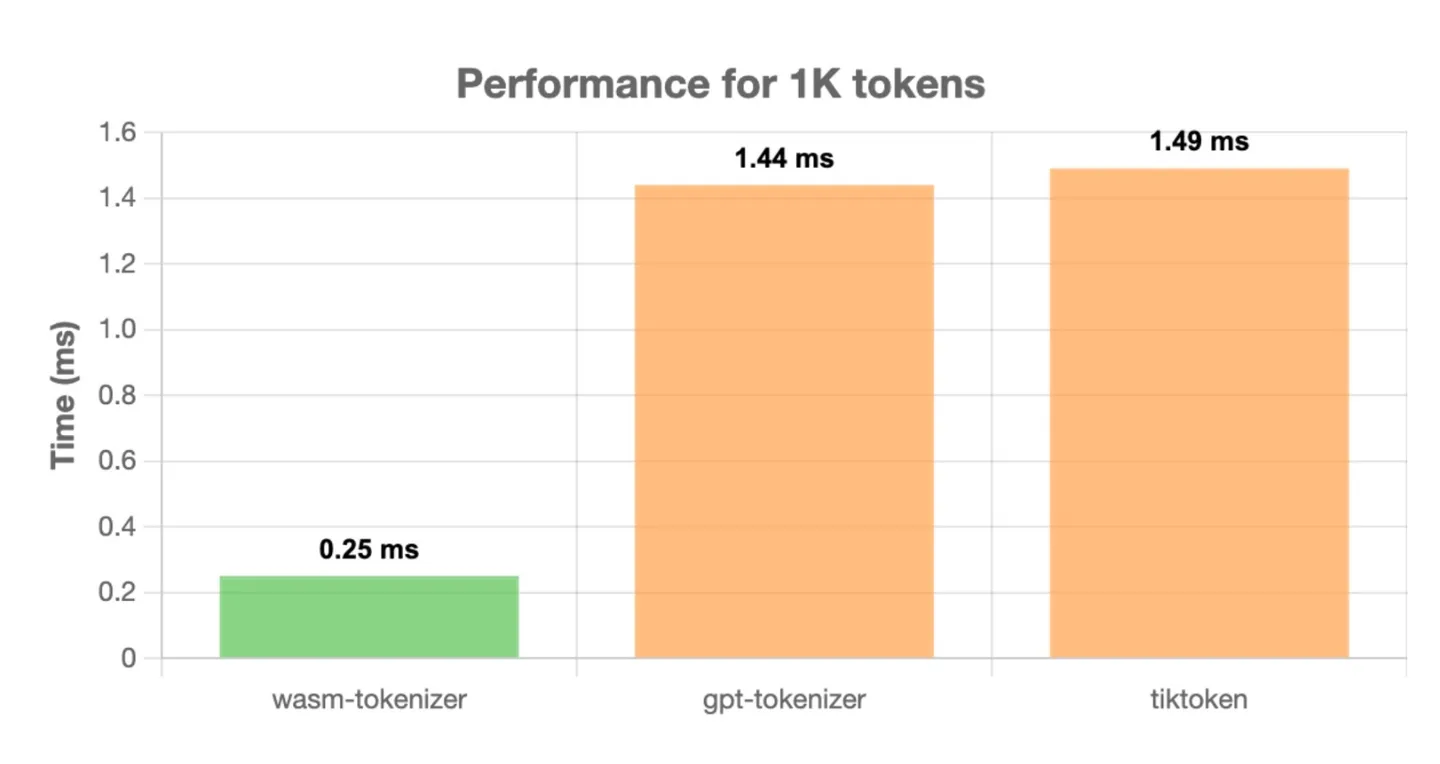
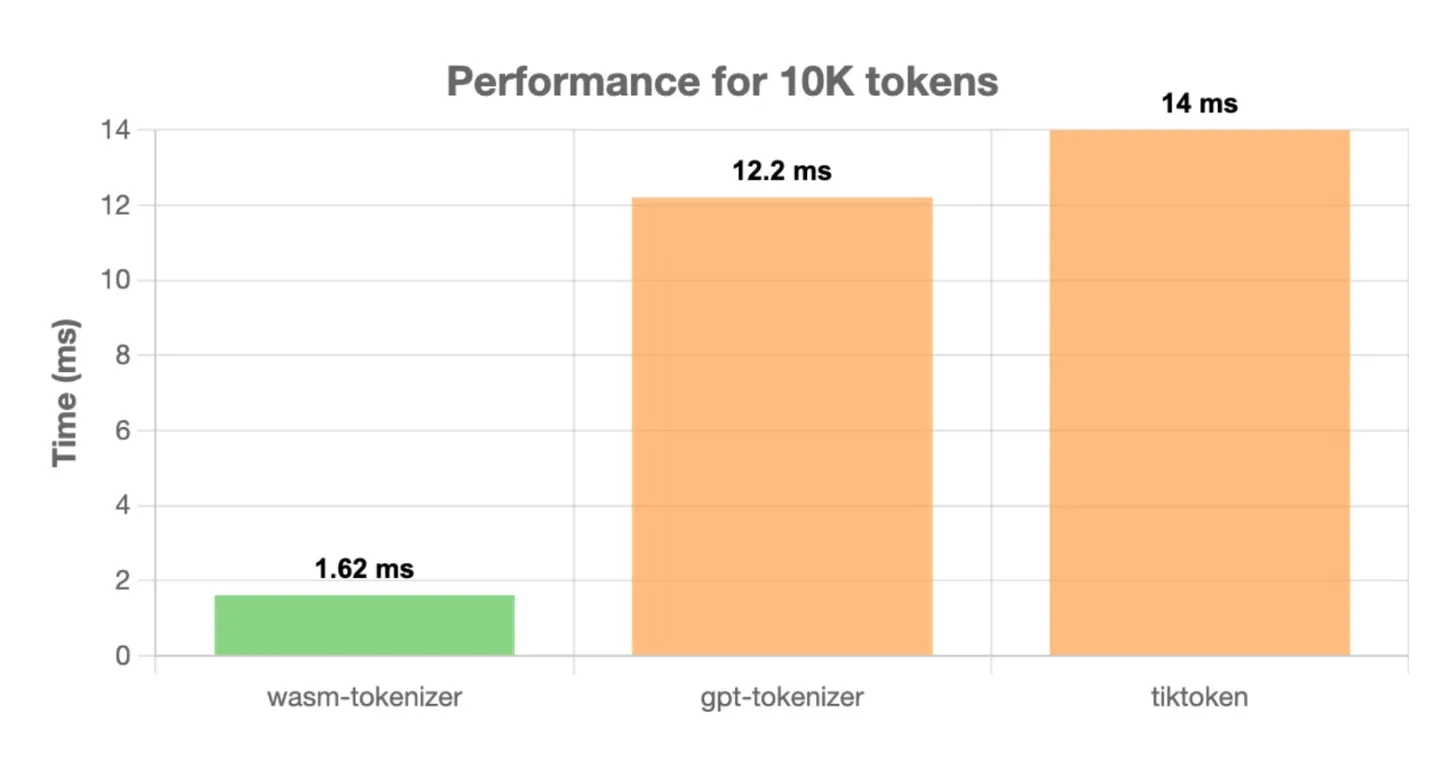
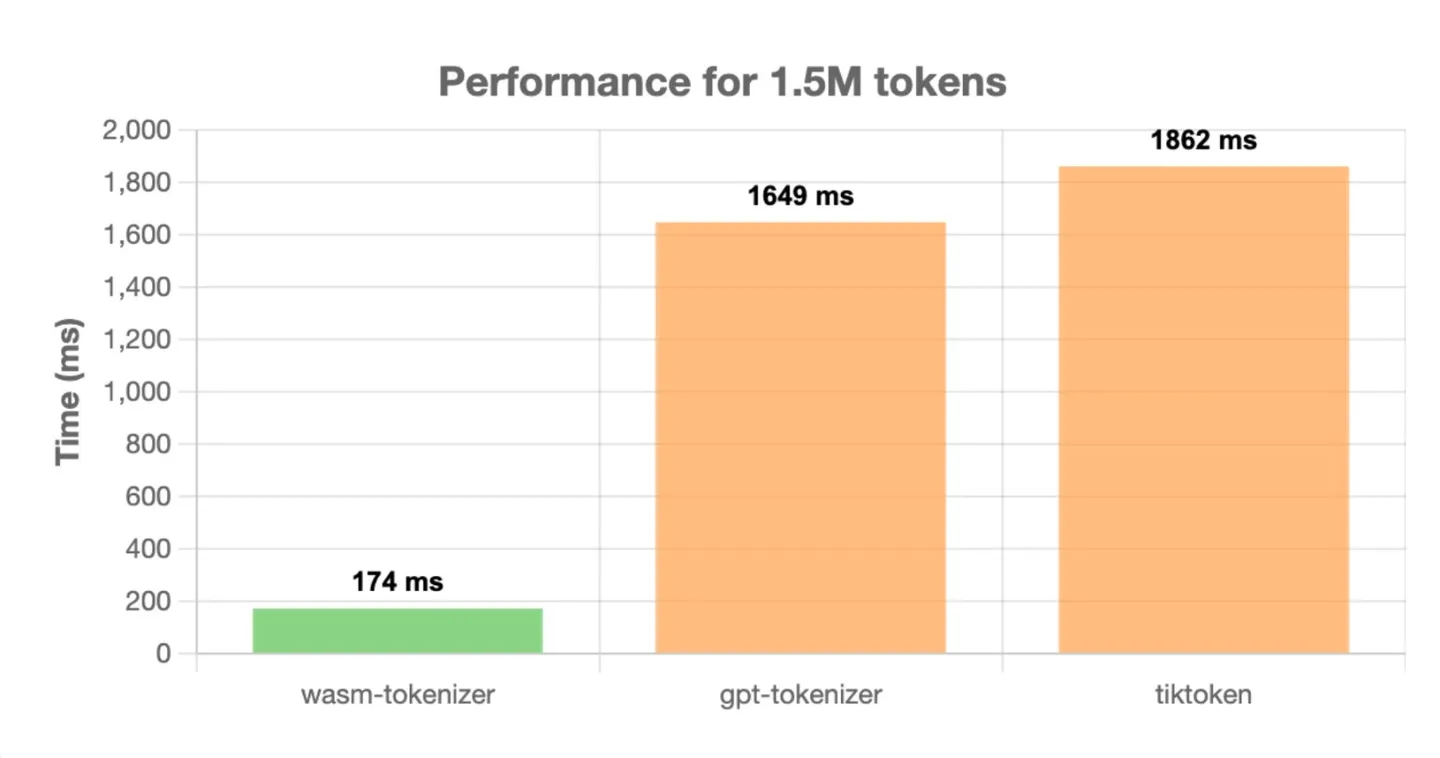
All tests were run on a MacBook M1 Pro using Node.js v21.6.2, with 1000 iterations to calculate average time.
import WASMTokenizer from './WASMTokenizer'

WASMTokenizer().then((tokenizer) => {
  const text = "Hello world";
  const length = tokenizer.count(text);
  const tokens = tokenizer.encode(text);
  const decoded = tokenizer.decode(tokens);

  console.log(decoded, length, 'tokens');
});Using wasm-tokenizer in a web environment requires loading the WebAssembly module and the token database. Here's an example of how to use it:
<head>
  <script src="tokenizer.js"></script>
</head>
<body>
  <script>
    fetch('cl100k_base.bin')
    .then(response => response.arrayBuffer())
    .then(arrayBuffer => {
      const uint8Array = new Uint8Array(arrayBuffer);
      wasmTokenizer().then((TokenizerModule) => {
        // Create a vector from the Uint8Array
        const vector = new TokenizerModule.VectorUint8();
        for (let i = 0; i < uint8Array.length; i++) {
          vector.push_back(uint8Array[i]);
        }

        // Create the tokenizer using the vector
        const tokenizer = new TokenizerModule.Tokenizer(vector);
        // Clean up the vector
        vector.delete();

        const text = "Hello world";
        const length = tokenizer.count(text);
        const tokens = tokenizer.encode(text);
        const decoded = tokenizer.decode(tokens);

        console.log(decoded, length, 'tokens');
      });
    });
  </script>
<body>wasm-tokenizer includes a tool to convert tiktoken file format to binary. This conversion reduces the size of the cl100k token database by 60%, further improving performance and reducing resource usage.
You can see wasm-tokenizer in action on GPTunneL, where it's used to power token calculations for various LLM models. Visit GPTunneL to experience the performance benefits of wasm-tokenizer and explore some of the most powerful language models available.
We welcome contributions to wasm-tokenizer! If you'd like to contribute, please follow these steps:
- Fork the repository
- Create a new branch for your feature or bug fix
- Make your changes and commit them with clear, descriptive messages
- Push your changes to your fork
- Submit a pull request to the main repository
- npm package
- add all databases
- add chat encode support
This project is licensed under the MIT License.
wasm-tokenizer was developed by ScriptHeads for use in the GPTunneL AI Aggregator. We thank the open-source community for their continuous support and contributions.