








Available as both a user and server app.
When installed as a user app, you can right click a message to fix its embed or extract its media.
- Request new fix
- Report a bug
- Request a new feature
- Contribute to translations
- Contact me on Discord (my username is @seria_ati)
As we know, social media embeds on Discord are bad:
- Pixiv embeds don't show the full artwork
- X/Twitter sometimes doesn't embed
- Instagram doesn't show the image/video
- Reddit doesn't show the images
- Tiktok doesn't show the video
- Twitch clip doesn't play the clips
- And so on...
Worry no more, this Discord bot fixes all of those issues.
Fixings are currently available for:
- Twitter/X: FxEmbed/BetterTwitFix/EmbedEZ
- Pixiv: Phixiv
- TikTok: fxTikTok/EmbedEZ/KKTikTok
- Reddit: FixReddit/vxReddit/EmbedEZ
- Instagram: InstaFix/EmbedEZ/KKInstagram
- FurAffinity: xfuraffinity/fxraffinity
- Twitch Clips: fxtwitch
- Iwara: fxiwara
- Bluesky: VixBluesky/FxEmbed
- Kemono: Media extraction only, no embed fixing
- Facebook: EmbedEZ/fxfacebook/facebed
- Bilibili: fxbilibili/EmbedEZ/BiliFix
- Tumblr: fxtumblr
- Threads: FixThreads/vxThreads/EmbedEZ
- PTT: fxptt
- DeviantArt: fxdeviantart
If your message contains link(s) that are of any of the social medias above, it gets deleted and resent using a webhook with your name and avatar containing the fix. There is also a ❌ reaction made to the message, so that the author of the message can click on and delete the message. The emoji used can be changed with the /settings command.

Tip
You can disable embed fixing for a specific link by adding $ at the beginning of the link, or wrapping the link with <>. For example, $https://twitter.com/... and <https://twitter.com/...> will not be fixed.
For Pixiv and Twitter/X links, the bot checks if the artwork/post is marked as NSFW. For kemono links, posts are always assumed to be NSFW. If the channel doesn't have NSFW turned on and the artwork/post is marked as NSFW, the bot will not fix the embed.
Turn on "Show original link button" in /settings when using EmbedEZ fixes if you want to go to the original post without seeing the ads.
EmbedEZ is a service that covers many platforms for embed fixing; however, it is closed-source and has ads. I originally made a proxy to it to bypass the ads, but it stopped working after the site owner changed some stuff.
Use the /ignore-me command.
When you reply to a webhook, it replies to the webhook, not the original author. The bot fixes this by tagging the original author with the same name of the webhook.
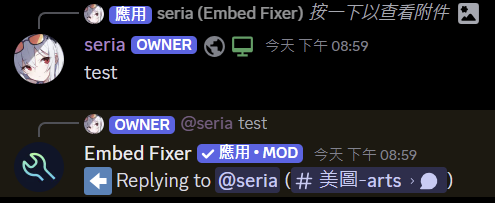
Tip
Add $ at the beginning of your message to disable this feature.
The following platforms are supported:
- Twitter/X
- Pixiv
- Iwara
- Kemono
- Bluesky
When you send a link that is from one of the platforms above in channel(s) with this feature on, the bot resends all of the images/videos in the link in a nice gallery-like layout.

If the link is sent in a NSFW channel, then the extracted media will be spoilered automatically (changeable).
Also, if you wrap the URL with spoiler tags, like ||https://x.com/...||, the extracted image(s) will be spoilered automatically.
All settings are unique to each server, you can use /reset to reset them to default values.
Below are settings you can change with the /settings command:
- Language: Change the language of the bot
- Disable Embed Fixes for Websites: Disable embed fixes for specific websites
- Media Extraction Channels: Images/Videos from Twitter/X/Pixiv links sent in these channels will be extracted
- Embed Fix Channel Blacklist: Channels here will not receive embed fixes, whitelist has priority over blacklist
- Embed Fix Channel Whitelist: Only channels set here will receive embed fixes, whitelist has priority over blacklist
- Toggle Webhook Reply: Toggle the ping to the original author when replying to a webhook
- Disable Automatic Spoilering in NSFW Channels: For the media extraction feature, NSFW channels selected here will not have medias automatically spoilered
- Toggle Delete Message Reaction: Whether to add emoji reactions to webhook messages, so the original author can delete them by reacting
- Show Post Content Channels: If media extraction is enabled, channels selected here will show the content of the post
- Change Delete Message Reaction Emoji: Change the emoji used to delete messages
- Choose embed fix service: Choose the embed fix service to use for different websites
- Bot Visibility: If enabled, Embed Fixer will fix embeds sent by other bots. If disabled, it will only fix embeds sent by users.
- Funnel to Target Channel: If set, all fixed embeds and extract medias will be sent to the target channel instead of the original channel.
- Whitelist Roles: If set, only users that have one of these roles will have their embeds fixed. Leave empty to disable.
- Toggle Original Link Button: Whether to show a button linking to the original post in fixed embed messages
- Toggle Deleting Original Messages in Threads: Because threads can't have webhooks, the original message is kept to know who sent it. Enabling this will delete the original message in threads after sending the fixed embed.

Currently only supports Twitter/X, and only when fix provider is FxEmbed.
Use /translang to set the target language, choose "Disable" to disable.
- Create a Discord application
- On the Bot page, generate a token and save it for later
- Enable Message Content Intent
- Run the application with your bot token as the
DISCORD_TOKENenvironment variable - Invite your bot with the invite link in the logs
- Sync the commands
The command prefix is the bot's mention by default. For example, if your bot's name is Embed Fixer, the prefix would be @Embed Fixer.
Run @Embed Fixer sync to sync the commands, you need to restart your client to see the changes.
Changes to the database schema can be found in /migrations/embed_fixer.
To apply the changes, run aerich upgrade (only supports PostgreSQL; for other databases like SQLite, you need to migrate manually).
With SQLite:
docker run -v /my/mnt/logs:/app/logs -v /my/mnt/data:/data -e DISCORD_TOKEN=YOUR_DISCORD_BOT_TOKEN ghcr.io/seriaati/embed-fixer:latestWith PostgreSQL:
docker run -v /my/mnt/logs:/app/logs -v /my/mnt/data:/data -e DISCORD_TOKEN=YOUR_DISCORD_BOT_TOKEN -e DB_URI=postgres://USERNAME:PASSWORD@DBHOST:PORT/DBNAME ghcr.io/seriaati/embed-fixer:latest-asyncpg/app/logs: the logfiles produced by the program/data: the default location for theembed_fixer.dbSQLite database file
DISCORD_TOKEN: your Discord bot tokenDB_URI: defaults tosqlite:///data/embed_fixer.db, available to customize the database locationENV: defaults toprod, can be set todevfor development modeREDIS_URL: if set, uses Redis for caching instead of SQLite
- Install uv
- Clone the repository
- Create a
.envfile:
DISCORD_TOKEN=YOUR_DISCORD_BOT_TOKEN
ENV=prod
uv run run.py




![@renovate[bot]](https://avatars.githubusercontent.com/in/2740?s=64&v=4)
![@github-actions[bot]](https://avatars.githubusercontent.com/in/15368?s=64&v=4)
![@transifex-integration[bot]](https://avatars.githubusercontent.com/in/18568?s=64&v=4)
![@pre-commit-ci[bot]](https://avatars.githubusercontent.com/in/68672?s=64&v=4)


