

Python tools and migration reference for Conan Exiles mod makers upgrading to UE5.
Run all scripts from the UE5 Devkit Output Log:
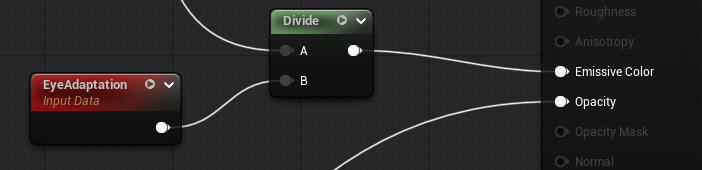
Conan Exiles UE5 uses Eye Adaptation (auto-exposure) which dynamically adjusts scene brightness. Without compensating for it in emissive materials:
- Daytime — emissive glow is barely visible because the scene is bright and eye adaptation dims everything
- Nighttime — emissive is massively blown out and overexposed
The fix is to divide the emissive value by the current Eye Adaptation value, so the emissive output scales correctly with the scene exposure at all times of day.
Scans all Surface materials in your mod folder and reports which ones have Emissive Color connected but are missing the EyeAdaptation node.
Automatically inserts EyeAdaptation → Divide → Emissive Color into every material that needs it.
⚠️ Backup your mod folder before running this script. It modifies and saves materials automatically with no undo. Make a copy of your Content/Mods folder first.
- Set
MOD_PATHto your mod folder - Run with
DRY_RUN = Truefirst to preview changes - Set
DRY_RUN = Falseto apply
Scans all assets in your mod folder (Blueprints, particle systems, meshes, materials, etc.) and reports any references that point to packages that no longer exist.
Useful for finding assets that lost their references during the UE4 → UE5 migration (show as None in the editor).
Outputs the old path the reference used to point to, so you can track down or replace the missing asset.
| UE4 | UE5 | Notes |
|---|---|---|
Event StartBuff |
Event OnStartBuff |
Same pins |
Clear Buff |
Remove Buff Call (Buff System Interface) |
Target = OwningCharacter, pass Get Class(self) |
Client Clear Buff |
Remove Buff Call (Buff System Interface) |
Same as above |
Remove Buff Widget |
Removed | Widget lifecycle is automatic. Use OnClearBuff for cleanup |
Add Buff Widget |
Call Signal Buff Added on Owning Client |
Also needs Initialize Buff System first |
Get Buff Duration |
Get Remaining Buff Duration |
Returns remaining seconds (float) |
Stop Buff Sound |
StopBuffSound |
Same node, space removed from name |
Get Skeletal Mesh |
Get Skeletal Mesh Asset |
On SkeletalMeshComponent |
CreateInputBox |
BP_EE_InputBox subclass pattern |
See blueprints/ |
ShowInputBox |
Open(0) on widget instance |
|
SignalInputUserActionPerformed |
OnConfirmed / OnCancelled dispatchers |
UE4 binary asset copied directly into UE5 project. Fix: export as CSV from UE4 devkit, reimport in UE5.
Struct property GUIDs changed between UE4 and UE5. Fix: open the Blueprint, find the Make/Break struct node, right-click Refresh Node.
Animation sequence has corrupt frame rate from UE4 to UE5 migration. Fix: enable Use Default Sample Rate in Asset Details, or reimport from source FBX.