Welcome to Tiny Legends! An innovative AI-powered platform that transforms comic books into interactive children's stories through intelligent character extraction, story generation, and visual storytelling. Built with LlamaIndex, CopilotKit, and OpenAI.
Tiny Legends is a complete AI-powered platform that creates engaging, age-appropriate content for children aged 5-10. It combines comic book analysis, AI character extraction, story generation, and visual storytelling to create interactive educational experiences. The platform uses advanced AI models to automatically extract characters from comics, generate age-appropriate stories, and create illustrated story slides with narration.
⚠️ Hackathon Project Disclaimer: This is a hackathon project created for demonstration purposes and is not production-ready. It may contain bugs, security vulnerabilities, and lacks enterprise-grade features. Use at your own risk and do not deploy to production environments.
Watch Tiny Legends in action:
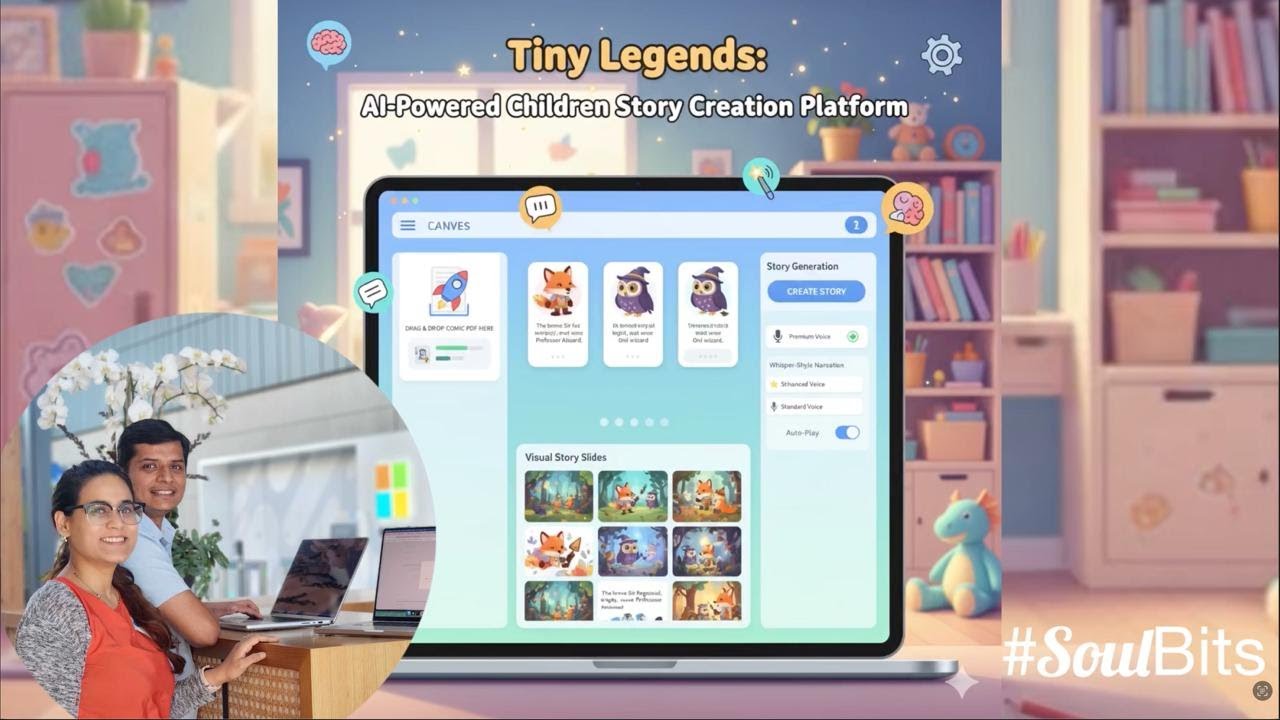

- PDF Comic Analysis: Upload comic PDFs and automatically extract character names, descriptions, and traits
- Smart Character Cards: AI-generated character profiles with detailed descriptions and visual traits
- DALL-E 3 Illustrations: Automatic character illustration generation using OpenAI's DALL-E 3
- Age-Optimized Content: Creates 7-line stories specifically tailored for 7-year-olds
- Character Integration: Stories feature extracted characters in engaging narratives
- Educational Focus: Promotes literacy, creativity, and storytelling skills
- Story Slides: Converts text stories into 9 illustrated story cards
- Interactive Canvas: Drag-and-drop interface for easy content management
- Real-time Editing: Live updates and state synchronization
- Whisper-Style TTS: High-quality text-to-speech with natural voice synthesis
- Auto-Play Functionality: Automatic slide advancement with narration
- Voice Customization: Multiple voice options with quality indicators
- Upload Comic: Drag and drop a PDF comic file to the canvas
- Character Extraction: AI analyzes the comic and extracts character information
- Auto-Population: Character cards are automatically created with descriptions and illustrations
- Story Generation: Ask the AI to create a story using the extracted characters
- Visual Story Slides: Convert the story into illustrated slides with narration
- Interactive Experience: Edit, rearrange, and customize all content through the visual interface
Before running Tiny Legends, ensure you have the following installed:
- Node.js 20+ - For the frontend application
- Python 3.10+ - For the AI agent backend
- OpenAI API Key - Required for AI character extraction and story generation
- uv - Python package manager (installation guide)
- Package Manager - Choose one:
- LlamaIndex Documentation - AI agent framework
- CopilotKit Documentation - Frontend-backend integration
- OpenAI API Documentation - AI model integration
- Next.js Documentation - Frontend framework
-
Clone and Install Dependencies
git clone <repository-url>
cd tiny_legends

# Install dependencies (both Node.js and Python)
pnpm install
-
Set up Environment Variables
Create
agent/.envfile:# Required: OpenAI API key for AI features OPENAI_API_KEY="your-openai-api-key-here"
Get your OpenAI API key from platform.openai.com/api-keys
-
Start the Development Servers
# Start both frontend and backend
pnpm dev
This will start:
- Frontend: http://localhost:3000
- Backend Agent: http://localhost:9000
-
Start Creating Stories!
Open http://localhost:3000 and:
- Upload a comic PDF file by dragging it to the canvas
- Watch as AI extracts characters and creates character cards
- Ask the AI to generate a story: "Create a story using the characters on the canvas"
- Convert the story to slides: "Create story slides from the generated story"
- Use the TTS feature to hear narration
- Upload Comic: Drag and drop a PDF comic file to the canvas
- AI Analysis: The system automatically extracts character information
- Character Cards: View auto-generated character cards with descriptions
- Generate Images: Click "Generate Image" on character cards to create DALL-E 3 illustrations
- Generate Story: Ask the AI: "Create a story using the characters on the canvas"
- Story Card: A story card will appear with the generated narrative
- Edit Story: Click on the story text to edit directly
- Create Slides: Ask the AI: "Create story slides from the generated story"
- Visual Story: 9 illustrated story cards will be created
- Edit Slides: Click on any slide to edit the caption or illustration prompt
- Rearrange: Drag and drop slides to reorder the story
- TTS Button: Click the microphone button (🎤) on any story slide
- Voice Selection: Choose from available voices using the dropdown
- Auto-Play: Enable auto-play to automatically advance through slides
- Keyboard Shortcut: Press 'T' key in StoryView mode to toggle narration
Try these natural language commands:
- "Extract characters from this comic"
- "Create a story about friendship"
- "Make the story more exciting"
- "Add more details to the character descriptions"
- "Create story slides with illustrations"
Run these commands using your preferred package manager (pnpm, npm, yarn, or bun):
dev- Starts both frontend and AI agent servers concurrentlydev:debug- Starts development servers with debug logging enableddev:ui- Starts only the Next.js frontend server (port 3000)dev:agent- Starts only the Python AI agent server (port 9000)install:agent- Installs Python dependencies for the AI agentbuild- Builds the Next.js application for productionstart- Starts the production serverlint- Runs ESLint for code linting
graph TB
    subgraph "Frontend (Next.js)"
        UI[Canvas UI<br/>page.tsx]
        Actions[Frontend Actions<br/>useCopilotAction]
        State[State Management<br/>useCoAgent]
        Chat[CopilotChat]
        ImageAPI[Image Generation<br/>API Route]
        TTS[TTS System<br/>StorySlide & StoryView]
    end

    subgraph "Backend (Python)"
        Agent[LlamaIndex Agent<br/>agent.py]
        Tools[Backend Tools<br/>- extract_characters_from_comic<br/>- generate_character_story<br/>- convert_story_to_slides]
        AgentState[Workflow Context<br/>State Management]
        Model[LLM<br/>GPT-4o-mini]
    end

    subgraph "External Services"
        OpenAI[OpenAI API<br/>DALL-E 3]
        PDF[PDF Processing<br/>LlamaIndex]
        SpeechAPI[Web Speech API<br/>TTS Voices]
    end

    subgraph "Communication"
        Runtime[CopilotKit Runtime<br/>:9000]
    end

    UI <--> State
    State <--> Runtime
    Chat <--> Runtime
    Actions --> Runtime
    Runtime <--> Agent
    Agent --> Tools
    Tools --> OpenAI
    Tools --> PDF
    Agent --> AgentState
    Agent --> Model
    ImageAPI --> OpenAI
    TTS --> SpeechAPI

    style UI text-decoration:none,fill:#e1f5fe
    style Agent text-decoration:none,fill:#fff3e0
    style Runtime text-decoration:none,fill:#f3e5f5,color:#111111
    style OpenAI text-decoration:none,fill:#e8f5e9,color:#111111
    style TTS text-decoration:none,fill:#fff8e1,color:#111111
    style SpeechAPI text-decoration:none,fill:#e3f2fd,color:#111111
sequenceDiagram
    participant User
    participant UI as Canvas UI
    participant CK as CopilotKit
    participant Agent as LlamaIndex Agent
    participant Tools
    participant OpenAI
    participant DALL-E

    User->>UI: Upload comic PDF
    UI->>CK: Update state via useCoAgent
    CK->>Agent: Send state + message
    Agent->>Tools: Execute extract_characters_from_comic
    Tools->>OpenAI: Analyze PDF content
    OpenAI-->>Tools: Return character data
    Tools-->>Agent: Return characters
    Agent->>Tools: Execute createItem for each character
    Agent->>Tools: Execute setCharacterName, setCharacterDescription, etc.
    Tools-->>Agent: Return confirmation
    Agent->>CK: Return updated state
    CK->>UI: Sync state changes
    UI->>User: Display character cards

    User->>UI: Click "Generate Image"
    UI->>DALL-E: Generate character illustration
    DALL-E-->>UI: Return image URL
    UI->>User: Display character image

    User->>UI: Ask for story creation
    UI->>CK: Send story request
    CK->>Agent: Process story request
    Agent->>Tools: Execute generate_character_story
    Tools->>OpenAI: Generate 7-line story
    OpenAI-->>Tools: Return story content
    Tools-->>Agent: Return story
    Agent->>Tools: Execute createItem for story-text
    Agent->>CK: Return updated state
    CK->>UI: Sync story card
    UI->>User: Display story card

    User->>UI: Click TTS button on story slide
    UI->>SpeechAPI: Initialize speech synthesis
    SpeechAPI-->>UI: Return available voices
    UI->>SpeechAPI: Speak slide caption with Whisper-style voice
    SpeechAPI-->>UI: Audio narration playing
    UI->>User: Visual feedback (mic icon, quality indicator)
The main UI component is in src/app/page.tsx. It includes:
- Canvas Management: Visual grid of character cards, story cards, and story slides
- State Synchronization: Uses
useCoAgenthook for real-time state sync with the AI agent - Frontend Actions: Exposed as tools to the AI agent via
useCopilotAction - Character Management: Drag-and-drop interface for character cards with image generation
- Story Creation: Interactive story generation and editing capabilities
- TTS Integration: Audio narration system with voice selection and auto-play
- File Upload: PDF comic upload with drag-and-drop functionality
The agent logic is in agent/agent/agent.py. It features:
- Character Extraction: Analyzes PDF comics to extract character information
- Story Generation: Creates age-appropriate stories using extracted characters
- Slide Conversion: Converts text stories into illustrated story slides
- Tool Integration: Backend tools for comic processing and story creation
- State Management: Uses LlamaIndex's Context for workflow state management
- AI Integration: GPT-4o-mini for text processing and DALL-E 3 for image generation
- FastAPI Router: Uses
get_ag_ui_workflow_routerfor seamless frontend integration
Each card type has specific fields defined in the system:
- Character: name (text), description (textarea), traits (tags), image (URL)
- Story: content (textarea), title (text), characters (array of character IDs)
- Story Slide: caption (text), illustration_prompt (text), slide_number (number)
- Name: Character's name (required)
- Description: Detailed character description and background
- Traits: Array of character traits and characteristics
- Image: Generated DALL-E 3 illustration URL
- Title: Story title (auto-generated or user-editable)
- Content: 7-line story content optimized for 7-year-olds
- Characters: References to character cards used in the story
- Caption: Text content for the slide
- Illustration Prompt: Detailed prompt for DALL-E 3 image generation
- Slide Number: Position in the story sequence (1-9)
- Define the data schema in
src/lib/canvas/types.ts - Add the card type to the
CardTypeunion - Create rendering logic in
src/components/canvas/CardRenderer.tsx - Update the agent's field schema in
agent/agent/agent.py - Add corresponding frontend actions in
src/app/page.tsx
- Field definitions are in the agent's FIELD_SCHEMA constant
- UI components are in
CardRenderer.tsx - Frontend actions follow the pattern:
set[Type]Field[Number]
- Global styles:
src/app/globals.css - Component styles use Tailwind CSS with shadcn/ui components
- Theme colors can be modified via CSS custom properties
- See CopilotKit's customization docs for the chat window
- Backend tools are defined in
agent/agent/agent.py - Frontend actions are in
src/app/page.tsx - API routes are in
src/app/api/
If you see "I'm having trouble connecting to my tools":
- The LlamaIndex agent is running on port 9000 (check terminal output)
- Your OpenAI API key is set correctly in
agent/.env - Both servers started successfully (UI and agent)
If you see "[Errno 48] Address already in use":
- The agent might still be running from a previous session
- Kill the process using the port:
lsof -ti:9000 | xargs kill -9 - For the UI port:
lsof -ti:3000 | xargs kill -9
If the canvas and AI seem out of sync:
- Check the browser console for errors
- Ensure all frontend actions are properly registered
- Verify the agent is using the latest shared state (not cached values)
If character extraction is not working:
- Ensure the PDF file is text-based (not image-only)
- Check that the OpenAI API key has sufficient credits
- Verify the PDF file is not corrupted or password-protected
If character images are not generating:
- Verify your OpenAI API key has DALL-E 3 access
- Check that you have sufficient API credits
- Ensure the character description is not empty
If text-to-speech is not working:
- Check that your browser supports the Web Speech API
- Ensure you have available voices on your system
- Try refreshing the page to reload voice options
If you encounter Python import errors:
cd agent
uv syncIf issues persist, recreate the virtual environment:
cd agent
rm -rf .venv
uv venv
uv syncFeel free to submit issues and enhancement requests! This starter is designed to be easily extensible.
This project is licensed under the MIT License - see the LICENSE file for details.
Important
Some features are still under active development and may not yet work as expected. If you encounter a problem using this template, please report an issue to this repository.