
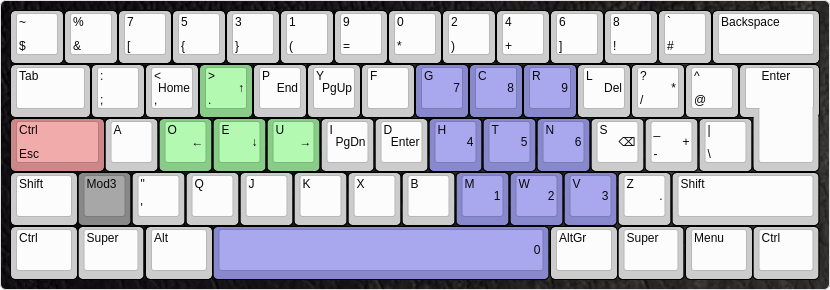
 Preview of the mwb-layout (programmer dvorak variant). It was designed to be used on ISO keyboards (Mod3-key).
- Arrow keys on the left side of the home row
- Numpad on the right side
- Navigation keys like Home, End, PgUp and PgDn are easy to acces
mkdir -p ~/.xkb/symbols/
cp mwb ~/.xkb/symbols/
To enable it:
setxkbmap -I ~/.xkb mwb -print | xkbcomp -I$HOME/.xkb - $DISPLAY
cp mwb /usr/share/X11/xkb/symbols/
To enable it:
setxkbmap mwb
Note, that the location of the console keymaps differs between distributions.
- On Gentoo:
cp mwb.map /usr/share/keymaps/i386/dvorak/
- On Arch/Parabola:
cp mwb.map /usr/share/kbd/keymaps/i386/dvorak/
loadkeys mwb
localectl set-keymap mwb
On other init systems it differs aswell.
On OpenRC you can edit the file /etc/conf.d/keymaps and set
keymap="mwb"
The layout does not change the behaviour of the Capslock key. However, it is advised that the user does that, since this key is, compared to Esc and Ctrl, easy to access but usually not used as often.
One recommendation is to use xcape so CapsLock can be used as Esc and Ctrl simultaneously:
setxkbmap -option 'caps:ctrl_modifier'
xcape -e '#66=Escape'
xcape can be found in many distributions repositories, or on github: https://github.com/alols/xcape