Add children variant
#6086
Add children variant
#6086
Conversation


|
Is there any news about this pull request? |

|
Hey @aggreggator! So we really love this feature idea, and we'd really love to see this as part of Tailwind CSS some day, but there are some issues with this PR that are preventing us from merging it in. Consider this example: <ul class="children:text-blue-500">
<li>React</li>
<li>Vue</li>
<li class="text-red-500">Angular</li>
<li>Svelte</li>
</ul>In this example, I think the expected behavior would be that the text for each item would be
That's because the .text-red-500 {
color: rgb(239 68 68);
}
.children\:text-blue-500 > * {
color: rgb(59 130 246);
}However, to make this work you'd need the children modifiers to come before the utilities: .children\:text-blue-500 > * {
color: rgb(59 130 246);
}
.text-red-500 {
color: rgb(239 68 68);
}Then you'd get this result:
Now generally you actually do want modifiers ordered after the base utilities, since you use them to override the default styles. For example, if <div class="text-blue-500 sm:text-red-500">
<!-- should be red -->
</div>So, to properly support this in Tailwind we'd have to figure out a way to conditionally order certain modifiers before the utilities — which is a much more complicated problem to solve. Again, this is something we'd love to solve some day in Tailwind, and we've already been having discussions about this as a team. However, given this ordering issue, we just don't feel comfortable merging this particular PR in, as much as we love the concept in general. Some good news — if this is a feature you'd really like to have in your Tailwind project, and you're okay with the above mentioned limitations, you can easily add this behavior to your project via a plugin. Here's how: module.exports = {
content: [
// ...
],
theme: {
extend: {
// ...
},
},
plugins: [
function ({ addVariant }) {
addVariant('children', '& > *')
}
],
}And, if you do run into the ordering issue, you can always cheat by using the important modifier 😅 <ul class="children:text-blue-500">
<li>React</li>
<li>Vue</li>
<li class="!text-red-500">Angular</li>
<li>Svelte</li>
</ul>Even though it doesn't make sense to add this feature to Tailwind right now, I suspect this is something we're going to revisit in the future. Thanks either way for this contribution 🙏 |
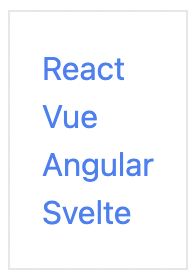
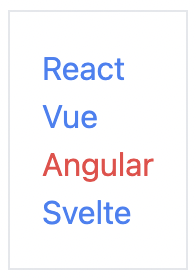


|
Hey @reinink ! i didn't expect to get such a detailed feedback and i agree with all of your objections to not merge it to tailwindcss.
I've rechecked this once again and my previous statement is just wrong. It was clear to me, that you can only escape from this in using the important modifier on the individual child element.
That's not trivial at all! Thank you all for the hard work! :-) |
|
I've just came up with an idea using the I've prepared a codepen with your example, because tailwindcss (and https://play.tailwindcss.com/) already uses |

|
What if the Example with the CSS appended: https://play.tailwindcss.com/FlvyafjuIc .text-red-500 {
color: rgb(239 68 68);
}
:where(.children\:text-blue-500 > *) {
color: rgb(59 130 246);
} |
|
@innocenzi yup that's a great idea too — the only issue is that the reset styles will then win out, as they will have higher specificity than the https://play.tailwindcss.com/QavZjsMiD4 One way to potentially solve that is to wrap all the styles in Preflight in |
|
Ah, that's a good point! Thanks for the clarification. |
4 participants


Add variant for
children.Examples:
children:bg-red-100hover:children:bg-red-500