
A standalone slide bar that your visitors unlock using drag and drop to prevent spambots for harvesting sensitive, private information stored in your web pages such as email address and phone number.
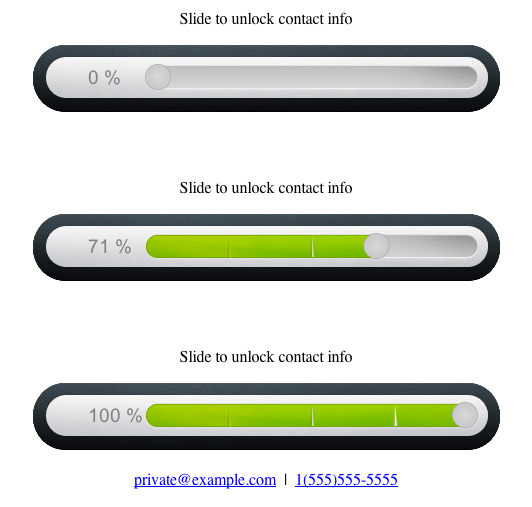

-
Add an anchor for the StandaLock in your HTML:
<div id="mystandalock"></div>
You may also add another empty div that will contain your personal information when shown (optional):
<div id="contact"></div>
-
Encrypt your personal information and prepare to provide a decrypt function. Remember that we are not fighting against humans but spambots, which search for particular patterns in clear text in a reasonable time. Make sure your information never appears in clear text. For an even better efficiency, try not to associate encrypted private information obvious variable names like "email" or "address" (tips provided in the next step). The following is given as an example of a Base64 encoding and can be obtained at this site:
```
email address encoded in Base64: cHJpdmF0ZUBleGFtcGxlLmNvbQ==
phone number encoded in Base64: MSg1NTUpNTU1LTU1NTU=
```

and prepare to provide the matching decrypt function:

```javascript
function(value) {
  return window.atob(value);
}
```
-
Set it up in your HTML:
<script src="/path/to/standalock.js"></script>
<script type="text/javascript" charset="utf-8">
 function load(){
   var config1 = {
     message: 'Slide to unlock contact info',
     anchor: '#mystandalock',
     data: {
       m-a-i-l: 'cHJpdmF0ZUBleGFtcGxlLmNvbQ==',
       t-e-l: 'MSg1NTUpNTU1LTU1NTU='
     },
     decrypt: function(value) {
       // my own decrypt function:
       return window.atob(value);
     },
     template: '<p>mail:{{m-a-i-l}} tel:{{t-e-l}}</p>'
   };
   StandaLock
     .add(config1)
     .render();
 }
 window.addEventListener('load', load, false);
 </script>
You can place this in the header of your page (or footer, both ways work) if you use anchors. Please have a look on the documentation for further details.
- Keeps your personal information safe from spambots and other malicious harvesting techniques;
- Tells you if visitor is Human;
- Supports for custom designs, both image- or HTML-based, for better integration in your exixting pages.
- Handles everything that can be represented as plain text: email, address, images...
Wondering about privacy and spambot harvesting? Many articles on the web are discussing about the best ways to protect personal information (PI) and prevent bots from using them for spam. A short resume of the state of the art could be:
- Spambots read HTML, so do not write PI in your web pages.
- The only way to know if the visitor is not a bot is making him proving is human.
- GUI-based actions (like reading a Captcha, listing to audio, picking an object of a certain kind or drawing a sheep) have the best results since no spambot can afford the computing power needed to process such inputs in a reasonnable time for brute force attacks.
- Slidelocks are a simple, user-friendly, device-agnostic way to do it compared to Captchas which require text input, focus, and multiple retries to get it unlocked.
In addition, these countermeasures support clickable email links (which cannot be done with HTML offuscation, for example).
-
It turns out that every slidelock found on the web is based on a client-server model implying various handshakes that end with the retrieval of PI from the server. But what if you cannot ask the server? What if the server cannot run PHP or Python? Today many websites are static-pages servers (Harp, Jekyll, etc.) as for GitHub.io. In these cases such slidelocks won't work.
-
Spambots can read JavaScript. So writing
my_email = "personal@example.com";
document.getElementById('my_contact_div').innerHTML = '<p>' + my_email + '</p>';
will not work either since the spambot can clearly read the line
my_email = "personal@example.com";. -
Embedding encrypted PI and decrypting it with JavaScript at render time is useless since the rendered web page read by spambots will contain clear PI.
-
So solution is to decrypt and render PI only if visitor is human, that is, if he manually unlocked the slide lock via GUI.
This solution is in pure client-side JavaScript, so no server implementation or communication is required:
- runs on static websites such as Jekyll servers,
- still runs if you loose network connection on your mobile,
- don't wait for the server to respond, get unlocked information instantly!
Of course, if you don't want to provide your decrypt function either, you can host it on your own server and give a decryptUrl instead. Awesome? Yes.
See wiki pages for complete documentation, tutorial and examples.
At this time it is not possible to bind several output anchors to the same StandaLock. It will be solved in further releases.
This software (graphics artwork included) is provided under the MIT license. Please read LICENSE file for further information. The canvas implementation is based on Red Hammond HTML5 canvas works you can find on his GitHub page. A detailed explanation of the HTML5 canvas construction of his original slidebar can be found here. Full credit for the original digital image goes here (this version was a bit modified).