Real-time AI scene description for live video streams. Frames are sent to a local Ollama instance running the Moondream vision model, and the resulting description is overlaid on a browser-accessible video dashboard with optional text-to-speech.
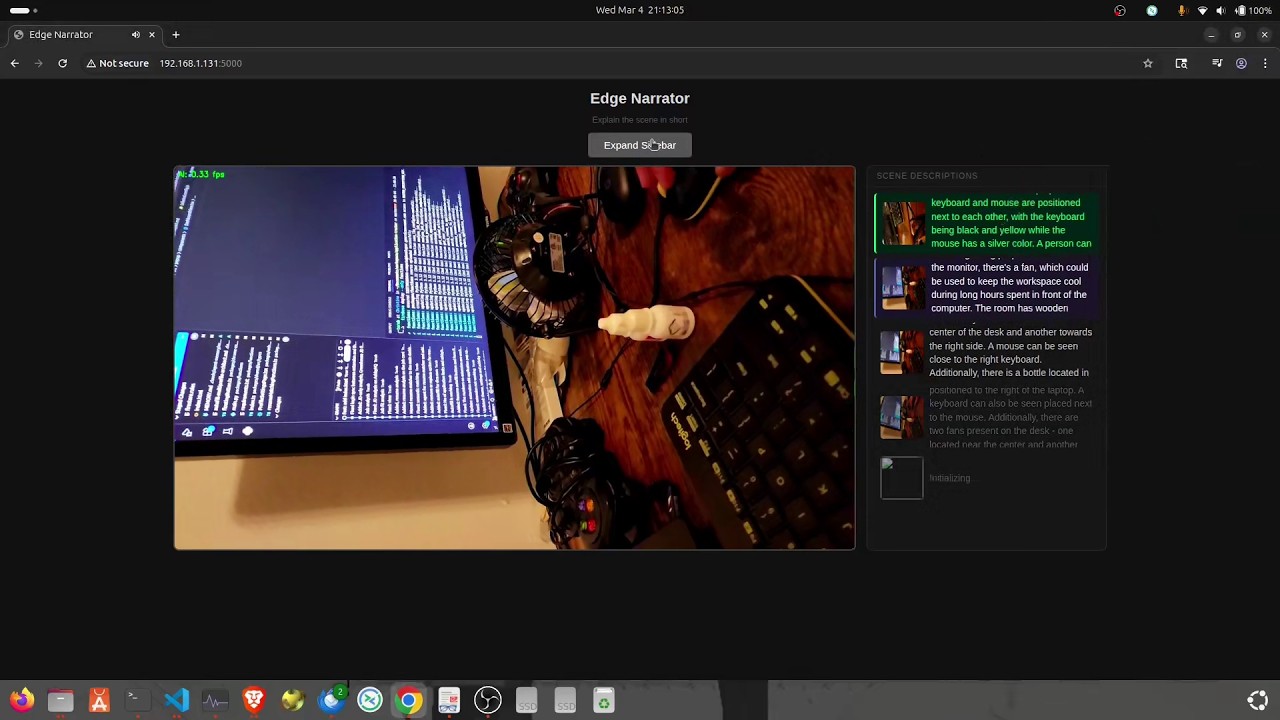
- Works with local webcams and RTSP streams
- Runs inference locally via Ollama — no cloud dependency
- Live web dashboard: video feed with inference FPS overlay
- Scrolling sidebar showing each result alongside a thumbnail of the analyzed frame
- Browser text-to-speech — speaks the latest result, never interrupts mid-sentence
- Python 3.13+
- Ollama running locally (
ollama serve) - Moondream model pulled:
ollama pull moondream - OpenCV-compatible camera or RTSP stream
git clone https://github.com/torabshaikh/EdgeNarrator.git
cd EdgeNarrator
python -m venv .venv
source .venv/bin/activate
pip install opencv-python ollama flaskpython main.py <source> [--prompt "..."]| Source | Example |
|---|---|
| Local webcam | python main.py 0 |
| RTSP stream | python main.py rtsp://192.168.1.10:554/stream |
| Custom prompt | python main.py 0 --prompt "Is there any person in the scene?" |
Then open http://localhost:5000 in a browser.
EdgeNarrator/
├── main.py           # Entry point: arg parsing, wires modules together
├── state.py          # Shared state: description, analyzed frame, inference FPS
├── video_stream.py   # Threaded VideoStream class (RTSP + webcam)
├── analyzer.py       # Ollama inference loop
└── server.py         # Flask web dashboard (MJPEG feed, sidebar, TTS)
The prompt can be changed at runtime via the CLI (see Usage above).
To change the model or frame size, edit the constants at the top of analyzer.py:
| Constant | Default | Description |
|---|---|---|
MODEL |
"moondream" |
Ollama model name |
FRAME_SIZE |
(336, 336) |
Resolution sent to the model |
PROMPT |
"Please describe the scene within 20 words" |
Default prompt (overridden by --prompt) |