Zero-click presenter with texture selection dropdown#22
Conversation


|
Supporting changes:
|
…Unity into mark/present-to-screen-v3

# Conflicts:
#	DisguiseUnityRenderStream/Editor/DisguiseRenderStreamBuild.cs
…for "resizeStrategy" instead)

| // overshadows a parent member (ex TextMeshPro.renderer). Since we traverse the hierarchy top to bottom, | ||
| // the top-level member will be resolved. | ||
|
|
||
| // * BindingFlags.IgnoreCase: For secondary lookup (ex "Position" after "m_Position" failed we want to match both "Position" and "position"). |
There was a problem hiding this comment.
The root of these edge cases is that we're trying to match UnityEditor.SerializedProperty.propertyPath to a System.Reflection.MemberInfo.
This could be fixed in another PR where we wouldn't use SerializedProperty anymore, by enumerating fields/properties using System.Serialization directly.

There was a problem hiding this comment.
Is it possible you are missing the .meta for that prefab and DisguisePresenter.cs? I have a null reference exception while building and I think this is the cause.
There was a problem hiding this comment.
I think this would be because the .gitignore has *.meta, do we want to keep that?
There was a problem hiding this comment.
Added the .meta files. They're all "default" meta files, except for NativeRenderingPlugin.dll.meta which is configured for Windows x64. Which makes me think maybe the bug could be unrelated to meta files because your default meta files should work like mine.
There was a problem hiding this comment.
Build exception is fixed. Probably the prefab uses some uuid from the .meta. So although it is the default one, my computer did not generate the same uuid than yours.
|
|
||
| namespace Disguise.RenderStream | ||
| { | ||
| /// <summary> |
There was a problem hiding this comment.
Brainstorm: This is brilliant to understand when we have a problem I tried and love it! However does that have any other usage than debug? Will it be used in production? If no then:
- Should we give a name making it more obvious that this is for debugging? UnityDebugPresenter? (Unity vs Disguise because the debug is displayed in the unity window on the rendering computer)
- Do we want this debug to be present by default (should probably ask Kylo?)? I'm asking because generally debugging in software are off by default.
There was a problem hiding this comment.
- Good point. Any preference between
UnityDebugPresenterandUnityWindowPresenter? I like "window" because it removes ambiguity around "local display" or "local screen". - The default texture selection is "None" so it's opt-in even when it's included in the schema. So the user wouldn't have to make a new build when they want to enable it.
There was a problem hiding this comment.
- Personally I like to have Debug in there so it is obvious that it is for debugging. What about
UnityDebugWindowPresenter? The best of both world? - Is there potential draw back of selecting something? I think it has a small performance impact? What about user activate it, forget about it and then has worst performance than before and can't find why?
| } | ||
|
|
||
| private const string k_PrefabPath = "DisguisePresenter"; | ||
| private const string k_NoneTextureLabel = "None"; |
There was a problem hiding this comment.
Minor from Rider: Inconsistent modifiers style: redundant 'private' modifier
| /// The choices for the texture selection dropdown are scene-specific and correspond to a concatenated list of: | ||
| /// None + Channels (output) + Live textures (input). | ||
| /// </remarks> | ||
| public static List<ManagedRemoteParameter> GetManagedRemoteParameters(ManagedSchema schema, ManagedRemoteParameters sceneSchema) |
There was a problem hiding this comment.
Curiosity: Why do we have this special mechanism for those remote parameters? Can't they be simply picked-up as normal remote parameters?
There was a problem hiding this comment.
I wanted to add the presenter to all scenes automatically. One method would be to add it to each scene in a build postprocessor but I'm not a fan of modifying scene files under the hood.
This other method is to add it to each scene at runtime after it's loaded. We only need to make sure it's in the schema by retrieving the presenter parameters from GetManagedRemoteParameters.
It also does some processing on the parameters, most importantly we need to collect the texture names for the dropdown (channels are global, but live textures are per-scene). So GetManagedRemoteParameters needs to be called after a first version of the schema has been generated.
There was a problem hiding this comment.
Improvement idea: Instead of keeping those settings in some ScriptableObject hidden somewhere in the assets, should we add it to the project settings? Using [SettingsProvider] like Wen did in ClusterDisplay?
There was a problem hiding this comment.
Agreed, I would expect to see them in Project Settings. I found the files you mentioned, I can do it in a follow-up PR.
| /// The generated schema will include remote parameters to select the texture to display and how to resize it to fit the screen. | ||
| /// </summary> | ||
| [SerializeField] | ||
| public bool exposePresenter = true; |
There was a problem hiding this comment.
Minor: If we keep the default UI for those those two fields (which on first sight are sufficient), maybe we should add tooltips with parts of the summary for those two parameters?

 wenzhang-unity
left a comment
wenzhang-unity
left a comment
wenzhang-unity
left a comment
There was a problem hiding this comment.
Awesome. I left some comments for you to consider.
| /// <para> | ||
| /// 2. Presenting a texture to the screen according to <see cref="Selected"/> and <see cref="ResizeStrategy"/>. | ||
| /// </para> | ||
| /// </summary> |
There was a problem hiding this comment.
Minor (style): The longer detailed description can go into <remarks>
| /// <remarks> | ||
| /// <paramref name="outputIdx"/> and <paramref name="inputIdx"/> are -1 when invalid. | ||
| /// </remarks> | ||
| void VirtualIndexToRealIndex(int virtualIdx, out int outputIdx, out int inputIdx) |
There was a problem hiding this comment.
A (very) inconsequential case here, but in general, instead of using magic numbers, prefer an alternative such as returning a bool or using nullables. This basically forces the user to deal with the "invalid" case (instead of accidentally passing -1 into an array). e.g.
(int? outputIdx, int? inputIdx) ToRealIndices(int virtualIdx)
Also, it might be more readable if this was split into 2 methods, since the 2 indices are calculated independently as far as I can tell.
| { | ||
| if (DisguiseRenderStreamSettings.GetOrCreateSettings().exposePresenter) | ||
| { | ||
| GameObject.Instantiate(DisguisePresenter.LoadPrefab()); |
There was a problem hiding this comment.
Curious: Why do we need a prefab? Why not create the components and set their fields via scripting? I can't really review a .prefab.
There was a problem hiding this comment.
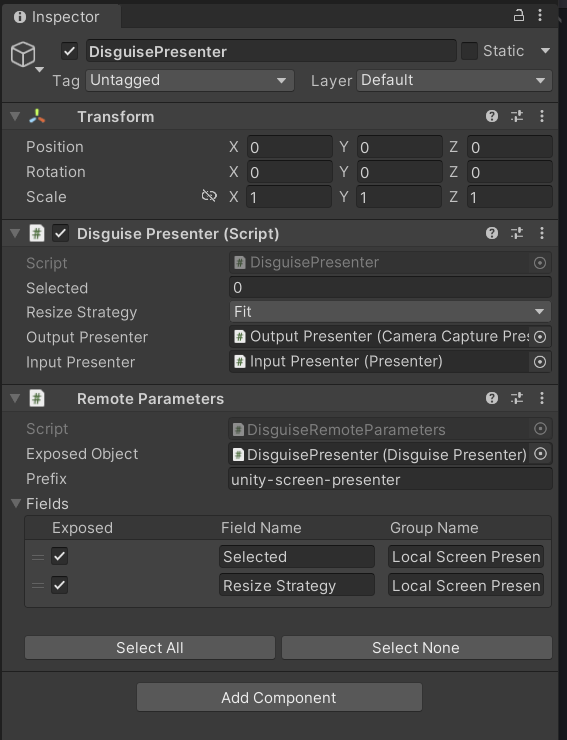
Yes the prefab is equivalent to
var root = new GameObject("Disguise Presenter");
var disguisePresenter = root.AddComponent<DisguisePresenter>();

var outputPresenterGO = new GameObject("Output Presenter");
outputPresenterGO.transform.parent = root.transform;
var outputPresenter = outputPresenterGO.AddComponent<CameraCapturePresenter>();

var inputPresenterGO = new GameObject("Input Presenter");
inputPresenterGO.transform.parent = root.transform;
var inputPresenter = inputPresenterGO.AddComponent<Presenter>();

disguisePresenter.OutputPresenter = outputPresenter;
disguisePresenter.InputPresenter = inputPresenter;
But I can't add the remote parameters through code. They look like this in the prefab:
| get | ||
| { | ||
| if (LatestFrameData.scene > m_SceneFields.Length) | ||
| return null; |
There was a problem hiding this comment.
I think it's less burdensome on the client if you return Enumerable.Empty<RenderTexture>() here instead of null, which will require special handling.
…lated ScriptableRenderContext + no reason to clear depth&stencil buffers)

3 participants


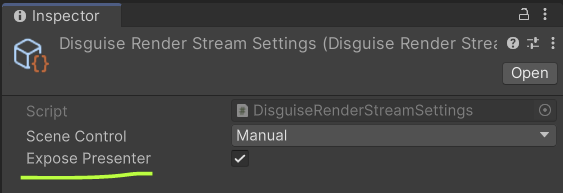
Project-wide setting enabled by default:
Adds remote parameter group to schema:
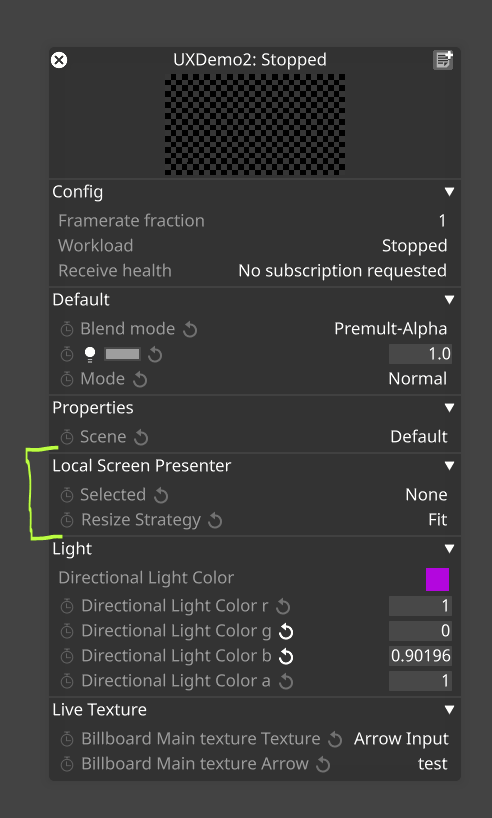
Options are None + channels + live textures:
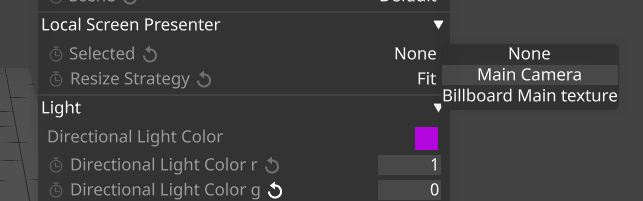
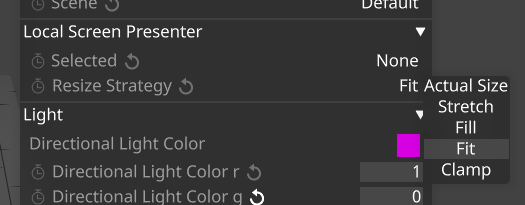
A number of resize strategies: