Project settings UI#23
Conversation


| @@ -0,0 +1,4 @@ | |||
| <ui:UXML xmlns:ui="UnityEngine.UIElements" xmlns:uie="UnityEditor.UIElements"> | |||
| <uie:PropertyField label="Scene Control" binding-path="sceneControl" /> | |||

There was a problem hiding this comment.
Minor: In code, I've started using L10.Tr() for strings, because this was the recommendation I got on the UIToolkit slack. Unfortunately, they don't have a good answer for strings in UXML. Figures 😞

| static SettingsProvider CreateSettingsProvider() => | ||
| new (k_SettingsPath, SettingsScope.Project) | ||
| { | ||
| label = Contents.SettingsName, |

There was a problem hiding this comment.
Food for thoughts: I noticed that when the Cluster Display package looks like is present settings looks like this:
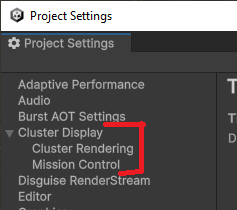
I wonder, is it what we want? Because there are a lot of settings in there that are not for Disguise RenderStream and could potentially confuse the user (and cause trouble if wrongly configured). In fact, when Cluster Display is working with Disguise I'd be tempted to have the following settings:
Disguise RenderStream:
- Scene Control
- Unity Debug Window Presenter
- Cluster Synchronization (as a "sub section", like Cluster Render and Mission Control is to Cluster Display)
- Multicast Address
- Port
- Handhsake Timeout
- Communication Timeout
- Adapter Name
But I guess this cannot be achieved only in this package, we also need a way for the ClusterDisplay package to stop providing its own settings when "requested" (or maybe we simply want to hardcode checking for the DisguiseRenderStream package)
There was a problem hiding this comment.
A few thoughts:
- Importing the Cluster Graphics package is a mistake for RenderStream projects (the "Cluster Rendering" section should not be present)
- I don't like the idea of hardcoding a check for the presence of DisguiseRenderStream in the Cluster Display logic. We can provide a link in the Disguise RenderStream settings page to the Cluster Display settings. Or we can expose some of the Cluster Display fields in the RenderStream settings, but this might add confusion.
There was a problem hiding this comment.
Oups, my bad.
Yeah, I must admit I'm not a big fan of Cluster Display knowing about Disguise RenderStream package either. What about Cluster Display only adds its setting pages if Cluster Graphics package is present? Not perfect but "less worst"?
There was a problem hiding this comment.
That's interesting. I rather like the idea of making Cluster Display (core) a "hidden" dependency of other packages (e.g. Graphics, RenderStream), kind of similar to Core SRP. Let's take a look at how Core SRP settings are exposed for inspiration.
3 participants


DisguiseRenderStreamSettingsEditor.csis shared for both the the Inspector and Project Settings windows. The uxml and uss files are assigned as default references inDisguiseRenderStreamSettingsEditor.cs.meta.The
DisguiseRenderStreamSettingsProvider.cscode is copied from Cluster Display with minor changes.Also added a few missing .meta files from the last 2 PRs.