

#21 Game API ##Technical Information
-
Spring Build and Dependencies:
- Project type: Maven
- Spring Version: 3.0.6
- Java Version: 17
- Dependencies
- DevTools
- Web
- PostgreSQL
- JPA
-
Software used:
- IntelliJ
- Postman
- Postico
- PostgreSQL
-
Installation instructions
- Git clone from the Repo
- [SSH Key] (git@github.com:williamdorling/Backend_TwentyOne_API.git)
- In your computer's terminal, "git clone" + SSH Key
- All java files are in Backend_TwentyOne_API
- ReadMe and Diagrams are in the Project directory
- Your SQL database will need to be created using the database name Backend_TwentyOne_API.
- Database settings are in Resources > Application Properties
- We set up our tests using Postman on localhost:8080
##Project Aims
- Create a game in which the 2 players each count up from zero by 1, 2 or 3. Whichever player reaches 21 first loses!
- Teach the computer to either play in "easy mode" (random number generator) or "hard mode" (playing to hit multiples of 4 so it will win).
- Add a player or a game into the database
- Assign games to a player
- add a multiplayer mode so that games can have multiple players
- add a "loserboard" for how many times each player lost!
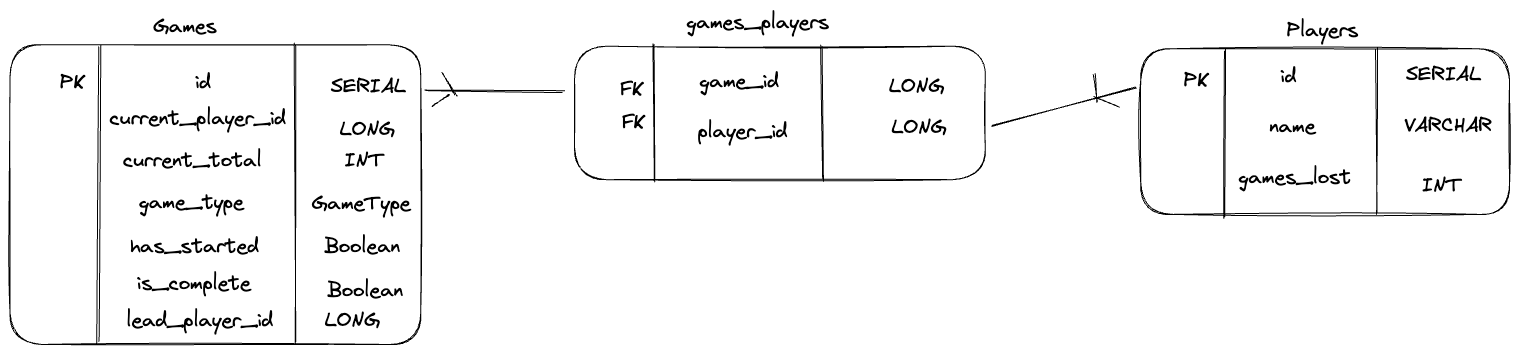
###ERD (Database Diagram)
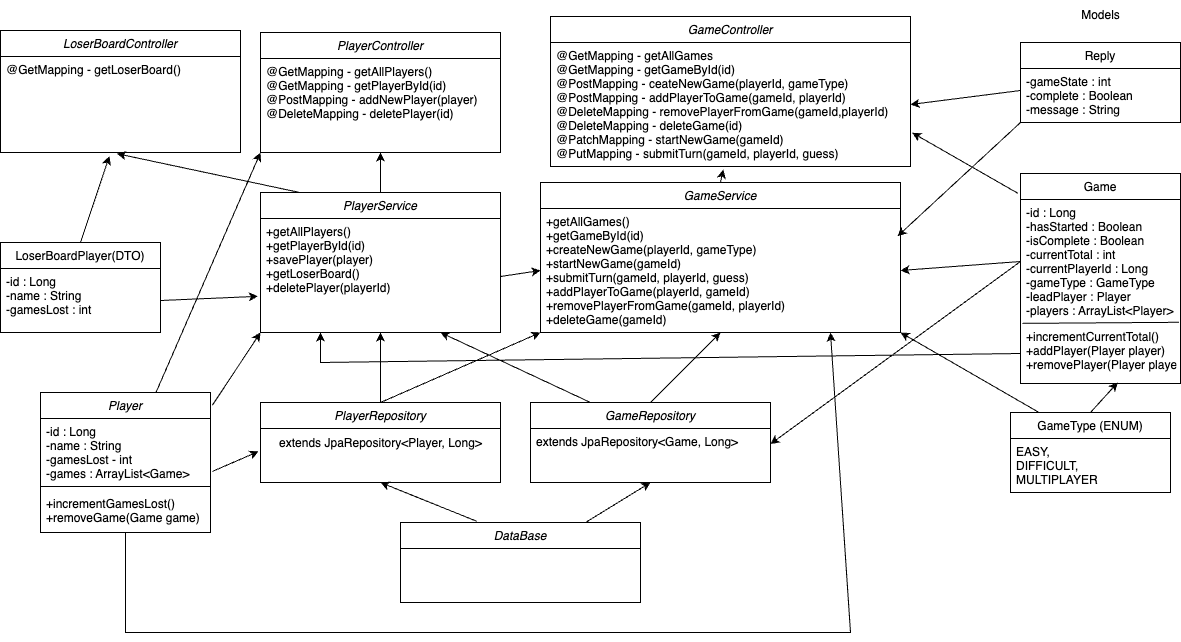
###Final UML Diagram
This class is responsible for handling HTTP requests related to player data in the Backend_TwentyOne_API application.
• @RestController: This annotation is used to indicate that the PlayerController class is a RESTful controller. It combines the functionality of @Controller and @ResponseBody, meaning that all methods in the class will return data in JSON format.
• @RequestMapping: This annotation is used to map HTTP requests to specific handler methods. In this case, the value attribute is set to "/players", so all requests that start with "/players" will be handled by methods in this class.
• @Autowired: This annotation is used to inject an instance of the PlayerService class into this controller. It automatically wires the PlayerService dependency into the PlayerController. This allows the controller to call methods from the service without needing to instantiate it manually.
• @GetMapping: This annotation is used to handle GET requests. The value attribute is set to "/", which means that this method will handle requests to the root URL of "/players". The second @GetMapping annotation handles requests to "/players/{id}", where "{id}" is a placeholder for the player's unique identifier.
@GetMapping
public ResponseEntity<List<Player>> getAllPlayers(){
    List<Player> players = playerService.getAllPlayers();
    return new ResponseEntity<>(players, HttpStatus.OK);
}
• @PostMapping: This annotation is used to handle POST requests. It expects a JSON payload in the request body, which is deserialized into a Player object.
@PostMapping
public ResponseEntity<Player> addNewPlayer(@RequestBody Player player){
    Player savedPlayer = playerService.savePlayer(player);
    return new ResponseEntity<>(savedPlayer, HttpStatus.CREATED);
}
• @DeleteMapping: This annotation is used to handle DELETE requests. It expects a player's unique identifier to be passed in the URL.
@DeleteMapping("/{id}")
public ResponseEntity<String> deletePlayer(@PathVariable("id") Long id) {
    Optional<Player> player = playerService.getPlayerById(id);
    if (!player.isPresent()) {
        return new ResponseEntity<>("Player not found", HttpStatus.NOT_FOUND);
    } else {
        playerService.deletePlayer(id);
        return new ResponseEntity<>("Player deleted successfully", HttpStatus.OK);
    }
}
• getAllPlayers(): This method returns a list of all players in the database.
• getPlayerById(Long id): This method returns a specific player by their unique identifier. If the player is not found, a 404 NOT FOUND response is returned.
• addNewPlayer(Player player): This method adds a new player to the database and returns a 201 CREATED response.
•deletePlayer(Long id): This method deletes a player from the database by their unique identifier. If the player is not found, a 404 NOT FOUND response is returned.
The LoserBoardPlayer DTO represents a player object that is used to store information about players that have lost games on the TwentyOne API platform and transfers information without unnecessary informations about the game. For example, if a player were to lose 3 games it would display the number of games lost and the name of the player instead of showing the number of games played and other unnecessary informations.
The LoserBoardPlayer DTO has three parameters:
• 'name' : a string that represents the player's name.
• 'playerId' : a Long integer that represents the player's unique ID.
• 'gamesLost' : an integer that represents the number of games a player has lost.
The LoserBoardPlayer DTO has two constructors:
• A constructor that takes in the values for 'name', 'playerId', and 'gamesLost'.
• A default empty constructor that takes no parameters.
The LoserBoardPlayer DTO has a set of getters and setters for each parameter. These methods allow the values of the 'LoserBoardPlayer' object to be accessed and modified.
@GetMapping: This annotation is used to handle GET requests. The value attribute is set to "/", which means that this method will handle requests to the root URL of "/loserBoard". This would return:
• player Id
• number of games lost
• a string which has the name of the playerID
@GetMapping
public ResponseEntity<List<LoserBoardPlayer>>  getLoserBoard(){
    List<LoserBoardPlayer> players = playerService.getLoserBoard();
    return new ResponseEntity<>(players, HttpStatus.OK);
}
To retreive the list of all possible games.
url: /games
@GetMapping
public ResponseEntity<List<Game>>  getAllGames(){
    List<Game> games = gameService.getAllGames();
    return new ResponseEntity<>(games, HttpStatus.OK);
}
url: /games/{id}
To retrieve a single game by id. If game is not found, returns http 404 exception not found.
@GetMapping(value = "/{id}")
public ResponseEntity<Game> getGameById(@PathVariable Long id){
    Optional<Game> game = gameService.getGameById(id);
    if (game.isPresent()){
        return new ResponseEntity<>(game.get(), HttpStatus.OK);
    } else {
        return new ResponseEntity<>(null, HttpStatus.NOT_FOUND);
    }
}
url: GET POST localhost:8080/games?playerId=1&gameType=difficult
To create a new game.
  @PostMapping
public ResponseEntity<Reply> createNewGame(@RequestParam Long playerId, @RequestParam String gameType) {
    return gameService.createNewGame(playerId,gameType);
}
url:
To add the player to a game. Add a player to a game by passing player Id and game Id in the path.
 @PostMapping( value = "/{gameId}")
public ResponseEntity<Reply> addPlayerToGame(@PathVariable Long gameId, @RequestParam Long playerId) {
    return gameService.addPlayerToGame(playerId,gameId);
}
To remove the player to a game. By passing player Id and game Id in the path.
@DeleteMapping("/{gameId}/{playerId}")
public ResponseEntity<String> removePlayerFromGame(@PathVariable("gameId") Long gameId, @PathVariable("playerId") Long playerId){
    return gameService.removePlayerFromGame(gameId, playerId);

}
To delete a game. This is done by passing game Id in the path.
 @DeleteMapping("/{id}")
public ResponseEntity<String> deleteGame(@PathVariable("id") Long id) {
    Optional<Game> game = gameService.getGameById(id);
    if (!game.isPresent()) {
        return new ResponseEntity<>("Game not found",HttpStatus.NOT_FOUND);
    } else {
        gameService.deleteGame(id);
        return new ResponseEntity<>("Game deleted", HttpStatus.OK);
    }
}
To add a new game. This is done by adding game Id in the path.
  @PatchMapping(value = "/{gameId}")
public ResponseEntity<Reply> startNewGame(@PathVariable("gameId") Long gameId) {
    return gameService.startNewGame(gameId);
}
To submit turn to a running game. This is done by passing gameId, playerId and int guess.
 @PutMapping(value = "/{gameId}")
public ResponseEntity<Reply> submitTurn (@PathVariable Long gameId,
                                         @RequestParam Long playerId,
                                         @RequestParam int guess) {
    return gameService.submitTurn(gameId, playerId, guess);
}
- including a 'reset' function for the game
- having a multiplayer game that includes the computer as one of the players
There were no bugs that we were aware of.