This repository was archived by the owner on May 22, 2025. It is now read-only.
[AI] AI Revamp | AI runs off of actual servers now #12388
Closed
Conversation
This file contains hidden or bidirectional Unicode text that may be interpreted or compiled differently than what appears below. To review, open the file in an editor that reveals hidden Unicode characters.
Learn more about bidirectional Unicode characters


This reverts commit e594c6c.
 Yogbot-13
added
DME Edit
Yogbot-13
added
DME Edit
Contributor
Author
|
merge conflicts lmao |


Contributor
|
 adamsong
added
the
Merge conflict
adamsong
added
the
Merge conflict

|
Is there a list of things still under development anywhere? This is a really cool project and i'd like to follow it. |
Contributor
Author
everything is still under development |
adamsong
added
Test Merge - Requested
Yogbot-13
added a commit
that referenced
this pull request
Nov 30, 2021
Yogbot-13
added a commit
that referenced
this pull request
Nov 30, 2021
Yogbot-13
added a commit
that referenced
this pull request
Nov 30, 2021
 Bibby0110
removed
the
Stale
Bibby0110
removed
the
Stale
Yogbot-13
added a commit
that referenced
this pull request
Dec 4, 2021
Bibby0110
changed the title
Contributor
Author
|
Closing the PR to re-open with new title + description for visibility. |
Sign up for free
to subscribe to this conversation on GitHub.
Already have an account?
Sign in.


Add this suggestion to a batch that can be applied as a single commit.
This suggestion is invalid because no changes were made to the code.
Suggestions cannot be applied while the pull request is closed.
Suggestions cannot be applied while viewing a subset of changes.
Only one suggestion per line can be applied in a batch.
Add this suggestion to a batch that can be applied as a single commit.
Applying suggestions on deleted lines is not supported.
You must change the existing code in this line in order to create a valid suggestion.
Outdated suggestions cannot be applied.
This suggestion has been applied or marked resolved.
Suggestions cannot be applied from pending reviews.
Suggestions cannot be applied on multi-line comments.
Suggestions cannot be applied while the pull request is queued to merge.
Suggestion cannot be applied right now. Please check back later.
User Guide (1st Test Merge)
For the AI
Your 'core' now consists of a physical server placed on the station. If this server is destroyed you're transferred to any other functioning server. You die when you run out of servers to transfer to. Theoretically there can be infinite servers, but it is up to the crew to build them.
You have 1 new button in your HUD:
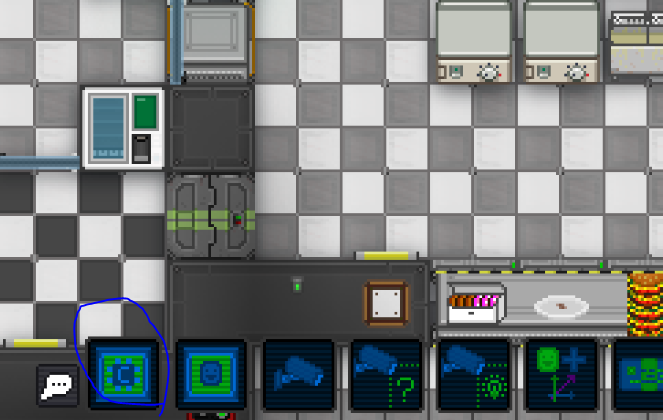
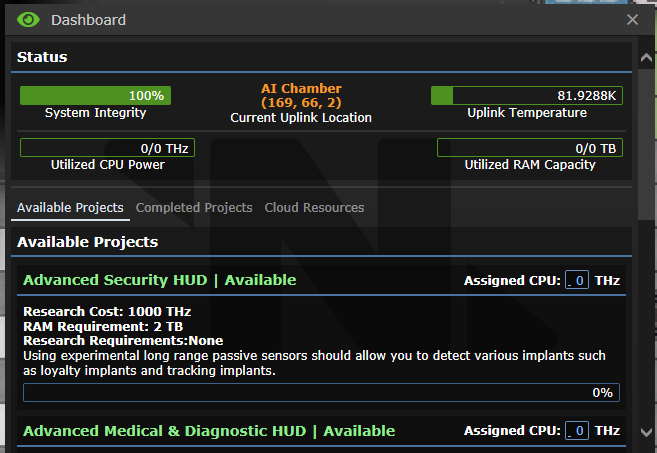
Clicking this opens the following menu:
As you can see at the top it shows how much health you have (Currently placeholder, will show server health in the future)
You can see the location and the temperature, which can't be too high
On the second line you can see how much CPU/RAM you have.
CPU is used for researching new upgrades. RAM is used for running them.
You research by typing in the amount of your CPU you want to allocate into the following box:
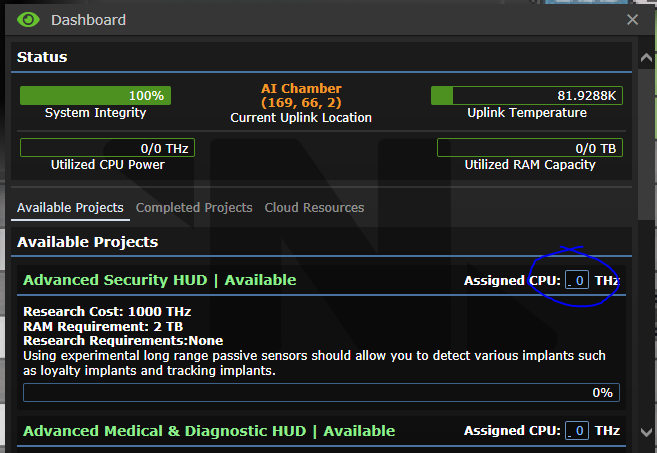
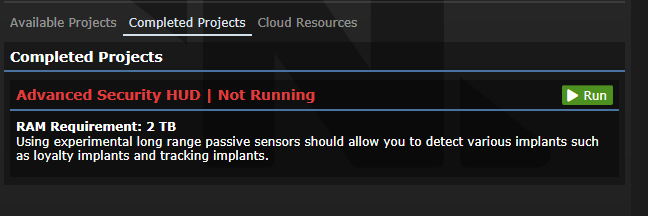
After a project is completed it will go into the 'Completed Projects' folder where you can start/stop programs as seen below:
The third tab contains an overview of all available processing power network wide. You can't interact with these unless they're assigned to you. Read more about assigning processing resources in the "For the Crew" section.
For the Crew
The AI is now dependent on you creating new Expansion Card Busses, which are regular machines you can create like any other. The circuitboard is gotten through the 'Artificial Intelligence' science project. This also unlocks the printing of CPU and RAM cards.
Adding CPU and RAM cards to an expansion card bus allows those resources to be assigned to the CPU. A bus can hold a maximum of 3 cards each.
Be aware that the Expansion Card Bus needs to be in a cool environment, which is not exposed to space, to be able to function.
The power usage is dependent only on the amount of CPU cards inserted. There's a penalty every time you add a CPU card to a bus in the form of exponential power drain.
When you've created an Expansion Card Bus for the AI you can assign the resources to it by using the 'AI system resource distribution console' in the room next to the old AI core.
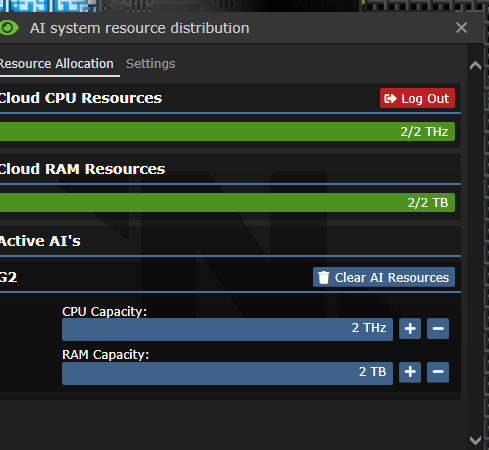
It looks like this and is pretty self-explanatory:
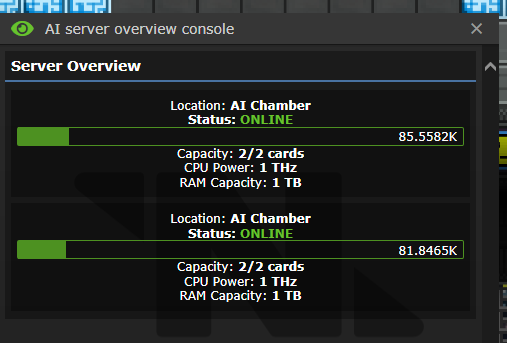
There's also an 'AI server overview console' which has the following UI:
AI Data Cores and you
AI Data cores are a new type of machine just like the expansion card bus. Instead of accepting CPU and RAM cards this machine is only used for hosting an AI. Consider it like an extra 'life' incase the AI loses its current data core. It too needs to be in a cooled room, and should not be in the same room as another data core as that negates the purpose. (Both would likely be destroyed at the same time)
Making new AIs and carding the current one
Using the last new console, the 'AI control console' you can upload new AIs to the network. This is done by either:
The UI for uploading looks as following:
Downloading looks like this:
It requires an IntelliCard to be inserted. When the download is started the AI is notified and told where the download is coming from. After a certain amount of time which the AI can change using upgrades, the AI is transferred to the inserted IntelliCard.
PR Concept
Old PR: #12262 (For stealing your comment ideas)
Malf will not be touched other than to make it function besides this system. Not in this PR at least.
Instead of being based on a singular core the AI is now an actual computer living through servers on the AI sat.
There is no core to kill, instead when an AI is created it's uploaded to the cloud and run through these servers.
Some AI roundstart abilities have been removed and moved to upgrades. (Being able to see mindshields is a prime example of this.)
The core itself requires cooling which is mapped in at roundstart. More cooling is potentially needed if enough additional CPU cards are installed. (RAM cards don't produce a noticeable amount of extra heat.)
Turns the Sig Tech into the Network Admin, in charge of general AI upgrades and caretaking.
WIP (For this PR, aka MVP):
Additional PRs will do the following:
Changelog
🆑
wip: This changelog
/:cl: