
A self-hosted, privacy-focused search engine with instant answers, multiple search categories, and powerful features. Built with Next.js and powered by SearXNG, it provides a clean, distraction-free search experience with calculator, unit converter, weather information, and more.
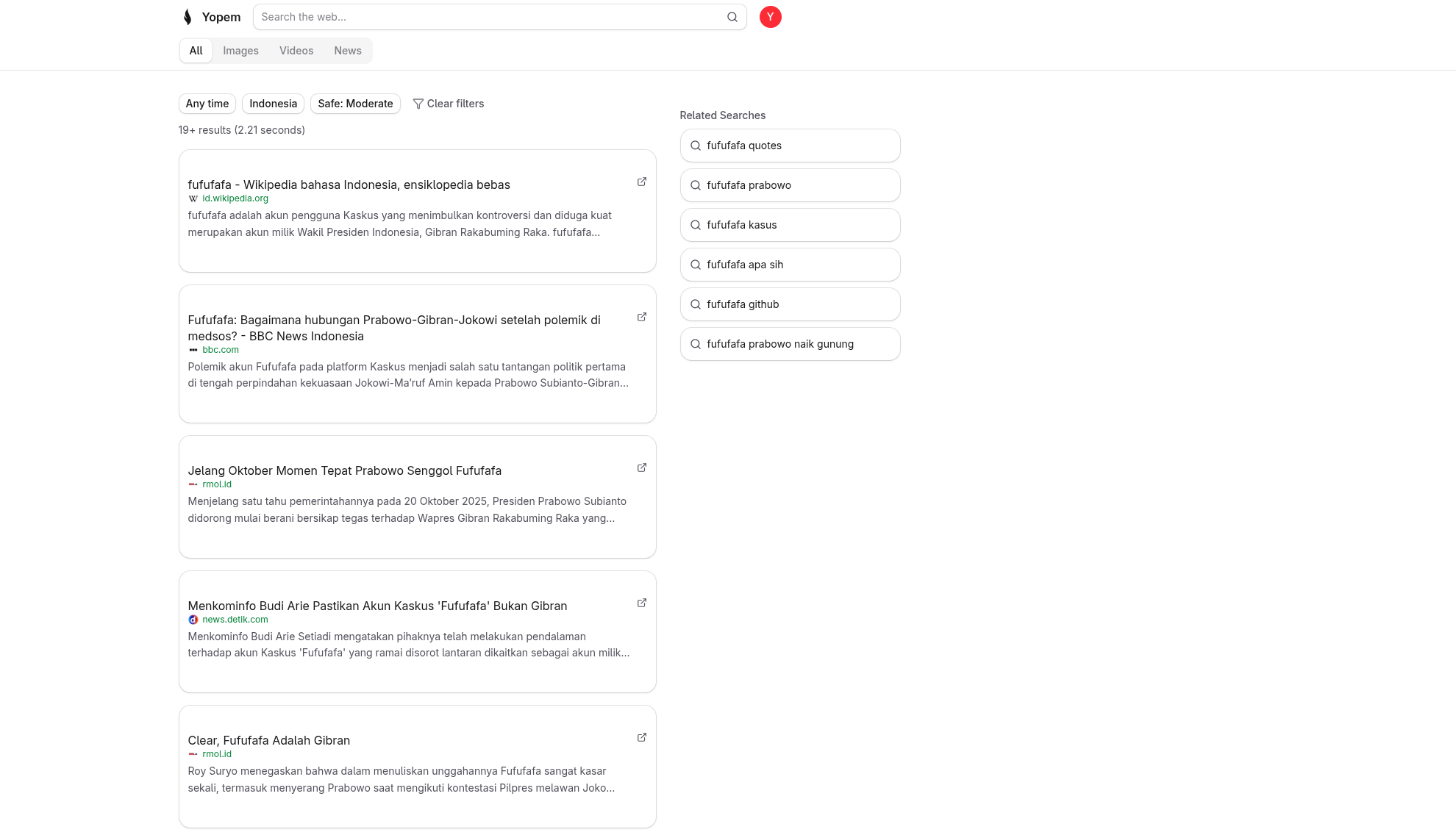
Self-hosted search engine that doesn't track your searches. Powered by SearXNG, aggregating results from multiple search engines while protecting your privacy.
Get immediate answers without visiting external websites. Built-in calculator, unit converter, and weather information for common queries.
Search across different content types:
- General - Traditional web search results
- Images - Visual search with full-screen viewer
- Videos - Video search with metadata
- News - Latest news articles
Quickly redirect searches to specific sites using bang syntax (e.g.,
!gh next.js to search GitHub, !mdn fetch api to search MDN).
Refine your search with:
- Time range filters (past day, week, month, year)
- Region-specific results
- Safe search levels
- Search history tracking
Beautiful, distraction-free interface with:
- Dark/light theme support
- Keyboard shortcuts for navigation
- Responsive design
- Related searches suggestions
- Runtime: Bun
- Framework: Next.js 16
- Language: TypeScript
- UI: React 19, Tailwind CSS, cossui
- Database: PostgreSQL with Drizzle ORM
- API: oRPC with TanStack React Query
- Authentication: OpenAuth
- Search Engine: SearXNG
- State Management: nuqs
- Bun 1.3 or higher
- PostgreSQL database
- Docker (for running SearXNG)
- Git
- OpenAuth Issuer - Required for authentication (setup guide)
- Weather API Key - Optional, for weather instant answers (WeatherAPI.com)
- TMDB API Key - Optional, for enhanced movie information panels (TMDB)
- Clone the repository
git clone https://github.com/yopem/search.git
cd search- Install dependencies
bun install- Set up environment variables
Copy the example environment file and configure it:
cp .env.example .envEdit .env and configure the required variables (see
Environment Variables section below).
- Run database migrations
bun run db:generate && bun run db:migrate- Start SearXNG
You need a running SearXNG instance. You can use the provided Dockerfile:
Build the SearXNG Docker image:
docker build -f Dockerfile.searxng -t searxng-custom .Run the SearXNG container:
docker run -d \
  --name searxng \
  -p 3600:3600 \
  searxng-custom
The SearXNG instance will be available at http://localhost:3600. Make sure to
set SEARXNG_URL=http://localhost:3600 in your .env file.
Stop and remove the container:
docker stop searxng
docker rm searxng- Start the development server
bun run dev- Access the application
Open your browser and navigate to http://localhost:3000
| Variable | Description | Example |
|---|---|---|
DATABASE_URL |
PostgreSQL connection string | postgresql://user:password@localhost:5432/search |
AUTH_ISSUER |
OpenAuth issuer URL (see OpenAuth Setup below) | https://auth.example.com |
NEXT_PUBLIC_API_URL |
Public API URL | https://search.example.com |
SEARXNG_URL |
SearXNG instance URL | http://localhost:3600 |
Yopem Search uses OpenAuth for authentication. You need to set up an OpenAuth issuer to handle user authentication.
-
Follow the official guide: Visit OpenAuth Issuer Documentation for detailed setup instructions
-
Deploy your issuer: You can deploy an OpenAuth issuer using:
- Your own server
- Serverless platforms (AWS Lambda, Cloudflare Workers, etc.)
- Container platforms (Docker, Kubernetes)
-
Configure the
AUTH_ISSUERvariable: Once your issuer is running, set theAUTH_ISSUERenvironment variable to your issuer's URL:AUTH_ISSUER=https://your-auth-issuer-domain.com
-
Important: Without a properly configured OpenAuth issuer, the application will not be able to authenticate users and login functionality will not work.
For local development, you can run an OpenAuth issuer locally. Refer to the OpenAuth documentation for local setup instructions.
| Variable | Description |
|---|---|
REDIS_URL |
Redis connection string (for caching) |
WEATHER_API_KEY |
Weather API key for weather instant answers |
TMDB_API_KEY |
TMDB API key for enhanced movie information panels |
NEXT_PUBLIC_GA_MEASUREMENT_ID |
Google Analytics measurement ID |
NEXT_PUBLIC_UMAMI_TRACKING_ID |
Umami Analytics tracking ID |
NEXT_PUBLIC_LOGO_URL |
Custom logo URL |
NEXT_PUBLIC_LOGO_OG_URL |
Custom Open Graph logo URL |
NEXT_PUBLIC_SITE_TITLE |
Custom site title |
NEXT_PUBLIC_SITE_DESCRIPTION |
Custom site description |
NEXT_PUBLIC_SITE_DOMAIN |
Site domain |
NEXT_PUBLIC_SITE_TAGLINE |
Site tagline |
NEXT_PUBLIC_SUPPORT_EMAIL |
Support email address |
CF_ACCOUNT_ID |
Cloudflare R2 account ID |
R2_ACCESS_KEY |
Cloudflare R2 access key |
R2_SECRET_KEY |
Cloudflare R2 secret key |
R2_BUCKET |
Cloudflare R2 bucket name |
R2_DOMAIN |
Cloudflare R2 domain |
For a complete list of environment variables, see .env.example.
-
Access the application at
http://localhost:3000 -
Create an account or log in using the authentication system
-
Start searching:
- Enter your query in the search box
- Use instant answers for calculations, conversions, and weather
- Try bang syntax for quick redirects (e.g.,
!gh react)
-
Apply filters:
- Click on category tabs (General, Images, Videos, News)
- Use time range filters for recent results
- Select region for localized results
- Adjust safe search settings
-
Use instant answers:
- Calculator:
2+2,sqrt(16),sin(1.5) - Unit Converter:
10 km to miles,100 celsius to fahrenheit - Weather:
weather jakarta,tokyo weather
- Calculator:
-
Keyboard shortcuts:
/- Focus search inputEsc- Unfocus search input1-4- Switch between category tabs- Arrow keys - Navigate image viewer
For detailed features and usage guide, see SEARCH_FEATURES.md.
| Command | Description |
|---|---|
bun run dev |
Start development server with Turbopack |
bun run build |
Build for production |
bun run start |
Start production server |
bun run lint |
Run ESLint |
bun run lint:fix |
Run ESLint with auto-fix |
bun run typecheck |
Run TypeScript type checking |
bun run format:write |
Format code with Prettier |
bun run format:check |
Check code formatting |
bun run db:studio |
Open Drizzle Studio (database GUI) |
bun run db:migrate |
Run database migrations |
bun run db:push |
Push schema changes to database |
bun run db:generate |
Generate new migration |
bun run check |
Run all quality checks (lint, typecheck, format) |
bun run preview |
Build and start production preview |
This project is licensed under the AGPL-3.0-or-later license. This is a copyleft license that requires any derivative works to be distributed under the same license terms.