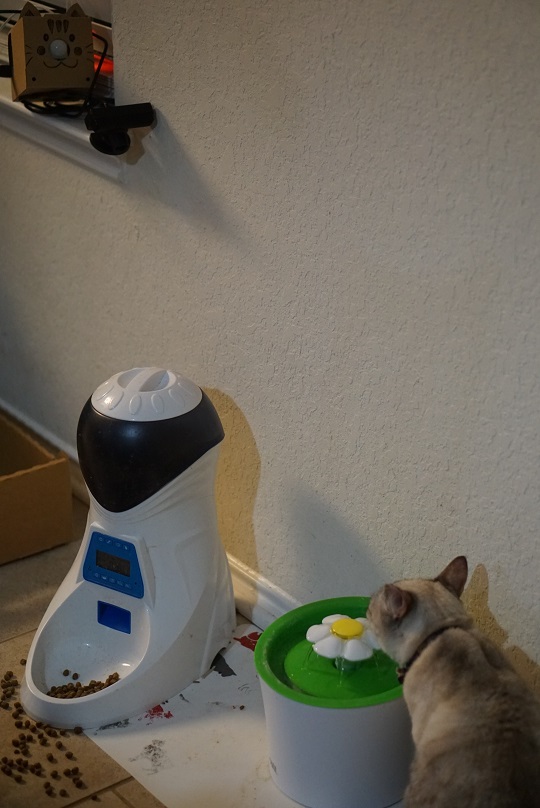
The objectives of this project are:
- Alert when my cat's water fountain becomes empty (I always forget to refill!)
- Alert if something/someone other than my cat approaches the fountain when I'm not home (for security)
- Alert if cat's fountain area's temperature is significantly different from Nest thermostat (for cat's optimal comfort)
Here are how they work:
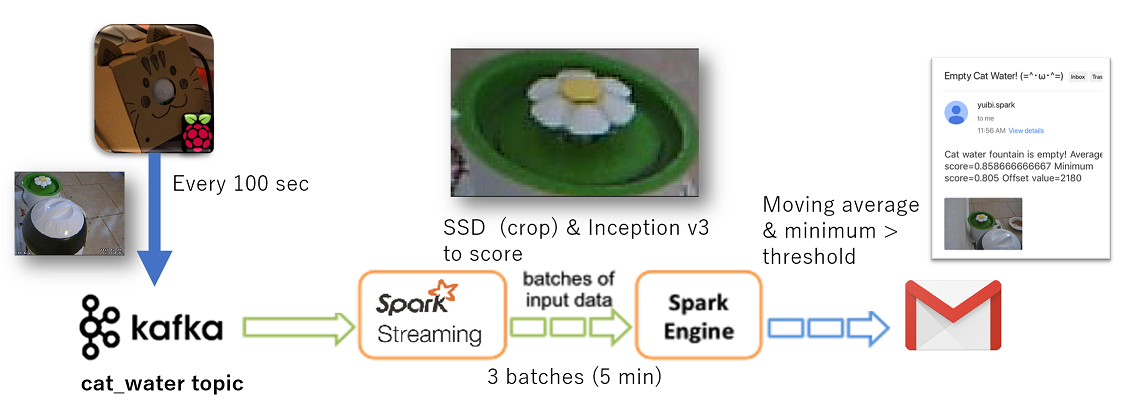
- Raspberry Pi 3 sends a JPEG image to Kafka every 100 seconds. Spark streaming consumes the image, and crops just the water fountain using SSD (Single Shot MultiBox Detector). Then, it scores to see if the cropped image (water fountain) is empty or not with keras (Inception v3) model. If the moving average and minimum score (in 3 batches = 5 minutes) exceed a threshold (meaning the model is confident that the fountain is empty), I receive an email alert with the image attached.
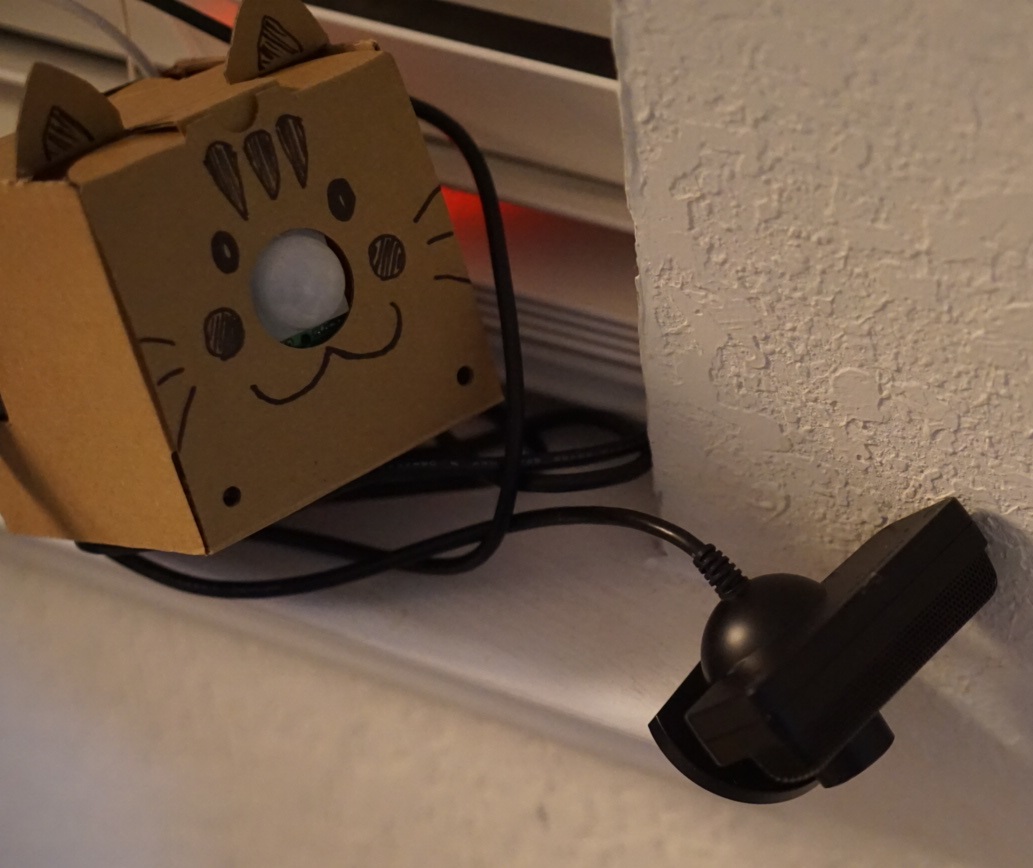
- Raspberry Pi 3 sends a JPEG image to Kafka when its motion sensor detects a motion in cat's water fountain area. Raspberry Pi 3's LED turns on. Spark streaming consumes the image. If the SSD model determines that the image doesn't contain a cat, and my telematics device's GPS location is away from home (meaning I'm not home), I receive an email alert with the image attached.

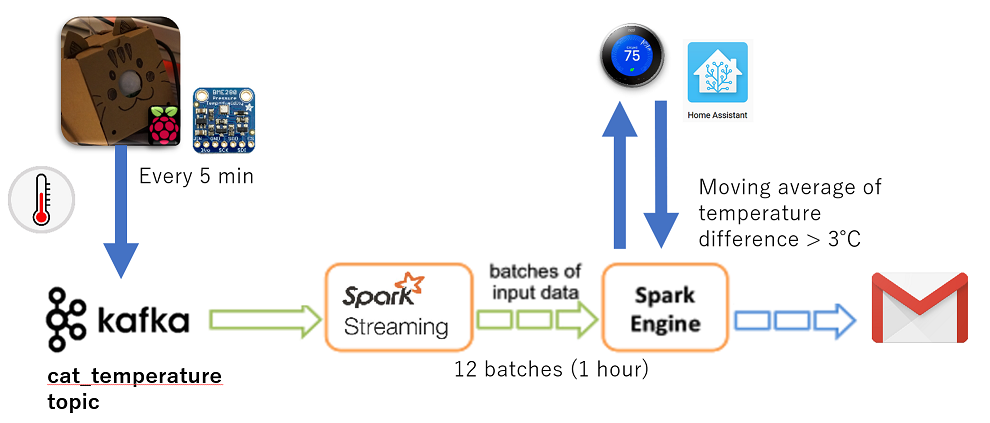
- Raspberry Pi 3 reads temperature from its sensor, and sends it to Kafka every 300 seconds. Spark streaming consumes the data, and calculates the difference between the sensor's temperature and Nest thermostat's current temperature. If the moving average of the temperature difference (in 12 batches = 1 hour) is more than 3 degrees Celsius, I receive an email alert.
Hardware
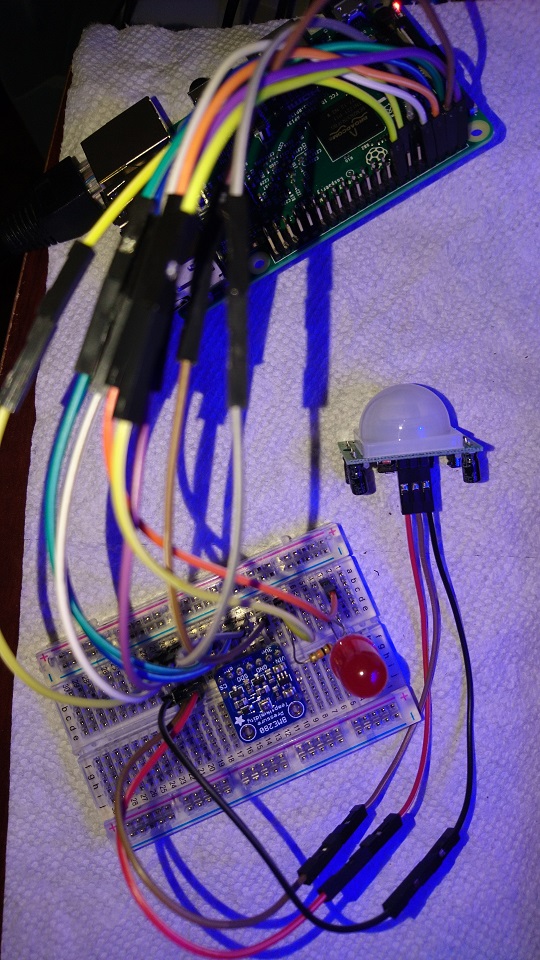
- Raspberry Pi 3
- Adafruit BME280 Temperature Humidity Pressure Sensor
- Adafruit PIR (motion) sensor
- LED light
- Breadboard
- Jumper wires
- Webcam (I used $5 PS3 Eye)
- Micro USB charger (1.5A)
- Micro SD card
- Server for Kafka and Spark Docker images (I used ESXi)
- Computer with GPU for deep learning model training
- (Smart plug, such as tp-link HS100 if you want to generate training image data efficiently)
(Microsoft gave me an IoT starter kit, so I only had to buy a Raspberry Pi 3 and a webcam)
Software
- Raspbian
- Python >2.7
- MotionEyeOS
- Apache Kafka >0.1
- Apache Spark >2.2
- Home Assistant (for smart home/IoT integration)
Set up Raspberry Pi 3
- Download Raspbian OS onto a micro SD card, and boot up Raspberry Pi 3.
- Connect a breadboard, sensors, wires, an LED, and a webcam.
- Boot up Raspberry Pi 3, and enable I2C interface using raspi-config.
- Install Docker.
curl -sSL https://get.docker.com/ | sh - Run Raspbian container on top of Raspbian. :)
sudo docker run -ti --privileged resin/rpi-raspbian:jessie /bin/bash - Inside the container, install dependencies for sensors:
apt-get update
apt-get install python3-pip python3-dev gcc i2c-tools python-smbus vim git wget - On home directory (/root), install Python libraries for the sensors:
git clone https://github.com/adafruit/Adafruit_Python_GPIO.git
cd Adafruit_Python_GPIO
python3 setup.py install
cd ~
git clone https://github.com/adafruit/Adafruit_Python_BME280.git
cd Adafruit_Python_BME280
python3 setup.py install
cd ~ - Copy the content of this repo (raspbian_neko_monitor).
- Enable services:
cp *.service /lib/systemd/system/
systemctl enable real_time_image_to_kafka.service
systemctl enable motion_image_to_kafka.service
systemctl enable temp_humidity_to_kafka.service - (If you want to generate training image data efficiently) install tp-link smart plug sh script. I used this script on cron to stop the cat water fountain for 10 minutes every hour to capture "empty" water fountain images.
apt-get install nmap
git clone https://github.com/branning/hs100.git - Exit out of the container, and save it.
sudo docker commit [container_ID] yfujimoto/catcam:v1 - Stop the original container:
sudo docker stop [container_ID] - Run the new container:
sudo docker run --privileged --restart=always yfujimoto/catcam:v2
Set up MotionEyeOS (for capturing Motion JPEG images)
- Pull MotionEyeOS Docker image:
sudo docker pull vividboarder/rpi-motioneye - Create a directory for config:
sudo mkdir -p /mnt/motioneye/config - Run the container:
sudo docker run --device=/dev --privileged -p 8081:8081 -p 8765:8765 -v /mnt/motioneye/config:/etc/motioneye vividboarder/rpi-motioneye:latest - On your web browser, log into http://[ip_address]:8765/ and add the webcam, add admin password, and disable motion detection.
- Exit out of the container, and save it.
sudo docker commit [container_ID] yfujimoto/motioneye:v1 - Stop the original container:
sudo docker stop [container_ID] - Run the new container:
sudo docker run --device=/dev --privileged -p 8081:8081 -p 8765:8765 -v /mnt/motioneye/config:/etc/motioneye --restart=always yfujimoto/motioneye:v1
Configure Apache Kafka on a Server
- Pull Kafka Docker image:
sudo docker pull spotify/kafka - Run the container:
sudo docker run -p 2181:2181 -p 9092:9092 --env ADVERTISED_HOST=x.x.x.x--env ADVERTISED_PORT=9092 spotify/kafka - Get into the container:
sudo docker exec -it [container_id] bash - Create Kafka topics:
cd /opt/kafka_2.11-0.10.1.0/bin
./kafka-console-producer.sh --broker-list localhost:9092 --topic cat_water
./kafka-console-producer.sh --broker-list localhost:9092 --topic cat_motion
./kafka-console-producer.sh --broker-list localhost:9092 --topic cat_temp_humidity - Check if the topics were successfully created:
./kafka-topics.sh --list --zookeeper localhost:2181 - Exit out of the container, and save it.
sudo docker commit [container_ID] yfujimoto/kafka:v1 - Stop the original container:
sudo docker stop [container_ID] - Run the new container:
sudo docker run -p 2181:2181 -p 9092:9092 --env ADVERTISED_HOST=x.x.x.x --env ADVERTISED_PORT=9092 --restart=always yfujimoto/kafka:v1
Configure Apache Spark on a Server
- Pull Spark Docker image:
sudo docker pull jupyter/pyspark-notebook - Create a directory to store files and notebooks:
mkdir /home/yuibi/jupyter
chown 1000 /home/yuibi/jupyter - Run the container:
sudo docker run -d --user root -p 8888:8888 -e NB_UID=1000 -e NB_GID=100 -e GRANT_SUDO=yes -v /home/yuibi/jupyter:/home/jovyan/work jupyter/pyspark-notebook start-notebook.sh --NotebookApp.token='' - Get into the container:
sudo docker exec -it [container_id] bash - (If you want to use spark deep learning. I ended up not using it since it was designed for batch process) set up conda (Python 2.7) environment and dependencies:
apt-get update
cd /opt/conda
conda create -n yfujimoto python=2.7
source activate yfujimoto
conda install numpy scipy matplotlib pillow pandas h5py jupyter
pip install tensorflow keras opencv-python - Create a default config for Jupyter notebook:
jupyter notebook --generate-config - Modify the config:
vi ~/.jupyter/jupyter_notebook_config.py
(Change the following)
c.NotebookApp.port = 8989
c.NotebookApp.token = ''
- Give jovyan user full access to .jupyter directory:
chown -R jovyan.users ~/.jupyter - Run Jupyter notebook for test:
nohup su jovyan -c "env PATH=/opt/conda/envs/yfujimoto/bin:/usr/local/sbin:/usr/local/bin:/usr/sbin:/usr/bin:/sbin:/bin /opt/conda/envs/yfujimoto/bin/python /opt/conda/bin/jupyter-notebook --NotebookApp.token= --NotebookApp.port=8989" & - Exit out of the container, and save it.
sudo docker commit [container_ID] yfujimoto/pyspark:v1 - Stop the original container:
sudo docker stop [container_ID] - Run the new container:
sudo docker run -d --user root -p 8888:8888 -p 8989:8989 -e NB_UID=1000 -e NB_GID=100 -e GRANT_SUDO=yes -v /home/yuibi/jupyter:/home/jovyan/work yfujimoto/pyspark:v1 start-notebook.sh --NotebookApp.token=''
Collect data
- Add the following commands to your crontab. I personally set it to turn off the water fountain for 10 minutes every hour.
/home/pi/hs100/hs100.sh -i [smart_plugs_ip] on
/home/pi/hs100/hs100.sh -i [smart_plugs_ip] off - Run this bash command to capture an image every 20 seconds:
#!/bin/sh
while true
do
wget -q -O /home/pi/pictures/neko_`date +%Y%m%d_%H%M%S`.jpg http://localhost:8765/picture/1/current/
sleep 20s
done
- Randomly split the dataset by 80/20, and move them to appropriate directories (e.g. ./data/train/0, ./data/train/1, etc).
- For this project, I selected 392 images:
Training: 320 (160 with empty + 160 with not empty)
Test: 72 (36 with empty + 36 with not empty)
Train machine learning models
Initially, I used the entire picture without cropping to train my keras inception v3 model. It did an OK job, but the noise around the water fountain was often affecting the accuracy. For example, the presence of the cat itself was causing false positives (I assume the cat was more likely to be around the water fountain when it was turned on in the training set?). Here's how I overcame it:
- Install necessary Python packages on a GPU machine:
pip install keras==1.2.2 opencv-python tensorflow
conda install scipy matplotlib pillow pandas h5py jupyter - Clone an SSD port:
git clone https://github.com/rykov8/ssd_keras.git - Resize training images to 300 x 300.
- Use labelImg.exe to label water fountain and cat in each picture.

- Create a pickle file.
- Train an SSD model.
- Train an Inception v3 model based on the images that are cropped by the SSD model
Deploy machine learning models
- Copy the content of this repo (spark_streaming) to Spark server.
- Run all 3 Spark streaming applications:
export PYSPARK_PYTHON=/opt/conda/envs/yfujimoto/bin/python2.7 && /usr/local/spark-2.2.0-bin-hadoop2.7/bin/spark-submit --packages org.apache.spark:spark-streaming-kafka-0-8_2.11:2.0.2 /home/jovyan/work/streaming_cat_water.py
export PYSPARK_PYTHON=/opt/conda/envs/yfujimoto/bin/python2.7 && /usr/local/spark-2.2.0-bin-hadoop2.7/bin/spark-submit --packages org.apache.spark:spark-streaming-kafka-0-8_2.11:2.0.2 /home/jovyan/work/streaming_cat_motion.py
export PYSPARK_PYTHON=/opt/conda/envs/yfujimoto/bin/python2.7 && /usr/local/spark-2.2.0-bin-hadoop2.7/bin/spark-submit --packages org.apache.spark:spark-streaming-kafka-0-8_2.11:2.0.2 /home/jovyan/work/streaming_cat_temperature.py
DONE!