[create-theme]: zen-floating-bookmarks #1686

Description

Name
zen-floating-bookmarks
Description
mod that turns the bookmarks sidebar into a floating slide-in panel with smooth animations and modern styling.
Homepage
https://github.com/aaronedev/zen-floating-bookmarks
Image
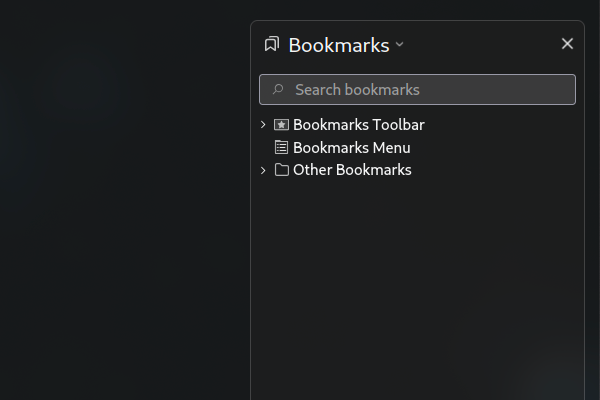
Type
- JSON Color Theme
Theme Styles
:root {
    --floating-bookmarks-transform-translateX: 110%;
    --floating-bookmarks-position-right: 15px;
    --floating-bookmarks-position-left: auto;
}

/* Horizontal Position */

:root:has(#theme-Floating-Bookmarks[theme-floating_bookmarks-position="right"]) {
    --floating-bookmarks-transform-translateX: 110%;
    --floating-bookmarks-position-right: 15px;
    --floating-bookmarks-position-left: auto;
}

:root:has(#theme-Floating-Bookmarks[theme-floating_bookmarks-position="left"]) {
    --floating-bookmarks-transform-translateX: -110%;
    --floating-bookmarks-position-left: 15px;
    --floating-bookmarks-position-right: auto;
}

/* Disable dragable splitter */
#sidebar-box[sidebarcommand="viewBookmarksSidebar"] + splitter {
  display: none !important;
}

/* Make sure content is not affect by bookmarks tab sliding in and out */
#tabbrowser-tabbox[flex="1"][tabcontainer="tabbrowser-tabs"] {
    will-change: unset !important;
}

/* Bookmarks Tab Styles */
#sidebar-box[sidebarcommand="viewBookmarksSidebar"] {
    order: none !important;
    height: 80% !important;
    width: 22em !important;

    position: fixed !important;

    right: var(--floating-bookmarks-position-right);
    left: var(--floating-bookmarks-position-left);

    transform: translateX(50%) !important;
    z-index: 10;

    transform: translateY(12%) !important;

    border-radius: var(--zen-border-radius) !important;

    box-shadow: var(--box-shadow-10) !important;
    background: var(--zen-colors-tertiary) !important;
    border: 1px solid var(--zen-colors-border) !important;

    transition: transform 0.35s !important;
    visibility: visible !important;
    opacity: 1 !important;


    &[hidden="true"] {
		display: flex !important;
        transform: translateX(var(--floating-bookmarks-transform-translateX)) translateY(12%) !important;
	}

    @starting-style {
        display: flex !important;
        transform: translateX(var(--floating-bookmarks-transform-translateX)) translateY(12%) !important;
    }

    &[checked="true"] {
        display: flex !important;
        transform: translateX(0%) translateY(12%) !important;
    }
}

/* Inner Styles of Bookmarks Tab */

#sidebar-box[sidebarcommand="viewBookmarksSidebar"] box#sidebar-header {
    border-bottom: none !important;
}

/* Bookmarks Panel Styles */
#bookmarksPanel {
    box-shadow: var(--box-shadow-10) !important;
    background: var(--zen-colors-tertiary) !important;
}

/* Search Bar Styles */
#bookmarksPanel search-textbox#search-box {
    appearance: none !important;
    background-color: var(--input-bgcolor, var(--zen-colors-tertiary)) !important;
    color: var(--input-color, var(--toolbar-field-color)) !important;
    border: 1px solid var(--zen-input-border-color, rgb(66,65,77));
    border-radius: 4px;
    outline: none;
    box-sizing: border-box;
    padding: 0.5rem !important;


    &[focused="true"] {
        background-color: var(--input-bgcolor, var(--toolbar-field-background-color)) !important;
        border: 1px solid var(--input-border-color, rgb(66,65,77));
    }
}

/* Bookmarks Toolbar Integration */
#bookmarksPanel .bookmarks-toolbar {
    background: transparent !important;
    border: none !important;
    margin: 0.5rem !important;
}

/* Bookmark Items Styling */
#bookmarksPanel .bookmark-item {
    border-radius: 4px !important;
    margin: 2px !important;
    padding: 4px 8px !important;
}

#bookmarksPanel .bookmark-item:hover {
    background-color: color-mix(in srgb, currentColor 10%, transparent) !important;
}

#bookmarksPanel .bookmark-item:active {
    background-color: color-mix(in srgb, currentColor 15%, transparent) !important;
}

/* View/Options Button Styles */
#bookmarksPanel hbox button {
    appearance: none !important;
    margin-inline-end: 4px !important;
    border-radius: 6px !important;
    border: 1px solid transparent !important;
    padding: 2px 4px !important;
    background: transparent !important;
}

#bookmarksPanel hbox button:hover {
    background-color: color-mix(in srgb, currentColor 10%, transparent) !important;
}

#bookmarksPanel hbox button:active {
    background-color: color-mix(in srgb, currentColor 15%, transparent) !important;
}

#bookmarksPanel hbox {
    margin-bottom: 1rem !important;
}
Readme
# Floating Bookmarks

A Zen Browser mod that transforms the bookmarks sidebar into a floating panel with smooth slide animations.

## Features

- **Floating Panel**: Bookmarks sidebar floats over the page content instead of taking up space
- **Smooth Animations**: 0.35s slide transitions when opening/closing
- **Configurable Position**: Choose between left or right side positioning
- **Modern Styling**: Rounded corners, shadows, and theme-integrated colors
- **Enhanced UI**: Styled search bar and bookmark items with hover effects

## Installation

1. Download the mod from the Zen Browser Mods Registry
2. Install through Zen Browser's built-in mod manager
3. Configure position in Settings → Mods → Floating Bookmarks

## Usage

- Open bookmarks sidebar (Ctrl+Shift+B or View → Sidebar → Bookmarks)
- The bookmarks panel will slide in as a floating overlay
- Adjust position (left/right) in mod preferences

## Configuration

- **Position**: Choose left or right side positioning for the floating panel

## Compatibility

- Requires Zen Browser latest version
- Compatible with most other Zen themes and mods
Preferences
[
    {
        "property": "theme.floating_bookmarks.position",
        "label": "Position",
        "type": "dropdown",
        "defaultValue": "right",
        "placeholder": "Use Default (Right)",
        "options": [
            {
                "label": "Right",
                "value": "right"
            },
            {
                "label": "Left",
                "value": "left"
            }
        ]
    }
]