-
Notifications
You must be signed in to change notification settings - Fork 142
Tabgroup dropdown button size #2038
New issue
Have a question about this project? Sign up for a free GitHub account to open an issue and contact its maintainers and the community.
By clicking “Sign up for GitHub”, you agree to our terms of service and privacy statement. We’ll occasionally send you account related emails.
Already on GitHub? Sign in to your account
Closed
Closed
Changes from all commits
Commits
Show all changes
2 commits
Select commit
Hold shift + click to select a range
File filter
Filter by extension
Conversations
Failed to load comments.
Loading
Jump to
Jump to file
Failed to load files.
Loading
Diff view
Diff view
There are no files selected for viewing
This file contains hidden or bidirectional Unicode text that may be interpreted or compiled differently than what appears below. To review, open the file in an editor that reveals hidden Unicode characters.
Learn more about bidirectional Unicode characters
This file contains hidden or bidirectional Unicode text that may be interpreted or compiled differently than what appears below. To review, open the file in an editor that reveals hidden Unicode characters.
Learn more about bidirectional Unicode characters
Add this suggestion to a batch that can be applied as a single commit.
This suggestion is invalid because no changes were made to the code.
Suggestions cannot be applied while the pull request is closed.
Suggestions cannot be applied while viewing a subset of changes.
Only one suggestion per line can be applied in a batch.
Add this suggestion to a batch that can be applied as a single commit.
Applying suggestions on deleted lines is not supported.
You must change the existing code in this line in order to create a valid suggestion.
Outdated suggestions cannot be applied.
This suggestion has been applied or marked resolved.
Suggestions cannot be applied from pending reviews.
Suggestions cannot be applied on multi-line comments.
Suggestions cannot be applied while the pull request is queued to merge.
Suggestion cannot be applied right now. Please check back later.
There was a problem hiding this comment.
Choose a reason for hiding this comment
The reason will be displayed to describe this comment to others. Learn more.
This component is also used by the
navbarto create dropdowns.As
dropdowncomponent innavbaralready hasnav-linkclass, the padding is applied here twice.Notice how the links are no longer aligned on the navbar due to having extra paddings.
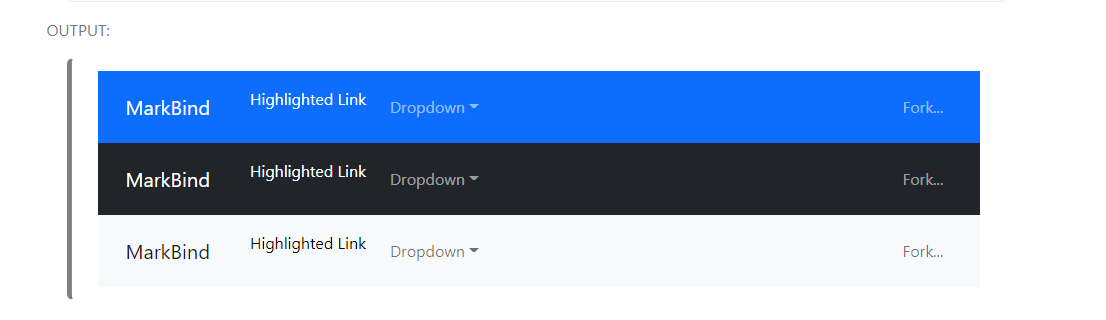
The relevant code:
Uh oh!
There was an error while loading. Please reload this page.
There was a problem hiding this comment.
Choose a reason for hiding this comment
The reason will be displayed to describe this comment to others. Learn more.
ahhh yes this is an issue, let me see if I can find a workaround for this 👍
Uh oh!
There was an error while loading. Please reload this page.
There was a problem hiding this comment.
Choose a reason for hiding this comment
The reason will be displayed to describe this comment to others. Learn more.
hi @jonahtanjz, I think it is okay to simply remove the
nav-linkclassname from the dropdown element to remove the extra padding. i.e.the dropdown element element already wraps its anchor element with a
nav-linkanyway so I think the outernav-linkis safe to remove. I think this way the navbar elements would also be more consistent as the classname is only applied to the anchor elements within the navbar elements, dropdown or not:I noticed that this would also affect the text colour of the anchor element and have accounted for it with another commit.
does this fix work, or is there a better approach?
There was a problem hiding this comment.
Choose a reason for hiding this comment
The reason will be displayed to describe this comment to others. Learn more.
I think this approach is fine but one main concern is that currently, most of the MarkBind sites will have the
nav-linkclass in thedropdowncomponent. If we go with this approach, users will have to remove the class on their end in the next release, which will be considered sort of a "breaking" change in the UI.One workaround that you can do for now is to have an overriding CSS within
Dropdown.vueto remove the padding fromnav-linkon the outer<li>element. This should ensure that there will not be extra padding with or without thenav-linkclass on thedropdowncomponent. Once we are ready to make a release with breaking changes, we can then remove this workaround.Note: You will need to update the user guide as well under
navbarto remove the class.There was a problem hiding this comment.
Choose a reason for hiding this comment
The reason will be displayed to describe this comment to others. Learn more.
I'm not sure if removing the nav-link class is the best way to go. Because that means that it won't use the bootstrap styling anymore and may not be consistent with the other elements that use the Bootstrap styling.
Should I still proceed to remove it anyway? @jonahtanjz
There was a problem hiding this comment.
Choose a reason for hiding this comment
The reason will be displayed to describe this comment to others. Learn more.
This is how tabs look like with the removal of the nav-link class from dropdown looks. Some styling can obviously be done but not sure it will be better than using the in built bootstrap