


Depreciated and disabled (server has been shut down)
API for the VS Statuses extension. Requests to the API are processed with new status updates from users being stored in a MYSQL database. Updates from users you are following are then returned by the API to be processed by the extension.
This API is built upon the Express.js framework utilising Typescript for added type safety.
Donations of any amount are greatly appreciated to help fund my uni-student diet of instant ramen packs and my bubble tea addiction (along with servers - those are expensive af!)

The API can be run locally over HTTPS by generating your own SSL Certificates and trusting them. By default the API runs on port 8000. To generate your own certificates and keys type the following:
openssl req -x509 -newkey rsa:2048 -keyout keytmp.pem -out cert.pem -days 365
openssl rsa -in keytmp.pem -out key.pem
This generates the cert.pem and key.pem certificates that are used in the API to create the HTTPS server. For more information visit the Express docs or the following link. Click Here.
Ensure you have the normal npm stuff installed before you run the following commands:
cd VS-Statuses-api
npm i
npm run start
Create a .env file in the root of the project and add the following fields with their respective values:
- NODE_ENV (Specify the environment we're running the server in e.g. "development")
- TYPEORM_CONNECTION (Specify the database type e.g. "mysql")
- TYPEORM_HOST (Specify the host of the database e.g. "localhost")
- TYPEORM_USERNAME (Specify the username for logging into the database e.g. "root")
- TYPEORM_PASSWORD (Specify the password associated with the username e.g. "password")
- TYPEORM_DATABASE (Specify the database name e.g. "database")
- TYPEORM_PORT (Specify the port the database is accessible from e.g. 3306)
- TYPEORM_ENTITIES (Specify the path to the compiled entity files e.g. "dist/entities/*.js")
- ACCESS_TOKEN_SECRET (Specify the secret key used for signing jwt's)
- REFRESH_TOKEN_SECRET (Specify the secret key used for signing jwt's)
Optionally TYPEORM_SYNCHRONIZE and TYPEORM_LOGGING may also be specified for a development environment.
For the production environment, TYPEORM_MIGRATIONS and TYPEORM_MIGRATIONS_DIR should also be specified instead of using database synchronisation.
See TypeORM and TypeORM Config with Env Variables for more information on configuring your local database with the env variables.
The main source code files for the API are under the src file in the root of the project. This consists of:
entities: Definitions for the ORM's used to access the information in the database through typeorm.interfaces: Definitions for interfaces for different objects used throughout the APIroutes: Definitions for each of the routes respective functionsutilities: Definitions for utility functions used in the API such as error handling, token generation and other functions
The scripts folder contains scripts used for deployment via AWS CodePipeline, CodeBuild and CodeDeploy. The server consists of an Apache2 server running on an Ec2 instance which proxies requests to the Express API running indefinitly via pm2, accessing a MySQL database running on Amazon's RDS to store and retrieve information. A CI/CD Pipeline is setup off the master branch so that any code successfully integrated is automatically deployed to the live server after approval. The appspec.yml and buildspec.yml are used for CodeDeploy and CodeBuild respectively. More information can be found here although the actual deployment differs slightly.
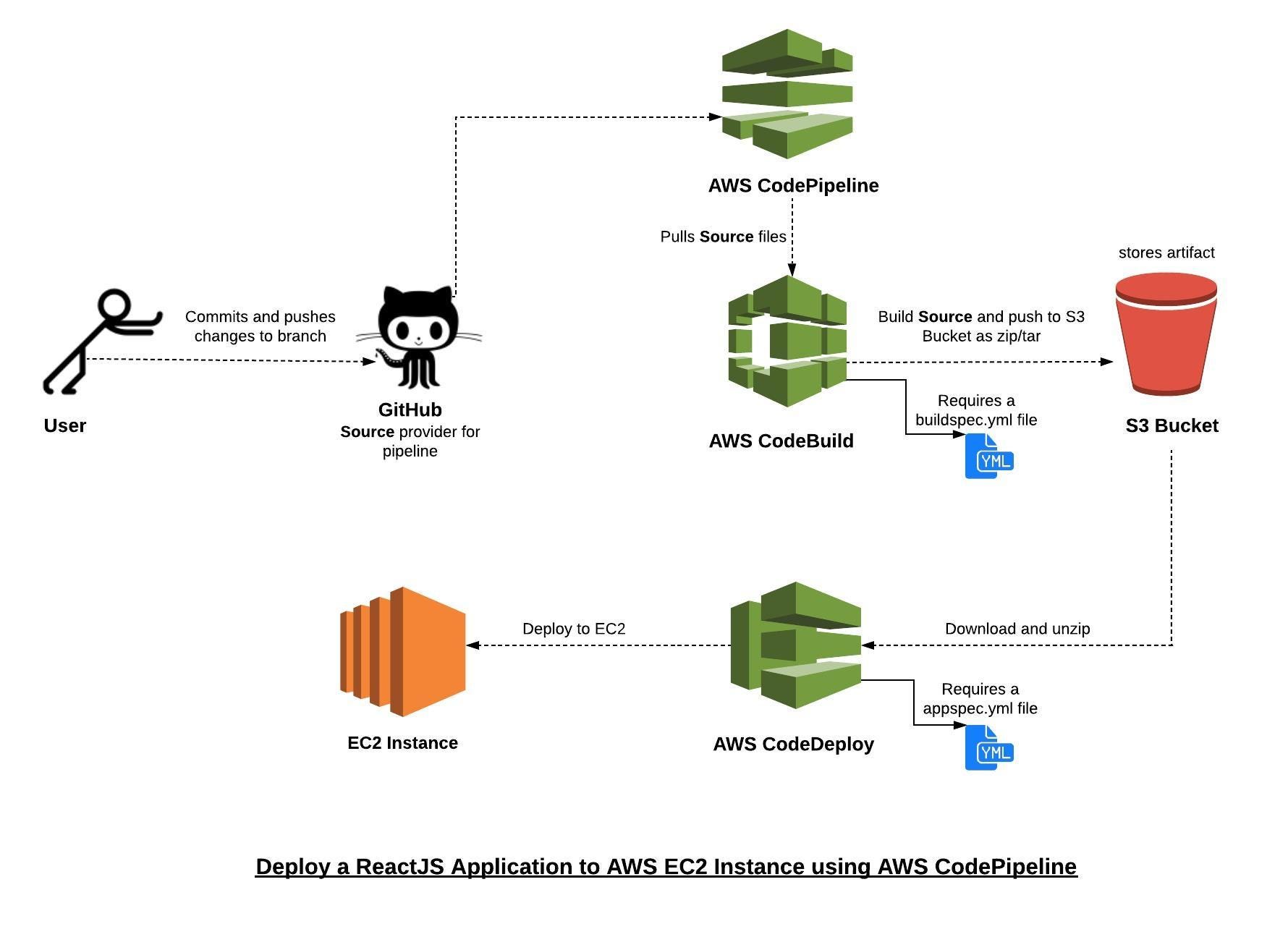
Migrations are run manually in order to avoid potential issues with automated syncing of the production database. In order to run migrations, ssh into the Ec2 instance and run the following commands:
npm run typeorm migration:generate -- -n <Name of migration here>
npm run typeorm migration:run
❤️ Great that you want to contribute; contributions are always very welcome! ❤️
Usual Github contribution flow:
- Fork this repository
- Clone your fork to your local development environment
- Create a branch from
masterfor you to work off of - Commit and push your changes
- Open a pull request
- Wait to get approved!
✨✨ And your done! ✨✨
Make sure to add comments as you make your changes. Follow existing coding patterns and idioms already present in the project.
Found a bug or got a suggestion? Feel free to submit a new Issue