Skip to content

fix legend entry text size with theme grey#78

Merged
Faye-yufan merged 7 commits intomasterfrom
fix-legend-entry-text-size
Sep 14, 2022
Merged

fix legend entry text size with theme grey#78
Faye-yufan merged 7 commits intomasterfrom
fix-legend-entry-text-size

Conversation

@tdhock
Copy link
Copy Markdown
Collaborator

@tdhock tdhock commented Sep 1, 2022

Hi @Faye-yufan I noticed an unexpected inconsistency while re-building the animint2 manual.
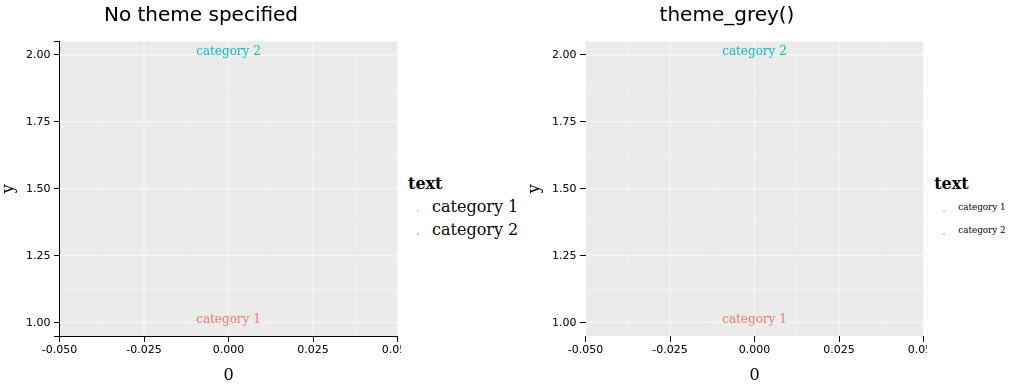
See screenshot below, notice how legend entry sizes are too small in the second plot. I added a test which says both should be 16px. Can you please investigate and fix?
image

@tdhock
Copy link
Copy Markdown
Collaborator Author

tdhock commented Sep 1, 2022

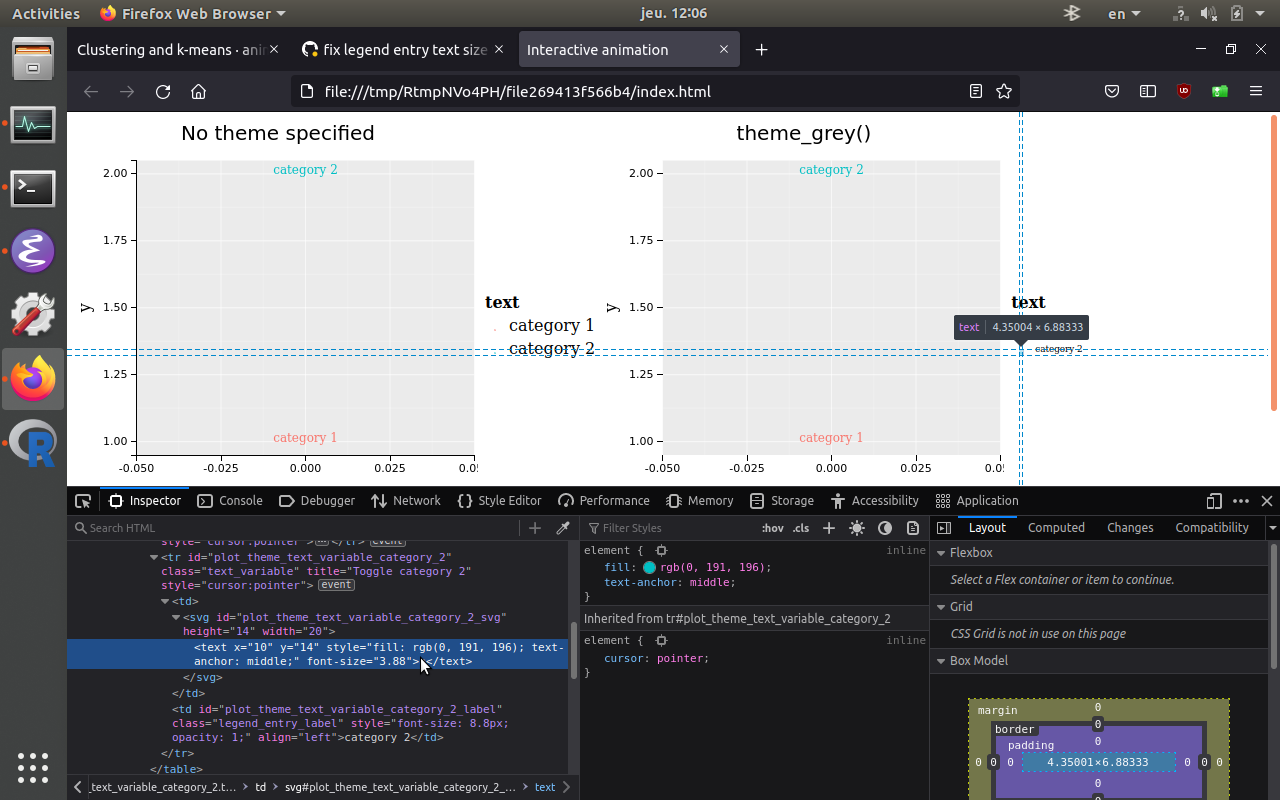
Also I noticed the "a" character which is drawn in the tiny svg to the left of each legend entry is too small to read, currently 3.88 -- can you please add a test which fails for the current code and then fix? (this is actually a separate issue which has existed for a long time, but shows up clearly in the test case that I created for this PR, so seems like a good opportunity to fix)
image

@tdhock
Copy link
Copy Markdown
Collaborator Author

tdhock commented Sep 1, 2022

Another inconsistency that is clear from this test case is that there are black axis lines drawn on the first plot but not on the second. For consistency with default ggplot2 appearance we could remove the black axis lines from the first? What do you think?

@Faye-yufan
Copy link
Copy Markdown
Contributor

Faye-yufan commented Sep 1, 2022

Appreciate the feedback.

@tdhock
Copy link
Copy Markdown
Collaborator Author

tdhock commented Sep 2, 2022

thanks for this quick fix!
However I don't think the logic of checking for a complete theme is correct.
I added a new test case to illustrate.
If you use a complete theme and then overwrite the legend.text size, then that value of text size should be used, even though it is a complete theme. (current code takes the default value)
Can you please try a different fix that can handle this as well?

@Faye-yufan
Copy link
Copy Markdown
Contributor

Thanks for the info!
I'm trying to figure out how to distinguish if the legend text size was input or by default.

@tdhock
Copy link
Copy Markdown
Collaborator Author

tdhock commented Sep 6, 2022

I don't think the logic should care whether or not the size was default. Also I think the default value of 16 should be specified in the theme, not in the getLegendList function. But we previously observed that changing the theme value to 16 results in static ggplot text which is too big.
The tricky part is that ggplot2 text size units are in points/pts (see ?gpar and ?element_text), which is not the same as animint2/svg text size units (px/pixels).
One solution may be to to try using "pt" instead of "px" in animint JS code. "pt" does appear to be a valid CSS unit, https://developer.mozilla.org/en-US/docs/Web/CSS/font-size#values can you please try that? In that case we probably want a default value smaller than 16 (since 16pt is probly a lot bigger than 16px).

@Faye-yufan
Copy link
Copy Markdown
Contributor

Interesting, thanks a lot! Will do.

@Faye-yufan
Copy link
Copy Markdown
Contributor

Faye-yufan commented Sep 8, 2022

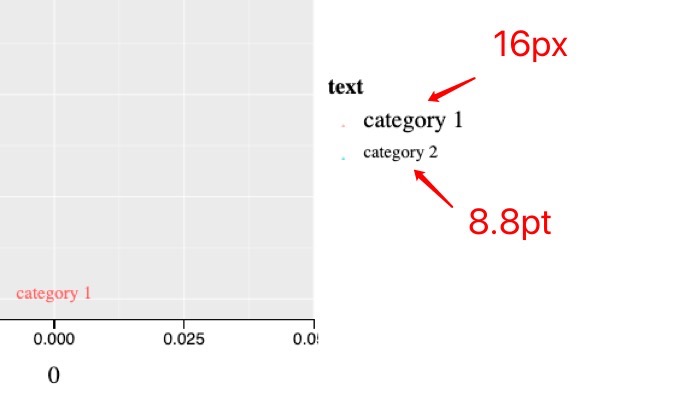
8.8pt(ggplot theme default) seems still smaller than 16px(animint default) on my screen.
image

And I start considering that px is still the better option after reading this article https://www.w3.org/Style/Examples/007/units.en.html since pt is the absolute units in CSS, it is not as good as px except for printed output, the legend entry text size might not be aligned with other elements of the plot.

The magic unit of CSS, the px, is a often a good unit to use, especially if the style requires alignment of text to images, or simply because anything that is 1px wide or a multiple of 1px is guaranteed to look sharp.

Indeed, it looked inappropriately large on a static plot if I modified the theme. How about magnifying the font size proportionally to px, based on ggplot theme output? something like this:

.style("font-size", function(d){ return d["text_size"] * 1.82 + "px"})

@Faye-yufan
Copy link
Copy Markdown
Contributor

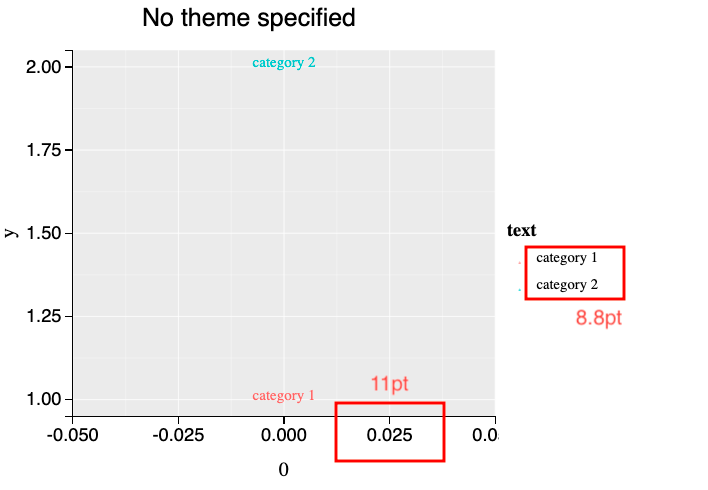
Now the rules of legend and axis text size are:

  1. Default using ggplot2 theme_grey() text size, with unit pt in CSS styles
  2. If use numeric/number to define the text size, the unit would be pt
  3. If define with a character/string, it must end with px or pt

The default is different from what animint previous looked like.
Screen Shot 2022-09-10 at 6 44 48 PM

test_that("Warning for invalid character/string input ", {
viz <- list(
s=scatterFacet + theme(axis.text.x = element_text(size = "12p")))
expect_warning(animint2HTML(viz), "axis.text.x is not numeric nor character ending with \'pt\' or \'px\', will be default 11pt")
Copy link
Copy Markdown
Collaborator Author

Choose a reason for hiding this comment

The reason will be displayed to describe this comment to others. Learn more.

this is a good test

@tdhock
Copy link
Copy Markdown
Collaborator Author

tdhock commented Sep 13, 2022

This looks great, thanks for the fix. OK to merge now if you like, after you update DESCRIPTION/NEWS.
Also for a future PR: it is possible for the user to specify other text sizes in this way? (axis names, axis tick labels, facet titles, plot title)

@Faye-yufan
Copy link
Copy Markdown
Contributor

Yes, it is possible and easier to specify other text since we had settled down the font size strategy. Thanks!

@Faye-yufan Faye-yufan merged commit d475906 into master Sep 14, 2022
@Faye-yufan Faye-yufan deleted the fix-legend-entry-text-size branch September 14, 2022 20:58
Sign up for free to join this conversation on GitHub. Already have an account? Sign in to comment

Labels

None yet

Projects

None yet

Development

Successfully merging this pull request may close these issues.

2 participants