METRON-1224: Add time range selection to search control #796
Conversation


|
One thing that would be cool would be if when I clicked on a timestamp in the table, i was able to select from quick ranges related to that timestamp. So 30 minutes either side of Selected, 1 hr leading up to selected, etc etc |
 iraghumitra
changed the title
iraghumitra
changed the title

|
@ottobackwards that's a good suggestion can you create a ticket with some more details about new quick filters and any design that you have in mind. I would be happy to pick it up as a follow-on |

|
@ottobackwards @iraghumitra i already filed a feature request on that: https://issues.apache.org/jira/browse/METRON-1248 |
|
I tested the PR. The only issue I see is that when I paste the timestamp or manually type it into the boxes it overwrites it with the calendar entries. So essentially the only way to get the timestamp in is to enter it through the calendar selection. Other than that it works great. I tested the positive case and the negative case. The search functionality works. I am a conditional +1 on this, because I do want to be able to enter the timestamps manually (not through the calendar picker). If you can fix that I think this PR is good to go |
|
On my objection about not being able to paste a timestamp, I filed a follow-on Jira so that this PR can go in |

|
I tested this as well. First a couple things I'm curious about:
I also found some issues. The first is related to time-range selections that include 'Now' as part of the range (Last 7 days, Last 5 minutes, Today so far, etc). This should be a sliding window so I would expect the search query to be different every time the results are refreshed. For example when I select "Last 5 minutes" this is the query that is immediately sent (only query field is shown for simplicity): After several cycles the query does not change although "Last 5 minutes" is a different time window now: I would also expect the time range to change in the time range selector dropdown ("2017-10-19 10:16:33 to Now" for example) as well. I also found the time range selector value isn't populated correctly when loading a saved or recent search. For example when I select a recent or saved search the time range clause is included in the search bar and the searches now return a 500 error: Based on how it works normally I would expect there to be no time range clause in the search bar and the time range dropdown to be populated correctly instead. A couple other minor issues:
As far as testing is concerned, this is my understanding of the tests included in this PR:
This is a good start but I think we need more to cover the issues I found. I would suggest adding tests to:
|

|
I definitely like the testing section @merrimanr I'd like to see the test in existence in the PR split into the test cases that you suggest. Testing those time range quicklinks turn into sensible timestamp pairs shouldn't even really require an end-to-end test, just a quick set of unit-style tests of the javascript. |
|
@merrimanr plz find my replies
|
|
Just tried this again and I could not get it to work. I noticed master has not been merged in recently so that could be the cause. Here are the issues I see:
I suspect something is off so I will pause on reviewing until a search with a time range is working again. |
|
@merrimanr |
|
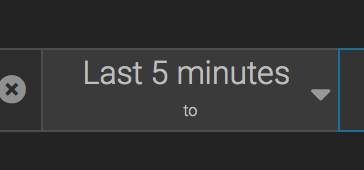
A few things didn't work for me. First, when I select a time range of (t-x minutes) the start and end time does not fill in per screen shot below.
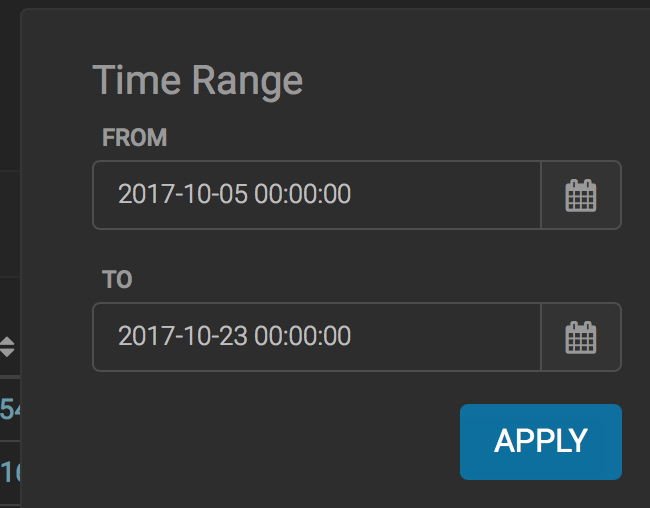
The time box was initially populated with the word "now", which did not allow me to save. I had to manually enter valid timestamps in order for this to work:
When I click to save a search I get the following exception: TypeError: path must be absolute or specify root to res.sendFile |
|
@merrimanr @james-sirota There was a bug in handling the recent searches that were in old format can you check it now. Sorry for the trouble |
|
@iraghumitra looks like everything has been addressed. I am +1 on my side, but lets have @merrimanr chime in |

|
This issue is still not fixed:
I submitted a PR against this PR that should address it (also has the latest version of master merged in). Let me know if you think this is the right way to fix it. Seems kind of strange to import a class (QueryBuilder) in alerts-list into a service but I'll let you decide if that is ideal. Saved search is working now and everything else seems to function correctly. I did notice a regression where if I rename a column, type a query with the friendly name in the query box (ie. sourceType:snort) results are no longer returned. Not sure if that was introduced in this PR or not because I don't think we are testing for it. I am still not a fan of how the Time Range selection works. The "now" designation is essentially meaningless because you can't save a range with "now" in either FROM or TO. I still agree with all my previous complaints about this too. If the community feels it is working correctly then I would not hold up this PR over it. The e2e tests are still insufficient and failing. I gave some recommendations here for your reference. |
Fix for sliding window queries
|
@merrimanr I have added e2e tests as suggested and merged your PR too. Plz, let me know if I missed anything. I had to omit assertions for a couple of quick ranges as they can cause trouble when we have leap years and 29 day months. I hope it's not an issue. |
|
I think the test coverage looks pretty good. I'm +1 conditional on the e2e tests passing. |
|
login to application metron-alerts App metron-alerts configure table metron-alerts Search metron-alerts tree view metron-alerts facets metron-alerts alert status metron-alerts alert status
|
login to application metron-alerts App metron-alerts configure table metron-alerts Search metron-alerts tree view metron-alerts facets metron-alerts alert status metron-alerts alert status Executed 42 of 42 specs SUCCESS in 5 mins 2 secs. |
|
+1 |

5 participants


Contributor Comments
This PR adds a time-range selector for search bar in alerts-ui. The time-range selectors have the following features
Testing
Pull Request Checklist
Thank you for submitting a contribution to Apache Metron.
Please refer to our Development Guidelines for the complete guide to follow for contributions.
Please refer also to our Build Verification Guidelines for complete smoke testing guides.
In order to streamline the review of the contribution we ask you follow these guidelines and ask you to double check the following:
For all changes:
For code changes:
Have you included steps to reproduce the behavior or problem that is being changed or addressed?
Have you included steps or a guide to how the change may be verified and tested manually?
Have you ensured that the full suite of tests and checks have been executed in the root metron folder via:
Have you written or updated unit tests and or integration tests to verify your changes?
If adding new dependencies to the code, are these dependencies licensed in a way that is compatible for inclusion under ASF 2.0?
Have you verified the basic functionality of the build by building and running locally with Vagrant full-dev environment or the equivalent?
For documentation related changes:
Have you ensured that format looks appropriate for the output in which it is rendered by building and verifying the site-book? If not then run the following commands and the verify changes via
site-book/target/site/index.html:Note:
Please ensure that once the PR is submitted, you check travis-ci for build issues and submit an update to your PR as soon as possible.
It is also recommended that travis-ci is set up for your personal repository such that your branches are built there before submitting a pull request.