Skip to content
This repository was archived by the owner on Dec 18, 2018. It is now read-only.

Enable TCP Loopback Fast Path (Windows)#416

Merged
cesarblum merged 2 commits into
aspnet:devfrom
benaadams:loopback-fastpath
Feb 18, 2016
Merged

Enable TCP Loopback Fast Path (Windows)#416
cesarblum merged 2 commits into
aspnet:devfrom
benaadams:loopback-fastpath

Conversation

@benaadams
Copy link
Copy Markdown
Contributor

Enable TCP Loopback Fast Path; where the IP layer is skipped, for lower latency for localhost comms. For example when fronted by the HttpPlatformHandler+IIS reverse proxy

TCP Loopback Fast Path reference: http://blogs.technet.com/b/wincat/archive/2012/12/05/fast-tcp-loopback-performance-and-low-latency-with-windows-server-2012-tcp-loopback-fast-path.aspx

Recommended work around for open issue in libuv "Enable Fast TCP Loopback on Win" libuv/libuv#489

Related: "Confirm HttpPlatformHandler uses Fast TCP Loopback" aspnet/IISIntegration#29

Resolves #420

Copy link
Copy Markdown
Member

Choose a reason for hiding this comment

The reason will be displayed to describe this comment to others. Learn more.

Why?

Copy link
Copy Markdown
Contributor Author

Choose a reason for hiding this comment

The reason will be displayed to describe this comment to others. Learn more.

Libuv reference counts and uses that to determine if it can shutdown loop. OnStop unreferences thread' OnStopRude calls Dispose on all the items still referenced and they call close which hopefully unreferences them. So OnStopRuder explicitly unreferences them.

Copy link
Copy Markdown
Contributor Author

Choose a reason for hiding this comment

The reason will be displayed to describe this comment to others. Learn more.

Actually will split this to different PR

@benaadams benaadams force-pushed the loopback-fastpath branch 2 times, most recently from df6bc8b to 948ac69 Compare November 23, 2015 14:13
Copy link
Copy Markdown
Member

Choose a reason for hiding this comment

The reason will be displayed to describe this comment to others. Learn more.

nit: casing

@benaadams
Copy link
Copy Markdown
Contributor Author

Rebased

Copy link
Copy Markdown
Contributor

Choose a reason for hiding this comment

The reason will be displayed to describe this comment to others. Learn more.

nit: var

@muratg
Copy link
Copy Markdown
Contributor

muratg commented Dec 3, 2015

Looks good to me, but I'll wait for @davidfowl or @halter73 to give the squirrel.

@benaadams
Copy link
Copy Markdown
Contributor Author

More deets https://msdn.microsoft.com/en-us/library/windows/desktop/jj841212(v=vs.85).aspx

The socket that plans to initiate the connection request must apply this IOCTL before making the connection request. So the socket used by the connect, ConnectEx, WSAConnect, WSAConnectByList, or WSAConnectByName function to initiate the connection must apply this IOCTL to use the fast path for loopback operations.

The socket that is listening for the connection request must apply this IOCTL before accepting the connection. So the socket used by the listen function must apply this IOCTL so any sockets that are accepted will use the fast path for loopback. Any sockets returned by the listen function and passed to the accept, AcceptEx, or WSAAccept function will be marked to use the special fast path for loopback operations.

Once an application establishes the connection on a loopback interface using the fast path, all packets for the lifetime of the connection must use the fast path.

Applying SIO_LOOPBACK_FAST_PATH to a socket which will be connected to a non-loopback path will have no effect.

^--- suggests no side effects; when not loopback

This TCP loopback optimization results in packets that flow through the Transport Layer (TL) instead of the traditional loopback through the Network Layer. This optimization improves the latency for loopback packets. Once an application opts in for a connection level setting to use the loopback fast path, all packets will follow the loopback path. For loopback communications, congestion and packet drop are not expected. The notion of congestion control and reliable delivery in TCP will be unnecessary. This, however, is not true for flow control. Without flow control, the sender can overwhelm the receive buffer, leading to erroneous TCP loopback behavior. The flow control in the TCP optimized loopback path is maintained by placing send requests in a queue. When receive buffer is full, the TCP/IP stack guarantees that the sends won't complete until the queue is serviced maintaining flow control.

Copy link
Copy Markdown
Contributor

Choose a reason for hiding this comment

The reason will be displayed to describe this comment to others. Learn more.

Does this work on Nano?

@cesarblum
Copy link
Copy Markdown
Contributor

Tested this on Windows 7, 8 and 2008 R2, both local connection and connection from another machine. Everything looks fine except I can't do a remote connection to 2008 R2. Not caused by the change though, I can't do it even without it. Might be a bug we have to look into, but I'm actually more suspicious it's something that needs to be setup correctly.

@cesarblum
Copy link
Copy Markdown
Contributor

Next I'll make sure this does't cause issues on Linux and Mac.

@benaadams
Copy link
Copy Markdown
Contributor Author

Opened windows advanced firewall ports on 2008?

@cesarblum
Copy link
Copy Markdown
Contributor

@benaadams Thanks, that worked. For 7 and 8 I only had to create an endpoint in Azure portal, but 2008 required that extra step.

@cesarblum
Copy link
Copy Markdown
Contributor

@benaadams Can you rebase?

Enable TCP Loopback Fast Path; where the IP layer is skipped, for lower
latency for localhost comms, like HttpPlatformHandler+IIS reverse proxy

http://blogs.technet.com/b/wincat/archive/2012/12/05/fast-tcp-loopback-performance-and-low-latency-with-windows-server-2012-tcp-loopback-fast-path.aspx

Have to do it this way due to open issue in libuv

Loopback fast path: libuv/libuv#489

Related: "Confirm HttpPlatformHandler uses Fast TCP Loopback"
aspnet/IISIntegration#29
@benaadams
Copy link
Copy Markdown
Contributor Author

Rebased

@cesarblum
Copy link
Copy Markdown
Contributor

@benaadams Yep, hanging here too. For me it's hanging before the test summary is displayed.

@cesarblum
Copy link
Copy Markdown
Contributor

@benaadams Have you see this in any of your runs?

Microsoft.AspNetCore.Server.KestrelTests.NetworkingTests.SocketCanRead [FAIL]
  System.Net.Sockets.SocketException : A connect request was made on an already connected socket
  Stack Trace:
       at System.Net.Sockets.Socket.BeginConnectEx(EndPoint remoteEP, Boolean flowContext, AsyncCallback callback, Object state)
       at System.Net.Sockets.Socket.BeginConnect(EndPoint remoteEP, AsyncCallback callback, Object state)
       at System.Threading.Tasks.TaskFactory`1.FromAsyncImpl[TArg1](Func`4 beginMethod, Func`2 endFunction, Action`1 endAction, TArg1 arg1, Object state, TaskCreationOptions creationOptions)
       at System.Net.Sockets.SocketTaskExtensions.ConnectAsync(Socket socket, EndPoint remoteEndPoint)
    D:\src\aspnet\KestrelHttpServer\test\Microsoft.AspNetCore.Server.KestrelTests\NetworkingTests.cs(143,0): at Microsoft.AspNetCore.Server.KestrelTests.NetworkingTests.<>c__DisplayClass7_0.<<SocketCanRead>b__3>d.MoveNext()
    --- End of stack trace from previous location where exception was thrown ---
       at System.Runtime.CompilerServices.TaskAwaiter.ThrowForNonSuccess(Task task)
       at System.Runtime.CompilerServices.TaskAwaiter.HandleNonSuccessAndDebuggerNotification(Task task)
       at System.Runtime.CompilerServices.TaskAwaiter.GetResult()
    D:\src\aspnet\KestrelHttpServer\test\Microsoft.AspNetCore.Server.KestrelTests\NetworkingTests.cs(151,0): at Microsoft.AspNetCore.Server.KestrelTests.NetworkingTests.<SocketCanRead>d__7.MoveNext()
    --- End of stack trace from previous location where exception was thrown ---
       at System.Runtime.CompilerServices.TaskAwaiter.ThrowForNonSuccess(Task task)
       at System.Runtime.CompilerServices.TaskAwaiter.HandleNonSuccessAndDebuggerNotification(Task task)
    --- End of stack trace from previous location where exception was thrown ---
       at System.Runtime.CompilerServices.TaskAwaiter.ThrowForNonSuccess(Task task)
       at System.Runtime.CompilerServices.TaskAwaiter.HandleNonSuccessAndDebuggerNotification(Task task)
    --- End of stack trace from previous location where exception was thrown ---
       at System.Runtime.CompilerServices.TaskAwaiter.ThrowForNonSuccess(Task task)
       at System.Runtime.CompilerServices.TaskAwaiter.HandleNonSuccessAndDebuggerNotification(Task task)

@benaadams
Copy link
Copy Markdown
Contributor Author

Wow, never - coreclr bug? Are you on later feed? What runtime, OS?

@cesarblum
Copy link
Copy Markdown
Contributor

Win10, volatile feed. This is on CoreCLR.

@benaadams
Copy link
Copy Markdown
Contributor Author

Was using ci; trying volatile

@cesarblum
Copy link
Copy Markdown
Contributor

How are you using ci without hitting this:

Unable to resolve Microsoft.DotNet.CoreHost (>= 0.0.1-beta-00001) for DNXCore,Version=v5.0.

?

@benaadams
Copy link
Copy Markdown
Contributor Author

Used the dotnet feed for something else; think it put it in my local cache

@benaadams
Copy link
Copy Markdown
Contributor Author

Freezing at first test summary on volatile rather than second :(

@cesarblum
Copy link
Copy Markdown
Contributor

Removing calls to ConnectAsync from lines 143 and 221 of NetworkingTests.cs got me past errors. Still hanging after test summary though.

var socket = new Socket(addressFamily, SocketType.Stream, ProtocolType.Tcp);
if (PlatformApis.IsWindows)
{
const int SIO_LOOPBACK_FAST_PATH = (-1744830448);
Copy link
Copy Markdown
Contributor

Choose a reason for hiding this comment

The reason will be displayed to describe this comment to others. Learn more.

Why the parens?

Copy link
Copy Markdown
Contributor Author

Choose a reason for hiding this comment

The reason will be displayed to describe this comment to others. Learn more.

Copy paste code from the blog post on example.

@cesarblum
Copy link
Copy Markdown
Contributor

🚢 after removing offending lines.

@benaadams
Copy link
Copy Markdown
Contributor Author

Removing calls to ConnectAsync from lines 143 and 221 of NetworkingTests.cs got me past errors. Still hanging after test summary though.

D'oh... double connect

@benaadams
Copy link
Copy Markdown
Contributor Author

Removed lines, made the changes - never saw the error as couldn't get to that point in tests :(

@cesarblum
Copy link
Copy Markdown
Contributor

@benaadams Still seeing hangs?

@benaadams
Copy link
Copy Markdown
Contributor Author

Still seeing hangs?

Yep; but see hangs with everything. Tried #633 to resolve them, didn't help.

Not sure if its kestrel shutdown, tests, xunit or dotnet stuff - but started happening for me on move to dotnet from dnx.

Know which is the xunit repo that the tests reference?

@cesarblum
Copy link
Copy Markdown
Contributor

This is the runner that we're using: https://github.com/xunit/xunit/tree/master/src/xunit.console

@benaadams
Copy link
Copy Markdown
Contributor Author

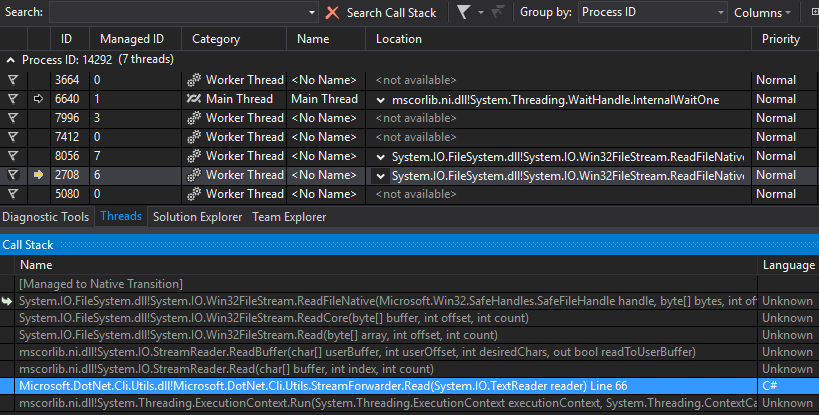
Always seem get stuck here

@benaadams
Copy link
Copy Markdown
Contributor Author

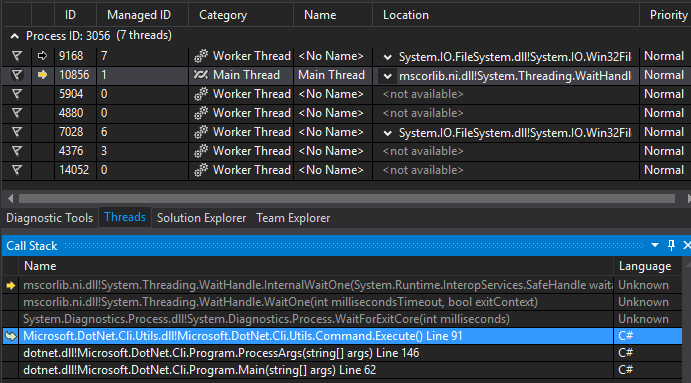
Other thread is stuck at which looks to be _process.WaitForExit();

@benaadams
Copy link
Copy Markdown
Contributor Author

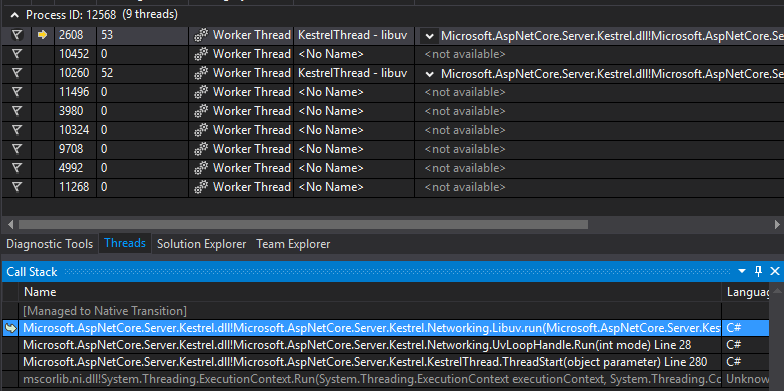
K and the process is stuff because the libuv is still in Run

kestrel

@benaadams
Copy link
Copy Markdown
Contributor Author

@benaadams
Copy link
Copy Markdown
Contributor Author

@CesarBS Added "Talk to the hand" stop to #633 which sorts out the hangs.

@cesarblum
Copy link
Copy Markdown
Contributor

Once #623 is merged the hands should be gone. As far as this PR goes, everything looks good now.

@cesarblum cesarblum merged commit ffa8f3f into aspnet:dev Feb 18, 2016
@benaadams benaadams deleted the loopback-fastpath branch May 10, 2016 10:59
Sign up for free to subscribe to this conversation on GitHub. Already have an account? Sign in.

Labels

None yet

Projects

None yet

Development

Successfully merging this pull request may close these issues.

7 participants