Add ZipDirectory and Unzip tasks#3291
Conversation


There was a problem hiding this comment.
Do we always want this? Seems like it could be a giant list in some cases and use up a lot of memory and may or may not be needed? The output folder might be enough?
There was a problem hiding this comment.
Its what <Copy /> does so I though I'd ... 😑 ... 😎 copy it.
Technically you could copy a ton of files as well
<ItemGroup>
  <Files Include="Folder\**" />
</ItemGroup>

<Copy
  SourceFiles="@(Files)"
  DestinationFolder="Foo"
  />
And we'll waste all of the memory. What should I do?

There was a problem hiding this comment.
@jeffkl Would it save memory to make _unzippedFiles and _destinationFiles a collection of tuples of sourceTaskItem and destinationPath.FullName? That way if you access the output properties DestinationFiles or UnzippedFiles you could build the full list of TaskItems on demand?
There was a problem hiding this comment.
We decided to just remove it. If necessary, we can add the functionality later.
 jeffkl
changed the title
jeffkl
force-pushed
the
zip
branch
2 times, most recently
from
jeffkl
changed the title
jeffkl
force-pushed
the
zip
branch
2 times, most recently
from
8a91c23 to
401c24d
Compare

There was a problem hiding this comment.
I'm a bit worried about this interface. It's pretty much impossible to get correct incremental behavior out of this. You'd have to:
- Enumerate the contents of the folder just before the target that invokes
ZipDirectory. - Additionally compute a hash of those items to avoid the removed-an-input problem.
- Use the new stuff in the target that calls this.
Accepting Item[] would be more complex in implementation but easier to make correct.
There was a problem hiding this comment.
I discussed this with @AndyGerlicher and we're concerned more about the complexity required to make it incremental out-of-the-box. So we're going to leave it as-is.
There was a problem hiding this comment.
I think if we wrote a target that used this we would need to make it incremental. But given that it zips a directory, it doesn't seem worth the complexity to implement at the task level. It might be worth writing a sample in the docs page that is a target that zips your output folder that would be incremental as an example.
jeffkl
force-pushed
the
zip
branch
3 times, most recently
from
2abd49c to
d7e7f23
Compare
There was a problem hiding this comment.
Does this not deserve an Overwrite param?
There was a problem hiding this comment.
Why not just create? Didn't we make something create instead of erroring in this situation fairly recently?
There was a problem hiding this comment.
This is the directory to zip up, so it must exist
There was a problem hiding this comment.
Yes, that . . . is definitely true 😬
There was a problem hiding this comment.
Do you think this is sufficiently long-running/IO intensive that we should Yield() here?
There was a problem hiding this comment.
Yeah the zip file could contain a large file, I'll add it
There was a problem hiding this comment.
I was at one point, good catch
There was a problem hiding this comment.
Worth using the CopyToAsync overload that takes a CancellationToken to speed up canceling if we're stuck in a huge file? Possibly not . . .
There was a problem hiding this comment.
Make this a CancellationTokenSource instead and pass around a CancellationToken?

|
@Microsoft/msbuild-maintainers this is ready for final review |

There was a problem hiding this comment.
Don't forget to manually port these to the internal VS repo after this merges.
There was a problem hiding this comment.
Use
[PlatformSpecific(TestPlatforms.Windows)]instead.


There was a problem hiding this comment.
Why not eagerly exit to reduce the time it takes to finish the build on error?
There was a problem hiding this comment.
Ah, to show all errors at once rather than one at a time. The alternative is to complicate things and check everything first, and do the extraction second.
In reply to: 188788554 [](ancestors = 188788554)
There was a problem hiding this comment.
Shouldn't Reacquire be in a finally block? Or does the engine handle this?
There was a problem hiding this comment.
What happens if there's files in multiple archives with the same path? Should there be an option to warn or error about this?
There was a problem hiding this comment.
I think its okay to just ignore it, do you want me to log something?
There was a problem hiding this comment.
I guess people can use the diagnostic log to see the task inputs, so I guess they already have insight into the sources.
There was a problem hiding this comment.
Should it be made readonly after the write to preserve user data? :)
There was a problem hiding this comment.
I'm not sure. I'd assume that if the file is readonly in the archive it should be readonly after extraction but I don't see attributes like that in the ZipArchiveEntry class... It seems a little weird to be setting the readonly attribute based on what the file used to have. Thoughts?
There was a problem hiding this comment.
nit: named constant for the buffer size.
There was a problem hiding this comment.
The other task wraps each IO in a try catch. Should this one be wrapped too?
There was a problem hiding this comment.
Shouldn't the returned task be awaited before the entire task returns?
There was a problem hiding this comment.
Curious what happens if another file exists in the destination and is longer than the archive entry. Does this override or does it just copy over the source stream, leaving some trailing bytes from the destination? The CopyTo documentation is a bit unclear on this.
There was a problem hiding this comment.

Add unit tests for Unzip

|
`Copy` doesn’t restore the RO bit, so I’d say don’t do it here either.
|
|
@cdmihai can you please review my changes to address your comments? I think this is ready to merge but wanted to make sure you were happy. |
| [Required] | ||
| public ITaskItem SourceDirectory { get; set; } | ||
|
|
||
| public override bool Execute() |
There was a problem hiding this comment.
Can you please make this yieldable as well?

| { | ||
| foreach (ZipArchiveEntry zipArchiveEntry in sourceArchive.Entries.TakeWhile(i => !_cancellationToken.IsCancellationRequested)) | ||
| { | ||
| FileInfo destinationPath = new FileInfo(Path.Combine(destinationDirectory.FullName, zipArchiveEntry.FullName)); |

There was a problem hiding this comment.
Sorry to comment after you've just merged, but would you consider normalizing directory separators? One of the most common errors I've encountered is that zips created on Windows using \ as a directory separator will not extract correctly on Linux/macOS. Instead \ becomes part of the filename.
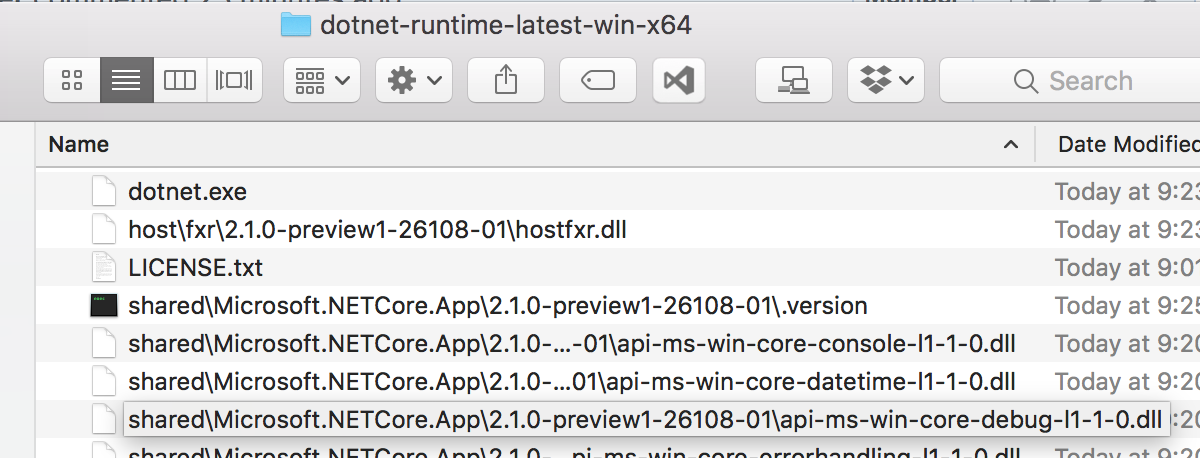
This common error is something we worked around in the unzip task used in the .NET Core build system: see https://github.com/dotnet/arcade/blob/0d117c0b3649565a6d9aacf9f435e29ab67c3c0d/src/Microsoft.DotNet.Build.Tasks.IO/src/UnzipArchive.cs#L64-L76
|
@natemcmaster I'll double check but I think my unit tests cover that scenario. |


| try | ||
| { | ||
| Log.LogMessageFromResources(MessageImportance.High, "ZipDirectory.Comment", sourceDirectory.FullName, destinationFile.FullName); | ||
| ZipFile.CreateFromDirectory(sourceDirectory.FullName, destinationFile.FullName); |

There was a problem hiding this comment.
I think need make the "includeBaseDirectory" argment as an option
7 participants


ZipDirectorytask zips up a whole directory. It will fail if the destination file already exists. Zipping individual files is a lot harder because you have to calculated a base path for all files and make zip entries relative to that. The code in the CLR that does this is very efficient by reusing string buffers and I didn't want to have to replicate the code. So for now there's onlyZipDirectoryinstead of a more genericZip.Unzipunzips files from an archive to a directory.Fixes #1781