[Accessibility] Incorrect ScreenReader blue rectangle for a new character in TextCompoments #3897


Description

Related issues:
- [Accessibility Insights] An element of the given ControlType must support the Text pattern for edit controls: TextBox/MaskedTextBox/ComboBox/NumericUpDown/DomainUpDown #1588
- [Accessibility] An element of the given ControlType must support the Text pattern for PropertyGrid: Text tree items #3683
- DataGridView's edit controls don't support UIA Text pattern as required by UIA rules #2786
- [Accessibility] ToolStripTextBox must support Text pattern #3860
The issue reproduces only in a context of Text pattern implementation
- .NET Core Version: 5.0.0-rc.1.20431.5
- Have you experienced this same bug with .NET Framework?: No (Text pattern is not implemented)
Problem description:
-
ScreenReader doesn't show the blue rectangle around an added character when typing a text in
ToolStripTextBox,DataGridViewTextBoxCell,PropertyGridView.GridViewEdit
Expected behavior:
- ScreenReader should show the blue rectangle for a new character like in
TextBox
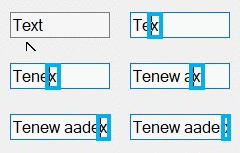
Minimal repro:
- Create .Net 5.0 app
- Add
ToolStripTextBox,DataGridViewTextBoxCell,PropertyGridView.GridViewEditto the app - Run the app and Narrator
- Try to type a text in a text field