Conversation


 RussKie
added
the
🚫 * NO-MERGE *
RussKie
added
the
🚫 * NO-MERGE *

| API missing from old) --> | ||
| <RunPreviousReleaseApiCompatForSrc>true</RunPreviousReleaseApiCompatForSrc> | ||
| <RunPreviousReleaseMatchingRefApiCompat>false</RunPreviousReleaseMatchingRefApiCompat> | ||
| <PreviousReleaseAPICompatLeftOperand>".NET Core 3.0 reference"</PreviousReleaseAPICompatLeftOperand> |

There was a problem hiding this comment.
In other places we use "implementation"
| <PreviousReleaseAPICompatLeftOperand>".NET Core 3.0 reference"</PreviousReleaseAPICompatLeftOperand> | |
| <PreviousReleaseAPICompatLeftOperand>".NET Core 3.0 implementation"</PreviousReleaseAPICompatLeftOperand> |
or we need to change in other places to use "reference" for the PreviousReleaseAPICompatLeftOperand

There was a problem hiding this comment.
Similar to above try to use more generic names so you don't need to version these.

Codecov Report
@@                  Coverage Diff                  @@
##           release/3.1       #2112         +/-   ##
=====================================================
- Coverage     26.51119%   26.50336%   -0.00783%
=====================================================
  Files              805         805
  Lines           268083      268083
  Branches         38068       38068
=====================================================
- Hits             71072       71051         -21
- Misses          191933      191952         +19
- Partials          5078        5080          +2
|

| </PropertyGroup> | ||
|
|
||
| <ItemGroup> | ||
| <PackageReference Include="System.Windows.Forms" Version="$(StableVersionToWitness)" /> |
There was a problem hiding this comment.
Do you actually ship packages for these? I think you don't: instead you want to get them out of your shared framework ref pack. That gets referenced automatically when using Sdk="Microsoft.NET.Sdk.WindowsDesktop" and <UseWindowsForms>true</UseWindowsForms>. Specifying StableVersionToWitness is probably redundant, but if you wanted to the right way to do so would be to use the property that controls the version of the refpack you use.
There was a problem hiding this comment.
but if you wanted to the right way to do so would be to use the property that controls the version of the refpack you use
That is what I want to be doing :)
Is that <RuntimeFrameworkVersion>?
There was a problem hiding this comment.
@dsplaisted / @nguerrera what property will control the version of the WindowsDesktopRefPack (presumably without mucking with the version of the NETCore App one)

There was a problem hiding this comment.
The version of the RefPack can be specified as TargetingPackVersion metadata on FrameworkReference. RuntimeFrameworkVersion can also be per FrameworkReference metadata.
There was a problem hiding this comment.
There was a problem hiding this comment.
@nguerrera When I add a FrameworkReference section, the project fails to load in VS. Is this because it is a WindowsDesktop SDK-style project?
There was a problem hiding this comment.
I would need to see a repro. What error do you get. This should work fine for windows desktop projects. Assuming you have not disabled the default framework references, make sure you are doing a FrameworkReference Update, not Include as in the example above.
There was a problem hiding this comment.
@nguerrera well it took me two days and a lot of soul searching, but I can shamefully announce to you and Eric that I needed an ItemGroup around the FrameworkReference element...
There was a problem hiding this comment.
Sorry, that I didn't look at this with you, a little slammed these past days.
There was a problem hiding this comment.
No worries!
I did notice a small typo in the code you linked to me, so I've made dotnet/cli#12971 to fix it 😄
| <ItemGroup> | ||
| <_contractReferencePath Include="@(ReferencePath)" Condition="'%(FileName)' == '$(ContractName)'" /> | ||
| <_allReferenceDirectories Include="%(ReferencePath.RootDir)%(ReferencePath.Directory)" /> | ||
| <_contractReferencePath Include="@(ReferencePath)" Condition="'%(FileName)' == '$(ContractName)'" /> |
There was a problem hiding this comment.
Lines 25 and 27 are identical. Why?
There was a problem hiding this comment.
Odd, yeah you're right! I am honestly not sure if it is neccessary but my gut tells me it's just a mistake. I copied this target from https://github.com/dotnet/machinelearning/blob/365ccf292789ba1f14d80b13e44daaf951517fff/tools-local/Microsoft.ML.StableApi/Microsoft.ML.StableApi.csproj#L26
RussKie
force-pushed
the
dev/zadanz/api-compat-3.1
branch
from
d87290c to
9d2fab1
Compare

Uses APICompat to verify implementation against the API surface of microsoft.targetingpack.netframework.v4.7.2 and .NET Core 3.0.

1. `WinFormsStableAPIProject` - a `dotnet new winforms` project with the `FramworkReference` updated to the version of the previous release and a target to extract the contract of that release. To change the API to witness, you should only have to edit the `StableVersionToWitness` property.

2. `Directory.Build.props` - establishes the path to the stable API "witness" project (`WinFormsStableAPIProject`).

3. `ResolveMatchingPreviousReleaseContract.targets` - uses the target in the `WinFormsStableAPIProject` to establish any matching contracts and their dependencies for API Compat.

4. `PreviousReleaseApiCompat.props` - sets properties to be used by API Compat

5. `PreviousReleaseApiCompat.targets` - runs the `ValidateApiCompatAgainstPreviousRelease` target which actually runs APICompat with the settings from `PreviousReleaseApiCompat.props` and the contract from `ResolveMatchingPreviousReleaseContract.targets`

6. `PreviousReleaseApiCompatBaseline.txt` files - represent known exclusions from API Compat failures release to release.

Related #2092
RussKie
force-pushed
the
dev/zadanz/api-compat-3.1
branch
from
9d2fab1 to
76de950
Compare
RussKie
force-pushed
the
dev/zadanz/api-compat-3.1
branch
from
76de950 to
362f1a0
Compare

|
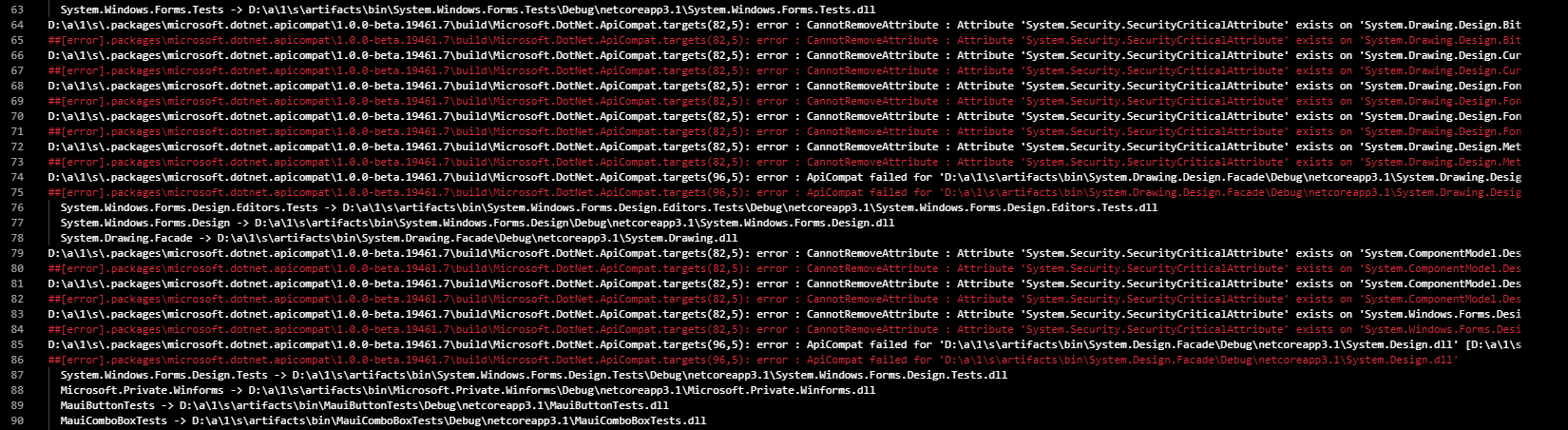
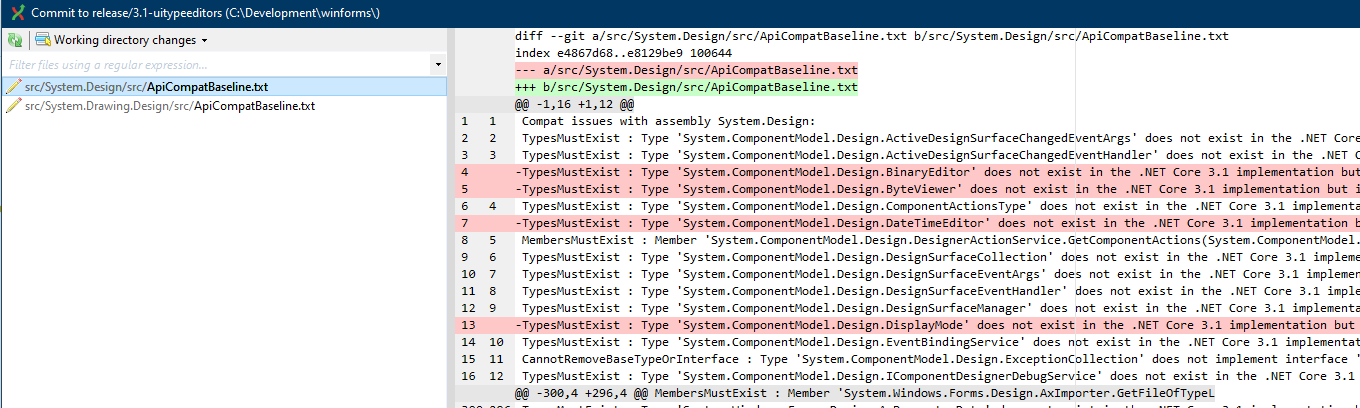
@ericstj could you clarify something for me please? If the current API surface is missing something that the baseline had, the CI build will fail: However if the current API bridges the gap, i.e. adds a previously removed type, the build won't fail: Is there a setting or a way to fail a build if any of ApiCompatBaseline.txt change? |
| <PropertyGroup> | ||
| <!-- If DotNetTool is undefined, we default to assuming 'dotnet' is on the path --> | ||
| <DotNetTool Condition="'$(DotNetTool)' == ''">dotnet</DotNetTool> | ||
| <_ApiCompatPath>$(MSBuildThisFileDirectory)\..\tools\netcoreapp2.1\Microsoft.DotNet.ApiCompat.dll</_ApiCompatPath> |
There was a problem hiding this comment.
@ericstj this path doesn't appear exist locally, and it gets resolved to:
"C:\Development\winforms\.dotnet\dotnet.exe" "C:\Development\winforms\eng\ApiCompatability\\..\tools\netcoreapp2.1\Microsoft.DotNet.ApiCompat.dll" @"C:\Development\winforms\artifacts\obj\Accessibility\Debug\netcoreapp3.1\apicompat.rsp" > C:\Development\winforms\src\Accessibility\src\ApiCompatBaseline.txt
Through binlog I found that there is a variable PkgMicrosoft_DotNet_ApiCompat that points to the NuGet package's folder, and then it resolves the path the the dll correctly, but I wonder whether it is the correct way to resolve the issue.
diff --git a/eng/ApiCompatability/PreviousReleaseApiCompat.targets b/eng/ApiCompatability/PreviousReleaseApiCompat.targets
index 1efc4fe4..4899064a 100644
--- a/eng/ApiCompatability/PreviousReleaseApiCompat.targets
+++ b/eng/ApiCompatability/PreviousReleaseApiCompat.targets
@@ -3,7 +3,7 @@
       <!-- If DotNetTool is undefined, we default to assuming 'dotnet' is on the path -->
     <DotNetTool Condition="'$(DotNetTool)' == ''">dotnet</DotNetTool>
-    <_ApiCompatPath>$(MSBuildThisFileDirectory)\..\tools\netcoreapp2.1\Microsoft.DotNet.ApiCompat.dll</_ApiCompatPath>
+    <_ApiCompatPath>$(PkgMicrosoft_DotNet_ApiCompat)\tools\netcoreapp2.1\Microsoft.DotNet.ApiCompat.dll</_ApiCompatPath>
I presume it was copied from https://github.com/dotnet/arcade/blob/master/src/Microsoft.DotNet.ApiCompat/build/Microsoft.DotNet.ApiCompat.targets#L9
There was a problem hiding this comment.
That is a correct way to do it. To ensure that property is generated you can add GeneratePathProperty="true" on the PackageReference. See NuGet/Home#6949.
There was a problem hiding this comment.
To be clear, this should be updated to use PkgMicrosoft_DotNet_ApiCompat as @RussKie suggests.

The baseline is a set of suppressions, so it's not like it "changes": it's an input. If you want to autogenerate suppressions you can, then just write your own validation to diff what's autogenerated and what's checked in. Then you can make it fail whenever it differs. |
| <Error Condition="'@(ResolvedMatchingPreviousReleaseContract)' == ''" | ||
| Text="ResolvedMatchingPreviousReleaseContract item must be specified to run API compat." /> | ||
| <Error Condition="!Exists('%(ResolvedMatchingPreviousReleaseContract.FullPath)')" | ||
| Text="ResolvedMatchingPreviousReleaseContract '%(ResolvedMatchingPreviousReleaseContract.FullPath)' did not exist." /> |
There was a problem hiding this comment.
@ericstj I'm not sure what ResolvedMatchingPreviousReleaseContract is supposed to be...
.\eng\ApiCompatability\PreviousReleaseApiCompat.targets(22,5): error : ResolvedMatchingPreviousReleaseContract item must be specified to run API compat. [.\eng\ApiCompatability\WinFormsStableAPIProject\WinFormsStableAPIProject.csproj]
There was a problem hiding this comment.
It's being defined here and fed into APICompat, it represents the last version of the project it's running against as a basis for comparison. I wouldn't expect it to be defined for WinFormsStableAPIProject since that's not actually a library you want to run APICompat against. I had chatted with Zach about this before. I don't think you should be setting flags that control this globally. Instead you probably want to define some convention for deciding which projects need to run this and only set the property for those projects.
Capture the surface of public API.
Record removed and added API.

Relates to dotnet#2705
Relates to dotnet#2112
|
@JuditRose here is the start of some of the API compat infra. You could choose to continue with this or take a different approach. This PR adds targets into the library build to compare each file as it builds that the file is compatible with the previous release (as well as desktop, if appropriate). An alternate approach is to do a single run against the whole set of the assemblies built by the repo. Rather than running in every project it would run at a single place (eg: the packaging project). The benefit of that approach is that it would catch cases where you completely delete an assembly/project. |
| API missing from old) --> | ||
| <RunApiCompatForSrc>true</RunApiCompatForSrc> | ||
| <RunMatchingRefApiCompat>false</RunMatchingRefApiCompat> | ||
| <DesktopAPICompatLeftOperand>".NET 4.7.2 implementation"</DesktopAPICompatLeftOperand> |
There was a problem hiding this comment.
.NETFramework reference assembly
| <RunApiCompatForSrc>true</RunApiCompatForSrc> | ||
| <RunMatchingRefApiCompat>false</RunMatchingRefApiCompat> | ||
| <DesktopAPICompatLeftOperand>".NET 4.7.2 implementation"</DesktopAPICompatLeftOperand> | ||
| <DesktopAPICompatRightOperand>".NET Core 3.1 implementation"</DesktopAPICompatRightOperand> |
| with the old one, not vice-versa (since latest may have new | ||
| API missing from old) --> | ||
| <RunPreviousReleaseApiCompatForSrc>true</RunPreviousReleaseApiCompatForSrc> | ||
| <RunPreviousReleaseMatchingRefApiCompat>false</RunPreviousReleaseMatchingRefApiCompat> |
| <ItemGroup> | ||
| <!-- Control the version of the Ref Pack used via the WindowsDesktop SDK --> | ||
| <FrameworkReference | ||
| Update="Microsoft.NETCore.App" |
There was a problem hiding this comment.
I think this should have been WindowsDesktop?
There was a problem hiding this comment.
Maybe it would be better to simplify this to look like a customer project from previous release with no CS / references.

 ghost
assigned
ghost
assigned
4 participants


Uses APICompat via Arcade to verify implementation in build against the references in microsoft.targetingpack.netframework.v4.7.2. See also #2092
Also APICompat (see how Arcade does this) to verify implementation in build against the API surface of the previous release.
WinFormsStableAPIProject- adotnet new winformsproject with theFramworkReferenceupdated to the version of the previous release and a target to extract the contract of that release. To change the API to witness, you should only have to edit theStableVersionToWitnessproperty.Directory.Build.props- establishes the path to the stable API "witness" project (WinFormsStableAPIProject).ResolveMatchingPreviousReleaseContract.targets- uses the target in theWinFormsStableAPIProjectto establish any matching contracts and their dependencies for API Compat.PreviousReleaseApiCompat.props- sets properties to be used by API CompatPreviousReleaseApiCompat.targets- runs theValidateApiCompatAgainstPreviousReleasetarget which actually runs APICompat with the settings fromPreviousReleaseApiCompat.propsand the contract fromResolveMatchingPreviousReleaseContract.targetsPreviousReleaseApiCompatBaseline.txtfiles - represent known exclusions from API Compat failures release to release.NOTE: restore does not seem to be working for newWinFormsStableAPIProject, even though it is in the solution. No idea... i have manually been running.dotnet\dotnet.exe restore eng\APICompatibility\WinFormsStableAPIProject\WinFormsStableAPIProject.csprojMicrosoft Reviewers: Open in CodeFlow
History:
dotnet new winformsand drive all the custom bits in some other way... I don't like the idea of checking in a project just for the sake of API compat. note it may be easier to go with the first option once Include .NET Core Runtime in WindowsDesktop bundle windowsdesktop#20 is done in 5.0