Skip to content
This repository was archived by the owner on Dec 5, 2024. It is now read-only.

Conversation

@StanleyGoldman
Copy link
Contributor

@StanleyGoldman StanleyGoldman commented Mar 29, 2018

DO NOT MERGE: This is part of #663

Problems

  1. After some investigation I realized that the PATH variables were being calculated/changed when calling an external git. Calculating a PATH variable for our internal portable git makes sense, but if the user is presenting us with a git setup, we should assume that the Git setup is functional on the system.
  2. Compared to the default PATH variable a Mac user has when he opens the terminal, the PATH variable we get through Unity/Mono appears incomplete. That is because OSX uses an additional script /usr/libexec/path_helper to augment the PATH variable. src.
  3. When you open a shell in GitHub for Unity, path_helper is executed. As a result the path variables when we open a terminal window does not match the path variables when we are calling Git. Which explains why users were able to run git lfs ... in the terminal we opened for them when we couldn't do it in code.

Fixes

  1. In ApplicationManagerBase.Run() we are calling path_helper if we are on a mac, and updating Environment.Path with the result.
  2. Being more careful about how we craft our PATH variable.
  3. If we are going to make decisions based on if we are using portable git or not, we need to let the users "Reset" back to the portable git we provide. Functionality to reset settings to use internal git #660
  4. We also cannot use our calculated path when attempting to find the system git, as that will cloud our results. Specifying dontUseGit when finding git #661
  5. Being sure the path we craft for console, actually matches what we are using when running git commands. Making sure path for console matches ProcessEnvironment #662

Fixes: #650

Depends on:

@StanleyGoldman
Copy link
Contributor Author

TLDR: I've isolated the problem to how we computer the PATH environment variable in ProcessEnvironment

I'm able to reproduce this on my mac. I have some updated information.
I was interested in capturing what the PATH was being set to. I added some logging to...

if (Environment.IsWindows)
{
var userPath = @"C:\windows\system32;C:\windows";
path = $"{gitPathRoot}\\cmd;{gitPathRoot}\\usr\\bin;{execPath};{binPath};{gitLfsPath};{userPath}{developerPaths}";
}
else
{
path = $"{gitExecutableDir}:{binPath}:{execPath}:{gitLfsPath}:{Environment.Path}:{developerPaths}";
}
if (execPath.IsInitialized)
psi.EnvironmentVariables["GIT_EXEC_PATH"] = execPath.ToString();
psi.EnvironmentVariables["PATH"] = path;

I got this...

/usr/bin:/usr::/usr:/usr/bin:/bin:/usr/sbin:/sbin:

Meanwhile on my normal shell.. (Minus some Ruby/homebrew stuff...)

/usr/local/bin:/usr/bin:/bin:/usr/sbin:/sbin:

In code I forcibly set that value in place and I was able to initialize the repo.

@StanleyGoldman
Copy link
Contributor Author

I did a bit more digging with some log messages.

// We need to essentially fake up what git-cmd.bat does
var gitPathRoot = Environment.GitInstallPath;
var gitLfsPath = Environment.GitInstallPath;
var gitExecutableDir = Environment.GitExecutablePath.Parent; // original path to git (might be different from install path if it's a symlink)
Logger.Trace("Environment.GitExecutablePath: {0}", Environment.GitExecutablePath);

ProcessEnvironment.Configure() attempts to craft a PATH environment around this installation.
But it is using the current Git installation as it's frame of reference, not the git installation being presented to it.

@StanleyGoldman
Copy link
Contributor Author

StanleyGoldman commented Mar 29, 2018

On my mac I have git & git-lfs installed via homebrew, which creates a symlink /usr/local/bin/git which points to /usr/local/Cellar/git/[version]/git.

C02L939KF6T6:~ stanleygoldman$ ls -la /usr/local/bin/git
lrwxr-xr-x  1 stanleygoldman  admin  28 Mar 29 10:12 /usr/local/bin/git -> ../Cellar/git/2.16.3/bin/git

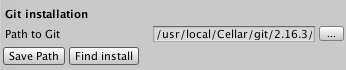
If a user attempts to select that path using the file browser, the file browser seems to resolve the symlink and give us the real path.

image

A savvier user might attempts to to save a git path by typing in /usr/local/bin/git, in that scenario we attempt to validate that git path, we do not resolve the symlink.

@StanleyGoldman
Copy link
Contributor Author

So thinking about this further. If we are providing Git to the user, it makes sense that we need to supplement the environment's PATH, but if the user is supplying their own git... I believe we should assume they have it installed correctly, and the environment's PATH should work correctly.

@StanleyGoldman
Copy link
Contributor Author

This dontSetupGit variable could be useful..

if (!Environment.GitInstallPath.IsInitialized || dontSetupGit)
return;

@StanleyGoldman
Copy link
Contributor Author

There is also no way to go back to the "default" setting.
The lack of a git path in a user's settings leads to the usage of the internal portable git path.
After a user changes this setting for the first time, there is no way to go back to the way things were.
A user could attempt to choose the portable git path, but that will just save this value to the user's settings.

If my comment above is correct, whereby we only modify the PATH if the user has changed it. This is a scenario that would fail. In this scenario we should modify the PATH because the user is attempting to use our portable git.

@StanleyGoldman
Copy link
Contributor Author

Also, note what happens here with opening a command window on a mac...

gitEnvironment.Configure(startInfo, workingDirectory);
var envVars = startInfo.EnvironmentVariables;
var scriptContents = new[] {
$"cd \"{envVars["GHU_WORKINGDIR"]}\"",
$"PATH=\"{envVars["GHU_FULLPATH"]}\":$PATH /bin/bash"
};
environment.FileSystem.WriteAllLines(envVarFile, scriptContents);

if (execPath.IsInitialized)
psi.EnvironmentVariables["GIT_EXEC_PATH"] = execPath.ToString();
psi.EnvironmentVariables["PATH"] = path;
psi.EnvironmentVariables["GHU_FULLPATH"] = path;

When running a command through ProcessEnvironment we set the path to the value we calculate.
When opening a command shell with ProcessManager we take what was given to us by ProcessEnvironment and we pre-pend it to the users PATH.

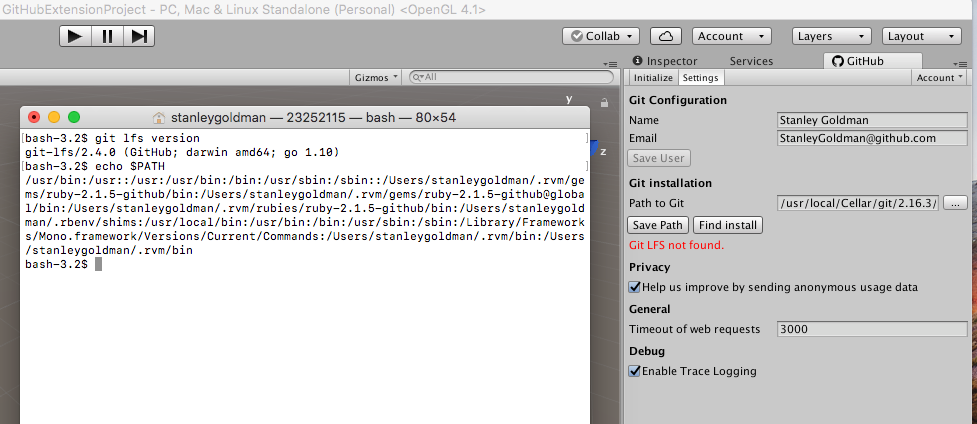
Which explains this scenario...

image

We cannot use LFS when we run commands, but the shell we open is able to.

Here is that shell's PATH

bash-3.2$ echo $PATH
/usr/bin:/usr::/usr:/usr/bin:/bin:/usr/sbin:/sbin::/Users/stanleygoldman/.rvm/gems/ruby-2.1.5-github/bin:/Users/stanleygoldman/.rvm/gems/ruby-2.1.5-github@global/bin:/Users/stanleygoldman/.rvm/rubies/ruby-2.1.5-github/bin:/Users/stanleygoldman/.rbenv/shims:/usr/local/bin:/usr/bin:/bin:/usr/sbin:/sbin:/Library/Frameworks/Mono.framework/Versions/Current/Commands:/Users/stanleygoldman/.rvm/bin:/Users/stanleygoldman/.rvm/bin

@StanleyGoldman
Copy link
Contributor Author

I believe most of the battle is to be fought here.

executable = executable ?? processTask.ProcessName?.ToNPath() ?? environment.GitExecutablePath;
//If this null check fails, be sure you called Configure() on your task
Guard.ArgumentNotNull(executable, nameof(executable));
var startInfo = new ProcessStartInfo
{
RedirectStandardInput = withInput,
RedirectStandardOutput = true,
RedirectStandardError = true,
UseShellExecute = false,
CreateNoWindow = true,
StandardOutputEncoding = Encoding.UTF8,
StandardErrorEncoding = Encoding.UTF8
};
gitEnvironment.Configure(startInfo, workingDirectory ?? environment.RepositoryPath, dontSetupGit);

Here we choose what executable to run, if none is chosen we choose git.
We also have the choke point on dontSetupGit here as well.

@StanleyGoldman
Copy link
Contributor Author

Also, the "Find Install" function is not working correctly... It does not specify dontSetupGit. As a result on Windows the find task returns the currently configured git installation. I can only wonder what it does on a mac.

new FindExecTask("git", Manager.CancellationToken)
.Configure(Manager.ProcessManager)

As compared to what happens during mac installation.

if (!environment.IsWindows)
{
startTask = new FindExecTask("git", cancellationToken)
.Configure(processManager, false, true);

if (Environment.IsMac)
{
getMacEnvironmentPathTask = new SimpleProcessTask(CancellationToken, "bash".ToNPath(), "-c \"/usr/libexec/path_helper\"")
.Configure(ProcessManager)
Copy link
Member

Choose a reason for hiding this comment

The reason will be displayed to describe this comment to others. Learn more.

This should probably set dontUseGit: true since we just want to run bash

{
getMacEnvironmentPathTask = new SimpleProcessTask(CancellationToken, "bash".ToNPath(), "-c \"/usr/libexec/path_helper\"")
.Configure(ProcessManager)
.Then((success, path) => success ? path.Split(new[] { "\"" }, StringSplitOptions.None)[1] : null);
Copy link
Member

Choose a reason for hiding this comment

The reason will be displayed to describe this comment to others. Learn more.

It's possible that this task will fail, and if it does nothing else will run and the UI will be kinda stuck. In that case, we probably want to have a Catch here returning true so if it fails it doesn't fail the whole chain.

@shana shana changed the base branch from fixes/findexectask-dontusegit to fixes/git-save-path-failure-cleanup April 3, 2018 18:42
shana and others added 18 commits April 4, 2018 20:10
- Fix a bunch of typos
- Make sure the download failing doesn't abort the whole process
- Install lfs if there is a git but lfs is missing
- Fix the download tests to download the real files that we're shipping
- Mock the unzipper for the git installer test so it's faster
- a bunch of other fixes
The installation state was getting passed into ExtractPortableGit
too early - that method needs to have the result of the download
tasks
…-more

Fix a bunch of stuff in the git installation process
@shana shana closed this Apr 5, 2018
@shana shana deleted the fixes/mac-path-variable branch April 5, 2018 19:14
@shana shana restored the fixes/mac-path-variable branch April 5, 2018 19:14
@shana shana reopened this Apr 5, 2018
@shana shana closed this Apr 5, 2018
@shana shana deleted the fixes/mac-path-variable branch April 5, 2018 19:15
Sign up for free to subscribe to this conversation on GitHub. Already have an account? Sign in.

Projects

None yet

Development

Successfully merging this pull request may close these issues.

3 participants