Describe the bug
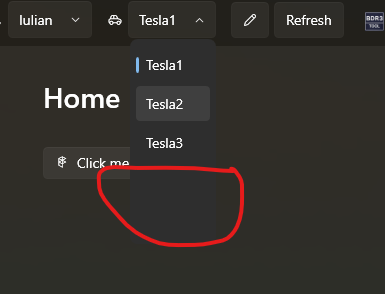
When the item source of the combobox is changing and the number of the elements of the observable collection is different from the previous , the drop down menu size is not updating correctly.
To Reproduce
Start the test app.
Open the ComboBox drop down and close it (e.g. by selecting any item or just clicking somewhere outside the control). The source collection items are displayed properly.
Change the item source ObservableCollection with a different size.
Open the ComboBox drop down again: the item doesn't appear in the drop down and the size is not corrent.
Expected behavior
When changing the item source the items and the drop down menu needs to remain consistent with the one of the observable collection.
Screenshots

OS version
7.0
.NET version
6.0.1
WPF-UI NuGet version
2.0.3
Additional context
No response

Describe the bug
When the item source of the combobox is changing and the number of the elements of the observable collection is different from the previous , the drop down menu size is not updating correctly.
To Reproduce
Start the test app.
Open the ComboBox drop down and close it (e.g. by selecting any item or just clicking somewhere outside the control). The source collection items are displayed properly.
Change the item source ObservableCollection with a different size.
Open the ComboBox drop down again: the item doesn't appear in the drop down and the size is not corrent.
Expected behavior
When changing the item source the items and the drop down menu needs to remain consistent with the one of the observable collection.
Screenshots
OS version
7.0
.NET version
6.0.1
WPF-UI NuGet version
2.0.3
Additional context
No response