Return all installed DotNetSDK versions #79
Conversation


|
|

samples/BuilderApp/BuilderApp.csproj
Outdated
| <PropertyGroup> | ||
| <OutputType>Exe</OutputType> | ||
| <TargetFrameworks>net471;netcoreapp2.1</TargetFrameworks> | ||
| <TargetFrameworks>net472;netcoreapp2.1</TargetFrameworks> |

| } | ||
|
|
||
| var matched = DotNetBasePathRegex.Match(outputString); | ||
| if (!matched.Success) |
There was a problem hiding this comment.
Move this check before parsing sdks, since it would keep us from doing extra work.
|
|
||
| path = Path.Combine(path, version) + "\\"; | ||
|
|
||
| //basePaths.Add(path); |
|
|
||
| while (lineSdkIndex < lines.Count && !lines[lineSdkIndex].Contains(".NET Core runtimes installed")) | ||
| { | ||
| var ma = SdkRegex.Match(lines[lineSdkIndex]); |
There was a problem hiding this comment.
Use a variable name like sdkMatch to provide more meaning.
src/MSBuildLocator/MSBuildLocator.cs
Outdated
| yield return devConsole; | ||
|
|
||
| #if FEATURE_VISUALSTUDIOSETUP | ||
| #if FEATURE_VISUALSTUDIOSETUP |
There was a problem hiding this comment.
Revert these indentation changes.


|
I have finally added another commit to this PR. I also added support for returning .NET 5.0 SDKs, which this PR did not previously have support for. |

 ladipro
left a comment
ladipro
left a comment
ladipro
left a comment
There was a problem hiding this comment.
Thank you @kurtcodemander! I left a few comments inline, mostly nits but please consider switching from dotnet --info to dotnet --list-sdks.
I believe that in addition to this change, we should also modify RegisterDefaults() to register the highest .NET SDK version lower or equal to the runtime of the executing process. This is to fully address #96. It will probably be a separate PR building on top of your work but I wanted leave a note since #96 seems to have broken many developers and should be treated as high-pri.
|
|
||
| foreach (var basePath in basePaths) | ||
| { | ||
| yield return GetInstance(workingDirectory, basePath); |
There was a problem hiding this comment.
nit: It would be cleaner to filter out null instances here and revert the extra check in QueryVisualStudioInstances.
src/MSBuildLocator/MSBuildLocator.cs
Outdated
| "Microsoft.Build", | ||
| "Microsoft.Build.Engine", | ||
| "Microsoft.Build.Framework", | ||
| "Microsoft.Build.Tasks.Core", | ||
| "Microsoft.Build.Utilities.Core" | ||
| "Microsoft.Build.Utilities.Core", | ||
| "System.Runtime.CompilerServices.Unsafe", | ||
| "System.Numerics.Vectors" |
There was a problem hiding this comment.
These changes are already in the master branch, please rebase.
There was a problem hiding this comment.
Forgind merged master into this branch yesterday and I pulled those changes down today before committig the latest changes.
| { | ||
| string dotNetSdkPath = GetDotNetBasePath(workingDirectory); | ||
|
|
||
| public static VisualStudioInstance GetInstance(string workingDirectory, string dotNetSdkPath) |
There was a problem hiding this comment.
workingDirectory is now unused and can be removed.
There was a problem hiding this comment.
It has been removed.
| } | ||
|
|
||
| return matched.Groups[1].Value.Trim(); | ||
| var lineSdkIndex = lines.FindIndex(line => line.Contains(".NET Core SDKs installed") || line.Contains(".NET SDKs installed")); |
There was a problem hiding this comment.
Suggestion: Run dotnet --list-sdks instead of dotnet --info and you wouldn't have to match on complex human readable strings.
There was a problem hiding this comment.
Fixed. It now uses --list-sdks.
| var version = sdkMatch.Groups[1].Value.Trim(); | ||
| var path = sdkMatch.Groups[2].Value.Trim(); | ||
|
|
||
| path = Path.Combine(path, version) + "\\"; |
There was a problem hiding this comment.
Path.PathSeparator instead of \ for portability?
Edit: Actually Path.DirectorySeparatorChar, I always confuse the two :)
|
|
||
| // We insert at index 0 so that instance list will be sorted descending so that instances.FirstOrDefault() | ||
| // will always return the latest installed version of dotnet SDK | ||
| basePaths.Insert(0, path); |
There was a problem hiding this comment.
I don't see dotnet returning SDKs in a particular order documented anywhere. Also, this is O(N^2) and although not a big deal given the tiny number of items, it would be nicer to avoid it. My suggestion would be to return in the order as printed by dotnet, i.e. no sorting.
There was a problem hiding this comment.
You're correct though that if we don't add any smarts to this PR to pick the "right" SDK, we should keep the current behavior of returning the newest first. Maybe use List<T>.Reverse() then?
There was a problem hiding this comment.
For what it's worth, I don't think it's guaranteed that a foreach loop goes in order either. I don't think they'll ever change that unless they have aggressive parallelism, but it could be an argument for either explicitly sorting them or iterating (with a normal for loop) from top to bottom.
There was a problem hiding this comment.
The code now uses --list-sdks with a foreach loop and .Reverse. Need for any change to that?


src/MSBuildLocator/MSBuildLocator.cs
Outdated
| VisualStudioInstanceQueryOptions options) | ||
| { | ||
| return instances.Where(i => options.DiscoveryTypes.HasFlag(i.DiscoveryType)); | ||
| return instances.Where(i => i != null && options.DiscoveryTypes.HasFlag(i.DiscoveryType)); |
There was a problem hiding this comment.
GetInstance can return null and consequently GetInstances can enumerate null. I, too, find it confusing. It would make more sense to not enumerate missing/broken instances in the first place.
There was a problem hiding this comment.
null check has been moved to GetInstances


|
So the current behavior is that for the current working directory you will get back the newest SDK or the one pinned in the global.json, I would prefer it if this behavior is retained when invoking |
It was suggested to use --list-sdks to populate the list of instances, which made sense to me, so that's what the latest commit contains, but it dawns on me that if there's one pinned in global.json then we'll probably have to use the "Base Path" from "dotnet --info" like before in order for the current behavior to be retained when invoking With the behavior from the latest commit b6353cb So, do we revert back to using dotnet --info again and checking the Base Path in addition to parsing SDKs from dotnet --info? Is there an argument for invoking dotnet.exe twice in order to parse Base Path from dotnet --info and then the list of SDKs from dotnet --list-sdks? The latter doesn't feel quite right. |
 Forgind
left a comment
Forgind
left a comment
Forgind
left a comment
There was a problem hiding this comment.
dotnet --version should be a more efficient/simpler way to get the pinned version. I tried putting --version & dotnet --list-sdks into the arguments, but that didn't work. I like the simplicity of calling dotnet --list-sdks for all the sdks and dotnet --version for the pinned one if relevant, but I'd prefer not to start two processes if it's avoidable. Not sure what's best.
| var version = sdkMatch.Groups[1].Value.Trim(); | ||
| var path = sdkMatch.Groups[2].Value.Trim(); | ||
|
|
||
| path = Path.Combine(path, version) + Path.DirectorySeparatorChar; |
There was a problem hiding this comment.
Since we use Path.Combine with this, I don't think we actually need Path.DirectorySeparatorChar here.
| path = Path.Combine(path, version) + Path.DirectorySeparatorChar; | |
| path = Path.Combine(path, version); |
There was a problem hiding this comment.
Path.Combine doesn't add the directory separator to the end so in order to preserve VisualStudioInstance.VisualStudioRootPath and VisualStudioRootPath.MSBuildPath having a trailing separator then we need it.
|
Since it doesn't seem to be possible to get both the pinned version in use and the list of SDKs starting only one process without using dotnet --info I have made another commit going back to dotnet --info, but also making some improvements to the older version which used --info. Now comparing each SDK path to the base path of the version in use, inserting the version in use at the top of the list whilst simply adding the rest to the list. The Now, we preserve the functionality of FirstOrDefault() always returning the pinned version in use as reflected by global.json. A separate PR should probably address the comment from @ladipro and #96 Comments on the latest commit and this way of doing it? |
Forgind
left a comment
Forgind
left a comment
There was a problem hiding this comment.
Looks good to me, thanks!
| path = Path.Combine(path, version) + Path.DirectorySeparatorChar; | ||
|
|
||
| if (path.Equals(basePath)) | ||
| { |
There was a problem hiding this comment.
nit: indentation (here and below)
|
|
||
| if (path.Equals(basePath)) | ||
| { | ||
| // We insert the version in use at the top of the list in order to preserve FirstOrDefault to always return the version in use |
There was a problem hiding this comment.
| // We insert the version in use at the top of the list in order to preserve FirstOrDefault to always return the version in use | |
| // We insert the version in use at the front of the list in order to ensure FirstOrDefault always returns the version in use. |
?
There was a problem hiding this comment.
Looks good, fixed
| var version = sdkMatch.Groups[1].Value.Trim(); | ||
| var path = sdkMatch.Groups[2].Value.Trim(); | ||
|
|
||
| path = Path.Combine(path, version) + Path.DirectorySeparatorChar; |
There was a problem hiding this comment.
I wasn't clear with what I meant on this—sorry about that. I meant that this is not a public-facing method, and when we use basePaths in GetInstance, we use Path.Combine to combine it with other things, so it doesn't matter if it has a slash at the end or not. I noticed the base path from dotnet --info does have the slash, though, so you'd also have to change path.Equals (below) to StartsWith. Ultimately, doesn't really matter either way.
There was a problem hiding this comment.
I see, but at the bottom in GetInstance we set dotNetSdkPath directly into new VisualStudioInstance(..) and the VisualStudioInstance constructor saves it directly to VisualStudioRootPath and MSBuildPath so that's where it would break the existing functionality having a trailing separator.
There was a problem hiding this comment.
Ah, missed that. You're right.
ladipro
left a comment
ladipro
left a comment
There was a problem hiding this comment.
@kurtcodemander thank you for following up and apologies for having randomized you with --list-sdks. I am requesting changes to fix an issue with the SDK version regex, please see inline. Other than that it looks good to me.
| { | ||
| private static readonly Regex DotNetBasePathRegex = new Regex("Base Path:(.*)$", RegexOptions.Multiline); | ||
| private static readonly Regex VersionRegex = new Regex(@"^(\d+)\.(\d+)\.(\d+)", RegexOptions.Multiline); | ||
| private static readonly Regex SdkRegex = new Regex(@"(\d+\.\d+\.\d+) \[(.*)]$", RegexOptions.Multiline); |
There was a problem hiding this comment.
This won't work for rc's, previews, and other releases with non-numeric version strings. For example:
.NET SDKs installed:
5.0.100-preview.8.20373.19 [C:\Program Files\dotnet\sdk]
The regex should be made more permissive.
There was a problem hiding this comment.
Any suggestion for a change to the regex to make it more permissive? RegEx is one of my achilles' heels :-p
There was a problem hiding this comment.
I'd try (\S+) \[(.*)]$, i.e. expecting the version to be a non-empty string of non-whitespace characters.
There was a problem hiding this comment.
I tried that with "14.3.155-preview-02334alpha", and it didn't seem to work. I think \S is whitespace rather than non-whitespace characters (fixable with ^?) and it also makes it harder to parse out groups.
I used @"(\d+)\.(\d+)\.(\d+)", and that seemed to work pretty well.
There was a problem hiding this comment.
Maybe it appears to work because it's not matching the entire version. Based on this fiddle (\d+)\.(\d+)\.(\d+) is not working and \S+ looks OK: https://dotnetfiddle.net/QS5kui
There was a problem hiding this comment.
Interesting...I was testing with a local ConsoleApp that didn't agree. Did I do something wrong?
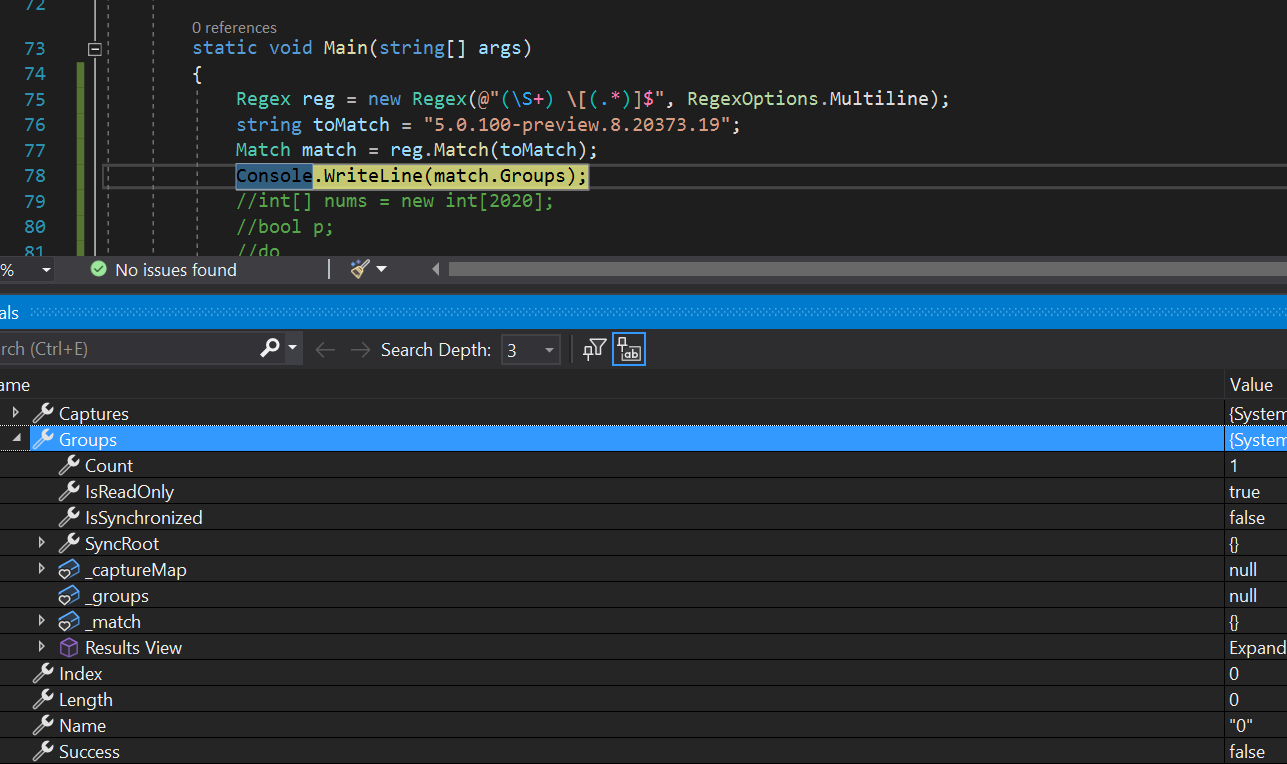
I tweaked my version to make it work: https://dotnetfiddle.net/0IUKbB
There was a problem hiding this comment.
In your screenshot toMatch is just a version, it does not have the space and square brackets as required by the regex.
There was a problem hiding this comment.
I have commited this change now.
| return null; | ||
| } | ||
|
|
||
| var basePath = matched.Groups[1].Value.Trim(); |
There was a problem hiding this comment.
nit: GetDotNetBasePaths could be an iterator method and simply yield return basePath here and then yield return path in the loop below. Just a thought, looks good either way.
There was a problem hiding this comment.
I like this idea and have submitted a new commit with this change. Looks quite nice and clean.
 rainersigwald
left a comment
rainersigwald
left a comment
rainersigwald
left a comment
There was a problem hiding this comment.
Thanks! Note that we have a bunch of PRs to land and this adds a new feature so it might need to sit a bit while we work through some bugfixes.
| return matched.Groups[1].Value.Trim(); | ||
| yield return basePath; // We return the version in use at the front of the list in order to ensure FirstOrDefault always returns the version in use. | ||
|
|
||
| var lineSdkIndex = lines.FindIndex(line => line.Contains("SDKs installed")); |
There was a problem hiding this comment.
I was worried about this English literal but it's forced to English
| path = Path.Combine(path, version) + Path.DirectorySeparatorChar; | ||
|
|
||
| if (!path.Equals(basePath)) | ||
| yield return path; |
There was a problem hiding this comment.
Part of me wants to order this list by version descending (dotnet --info returns results in ascending order). But we already extract the global.json-or-highest version as basePath first, and that ordering is most critical. And we don't order VS instances. So I think the current approach is good.
There was a problem hiding this comment.
I think it's still useful to sort the results even with the basePath first because of #106. If the default SDK is from after the runtime in use, it'll be disqualified, and we'd go with the second in the list. If you don't clean your machine regularly and still have a 1.0 SDK lying around, that's what we'd find and register with RegisterDefaults.
There was a problem hiding this comment.
So should I remove the new iterator/yield code and go back to the code using List with Reverse(), or do we have a better solution based on the current code?
There was a problem hiding this comment.
I think that's the best solution. I already wrote up the change in #106, so I wouldn't worry about remaking that change here.

|
Also, related SDK feature request: dotnet/sdk#9865. Does no good yet, of course. |


Co-authored-by: Rainer Sigwald <raines@microsoft.com>

rainersigwald
left a comment
rainersigwald
left a comment
There was a problem hiding this comment.
Thanks @kurtcodemander!

Components of the SDK often have dependencies on the runtime they shipped with, including that several tasks that shipped in the .NET 5 SDK rely on the .NET 5.0 runtime. Assuming the runtime that shipped with a particular SDK has the same version, this ensures that we don't choose an SDK that doesn't work with the runtime of the chosen application. This is not guaranteed to always work but should work for now.

Fixes #92

This is based on #79.

This PR supersedes #117.
It contains some improvements to #79 (Return all installed DotNetSDK).

Fix console output event handling
Problem: if the "dotnet --info" process runs faster and completes before we subscribe to the output events we loose its output. And we also were checking if the process completes successfully before this line we were existing without the actual list of SDKs.
Fixes:
Subscribe to output events before starting the process
Don't exit if the process has already finished
Fix to not require the base path to be present to return the full list of SDKs
Problem: the base path is not returned by "dotnet --info" if the required version (from global.json) is not found. Still, we could return the list of installed SDKs and let the caller method to decide whether or not to use the available SDKs.
Fix: if the base path is found return it, otherwise proceed to list the installed SDKs
7 participants


Returns a list of all installed dotnet SDKs as reported by dotnet --info instead of only the latest