ReactApplication doesn't have a way to mix RN and non-RN content #4925

Description

The playground app does a good job of showing how you can use ReactNativeHost .
The e2e test app uses ReactApplication - but it doesn't allow you to mix and match content between XAML or anything else, and RN.
The Frame.Content gets set to a new ReactRootView in the ReactApplication. This class has logic to create a Frame and a ReactRootView and everything works fine, but if I reparent that ReactRootView underneath e.g. a StackPanel, weird things start happening:
 base.OnLaunched(e);
 var frame = Window.Current.Content as Frame;
 if (useRNTester)
 {
     // inject the RNTester tree dump control
     var stackPanel = new StackPanel();
     var treeDumpControl = new TextBlock() { Text = "TreeDump", Padding = new Thickness(20) };
     stackPanel.Children.Add(treeDumpControl);
     stackPanel.Children.Add(frame.Content as ReactRootView);
     frame.Content = stackPanel;
}
Before the bundle loads everything looks ok - the textbox shows on top, the rest of the app underneath it.

But when the bundle loads, layout goes awry:
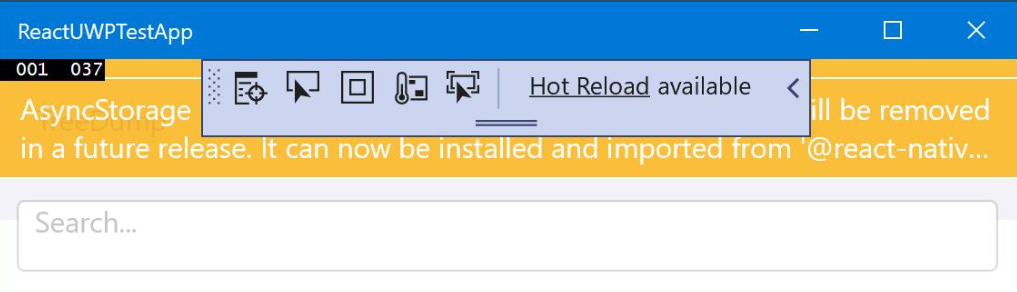
and if I create my own ReactRootView and add that to my layout, the React content isnt shown
What's the "right way" to mix RN and non-RN content?
From @vmoroz:
The current ReactRootView is my very rough translation of what we had before in the ReactUWP. The only improvement that I had done for it is to make sure that we do not use shared_ptr for the C++/WinRT controls. Thus, the split of functionality between the ReactRootView and ReactRootControl. It was an anti-pattern and it had to be fixed. All shared_ptr ownership is in the ReactRootControl, while ReactRootView is a true XAML C++/WinRT control. I guess if something does not work properly, then it could be related to how these two communicate between each other.
Also, in Office version we unload user UI when UI control get un-parented. I do not remember if I implemented this mechanism in RNW (I will verify it later today). It means that the UI must be reloaded after it is parented again. Though, I would expect that it must be done automatically.
Also it has a quite strange hierarchy:
// Visual tree to support safe harbor
  // m_rootView
  //  safe harbor
  //  m_xamlRootView
  //    JS created children
The ReactApplication is used in the new applications. It internally initializes ReactRootView. The ReactRootView can be used on its own along with the ReactNativeHost if developers want to embed the RN into their existing apps. The ReactApplication is considered as a "utility" class for these two and to get a simple RN app quickly up-and-running.
No, I do not see that the unloading of RN UI on component un-parenting be implemented in RNW.
The only other explanation for the behavior that you see is that we may not have correct attributes for resizing of the ReactRootView vs other components you have. Is it possible that it becomes zero height? When I worked with it and saw some UI rendering issues, I had to add a border thickness and color to see what is happening.