Skip to content

Conversation

@mmagnuski
Copy link
Member

@mmagnuski mmagnuski commented Nov 28, 2018

Implements the extra points layout for topo interpolation discussed in #5315
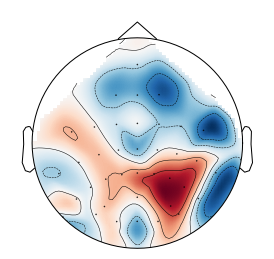
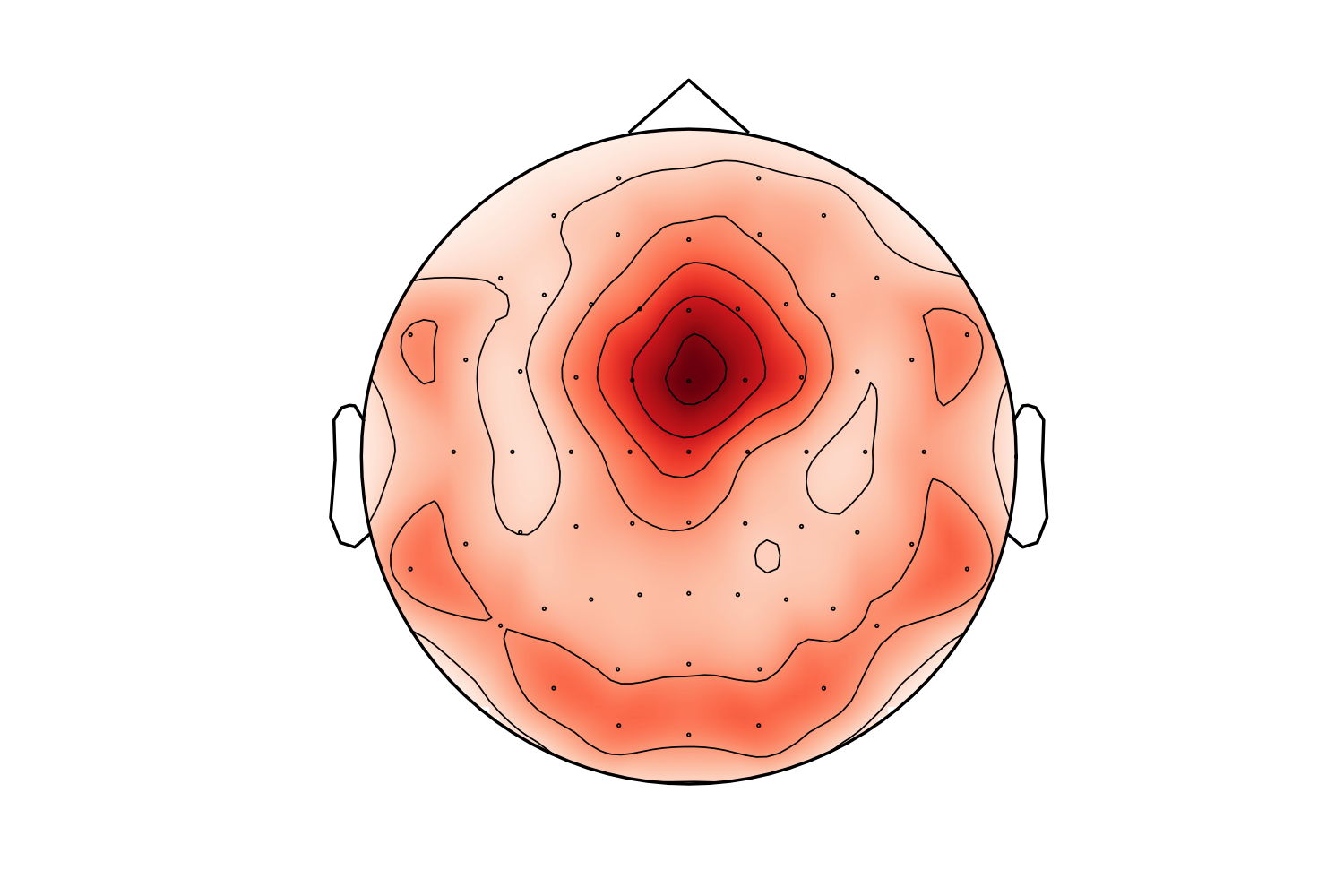
It may eliminate the issues raised in #5315 but it might be suboptimal in some standard cases. For example this is a frontal theta topography before this PR:

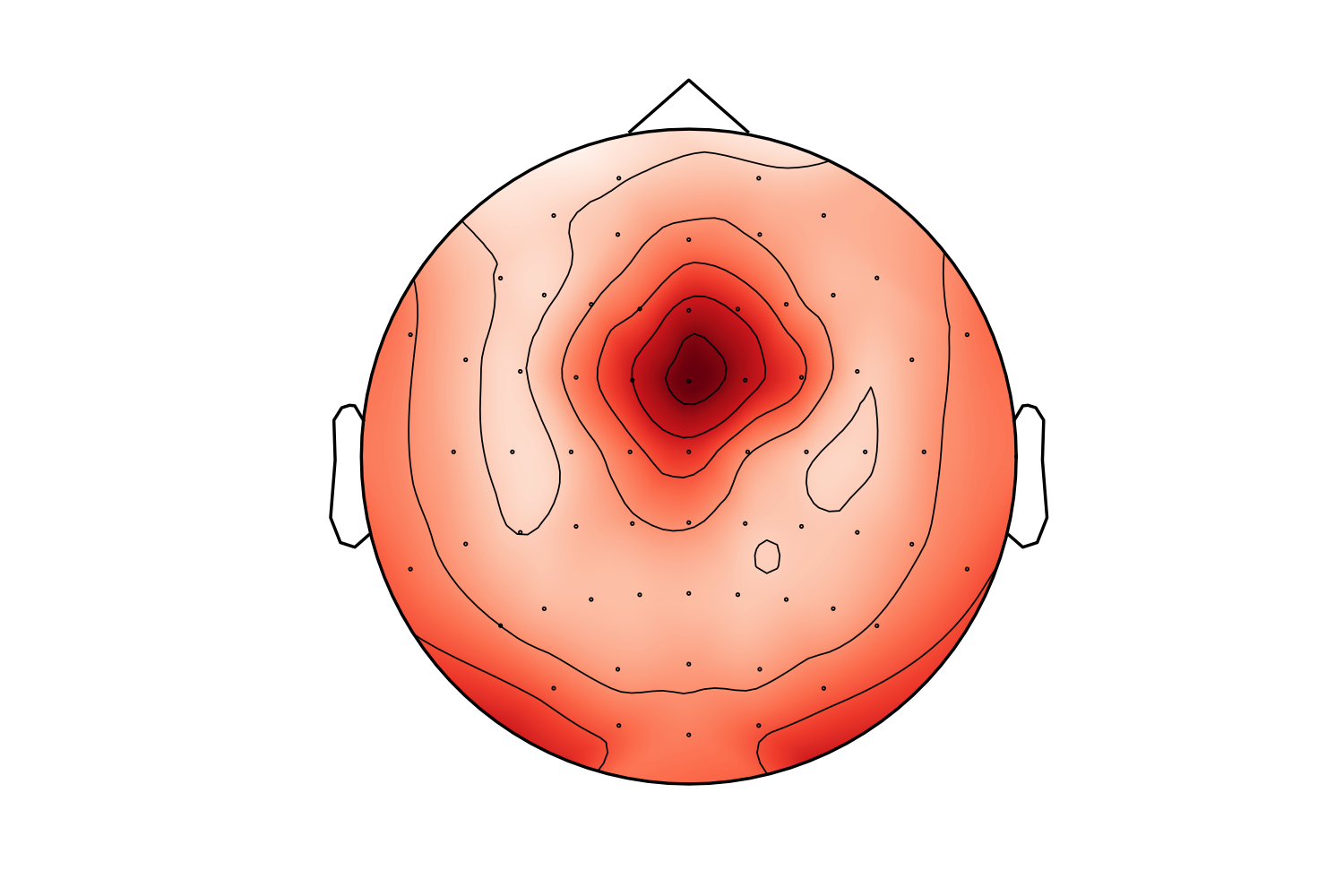
and this is after:

I must say I prefer the "before" topo in this case (the "after" looks like a laughing cyclops in a party hat). Probably the extra points are too close to channels. I'll check that later. Also - masking using convex hull (but slightly less extended than here) might make it better.

TODO:

  • rebase and add tests
  • add whats new
  • link topomap example to evoked plotting tutorial
  • enhance example to show the new extrapolation option
  • add back the old behavior (let's call it 'box' bacause the additional points were added on a rectangular box)
  • resolve what to do when outlines='skirt'
  • add tests
  • special case for colinear points when extrapolate='local'
  • test extra points on the head circle
  • use median inter-channel distance
  • take convex hull from triangulation to use Delaunay only once

@larsoner
Copy link
Member

Personally I don't mind the second one.

We have already discussed having a new param border=0. (or fill_value=0.) to say what the values should be for these extended edge points. We could add an option (default for backward compat, probably) as border='extrapolate', meaning that these new points get assigend the average value of its neighbors in the Delaunay triangulation of the expanded set of vertices. This would probably make the second one look more like the first.

@mmagnuski
Copy link
Member Author

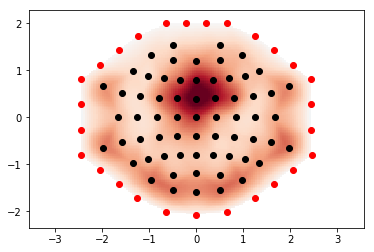
I like boarder=0. and boarder='extrapolate'. But I am still wondering if the added points are'nt too close to the channels. If they were further away the transition would be smoother. Here you can see the scatter outlining their position (you may also notice that the edges of the hull are not divided into equal parts, I can change that in the implementation):
image
Also - I am currently calculating the distance as the mean of the 10% lowest distances, which may be too convoluted.

@larsoner
Copy link
Member

larsoner commented Nov 28, 2018

I am still wondering if the added points are'nt too close to the channels.

It makes sense to me to have the edge/"stop interpolating" point be beyond your "average" electrode spacing. It's roughly equivalent to thinking of your data at each electrode representing a value at the center of pixel within grid.

In addition to be a simple way of framing things, it has the advantage of not letting you think that you have data outside that range, which becomes especially important after picking channels. Pick a larger spacing, and your difference between the picked and un-picked representations could very well become worse.

Speaking of which, somewhere we set a mask for the points pcolormesh plot. Currently it's the head circle. Eventually, we probably want it to be this ConvexHull polygon. This will make the PR much more annoying :) And it will also interact with outlines='skirt' and such... part of the reason it's difficult to make these sorts of changes is we have many of these going on. But I'd first target the standard (non-skirt) full coverage and, say, one-picked-hemisphere data to get them to look reasonable. Then deal with additional cases.

If they were further away the transition would be smoother.

I suspect that this will mostly be alleviated somewhat by the extrapolate option.

I am currently calculating the distance as the mean of the 10% lowest distances, which may be too convoluted.

We'll have to see how it does in testing. I'd use the median neighbor-to-neighbor (from the Delaunay triangulation) distance because it's the simplest reasonably representative thing I can think of.

@mmagnuski
Copy link
Member Author

I agree with all your points.

I'd use the median neighbor-to-neighbor (from the Delaunay triangulation) distance because it's the simplest reasonably representative thing I can think of.

Yes, the 10% is a temporary hack :) I will change the distance to the median neighbour-to-neighbor.
From what I remember Delaunay allows to add points after initial computation, so I'll compute it at the beginning for pos and later add the additional points to it. If so - would it be better to take the convex hull from Delaunay (although the docs warn that this may be inaccurate) or compute it separately?

Speaking of which, somewhere we set a mask for the points pcolormesh plot.

Oh, yes, I am aware of the mask - I was playing with it recently to generate the masked topos I posted in #5315. I can work on that after this PR.
And while you are mentioning skirt - EEGLAB IIRC has a principled way of setting which electrodes are within the head circle, and which outside - channels below some defined y position (similar to 10-20 skull circumference level) are plotted outside the head.

@mmagnuski
Copy link
Member Author

There are some edge cases to cover too: currently CIs fail due to scipy.spatial.qhull.QhullError: QH6214 qhull input error: not enough points(2) to construct initial simplex (need 3). This doesn't have to be two points, 3 channels on the same y level would also be problematic.

@cbrnr
Copy link
Contributor

cbrnr commented Nov 29, 2018

Regarding the added points, I thought they should be exactly on the head circle. Can you try and see how this looks, including setting the values to zero?

@mmagnuski
Copy link
Member Author

mmagnuski commented Nov 29, 2018

@cbrnr - the added values are zero in the "after" example (that's why the colors go to white around these added points). If they were placed on the head circle as it is drawn:

  • the interpolation function would need to know where the head circle is
  • some of the channels would have these additional points closer than currently (that is below the average/median inter-electrode distance)
  • in the case of plotting only some of the channels and once head circle does not adapt to electrode's range (Eric's PR) these distances might be much higher (for example - plotting occipital channels only would still interpolate to the front of the head)
  • then, the interpolation function would also need to know whether the skirt mode is used in which case the zero points shouldn't be added at the circle, but somewhere else
    but I can try that - so you can see how it looks, in the case above it should be pretty similar.

@cbrnr, @jsosulski, @larsoner - If you can paste a few snippets with problematic/interesting topo activity (and channel pos) I could generate more plots for better comparisons.

@cbrnr
Copy link
Contributor

cbrnr commented Nov 29, 2018

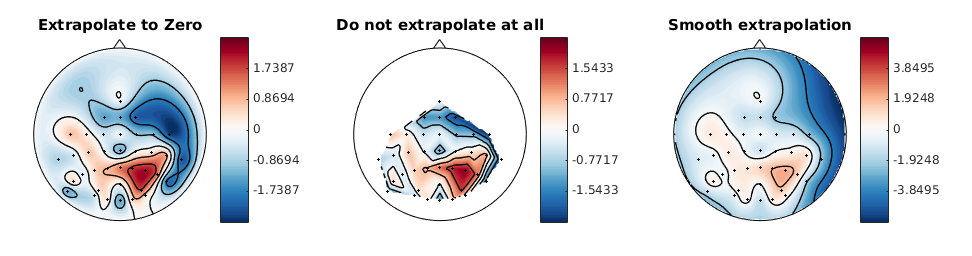
@mmagnuski but to me it looks like this is what the MATLAB toolbox in #5315 (comment) is doing - the values on the circle are exactly zero, and this looks like it should.

@cbrnr
Copy link
Contributor

cbrnr commented Nov 29, 2018

@jsosulski can you share the code snippet you used to produce topoplots with the MATLAB toolbox?

@jsosulski
Copy link
Contributor

Sure, see this gist.

Additionally another example how bbci plots topomaps:

image

In my opinion, the first one is the best compromise between correctness and aesthetically pleasing. The second one does not look good but is 'most accurate' while the last one seems to be misleading at best.

(the "after" looks like a laughing cyclops in a party hat).

While true, I must say in the first one the outer values look very close to the strong frontal/central activity which could be misinterpreted as activity in that region. This does not happen in the second case.

@mmagnuski
Copy link
Member Author

I'll check the placement of extra points on the circle later today (the example below show that it may be useful). But using the circle would have to mean that for skirt we still use something like the convex hull. Currently the data provided by @jsosulski give this with this PR (note that the stretched to fill the whole scalp but that is another problem: #5085):
image

@cbrnr
Copy link
Contributor

cbrnr commented Nov 30, 2018

Thanks for the gist @jsosulski - I think MNE also needs an option to not extrapolate at all. As you say, extrapolating is making up information, so we primarily do this for aesthetic purposes. So maybe there could be a parameter extrapolate which can be 'head' (the head circle, default), 'none' (or None), and 'smooth'. If extrapolate == 'head', we'd also need to specify the values on the head circle, which by default should be 0. This probably requires another parameter.

I am also +1 for a Pinocchio parameter 😄.

@jsosulski
Copy link
Contributor

Currently the data provided by @jsosulski give this with this PR

This looks much better than the current default mne topomap!

for example - plotting occipital channels only would still interpolate to the front of the head

To compromise, I would use the current method to place these support points, but if they extend beyond the outline of the scalp, put them exactly on the scalp border. This would also (i think) improve the bottom right blue blob in your plot @mmagnuski , which currently does not seem to go towards 0 fast enough.

@mmagnuski
Copy link
Member Author

This looks much better than the current default mne topomap!

That's good. It even shows that the nose is only the peak of a larger pyramid starting at the ears. ;)

So maybe there could be a parameter extrapolate which can be 'head' (the head circle, default), 'none' (or None), and 'smooth'. If extrapolate == 'head', we'd also need to specify the values on the head circle, which by default should be 0. This probably requires another parameter.

Eric suggested boarder parameter (0. vs 'extrapolate'). The option 'extrapolate' could be however confusing if we have extrapolate parameter, so boarder could be 0 vs 'closest' for example?

To compromise, I would use the current method to place these support points, but if they extend beyond the outline of the scalp, put them exactly on the scalp border. This would also (i think) improve the bottom right blue blob in your plot @mmagnuski , which currently does not seem to go towards 0 fast enough.

I can check this in a follow-up PR. I'd like to restrict this one to boarder + extrapolate in a relatively simple manner. Notice that the distances would be shorter once I implement what Eric suggested so it may look better.

I am also +1 for a Pinocchio parameter

Yes and we could also add different hairstyles than the default bald. ;)

At this point my main questions is: what should be the default for extrapolate ('head' vs let's say 'local' or 'hull')? If 'head' then it probably should switch to convex hull in outlines='skirt'. If 'local'/'hull' should be the default then there could be an error on outlines='skirt' + extrapolate='head'. What do you think?

@cbrnr
Copy link
Contributor

cbrnr commented Nov 30, 2018

At this point my main questions is: what should be the default for extrapolate ('head' vs let's say 'local' or 'hull')? If 'head' then it probably should switch to convex hull in outlines='skirt'. If 'local'/'hull' should be the default then there could be an error on outlines='skirt' + extrapolate='head'. What do you think?

Honestly, I don't understand how these parameters influence the plot. Can't we come up with less technical ones (i.e. use similar parameters to the MATLAB toolbox)? Basically, I want to be able to specify if we extrapolate or not. And if we extrapolate, I want to be able to say to which locations we extrapolate, and what the value at these locations is (default zero). I have difficulties understanding what you mean by skirt, local, and (convex) hull, and probably this will also be problematic for other users.

@mmagnuski
Copy link
Member Author

Honestly, I don't understand how these parameters influence the plot. Can't we come up with less technical ones (i.e. use similar parameters to the MATLAB toolbox)?

Sure, these were just my propositions. But to clarify what I meant I respond below:

I want to be able to specify if we extrapolate or not.

This would come in the next PR. In this one you could specify how you want to extrapolate (see below).

And if we extrapolate, I want to be able to say to which locations we extrapolate

You could choose whether additional points (the locations to which you want to extrapolate) are placed on the head circle (extrapolate='head') or locally (so it could be extrapolate='local'), based on the convex hull (this is just a shape that encompasses all channel positions - similar to the yellow line that you drew in #5315). We could also consider whether one could specify the max distance from the channels to which interpolation is done (this wouldn't be precisely max distance, but the distance by which the convex hull is extended).

and what the value at these locations is (default zero).

That would be boarder=0 if we want to extrapolate to 0 or boarder='closest' if the values at the "extrapolation boarder" are based on values of closest channels.

I have difficulties understanding what you mean by skirt

Skirt is an option that is currently available in topo plots, it is designed to match what EEGLAB does (channels below the head circumference are moved outside the head circle). See here for an example:
image

@mmagnuski
Copy link
Member Author

@larsoner What do you think? And I think we should fall back to the old behavior if there is < 3 channels (this is why CI's fail).

@larsoner
Copy link
Member

larsoner commented Dec 1, 2018

And I think we should fall back to the old behavior if there is < 3 channels

If by "old behavior" you mean "interpolate to the edges" I don't think that's right, at least for the ConvexHull-style interp. In Convex-hull mode, if there are only co-linear points (i.e., <= 2 points, or > 2 but all along a single line) then we can deal with it by putting a rectangle around them (1x the median distance between points away; if only a single point, then just use some sane, small value like 1/20th or 1/10th of the head diameter; in fact maybe the convex hull should always be the max(median(dists), 0.05) or something).

@cbrnr
Copy link
Contributor

cbrnr commented Dec 1, 2018

Thanks @mmagnuski, this makes sense. We should make/update a topoplot tutorial that shows all options once this and the next PR are done. BTW, the argument should be named border and not boarder.

@mmagnuski
Copy link
Member Author

@larsoner Yes - I didn't mean exactly what was previously done but some box-like approach. I'll check the max(median, 0.05) too (although I am not sure at which point the channels are scaled to the head circle).

We should make/update a topoplot tutorial that shows all options once this and the next PR are done.

Oh, yes, definitelly!

BTW, the argument should be named border and not boarder.

Yes, I must have meant a cross between boar and border ;)

@mmagnuski
Copy link
Member Author

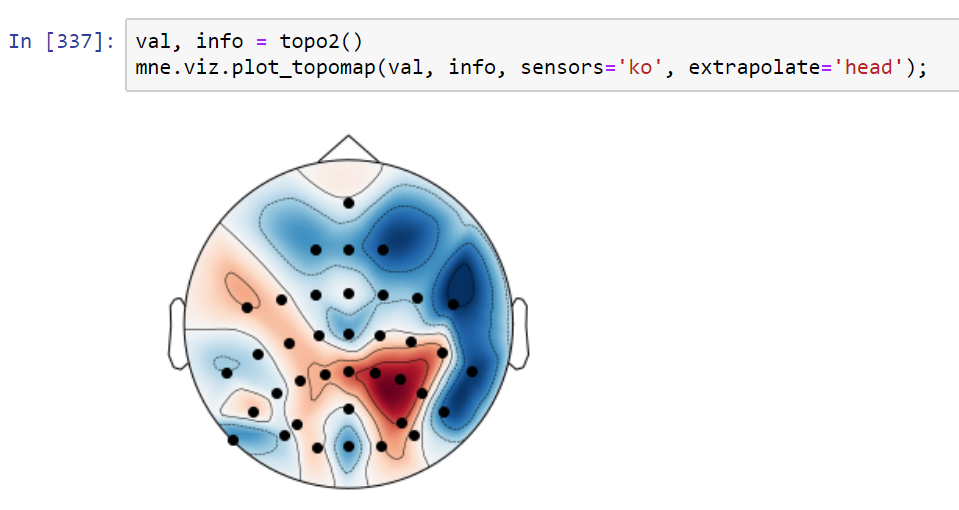
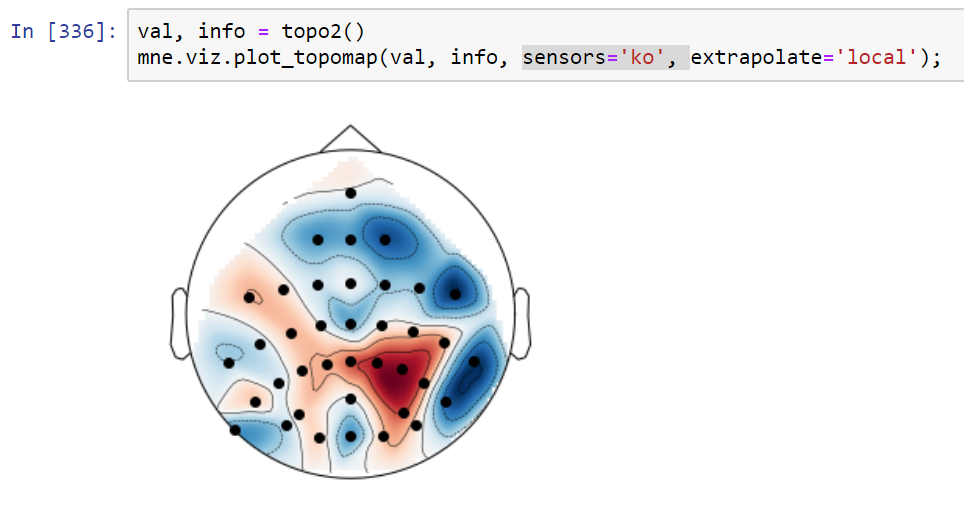
Comparison of extrapolate='local' and extrapolate='head', both with border=0:
image
image
in the case of placing points on head, I actually had to place them slightly outside head (at 0.53 instead of 0.5) to avoid the pixelated edges.

@cbrnr
Copy link
Contributor

cbrnr commented Dec 2, 2018

What does my example from #5315 look like?

@mmagnuski
Copy link
Member Author

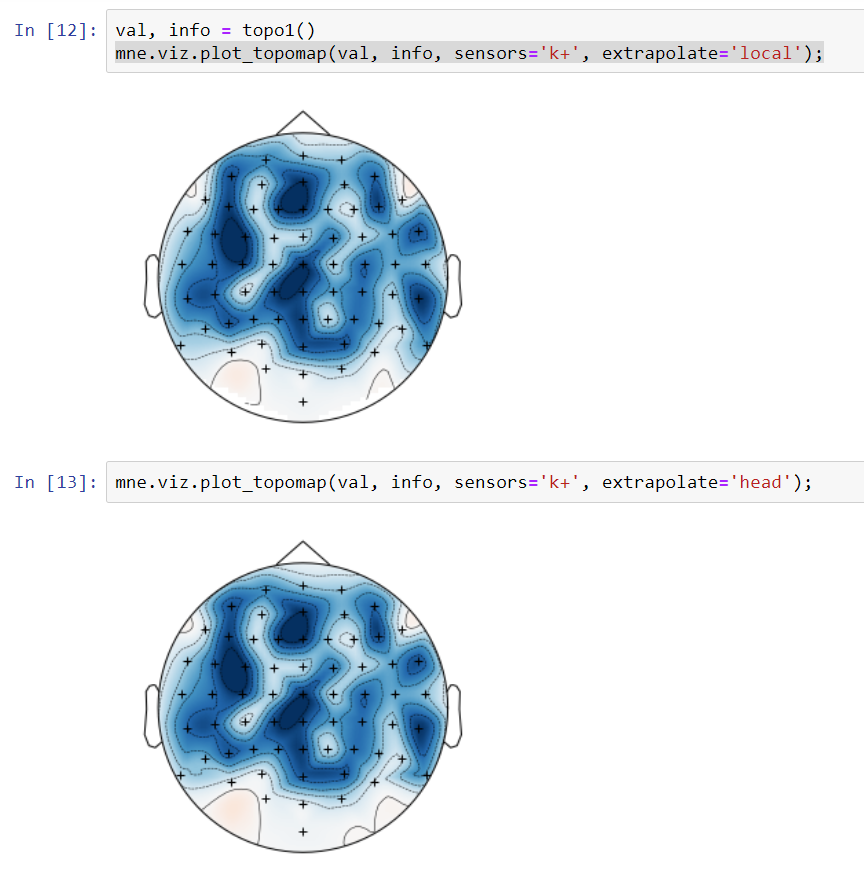
@cbrnr: Both 'local' and 'head' look very similar:
image

@mmagnuski
Copy link
Member Author

@larsoner
With respect to outlines='skirt' there are (at least) two options:

  • make extrapolate='local' default and raise error when extrapolate='head' and outlines='skirt'
  • make extrapolate='head' default and switch to extrapolate='local' when outlines='skirt'
    I have a preference for the first option as there is less magic under the hood.

@mmagnuski mmagnuski changed the title ENH: alternative layout of extra points in interpolation [WIP] ENH: alternative layout of extra points in interpolation Dec 2, 2018
@cbrnr
Copy link
Contributor

cbrnr commented Dec 2, 2018

Both variants are much better than the previous default, because the red (positive) patches are much less pronounced. However, the BBCI toolbox topoplot still looks better because it doesn't contain any positive values.

@mmagnuski
Copy link
Member Author

@cbrnr - we can check different interpolation methods later to see if that helps. I could also add more points on the border an we can see if that helps.

@mmagnuski
Copy link
Member Author

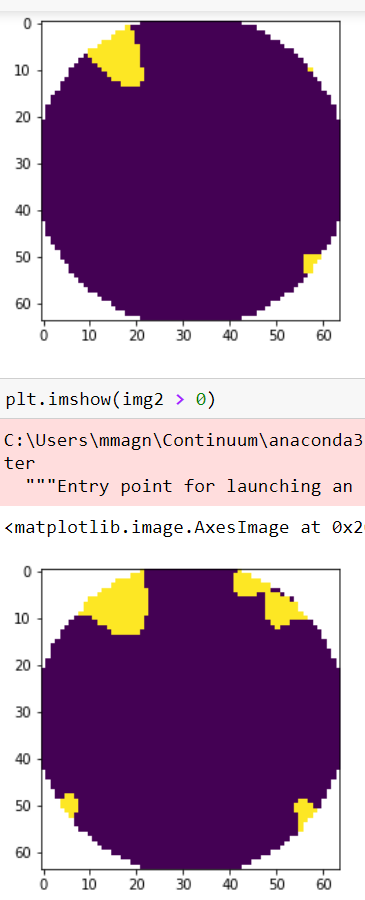
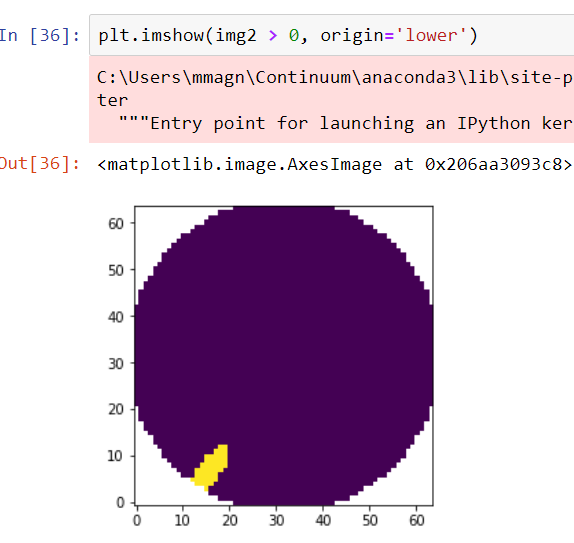
@cbrnr Additional points do not help much. Below you can find images of mask highlighting positive values with more (upper plot) and less (lower) extra points. The figures are without origin='lower' so you'd have to flip them upside down in your head. :)
image

Adding even ludicrous amount of extra points (20 times more than default) doesn't help so much (the plot below is with origin='lower', just to confuse you ;) ):
image

I'd blame it on different interpolator used and maybe some differences in the 2d layout of channels between mne and the BCI toolbox (it seems that 2d channel positions are different - if one could extract the 2d coordinates of the points we could check that).

@cbrnr
Copy link
Contributor

cbrnr commented Dec 2, 2018

I suspect its the different interpolation scheme. @jsosulski can you check if there are any positive values in the BBCI topoplot of my example (e.g. with a mask)?

@jsosulski
Copy link
Contributor

jsosulski commented Dec 3, 2018

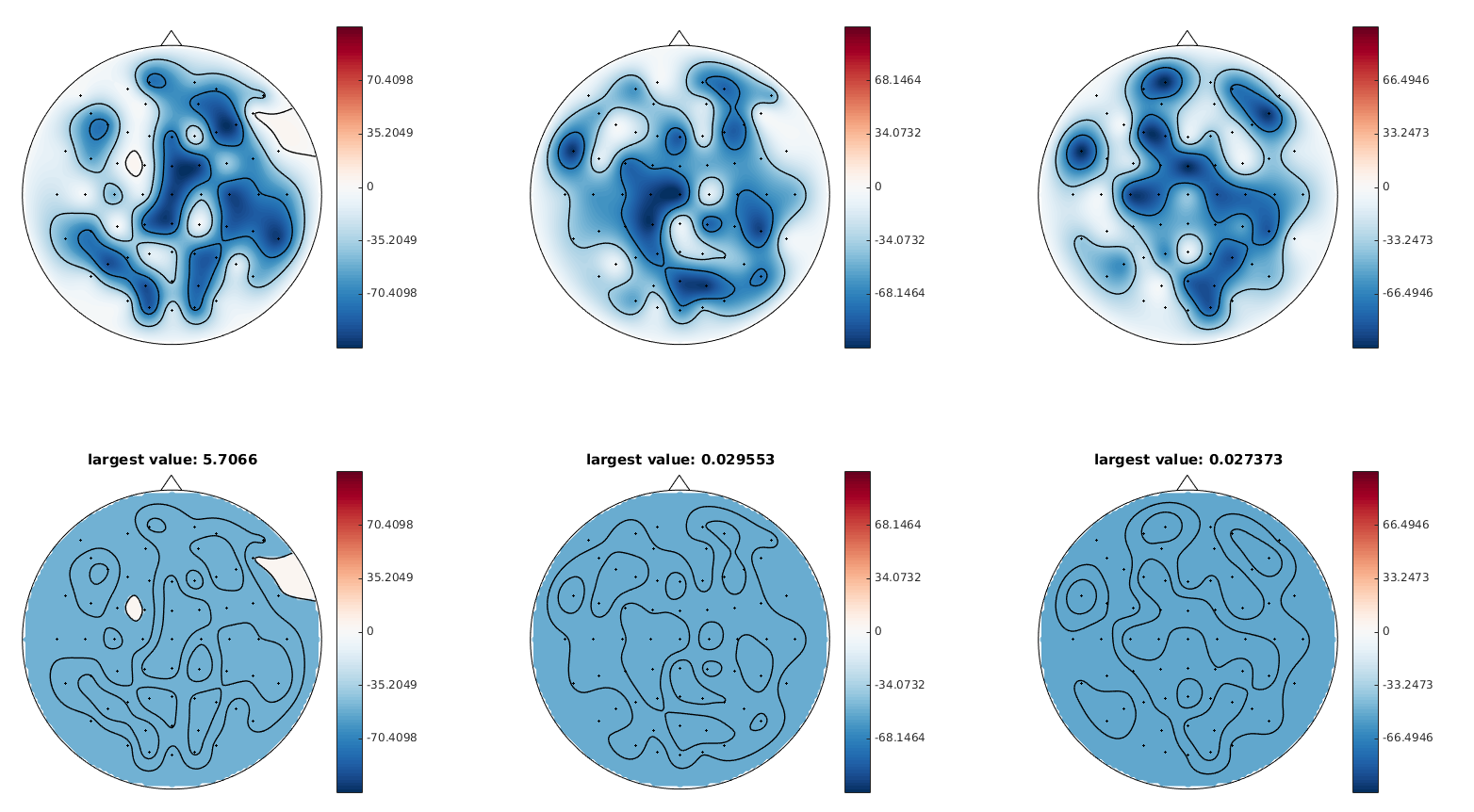
There actually are, I plotted some random integers between 0 and -100 as I did not have your original data available anymore right now. The plots above show the actual data and below is the mask, where white areas show positive values. The largest (interpolated) value measured is shown in the title.

image

If one uses linear interpolation, there are obviously no more positive values, but the topomap looks more like a picasso picture. For the above plots the matlab toolbox uses griddata with 'v4' interpolation, i.e. bi-harmonic spline interpolation.

@mmagnuski
Copy link
Member Author

Thanks for the comments @cbrnr, I think I adressed all. Now I am at the mercy of CIs...

@cbrnr
Copy link
Contributor

cbrnr commented Dec 18, 2018

There are still some open comments about magic numbers and a missing "the" in two or more places. Since the CIs have already failed you might as well push these changes.

@larsoner
Copy link
Member

Travis

tutorials/plot_visualize_evoked.py:104:80: E501 line too long (80 > 79 characters)

CircleCI

/home/circleci/project/examples/visualization/plot_evoked_topomap.py failed leaving traceback:
Traceback (most recent call last):
  File "/home/circleci/miniconda/envs/mne/lib/python3.6/site-packages/sphinx_gallery/gen_rst.py", line 402, in _memory_usage
    multiprocess=True)
  File "/home/circleci/miniconda/envs/mne/lib/python3.6/site-packages/memory_profiler.py", line 336, in memory_usage
    returned = f(*args, **kw)
  File "/home/circleci/miniconda/envs/mne/lib/python3.6/site-packages/sphinx_gallery/gen_rst.py", line 393, in __call__
    exec(self.code, self.globals)
  File "/home/circleci/project/examples/visualization/plot_evoked_topomap.py", line 85, in <module>
    show=False)
  File "/home/circleci/project/mne/evoked.py", line 359, in plot_topomap
    axes=axes, extrapolate=extrapolate)
  File "/home/circleci/project/mne/viz/topomap.py", line 1773, in plot_evoked_topomap
    cax = plt.subplot(1, n_fig_axes + 1, n_fig_axes + 1)
  File "/home/circleci/miniconda/envs/mne/lib/python3.6/site-packages/matplotlib/pyplot.py", line 1084, in subplot
    a = fig.add_subplot(*args, **kwargs)
  File "/home/circleci/miniconda/envs/mne/lib/python3.6/site-packages/matplotlib/figure.py", line 1352, in add_subplot
    ax = self._axstack.get(key)
  File "/home/circleci/miniconda/envs/mne/lib/python3.6/site-packages/matplotlib/figure.py", line 98, in get
    "Adding an axes using the same arguments as a previous axes "
  File "/home/circleci/miniconda/envs/mne/lib/python3.6/site-packages/matplotlib/cbook/deprecation.py", line 112, in warn_deprecated
    warnings.warn(message, category, stacklevel=2)
matplotlib.cbook.deprecation.MatplotlibDeprecationWarning: 
Adding an axes using the same arguments as a previous axes currently reuses the earlier instance.  In a future version, a new instance will always be created and returned.  Meanwhile, this warning can be suppressed, and the future behavior ensured, by passing a unique label to each axes instance.

@mmagnuski
Copy link
Member Author

@cbrnr, thanks, I'll fix it later today.

@mmagnuski
Copy link
Member Author

thanks @larsoner I'm on it.

@mmagnuski
Copy link
Member Author

@cbrnr cbrnr merged commit ef1929f into mne-tools:master Dec 19, 2018
@cbrnr
Copy link
Contributor

cbrnr commented Dec 19, 2018

Thanks @mmagnuski!

@mmagnuski
Copy link
Member Author

Unbelivable - it's finally merged :)
Thanks @cbrnr @larsoner @agramfort!
🚀

Sign up for free to join this conversation on GitHub. Already have an account? Sign in to comment

Labels

None yet

Projects

None yet

Development

Successfully merging this pull request may close these issues.

5 participants