Conversation


|
Thanks! Looks like tests are failing. |

Yeah for some reason I can't get the test working even in the main branch and I can't check the code.. looking into it |


 rgwood
left a comment
rgwood
left a comment
rgwood
left a comment
There was a problem hiding this comment.
Thank you for the PR! We appreciate you taking the time to get this ready, seems like it was a lot of work. Some comments:
Testing
I'm a little unsure about the way the tests are implemented. It would be nice to eliminate some of the duplication/redundancy. For example, instead of this:
fn copy_test() {
    nu!("cp ...");
    assert!(...)

    // same thing again but for --progress
    nu!("cp -p ...");
    assert!(...)
}
What about something like this?
fn copy_test(progress: bool) {
    let progress_flag: String = if progress {"-p"} else {""};
    nu!("cp {progress_flag} ...");
    assert!(...)
}
I think the latter would be easier to maintain.
1 progress bar per file
I noticed that cp -p shows 1 progress bar per file:
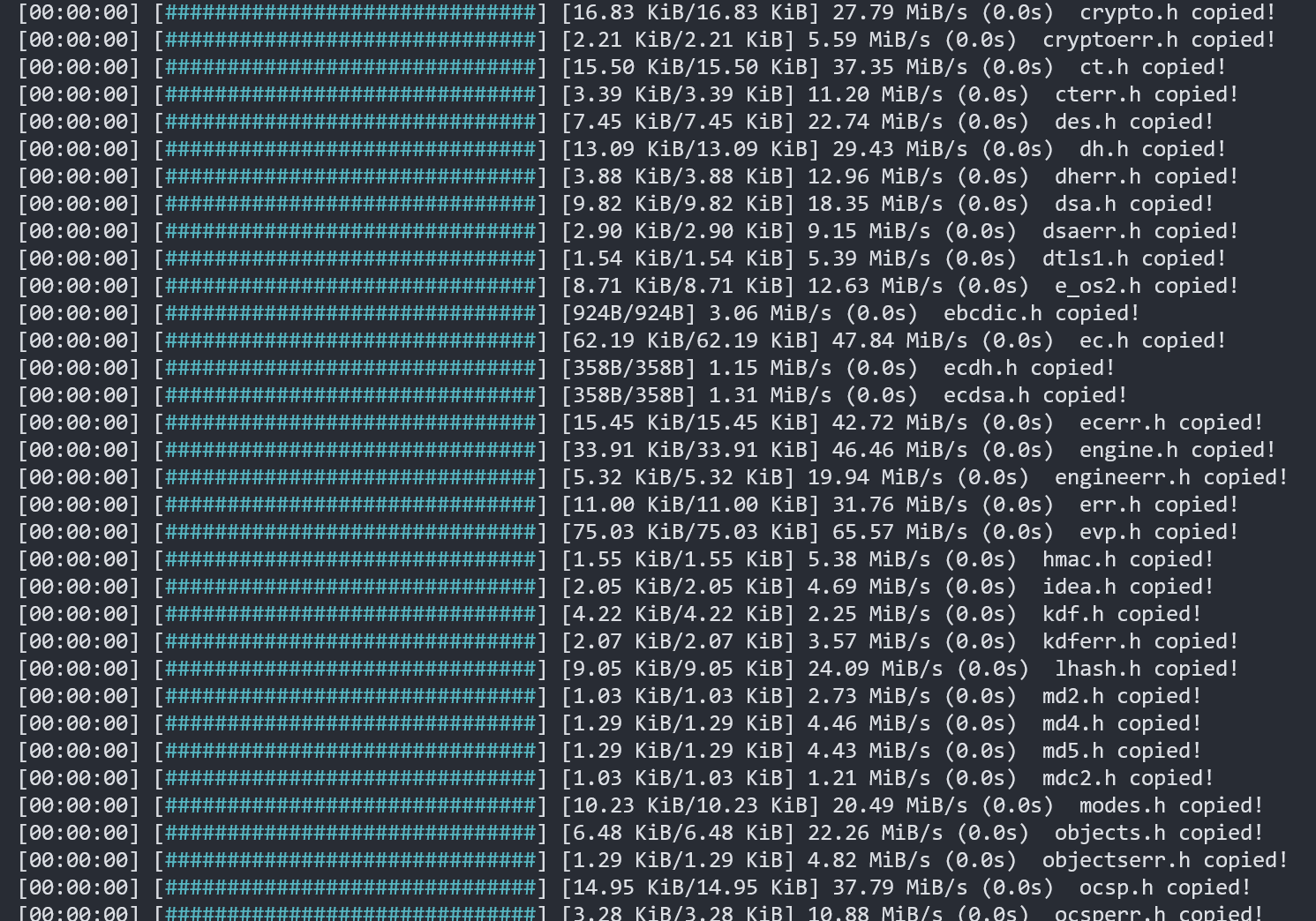
This is a bit overwhelming when copying large files with -r. The progress bars are created and finished much too quickly for the user to read. Would it make more sense to show a single progress bar for all files?
ctrl+c not supported
I noticed that ctrl+c doesn't work to interrupt a file copy with -p. We should probably fix that.
| fn get_file_hash<T: std::fmt::Display>(file: T) -> String { | ||
| nu!("open {} | to text | hash md5", file).out | ||
| } |
There was a problem hiding this comment.
FYI, this is a bit expensive. Not gonna say we shouldn't do it this way, but nu! launches a new instance of Nushell and that's a lot slower than a function call. Probably OK to leave as is for now though.
|
@rgwood Really appreciate you taking the time!!
I love it! 100% agreed! I will be working on those changes.
Is it ok to have both? I think the way is working right now is useful for some people... For example, I used to work for a VFX company where they manage a lot of big files. When artist wanted to move those files and work and the same time (because of crazy deadlines) it is important to know the status of each file. I am pretty sure they are other industries or cases likes this. Maybe we can have two flags and the default is the clean one (the one you suggested )?
Could you check with out the |
Let's do just 1 flag. We try to keep the number of flags on commands to the bare minimum.
Would it be enough to have the following information in the progress display?
I haven't thought this through in detail. We can go with the current approach if needed, but... it is a pretty bad UX for large numbers of files.
if nu_utils::ctrl_c::was_pressed(&ctrlc) {
    break;
} |
Totally understand
I think this might do it
Yeah let's go for the cleaner way. Do you mind accepting this PR first ( after I fix the tests ) and then I can make it cleaner? I want to avoid dealing with merging issues if someone works on the cp file. I had a bad experience last time xd but if that is a problem that's ok too, it's just that it would be easier
Cool! I can do that too in a different PR! |
Sure 👍 |
|
Working on this today! |

Codecov Report
Additional details and impacted files@@ Coverage Diff @@
## main #8012 +/- ##
==========================================
- Coverage 54.61% 54.19% -0.42%
==========================================
Files 608 608
Lines 99003 99093 +90
==========================================
- Hits 54068 53702 -366
- Misses 44935 45391 +456
|

@rgwood Actually we can't pass parameter when doing test. I get this error: |

I think in some of the nushell crates we use |
|
@Xoffio try something like: #[test]
fn copy_test() {
copy_test_impl(true);
copy_test_impl(false);
}
fn copy_test_impl(progress: bool) {
let progress_flag: String = if progress {"-p"} else {""};
nu!("cp {progress_flag} ...");
assert!(...)
} |
|
@rgwood The tests are done! :D If you can we can merge this one and I am starting to work to make it one progress bar. This will be a bit more work but it would be easy for me to merge later if someone works in the |

# Description
if you try to copy a big file with `cp` you will noticed that you can't
interrupt the process. This pull request fix that.
This was discuss here
#8012 (comment)

# User-Facing Changes
None

# Tests + Formatting
- Check - `cargo fmt --all -- --check` to check standard code formatting
(`cargo fmt --all` applies these changes)
- Check - `cargo clippy --workspace -- -D warnings -D
clippy::unwrap_used -A clippy::needless_collect` to check that you're
using the standard code style
- Check -  `cargo test --workspace` to check that all tests pass

---------

Co-authored-by: Reilly Wood <reilly.wood@icloud.com>
3 participants


NOTE
Clean duplicate of #7825
Sorry about all the mess guys... I got confuse with GitHub and and ended up mankind that mess.
This the same code I just cleaned the commits.
Description
Progress bar implementation for the
cpcommand. Now if the flag-por--progressis set, then the user will be able to see the progress of the file or files being copyUser-Facing Changes
A new flag (
--progress-p) was added to thecpcommandExamples:
Notes
std::io::{Read, Write}instead ofstd::fs::copyto get the progress. that means that when the progress bar is used the copy process might be a bit slower.copy_symlinkjust to add a progress bar that will be so fast to the point is not needed, but.. for consistency purposes we might need to added it, In that case I would have to pass the variableprogressby parameter (to not duplicate code unnecessary). If I do that i would have to pass theprogressvar to every function to respectcopy_impl: impl Fn(PathBuf, PathBuf, Span). Please let me know if this is not clear :p