Skip to content

cp progress bar - cleaner version#8325

Closed
Xoffio wants to merge 10 commits intonushell:mainfrom
Xoffio:progress_bar_cp_v02
Closed

cp progress bar - cleaner version#8325
Xoffio wants to merge 10 commits intonushell:mainfrom
Xoffio:progress_bar_cp_v02

Conversation

@Xoffio
Copy link
Contributor

@Xoffio Xoffio commented Mar 5, 2023

Description

Cleaner version for the cp progress bar. discussed here and here

nu_pb04

User-Facing Changes

The progress bar is not longer one for each file. Instead there are two: one showing the overall progress and the progress of the current file being copy

Tests + Formatting

Check - cargo fmt --all -- --check to check standard code formatting (cargo fmt --all applies these changes)
Check - cargo clippy --workspace -- -D warnings -D clippy::unwrap_used -A clippy::needless_collect to check that you're using the standard code style
Check - cargo test --workspace to check that all tests pass

@rgwood
Copy link
Contributor

rgwood commented Mar 5, 2023

Cool!

User-Facing Changes

NONE

Just to confirm: this PR changes the user interface, right? If I understand it correctly, you've tweaked the cp progress bar so it works better when copying multiple files.

@Xoffio
Copy link
Contributor Author

Xoffio commented Mar 5, 2023

Yes, now it is cleaner. So, instead of showing a progress bar for each file, now only shows the overall progress bar and the current file progress bar.
Sorry for the misunderstanding. I though that the "User-Facing Changes" was for things like flags (idk why :p).

@rgwood
Copy link
Contributor

rgwood commented Mar 5, 2023

Cool, sounds good. Let me know when tests are passing and I'll take a closer look!

@codecov
Copy link

codecov bot commented Mar 7, 2023

Codecov Report

Merging #8325 (0ab0497) into main (f93033c) will decrease coverage by 0.06%.
The diff coverage is 77.98%.

❗ Current head 0ab0497 differs from pull request most recent head 0f92e09. Consider uploading reports for the commit 0f92e09 to get more accurate results

Additional details and impacted files

Impacted file tree graph

@@            Coverage Diff             @@
##             main    #8325      +/-   ##
==========================================
- Coverage   68.56%   68.51%   -0.06%     
==========================================
  Files         620      620              
  Lines       99304    99471     +167     
==========================================
+ Hits        68086    68149      +63     
- Misses      31218    31322     +104     
Impacted Files Coverage Δ
crates/nu-command/src/filesystem/save.rs 80.81% <0.00%> (-0.52%) ⬇️
crates/nu-command/src/progress_bar.rs 75.34% <75.34%> (+10.34%) ⬆️
crates/nu-command/src/filesystem/cp.rs 70.92% <96.77%> (+1.38%) ⬆️

... and 64 files with indirect coverage changes

@ghost
Copy link

ghost commented Mar 14, 2023

Hi,
i have tested it and have some feedback:
currently the overall (all files) progress bar appears whenever i copy more than 1 file (example: cp ~/.config/nushell . -r).

  • the cp --progress argument ends up being kind of irritating, since it only toggles half of it
  • a option to disable it would be appreciated, since it makes writing "fancy" scripts a bit more complex (| null does not work)

@Xoffio
Copy link
Contributor Author

Xoffio commented Mar 15, 2023

* a option to disable it would be appreciated, since it makes writing "fancy" scripts a bit more complex (`| null` does not work)

Sorry @Jan9103 I couldn't understand exactly the problem you are having. if you don't want to use the progress bar you don't have to enable it.

Also, I don't know if you are testing the cp -p version already out or this one that hasn't being merge yet. This one is cleaner.

@ghost
Copy link

ghost commented Mar 15, 2023

Sorry @Jan9103 I couldn't understand exactly the problem you are having. if you don't want to use the progress bar you don't have to enable it.

the problem is: it is enabled by default and cant be disabled - i would like to have it, but also have the option to disable it

Also, I don't know if you are testing the cp -p version already out or this one that hasn't being merge yet. This one is cleaner

i have build the latest commit in your branch (0ab0497) for this test:

{ lib, fetchFromGitHub, rustPlatform, openssl, zstd, pkg-config, python3, xorg, testers, nushell, nix-update-script}:

rustPlatform.buildRustPackage {
  pname = "nushell";
  version = "a";

  src = fetchFromGitHub {
    owner = "Xoffio";
    repo = "nushell";
    rev = "0ab04970df0c1254fb704b6eb9e2d4d3cecccc75";
    sha256 = "sha256-oL2FxB6x7URqD28bFmQ5fNlzguNfCGemALpJq9Q62rI=";
  };

  cargoSha256 = "sha256-0GAlaio21TsSWKjRWZUe8Uy8k7t4BZm0aciTi+bepUk=";

  nativeBuildInputs = [ pkg-config python3 ];

  buildInputs = [ openssl zstd xorg.libX11 ];

  buildFeatures = [ "default" ];

  doCheck = false;

  meta = with lib; {
    description = "A modern shell written in Rust";
    homepage = "https://www.nushell.sh/";
    license = licenses.mit;
    #maintainers = with maintainers; [ Br1ght0ne johntitor marsam ];
    mainProgram = "nu";
    platforms = platforms.linux;
  };

  passthru = {shellPath = "/bin/nu"; };
}

for me this is the output:

$ cp ~/.config/nushell/ . -r
  [00:00:00] [##############################] [12/12]
$ cp ~/.bashrc .
$ cp ~/.bashrc . -p

and a realley weird one: cp ~/.config/nushell/ . -rp
overrides the command and i end up with

  [00:00:00] [##############################] [12/12]
$

(the command is overwritten)

the output i would expect is:

$ cp ~/.config/nushell/ . -r
$ cp ~/.config/nushell/ . -rp
  [00:00:00] [##############################] [12/12]
$ cp ~/.bashrc .
$ cp ~/.bashrc . -p
  [00:00:00] [##############################] [1/1]

if i misunderstood the MR or have some issue with my build-setup i apologize for the inconvenience.

@rgwood
Copy link
Contributor

rgwood commented Mar 15, 2023

it is enabled by default and cant be disabled

I can reproduce this; looks like the progress bar is enabled without the -p flag. Guessing that's unintentional?

@rgwood
Copy link
Contributor

rgwood commented Mar 15, 2023

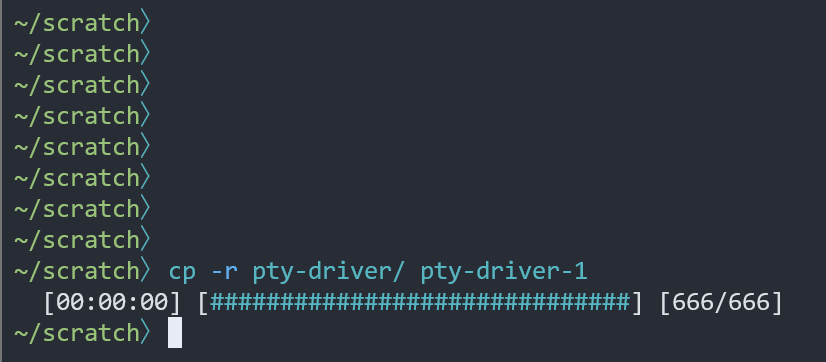
Hmm. If I run cp without -p, I get a progress bar "inline", at the current location of my prompt: image

If I include -p, my entire terminal is cleared and then the progress bar is displayed at the top:

image

Not sure why the difference, but I expected the former behaviour (progress displayed inline, terminal not cleared).

@Xoffio
Copy link
Contributor Author

Xoffio commented Mar 16, 2023

@Jan9103 @rgwood Thank you guys. I will be working on this

@Xoffio
Copy link
Contributor Author

Xoffio commented Mar 21, 2023

Hey @rgwood sorry that its taking a bit longer i have a test next Tuesday. After that I will get the fix pushed! Happy coding!

@rgwood
Copy link
Contributor

rgwood commented Mar 22, 2023

No rush!

@fdncred fdncred marked this pull request as draft March 24, 2023 20:14
@Xoffio
Copy link
Contributor Author

Xoffio commented Apr 5, 2023

@rgwood, @Jan9103 I fixed the issue.

@rgwood
Copy link
Contributor

rgwood commented Apr 6, 2023

Just tested this. The progress bar no longer appears without -p 👍

However, cp -r -p foo bar still clears the entire terminal. It updates too quickly to see anything, and the overall progress bar is not always visible. Is this expected?

Screen.Recording.2023-04-06.at.10.30.14.AM.mov

@Xoffio
Copy link
Contributor Author

Xoffio commented Apr 8, 2023

@rgwood that is not intended. I guess I was testing with a simpler folder. Looking into it! Thanks! :)

Xoffio added 2 commits May 22, 2023 23:07
terminal getting cleared was fixed. Now the user can cancel the copy process in places they couldn't before.
@Xoffio
Copy link
Contributor Author

Xoffio commented May 23, 2023

WIP - cleaning code

@Xoffio
Copy link
Contributor Author

Xoffio commented Jun 6, 2023

Hey @rgwood! I believe this is ready for approval. I would like to bring two points to your attention:

  1. At line 345, I noticed that the code attempts to generate a list of file paths from a folder. However, if the path is deeply nested and contains a large number of files, this process can become time-consuming. Unfortunately, the user cannot interrupt this section of the code by pressing Ctrl+C. I have added some commented-out code that allows the user to interrupt the copy process, but it results in a mismatch with the UI. Maybe we could include it in a separate commit for now? What do you think?

  2. After this commit, I will need to clean up the code in the progress_bar.rs file. I have chosen not to address it in this pull request, as it would require modifications to the save.rs file. Keeping these changes separate would allow me to handle the cleanup process in a more organized manner.

Thank you!! let me know if you need my help in any way!

@rgwood
Copy link
Contributor

rgwood commented Jun 6, 2023

Cool!

Sorry but I won't be able to review this in the near future. I've mentioned it on Discord in the hopes that someone else can take a look.

@fdncred
Copy link
Contributor

fdncred commented Aug 24, 2023

we're working on a replacement for cp that will have a progress bar in #10097. thanks for trying this!

@fdncred fdncred closed this Aug 24, 2023
Sign up for free to join this conversation on GitHub. Already have an account? Sign in to comment

Labels

None yet

Projects

None yet

Development

Successfully merging this pull request may close these issues.

3 participants