Navigation updates, Code Security name change#5395
Conversation


 zlonko
changed the title
zlonko
changed the title

|
Notifying subscribers in CODENOTIFY files for diff 035cc5e...74a99c8.
|

There was a problem hiding this comment.
This is great, Tim, thanks for the enhancements along the way. 😄
-
Can you merge main back into this branch so the staging job will run? I can't test the re-directs until then, but they look like they should be good.
-
I don't have perms to view the doc to see all the requirements. So I can't double check requirements met yet.
-
Maybe a Product concern, but I feel like
Case Studiesbeing intermixed with theUse Casesdrop down is a bit unorganized, right? I think Tailwind allows us to use Multi-level Dropdowns to clean this up: Tailwind-Dropdowns, Tailwind-Multilevel-Dropdowns
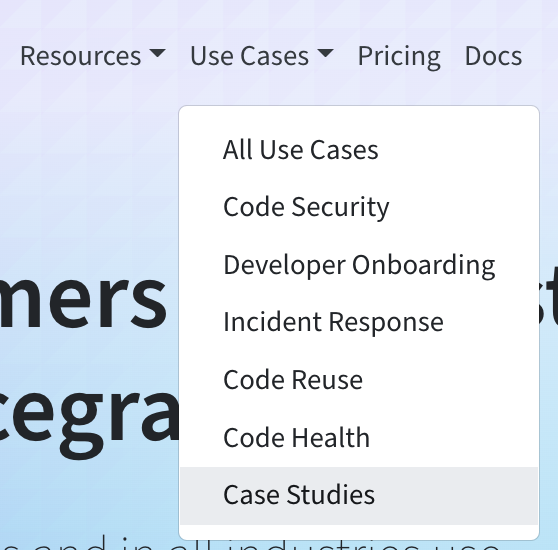
- And a few small comments below

|
@st0nebraker: The merge conflict must have happened after I requested you! I am sorry for the mix-up, it is resolved now and staging should run. I also added you/CPT to the doc and meta files. |

All good! The staging job wasn't running in the workflow for some reason. The new commit triggered it though 👍 I see the re-directs working perfectly 😎 |


 bretthayes
left a comment
bretthayes
left a comment
bretthayes
left a comment
There was a problem hiding this comment.
Looks good so far and the links work!
I'd like to make a suggestion as a refactor to make it more convenient for us to test and update these links in the future. I think we could create a nested data structure for our links and then we could add some mapping logic to render and reduce the amount of repeated markup.
Here's what I'm thinking:
const links = {
    product: [
        {
            title: 'Code Search',
            href: '/code-search'
        },
    ],
    resources: [
        {
            title: 'Code Intelligence',
            href: 'https://docs.sourcegraph.com/code_intelligence'
        },
        // ...etc.
    ],
    // ...etc.
}
Then you can use Object.keys in links to generate your IDs, react keys in your iterators, and your title attributes. This will also allow us to not have duplicate data and markup and we can render our desktop and mobile nav with the same data as the source of truth.

Co-authored-by: Brett Hayes <bretthayes@users.noreply.github.com>
bretthayes
left a comment
bretthayes
left a comment
There was a problem hiding this comment.
Awesome improvements Tim! ✨ Feel free to either follow up or refactor a bit more in this PR 🙂
src/components/Layout/Header.tsx
Outdated
| item.href.includes('http') ? ( | ||
| <Nav.Link | ||
| key={camelCase(item.title)} | ||
| href={item.href} | ||
| target="_blank" | ||
| rel="noreferrer" | ||
| > | ||
| {item.title} | ||
| </Nav.Link> | ||
| ) : ( | ||
| <Nav.Link key={camelCase(item.title)} href={item.href}> | ||
| {item.title} | ||
| </Nav.Link> | ||
| ) |
There was a problem hiding this comment.
I think we could make this a reusable rendering function since I see this used a few times. That could reduce our logic even further. You could pass a prop to render as a different element as well.
src/components/Layout/Header.tsx
Outdated
| > | ||
| Docs | ||
| </a> | ||
| </li> | ||
| <li className="nav-item" role="presentation"> | ||
| <a className="nav-link" href="https://sourcegraph.com/sign-in"> | ||
| Sign in | ||
| </a> | ||
| </li> | ||
| {!props.hideGetStartedButton && ( | ||
| <li className="header__nav-item nav-item" role="presentation"> | ||
| <a className="nav-link" href="https://sourcegraph.com/search"> | ||
| <li className="align-items-center nav-item" role="presentation"> | ||
| <a | ||
| className="nav-link" | ||
| href="https://sourcegraph.com/search" | ||
| data-button-style={buttonStyle.text} | ||
| data-button-location={buttonLocation.nav} | ||
| data-button-type="cta" | ||
| > | ||
| Search code | ||
| </a> | ||
| </li> | ||
| )} | ||
| <li className="header__nav-item nav-item" role="presentation"> | ||
| <li className="align-items-center nav-item" role="presentation"> | ||
| <Link href="/demo" passHref={true}> | ||
| {/* eslint-disable-next-line jsx-a11y/anchor-is-valid */} | ||
| <a className="nav-link">Request a demo</a> | ||
| <a | ||
| className="nav-link" | ||
| data-button-style={buttonStyle.text} | ||
| data-button-location={buttonLocation.nav} | ||
| data-button-type="cta" | ||
| > | ||
| Request a demo | ||
| </a> | ||
| </Link> | ||
| </li> | ||
| {!props.hideGetStartedButton && ( | ||
| <li className="header__nav-item nav-item" role="presentation"> | ||
| <li className="align-items-center nav-item" role="presentation"> | ||
| <Link href="/get-started" passHref={true}> | ||
| <a href="#none" className="nav-link"> | ||
| {/* eslint-disable-next-line jsx-a11y/anchor-is-valid */} | ||
| <a | ||
| className="nav-link" | ||
| data-button-style={buttonStyle.text} | ||
| data-button-location={buttonLocation.nav} | ||
| data-button-type="cta" | ||
| > | ||
| Get started | ||
| </a> | ||
| </Link> |
There was a problem hiding this comment.
We could even reduce the markup here as well by creating a rightNavLinks array
|
@bretthayes I introduced the two components here: 59c8ef8. Also, you make good points about additional optimizations, so I created #5416 for me to loop back in when I return from PTO! |
bretthayes
left a comment
bretthayes
left a comment
There was a problem hiding this comment.
Looks good Tim! Looking forward to some more refactoring here ✨

 st0nebreaker
left a comment
st0nebreaker
left a comment
st0nebreaker
left a comment
There was a problem hiding this comment.
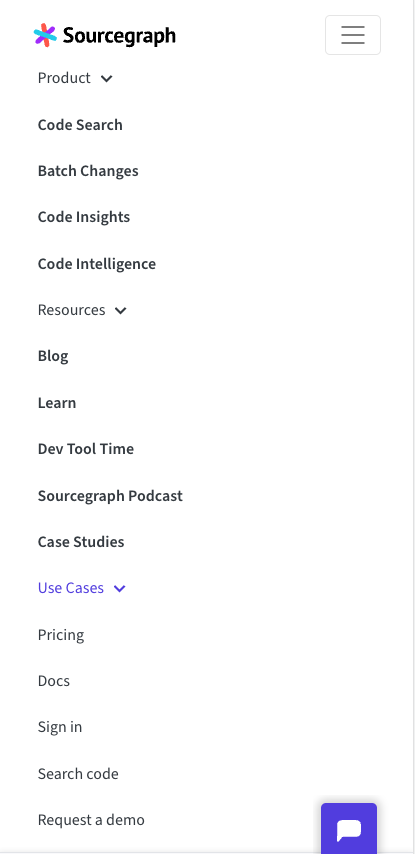
Lgtm! I think some other navbar enhancements worth considering for us is (1) To limit expanded navbar items on mobile. (2) Highlight the current page in the navbar
4 participants


This closes #5266. It updates navigation in the header to expose use cases and reflect the renamed Code Security page. Links are also updated to support Code Security and the removal of the Product Specialist page, a.k.a. "Become One".
Specs are located in this doc.
Changelog
Header/use-casesand/product-specialistFooterproduct-specialist.tsxper specs/contact/product-specialistto/demodemovulnerabilities.tsxtocode-security.tsxcode-security.tsx/use-cases/vulnerabilitiesto/use-cases/code-security/use-casesBug Fixes
Notes
/use-casesreact-bootstrap doesn't appear to support adding an href on NavDropdown: docs
This also seems to pose a usability issue: a user could click the header wanting to expand the menu, but end up following the link (or vice versa). Also, a user may not expect this behavior, because neither the Product nor Resource dropdowns will repeat this pattern. Perhaps it is more declarative to have another nested item for "All Use Cases"? For example:
Test
/use-cases/code-securitysuccessfully/use-casesare intact/product-specialistand/use-cases/vulnerabilities