Conversation


Simplifies what a user needs to know/do to use extensions, specifically the add/remove/enable/disable operations. The set of possible states for an extension remain the same, but the UI actions exposed to the user are much simpler and only address the common cases. To enable/disable/add/remove extensions for everyone (in global settings) or for organization members (in organization settings), you must edit those settings manually. That is acceptable (for now, at least) and makes the UI much simpler.

The previous approach is best described as "show the user the set of all possible changes to settings related to this extension". The new approach is "make it easy for the user to start or stop using an extension, and to know why an extension is enabled if it's enabled".

See https://sourcegraph.slack.com/archives/CCLF4R6EM/p1537634102000100?thread_ts=1537605588.000100&cid=CCLF4R6EM (internal link) for more context.


Codecov Report
@@            Coverage Diff             @@
##           master      #50      +/-   ##
==========================================
- Coverage   18.38%   16.05%   -2.34%
==========================================
  Files          36       36
  Lines        1164     1115      -49
  Branches      262      250      -12
==========================================
- Hits          214      179      -35
+ Misses        950      936      -14
Continue to review full report at Codecov.
|


|
🎉 This PR is included in version 8.6.0 🎉 The release is available on: Your semantic-release bot 📦🚀 |

|
Thanks for taking a stab at this.. but I am struggling to see this as a good change. I currently view this change as a regression overall. Here's why: (1) You have removed the ability to add the extension globally / just for an org.
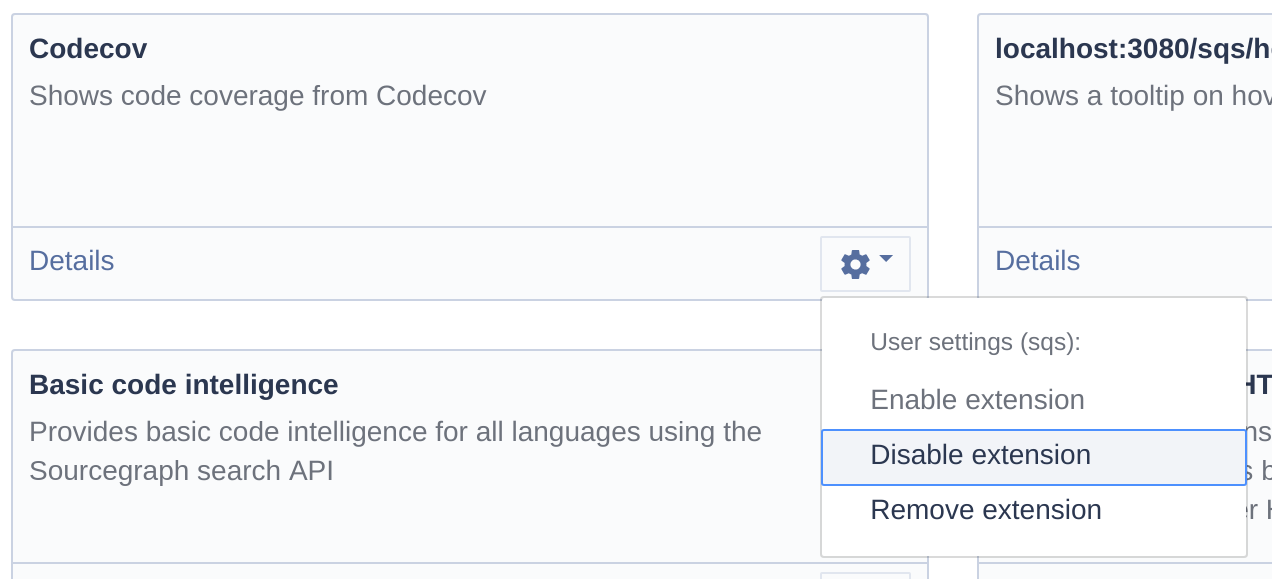
In fact, I would argue that if any individual settings modes should be removed it should be the user and organization-level ones, not the global one. (2) You have not addressed my confusion as a user over why enable/disable is different from add/removeIn this screenshot:
If I want to get rid of the extension, I don't understand whether or not I should be clicking disable or remove. Having both options immediately makes me ask questions like:
|

|
Thanks for the feedback. I will think about the first point in a bit. For the 2nd point, how could we convey these here? What if we just remove the “remove” action? Do you have this same confusion about VS Code extensions (which have the same options)? |
|
Re: org and global settings, what do you mean by “why are global and site settings different?” and “I added it to my site settings and it doesn’t work. Wait, they’re different?” If you add it to global settings, it will show as added and enabled for every user—did you think it would not work that way? Or is the confusion about global settings vs site config? As for needing this to be smooth for code discussions, I see that and wasn’t thinking about that. I’ll think of a simple way to add that functionality back so it’s just as easy as it was before to add an extension for everyone/an organization. |
|
For (2), also do you have those same questions about Chrome extensions? How did you clear up your understanding there? What UI cues etc helped you? |
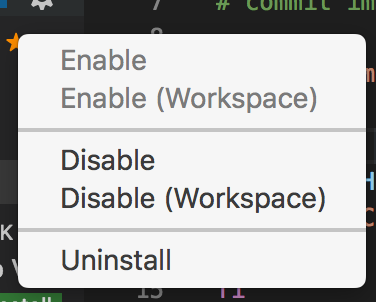
I think just removing the "remove" action or "disable" action entirely would be good. VS Code provides me these options:
This conveys to me two bits of information:
By these statements I just meant to convey the general issues around me describing to users in a README how to enable code discussions' extension for all users of a Sourcegraph instance. So, to be clear:
For example, if the code discussions README says:
It is very easy for even experienced Sourcegraph users to think "Oh, I know where global Sourcegraph settings are -- they are in my site config!" and add the snippet of code to their site config which will fail because it's not their global settings. The reason this is a problem is because users generally don't interact with the global settings. When the ability to configure this via UI buttons existed (before this PR) this was a non-issue because users just wouldn't run into the question in the first place: they would just use the UI.
I don't have the same questions about Chrome's UI, which is interesting. I think the reason that I don't is because: chrome://extensions/ shows me my installed extensions only, I can't add more extensions from there (or at least, the UI is not tailored for that). So if I click In fact, the Chrome Webstore itself offers me none of these options. If I visit an extension like Sourcegraph that I already have installed, I have no actions. I cannot remove it, disable it, etc. from this page. To conclude my thoughts here, I think the best UX here would be: (0) Add back the ability to enable extensions at a global level from the UX (even if just for the sake of code discussions). My suggestion for (4) would change if: a. We offered "disable for workspace" in the same UI location like VS Code does (this wouldn't be possible unless our extensions UX was tied to having a workspace open). |

|
While bumping e-c-c to support diff pages in the browser extension, I noticed that the extension list add/remove buttons are completely gone due to this change. I'm working on figuring out how to support client settings again, since this PR prevents that from working. Edit Fixed by editing the highest precedence settings (rather than always User settings). |

4 participants


Simplifies what a user needs to know/do to use extensions, specifically the add/remove/enable/disable operations. The set of possible states for an extension remain the same, but the UI actions exposed to the user are much simpler and only address the common cases. To enable/disable/add/remove extensions for everyone (in global settings) or for organization members (in organization settings), you must edit those settings manually. That is acceptable (for now, at least) and makes the UI much simpler.
The previous approach is best described as "show the user the set of all possible changes to settings related to this extension".
The new approach is "make it easy for the user to start or stop using an extension, and to know why an extension is enabled if it's enabled". The reason the latter is important (knowing why an extension is enabled) is that many extensions will be enabled for the user in global or organization settings even before they've taken explicit action.
See https://sourcegraph.slack.com/archives/CCLF4R6EM/p1537634102000100?thread_ts=1537605588.000100&cid=CCLF4R6EM (internal link) for more context.