Convert some of the UI tests screen objects from BaseScreen to ScreenObject – Part 1 of many#17221
Convert some of the UI tests screen objects from BaseScreen to ScreenObject – Part 1 of many#17221
BaseScreen to ScreenObject – Part 1 of many#17221Conversation


|
You can trigger an installable build for these changes by visiting CircleCI here. |
 mokagio
changed the title
mokagio
changed the title
BaseScreen to ScreenObjectBaseScreen to ScreenObject – Part 1 of many
|
You can trigger optional UI/connected tests for these changes by visiting CircleCI here. |
mokagio
force-pushed
the
convert-to-screen-objects
branch
from
d6c926e to
620870d
Compare

| "revision": "df8ee4983e674b583b546bb0640ec83428be2465", | ||
| "version": "0.1.0" | ||
| "revision": "2d65beae47cdcaaf21703ce1b321f382fe0d0730", | ||
| "version": "0.2.0" |
There was a problem hiding this comment.
Updated ScreenObject to the latest version to take advantage of the multiple-elements init method.
| extension ScreenObject { | ||
|
|
||
| @discardableResult | ||
| func thenTakeScreenshot(_ index: Int, named title: String) -> Self { | ||
| let mode = XCUIDevice.inDarkMode ? "dark" : "light" | ||
| let filename = "\(index)-\(mode)-\(title)" | ||
|
|
||
| snapshot(filename) | ||
|
|
||
| return self | ||
| } | ||
| } |
There was a problem hiding this comment.
This is a 1:1 copy of the extension on BaseScreen above and is a way to combine Fastlane's screenshot logic with a nice DSL in ScreenObject.
Eventually, we might want to add some kind of abstraction and make this part of the framework. For the moment, though, the focus is to convert all the screens, so this will do.
| public init() { | ||
| super.init(element: XCUIApplication().otherElements.firstMatch) | ||
| public init(app: XCUIApplication = XCUIApplication()) throws { | ||
| try super.init(expectedElementGetters: [ { $0.otherElements.firstMatch } ]) |
There was a problem hiding this comment.
Worth pointing out that this matches is pretty useless because it will succeed most of the time.
The aim of the current work is not to fix "issues" in the tests, but to move to ScreenObject to make it easier to fix those issues later.
There was a problem hiding this comment.
Worth pointing out that this matches is pretty useless because it will succeed most of the time.
Indeed 😄
|
|
||
| // returns void since return screen depends on which editor you're in | ||
| /// - Note: Returns `Void` because the return screen depends on which editor the user is in. | ||
| public func closePostSettings() { |
There was a problem hiding this comment.
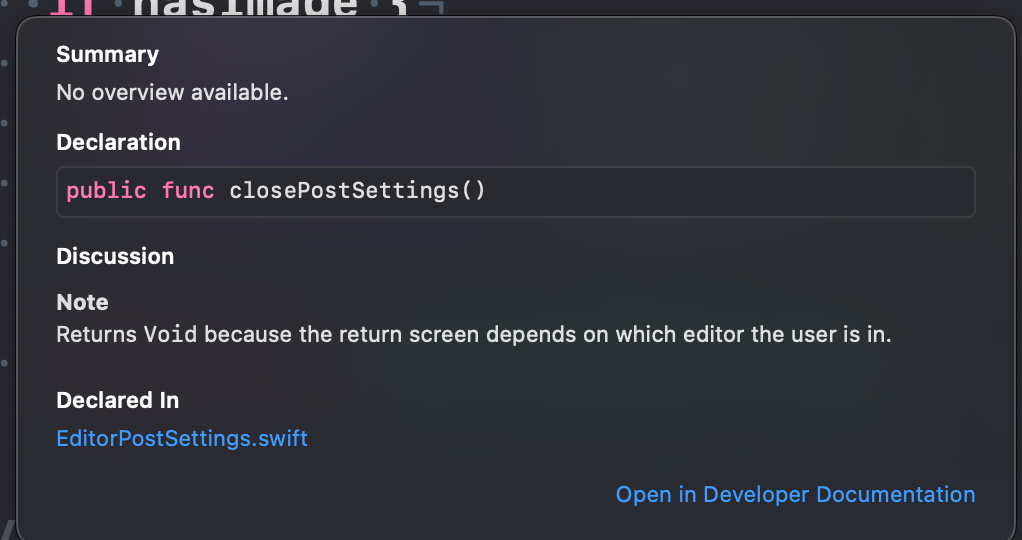
We want the UITestsFoundation framework to be super easy to use for feature developers to write tests with. This little change in how the documentation is formatted means Xcode will show this information during autocompletion or if a user Alt-clicks on the method name.
| return XCUIApplication().tables["SettingsTable"].exists | ||
| return (try? EditorPostSettings().isLoaded) ?? false |
There was a problem hiding this comment.
Rather than duplicating the logic to verify if a certain element exists, generating code that risks getting out of date, we can leverage the ScreenObject init behavior, which oden't fail the tests automatically if the screen is not loaded.
WordPress/UITestsFoundation/Screens/Editor/EditorPublishEpilogueScreen.swift
Outdated
Show resolved
Hide resolved
| public class FeaturedImageScreen: ScreenObject { | ||
|
|
||
| let removeButton: XCUIElement | ||
| var removeButton: XCUIElement { expectedElement } |
There was a problem hiding this comment.
TODO: add a code comment about this behavior here
mokagio
force-pushed
the
convert-to-screen-objects
branch
4 times, most recently
from
65451a1 to
e8c38d7
Compare
| } | ||
|
|
||
| func testGenerateScreenshots() { | ||
| func testGenerateScreenshots() throws { |
There was a problem hiding this comment.
Because the ScreenObject init throws, we now have a sprinkle of try calls around the test suite.
That's good. XCTest knows how to fail tests and report errors if a try call throws.
 mokagio
force-pushed
the
convert-to-screen-objects
branch
from
mokagio
force-pushed
the
convert-to-screen-objects
branch
from
e8c38d7 to
d565624
Compare

 pachlava
left a comment
pachlava
left a comment
pachlava
left a comment
There was a problem hiding this comment.
so here's the structure of a simple ScreenObject:
I wish I started the review from this PR, instead of woocommerce/woocommerce-ios/pull/5091 (which I did because it had 6 changed files less 😅 ). The overview that you provide in the PR description is very helpful! What do you think about making it a part of README.md from ScreenObject?
I executed the test locally, with no fails 👍

That's a great idea, thanks! I don't have time to tackle it just yet and I'd like the code to be used by a few more people to discover rough edges first. I opened Automattic/ScreenObject#10 to remember this. |
2 participants


This is the first PR of a series that will convert all
BaseScreensubclasses intoScreenObjectsubclasses.It might not be super clear by looking at the diff, so here's the structure of a simple
ScreenObject:Most screens use more than one element to verify if they're loaded correctly and for the test interactions. In those cases, we use a two step approach.
First, we define the getter closure as an instance
letThen we pass the value in the
expectedElementGettersarrayFinally, we access the element themselves by calling the closure. We don't use
expectedElementbecause that only returns the first element.That's it. I wish I could have found a cleaner way to do this, or one that required less explanation and relied more on the type system. This is the best I could do so far. 😕
Notice that I run the UI tests and the all passed.
Regression Notes
Potential unintended areas of impact
N.A.
What I did to test those areas of impact (or what existing automated tests I relied on)
N.A.
What automated tests I added (or what prevented me from doing so)
N.A.
RELEASE-NOTES.txtif necessary. N.A.