[No QA] Merge main into my branch #85610
[No QA] Merge main into my branch #85610stephanieelliott merged 1185 commits intoclaude-refineCardReconciliationArticlesfrom
Conversation


Signed-off-by: krishna2323 <belivethatkg@gmail.com>


…when expiration is enabled


The dragover event fires continuously while dragging. Remove the
listener after the first fire so dismiss() is only called once.

Co-Authored-By: Claude Opus 4.6 (1M context) <noreply@anthropic.com>

Introduce an IsInSidePanelContext and useIsInSidePanel hook that allows
descendants to query whether they're rendered inside a side panel without
prop drilling. SidePanelReport wraps its children with the provider.

The existing isInSidePanel prop is kept for backward compatibility and
will be removed in a follow-up PR that switches consumers to the hook.

Co-Authored-By: Claude Opus 4.6 (1M context) <noreply@anthropic.com>


Co-authored-by: parasharrajat <parasharrajat@users.noreply.github.com>
…r Sentry spans are sent

…aceNavBack

Co-authored-by: truph01 <truph01@users.noreply.github.com>


Introduce an IsInSidePanelContext and useIsInSidePanel hook so that any
descendant can query whether it is rendered inside the side panel without
prop drilling through ReportScreen → HeaderView / ReportFooter →
ReportActionCompose.

SidePanelReport wraps its children with the context provider. All four
consumers (ReportScreen, HeaderView, ReportFooter, ReportActionCompose)
now call useIsInSidePanel() directly instead of receiving the prop.

The Report/index.ts action-layer isInSidePanel parameter is a separate
concern and is not changed by this commit.

Co-Authored-By: Claude Opus 4.6 (1M context) <noreply@anthropic.com>

…idation

Fix: Enable strict HTML tag validation on tax name forms

[No QA] Add expo-location mock to jest setup
Non-existing room mentions in workspace descriptions showed a green
highlight because the MentionReportContext was missing exactlyMatch: true,
causing all mentions to be highlighted regardless of whether the room
exists. This matches the pattern used by PureReportActionItem,
ReportDetailsPage, and MoneyRequestConfirmationListFooter.

Co-authored-by: truph01 <truph01@users.noreply.github.com>

…ntAccountOnWalletSetup

Clear stale reimbursement account data on Wallet bank account setup


…-fork into Guccio163/onyx-connect/policy_tags/handleMoneyRequestStepScanParticipants
refactor buildUserReadableQueryString to use conciergeReportID from useOnyx
…Display

Fix travel card display in Assigned Cards

…texts-eslint-rule

[NoQA] Bump `eslint-config-expensify` and add `context-provider-split-values` eslint rule


|
@srikarparsi @lydiabarclay One of you needs to copy/paste the Reviewer Checklist from here into a new comment on this PR and complete it. If you have the K2 extension, you can simply click: [this button] |

Codecov Report✅ Changes either increased or maintained existing code coverage, great job!
|

|
test |
 github-actions
bot
changed the title
github-actions
bot
changed the title
![github-actions[bot]](https://avatars.githubusercontent.com/in/15368?s=60&v=4)
| title: Personal Karma | ||
| description: Learn how Personal Karma works, how donation amounts are calculated, and how to enable or disable automatic donations to Expensify.org. | ||
| keywords: [New Expensify, personal karma, donations, expensify.org, save the world, Expensify.org donation, automatic donation, billing card charge] | ||
| --- |

There was a problem hiding this comment.
Missing required metadata field: The YAML frontmatter is missing the internalScope field, which is mandatory per HELP_AUTHORING_GUIDELINES.md Section 3.
|
|
||
| ## How to enable or disable Personal Karma | ||
|
|
||
| 1. In the navigation tabs (on the left on Web, at the bottom on Mobile), choose **Account**. |
There was a problem hiding this comment.
Naming convention: Per HELPSITE_NAMING_CONVENTIONS.md Navigation Instruction Standards, when web and mobile navigation are structurally the same, the template phrasing uses lowercase "web" and "mobile": "on the left on web, on the bottom on mobile". Also consider using "Click" or "Select" instead of "choose" to match standard UI referencing verbs.
| 1. In the navigation tabs (on the left on Web, at the bottom on Mobile), choose **Account**. | |
| 1. Click the navigation tabs (on the left on web, at the bottom on mobile) and select **Account**. |
| ## How to enable or disable Personal Karma | ||
|
|
||
| 1. In the navigation tabs (on the left on Web, at the bottom on Mobile), choose **Account**. | ||
| 2. Select **Save the World** |
There was a problem hiding this comment.
Step formatting: Missing period at the end of this step. Other steps in this list end with punctuation -- this should be consistent.
| 2. Select **Save the World** | |
| 2. Select **Save the World**. |
|
|
||
| At the end of each month, Expensify calculates your total donation amount and charges your billing card on file. A donation receipt is sent to your email. | ||
|
|
||
| To change the card where Personal Karma is charged, [update your Expensify billing card](https://help.expensify.com/articles/new-expensify/billing-and-subscriptions/Add-a-payment-card-and-view-your-subscription#how-to-update-your-expensify-billing-card). |
There was a problem hiding this comment.
Cross-linking violation: Per HELP_AUTHORING_GUIDELINES.md Section 7 (Link Formatting), links to other HelpDot articles must use relative links only. Do not use full URLs.
| To change the card where Personal Karma is charged, [update your Expensify billing card](https://help.expensify.com/articles/new-expensify/billing-and-subscriptions/Add-a-payment-card-and-view-your-subscription#how-to-update-your-expensify-billing-card). | |
| To change the card where Personal Karma is charged, [update your Expensify billing card](/articles/new-expensify/billing-and-subscriptions/Add-a-payment-card-and-view-your-subscription#how-to-update-your-expensify-billing-card). |
|
|
||
| ## How can I learn more about Expensify.org's fund categories? | ||
|
|
||
| To learn more about Expensify.org funding categories, visit [expensify.org/funds](https://www.expensify.org/funds). |
There was a problem hiding this comment.
Cross-linking violation: Per HELP_AUTHORING_GUIDELINES.md Section 7 (Anchor Text Rules), avoid vague anchor text. The current anchor text "expensify.org/funds" is a URL, not a descriptive task or feature phrase. Consider something like:
| To learn more about Expensify.org funding categories, visit [expensify.org/funds](https://www.expensify.org/funds). | |
| To learn more about Expensify.org funding categories, visit [Expensify.org's fund details](https://www.expensify.org/funds). |
| 3. Under the **Subscription** section, enable Karma donations. | ||
|
|
||
| 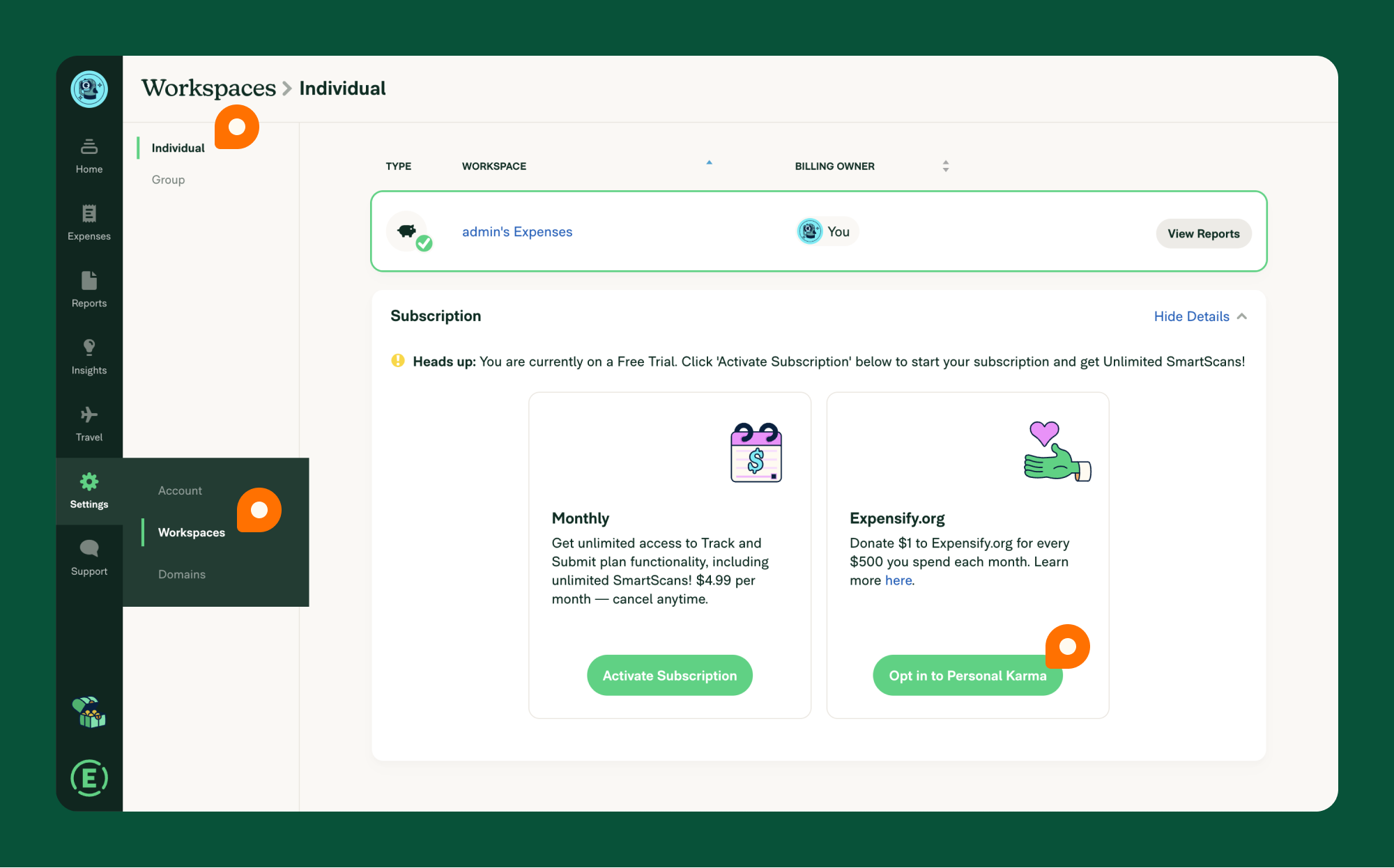{:width="100%"} | ||
| Personal Karma is now managed in New Expensify. To enable or disable Personal Karma donations, see the [Personal Karma](https://help.expensify.com/articles/new-expensify/settings/Personal-Karma) help page. |
There was a problem hiding this comment.
Cross-linking violation: Per HELP_AUTHORING_GUIDELINES.md Section 7 (Link Formatting), links to other HelpDot articles must use relative links, not full URLs.
| Personal Karma is now managed in New Expensify. To enable or disable Personal Karma donations, see the [Personal Karma](https://help.expensify.com/articles/new-expensify/settings/Personal-Karma) help page. | |
| Personal Karma is now managed in New Expensify. To enable or disable Personal Karma donations, see the [Personal Karma](/articles/new-expensify/settings/Personal-Karma) help page. |
| @@ -20,13 +20,7 @@ The fund from your Personal Karma is determined by the expense's MCC (Merchant C | |||
|
|
|||
| ## Setting Up Personal Karma Donations | |||
There was a problem hiding this comment.
Heading rule violation: Per HELP_AUTHORING_GUIDELINES.md Section 2, all ## headings must be task-based and start with an action verb or question word (How, What, Where, Who, Why, When). "Setting Up" is a gerund, not an imperative verb.
Consider: ## How to set up Personal Karma donations
| @@ -5,35 +5,14 @@ keywords: [Expensify Classic, workspace plan, subscription] | |||
| --- | |||
There was a problem hiding this comment.
Missing required metadata field: The YAML frontmatter is missing the internalScope field, which is mandatory per HELP_AUTHORING_GUIDELINES.md Section 3 and TEMPLATE.md.
| @@ -6,7 +6,7 @@ keywords: [Expensify Classic, create workspace, new workspace, getting started] | |||
|
|
|||
| Creating a workspace in Expensify Classic is the first step to organizing your expenses and managing your finances efficiently. This guide walks you through setting up your workspace so you can seamlessly track receipts, submit reports, and stay on top of your spending. | |||
| Creating a workspace in Expensify Classic is the first step to organizing your expenses and managing your finances efficiently. This guide walks you through setting up your workspace so you can seamlessly track receipts, submit reports, and stay on top of your spending. | ||
|
|
||
| All Expensify accounts include an Individual Workspace, which allows you to track personal expenses. If you want to connect your personal expenses to an accounting or travel integration, you can create a Group Workspace — even if you are the only member. | ||
| You can create a workspace to track personal expenses and connect to accounting or travel integrations — even if you are the only member. |
There was a problem hiding this comment.
Test probe - ignore
|
|
||
|
|
||
| Expensify offers several plans based on your needs: **Track, Submit, Collect, Control,** and **Free**. Your choice depends on whether you manage expenses individually, for a group, or for a company. You may need to upgrade if you hire employees who need access to a **Group Workspace** or require features exclusive to paid plans. | ||
| Expensify offers several plans based on your needs: **Collect, Control,** and **Free**. You may need to upgrade if you hire employees who need access to your workspace or require features exclusive to paid plans. |
There was a problem hiding this comment.
Structure violation: Per HELP_AUTHORING_GUIDELINES.md Section 4, each article must include exactly one # heading (the article title). This file has content before any # heading -- the article title should appear as a # heading immediately after the YAML frontmatter, before the introductory paragraph.
| --- | ||
|
|
||
| # Change a Subscription on an Individual Plan | ||
| # Changing Your Subscription |
There was a problem hiding this comment.
Multiple # headings violation: Per HELP_AUTHORING_GUIDELINES.md Section 4, an article may have exactly one # heading (the article title) plus an optional # FAQ. This file uses # Changing Your Subscription (line 12), # Downgrading to a Free Account (line 43), and # FAQ (line 63) -- that is three # headings. Demote # Changing Your Subscription and # Downgrading to a Free Account to ## headings, and keep the article's single # title matching the YAML title field.
|
|
||
| ## Adjust Subscription Size | ||
| 1. Go to **Settings > Workspaces > Group > Subscription**. | ||
| ## Adjust Annual Subscription Size |
There was a problem hiding this comment.
Heading rule violation: Per HELP_AUTHORING_GUIDELINES.md Section 2, all ## headings must be task-based and start with an action verb or question word (How, What, Where, Who, Why, When). "Adjust Annual Subscription Size" is a noun-phrase heading.
Consider: ## How to adjust your annual subscription size
| - **New Workspaces**: Based on active users in the first month. | ||
| - **Existing Workspaces Switching to Annual**: Based on the last month's active users. | ||
|
|
||
| ## Auto-Increase Subscription Size |
There was a problem hiding this comment.
Heading rule violation: Per HELP_AUTHORING_GUIDELINES.md Section 2, all ## headings must be task-based and start with an action verb or question word. "Auto-Increase Subscription Size" is a noun-phrase heading.
Consider: ## How to auto-increase your subscription size
| 2. Tap your **Apple ID** > **Subscriptions**. | ||
| 3. Cancel your Expensify subscription. | ||
| - **Note**: This cannot be done within Expensify. Downgrading to a free account must happen from the App Store. | ||
| 1. Go to **Settings > Workspaces > Subscription**. |
There was a problem hiding this comment.
Heading rule violation: Per HELP_AUTHORING_GUIDELINES.md Section 2, all ## headings must be task-based and start with an action verb or question word. "Auto-Renew Subscription" is a noun-phrase heading.
Consider: ## How to manage auto-renewal for your subscription
| # Downgrading to a Free Account from a Group Plan | ||
| # Downgrading to a Free Account | ||
|
|
||
| ## Pay-Per-Use Plan |
There was a problem hiding this comment.
Heading rule violation: Per HELP_AUTHORING_GUIDELINES.md Section 2, all ## headings must be task-based and start with an action verb or question word. "Pay-Per-Use Plan" is a noun-only heading.
Consider: ## How to downgrade from a pay-per-use plan
| - **Note**: Only the Billing Owner can delete a Workspace. Deleting a Workspace removes its settings and members but does not delete members' Expensify accounts. | ||
| - If any members were active that month (submitted, approved, or edited reports), you will be billed for their usage. | ||
|
|
||
| ## Annual Subscription |
There was a problem hiding this comment.
Heading rule violation: Per HELP_AUTHORING_GUIDELINES.md Section 2, all ## headings must be task-based and start with an action verb or question word. "Annual Subscription" is a noun-only heading.
Consider: ## How to downgrade from an annual subscription
| --- | ||
|
|
||
| # Downgrading to a Free Account from a Group Plan | ||
| # Downgrading to a Free Account |
There was a problem hiding this comment.
Multiple # headings violation: Per HELP_AUTHORING_GUIDELINES.md Section 4, no # headings are allowed other than the article title and # FAQ. This should be demoted to ## and made task-based.
Consider: ## How to downgrade to a free account
| ## Can I create a workspace to use just for myself? | ||
|
|
||
| Yes, group workspaces include key features such as more robust approval rules, direct connections to accounting integrations, and access to Expensify Travel. These are helpful features for automating expense tracking, even if you are the only member of the workspace. | ||
| Yes, a workspace includes features such as approval rules, direct connections to accounting integrations, and access to Expensify Travel -- even if you are the only member. |
There was a problem hiding this comment.
Cross-linking violation: Per HELP_AUTHORING_GUIDELINES.md Section 7 (Anchor Text Rules), avoid vague anchor text such as "here". Use descriptive anchor text that reflects the task or feature.
Also per Section 7 (Link Formatting), use relative links, not full URLs for HelpDot articles.
Consider: See [plan types and pricing details](/articles/new-expensify/billing-and-subscriptions/Plan-types-and-pricing).
HelpDot Documentation ReviewOverall AssessmentThis PR merges main into the Note: Because this PR is a large merge (300+ files), the exact line-level diff could not be retrieved via the API. This review analyzes the final state of each changed documentation file against the governance rules defined in Scores Summary
Key FindingsCritical issues:
Moderate issues:
Positive aspects:
Recommendations
Files Reviewed
|
| Yes, you can use Expensify for free to track expenses. | ||
|
|
||
| ## Can I create a Group workspace to use just for myself? | ||
| ## Can I create a workspace to use just for myself? |
There was a problem hiding this comment.
Heading rule violation: Per HELP_AUTHORING_GUIDELINES.md Section 2, all ## headings (including FAQ questions) must start with a question word (How, What, Where, Who, Why, When) or an action verb. "Can I create a workspace to use just for myself?" uses "Can" which is acceptable as a question, but note the broader structural issue: this article uses multiple # headings (lines 13, 20, 30, 38, 75, 95, 103, 113) in violation of Section 4, which allows only one # title plus optional # FAQ.
| @@ -20,13 +20,7 @@ The fund from your Personal Karma is determined by the expense's MCC (Merchant C | |||
|
|
|||
| ## Setting Up Personal Karma Donations | |||
|
|
|||


|
🚀 Deployed to staging by https://github.com/stephanieelliott in version: 9.3.41-0 🚀
Bundle Size Analysis (Sentry): |
|
🚀 Deployed to production by https://github.com/cristipaval in version: 9.3.41-4 🚀
|
20 participants


merge main