fix(#2949): TableView/ListView/DnD Windows High Contrast issues#3827
Conversation


 majornista
requested review from
devongovett,
jnurthen and
snowystinger
and removed request for
devongovett,
jnurthen and
snowystinger
majornista
changed the title
majornista
changed the title
majornista
requested review from
devongovett,
jnurthen and
snowystinger
and removed request for
devongovett,
jnurthen and
snowystinger
majornista
changed the title
majornista
changed the title
I wonder if the CSS-specificity hack might work to fix things like |

|
Can you say more about "not consistently getting applied"? |
The updates to Checkbox come from me noticing that in react-spectrum/packages/@adobe/spectrum-css-temp/components/checkbox/skin.css Lines 212 to 241 in 6d71896 Here's a screen shot showing the colors that are not being overridden, the default checked and indeterminate states, and the unchecked read-only state:
|
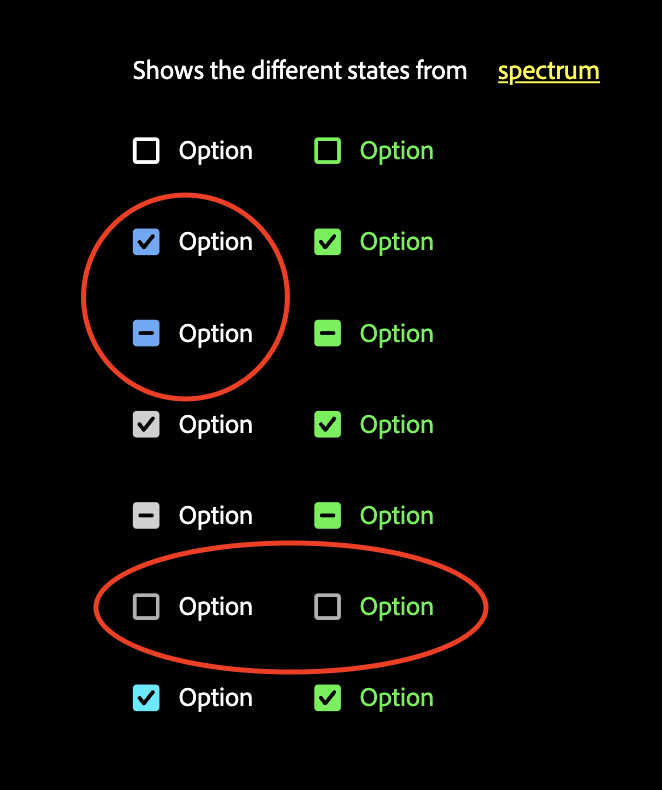
|
@snowystinger and @devongovett WHCM for Checkbox breaks with this: 9d21a67#diff-33c2361c79a3779c4950c8d95cd3af4b4e3a6ad989803452330f0337ffa64d97. The color styles defined in the index.css are taking precedence over the styles defined in the skin.css. |

This comment was marked as outdated.
This comment was marked as outdated.
|
Build successful! 🎉 |
There was a problem hiding this comment.
Ran chromatic, looks like the selection border changed a little bit https://www.chromatic.com/test?appId=5f0dd5ad2b5fc10022a2e320&id=63d7fc08564648dc28ef74e4
I'm looking into the why of it right now.
Looks like the dropshadow ::after is now --spectrum-table-row-border-color-selected <=== var(--spectrum-legacy-color-blue-500,var(--spectrum-global-color-blue-500))
and it used to be --spectrum-global-color-blue-500
I'm not sure why the legacy one is the lead choice and not the fallback, I see you followed some other examples. @devongovett maybe I'm just not understanding xvar, but shouldn't these all be switched?
Edit: I see why the legacy was preferred there, see description of #3857

 snowystinger
left a comment
snowystinger
left a comment
snowystinger
left a comment
There was a problem hiding this comment.
got some additional info regarding xvar
it is also used to not collapse variables, much like we have done by placing the variable declarations in the component's top level class.
I'm not sure we should move to using xvar, but just providing some more context
|
Build successful! 🎉 |
|
Build successful! 🎉 |

|
Build successful! 🎉 |
|
Build successful! 🎉 |


|
Build successful! 🎉 |
|
## API Changes
unknown top level export { type: 'identifier', name: 'Column' } |
|
Seems like it's hanging, going to close and reopen |

|
One more try |


5 participants


Relates to #2949
✅ Pull Request Checklist:
📝 Test Instructions:
forced-colors: activeemulation under the Customize and control DevTools menu button (looks like "⋮" in the upper right corner of DevTools panel toolbar) > More tools... > Rendering > Emulate CSS media feature forced-colors > forced-colors: activeAlso test ListView stories, including drag and drop: https://reactspectrum.blob.core.windows.net/reactspectrum/e23100ba3eff9c6206f91b525d06f5620eedb5d4/storybook/index.html?path=/story/listview--default&providerSwitcher-express=false&providerSwitcher-toastPosition=bottom
And Drag and Drop stories:
https://reactspectrum.blob.core.windows.net/reactspectrum/5d6f3c03ccdf2462277f32e53624cceea767e751/storybook/index.html?path=/story/drag-and-drop--default&providerSwitcher-express=false&providerSwitcher-toastPosition=bottom
Checkbox WHCM story:
https://reactspectrum.blob.core.windows.net/reactspectrum/5d6f3c03ccdf2462277f32e53624cceea767e751/storybook/index.html?path=/story/checkbox--whcm&providerSwitcher-express=false&providerSwitcher-toastPosition=bottom
Switch WHCM story:
https://reactspectrum.blob.core.windows.net/reactspectrum/5d6f3c03ccdf2462277f32e53624cceea767e751/storybook/index.html?path=/story/switch--whcm-test&providerSwitcher-express=false&providerSwitcher-toastPosition=bottom
🧢 Your Project:
Adobe/Accessibility