Add Winmd support #94
Conversation


|
This is an awesome change. I would like to understand a couple of things in terms of Unity behavior regarding WinMD:
We should mimick the Unity behaviour here with our setup. |
…into winmdSupport
...y/Packages/com.microsoft.msbuildforunity/Editor/ProjectGenerator/Scripts/UnityProjectInfo.cs
Outdated
Show resolved
Hide resolved
...y/Packages/com.microsoft.msbuildforunity/Editor/ProjectGenerator/Scripts/UnityProjectInfo.cs
Outdated
Show resolved
Hide resolved
...y/Packages/com.microsoft.msbuildforunity/Editor/ProjectGenerator/Scripts/UnityProjectInfo.cs
Outdated
Show resolved
Hide resolved
...ls.Unity/Packages/com.microsoft.msbuildforunity/Editor/ProjectGenerator/Scripts/WinMDInfo.cs
Outdated
Show resolved
Hide resolved

 andreiborodin
left a comment
andreiborodin
left a comment
andreiborodin
left a comment
There was a problem hiding this comment.
Looked at the code, some comments. Need to wait on the answers to the Unity behaviour questions.

|
So to start off, you can hit editor crashes if you have both the placeholder dll and winmd enabled for the editor and switch from the standalone player to the WSA player. It looks like this is a Unity exception compared to a MSBuildForUnity exception.
This generates an error when exporting/building stating that the "dll is not allowed to be included or could not be found"
This may have just been quick/strange wording, but WinMD's don't reference placeholder dll's. WinMDs and placeholder dlls define the same types for the WSA vs other players. If you include both a winmd reference and a placeholder reference for the WSA player an error is generated based on the colliding types. If you include just a placeholder dll reference for Android, things successfully build. This should be fine because the placeholder dll is callable no-op .NET dll. Folks may get unexpected behavior at runtime but they have fundamentally setup their code in a strange manner to use WSA types for non-WSA unity players. If you include a winmd and placeholder dll reference for Android you get the same error for including a winmd reference. |
|
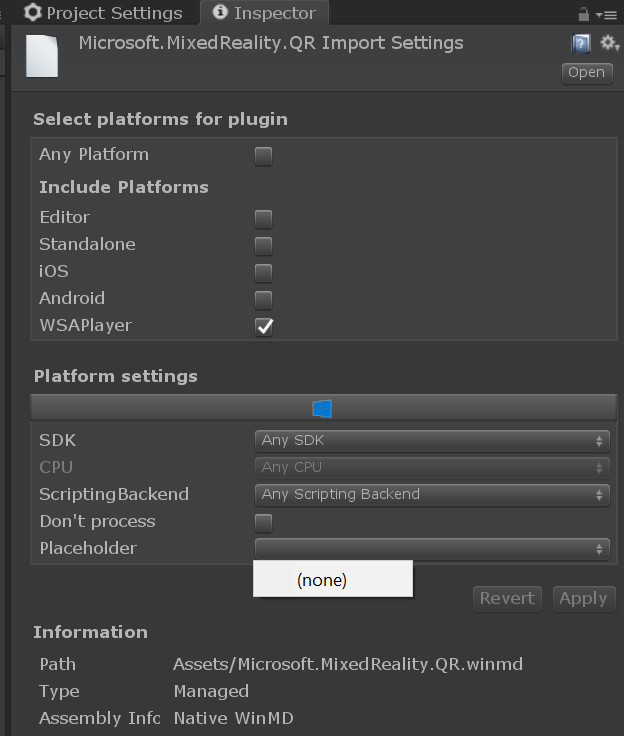
Thanks for looking into this. About specifying placeholder dlls, see this image: |
...y/Packages/com.microsoft.msbuildforunity/Editor/ProjectGenerator/Scripts/UnityProjectInfo.cs
Outdated
Show resolved
Hide resolved
|
|
||
| foreach (string assetAssemblyPath in Directory.GetFiles(Utilities.AssetPath, "*.dll", SearchOption.AllDirectories)) | ||
| IEnumerable<string> assetReferences = Directory.GetFiles(Utilities.AssetPath, "*.*", SearchOption.AllDirectories) | ||
| .Where(file => file.ToLower().EndsWith(".dll") || file.ToLower().EndsWith(".winmd")); |
There was a problem hiding this comment.
file.ToLower() [](start = 31, length = 14)
Could do .Select(t=>t.ToLower()).Where(t=> t.EndsWith() || ...)
There was a problem hiding this comment.
if you go this route you end up with all lower case file names which can cause issues with finding the asset relative path
There was a problem hiding this comment.
Ah, yes, my bad. Was thinking of how best to cache. Could you pass StringCompareOptions to EndsWith?
...y/Packages/com.microsoft.msbuildforunity/Editor/ProjectGenerator/Scripts/UnityProjectInfo.cs
Outdated
Show resolved
Hide resolved
|
I've added more robust error logging and winmd reference exclusion when things are configured incorrectly. |
| Debug.LogError($"WinMDs should only be enabled for the WSA Player; however, {ReferencePath} was configured to support {platform.Key}."); | ||
| valid = false; | ||
| break; | ||
| } |
There was a problem hiding this comment.
Do we want to correct this by just saying "we will only use it for UWP?" and logging an error, instead of just failing to use this as dependency?
2 participants


Currently only managed plugins are referenced in MSBuildForUnity project generation. In some instances, we also need to include winmd references. This change introduces the concept of winmds and adds winmd references to MSBuildForUnity generated projects.
#93 is currently open and addresses all changes before 137fd4d "add winmd support"