MRG, ENH: Combine channels #8014
Conversation


|
Hi @drammock, |

 drammock
left a comment
drammock
left a comment
drammock
left a comment
There was a problem hiding this comment.
I had a quick look and the code looks reasonable (and is easy to read; thanks for using clear variable names!). See my comments below. For now let's not worry about the dict.update() approach, it would be nice to have but is not a blocker.
Thanks for your detailed feedback :) |

Co-authored-by: Daniel McCloy <dan@mccloy.info>


|
2 things:
- method should operate inplace
- I am -1 on having both real EEG channels and virtual/combined EEG
channels in the same object.
2 options:
- use a function not a method that returns a new instance of an XxxArray
class
- remove all data / channels from the instance when adding these new
signals.
I am leaning towards a simple function.
… |
|
Just did the modifications based on your comments @drammock and @agramfort, thanks. Will implement tests now. |
|
I was actually thinking about turning verbose off when creating the new instances with XxxArray, is that something I should do with eg. |

|
I would set it to whatever the parent instance's |
Thanks @larsoner, I could do that if that's fine. The thing is that it is creating a new instance with one channel for every ROI, the console may become flooded with many ROIs if verbose is on for the parent's instance. |
I would create and return a single new instance with all the new (averaged) channels |
|
I would create and return a single new instance with all the new (averaged) channels
+1
|
|
I changed the code to create a single new instance. I also implemented tests, could you please give me some guidance on that? |


|
Looking great. I have one question about throwing an error if you try and combine less than two channels (one channel 😄). Here is my situation. I have a dataset which I want to split in to two regions of interest. Each region of interest has 4 channels. But for one participant they have lots of long hair and a bad connection between sensors and the scalp. And for this participant 3 of the 4 channels in the ROI is marked as bad. However, the remaining channel is clean and usable. In this situation, to be consistent with the rest of the dataset, I would want to create an ROI even though it has one channel. I could write a custom script for this one participant, or have an if statement, but I think it would be cleaner to just use the same code and have a combined channel from one channel. Could we perhaps print a warning to the user but not error in this situation? |
They look nice. I checked the codecov patch report and you have hit most of your lines of code. And the tests make sense and are documented well. But because you asked... you have only tested with combining two channels (unless I have read wrong), so you could check it works for 3 + channels. You also check the mean result is the same a numpy. You could do the same for the other methods. |
Yes you are right, thanks for pointing that out. I think that would be very handy, and I can see myself being in the same situation. Actually, I'm thinking that also adding a parameter (eg. EDIT: At the moment it is not taking care of bad channels and just considers them as normal channels which are combined if in the ROI dict. |

Averaging channels isn't what I normally think of as "preprocessing". I think this tutorial is probably a good spot for it: https://mne.tools/dev/auto_tutorials/evoked/plot_eeg_erp.html It's one that I haven't had a chance to overhaul yet (I've been working through them all gradually); since I'll likely change the tutorial a lot when I get round to that one, any additions you make now could be pretty skeletal --- i.e., just a sentence saying "if you want to average across sensors to make an ROI, do this" and then a couple lines of code to average and then a plot. Since the tutorial already defines |
|
I added a few lines to the EEG processing and Event Related Potentials (ERPs) tutorial, please let me know if that's okay for you @drammock :) Also some checks are failing, but I'm not sure if that's related to my changes... |
|
Windows 3.8 pip pre you can ignore for now, but CircleCI has a new warning (we don't allow warnings in Which would be this line: You can either do |
|
I killed Travis, it will fail until #8050 lands, then I'll restart CIs |
|
@HanBnrd if you merge with |
|
@HanBnrd let me know if you want help with the merge, but in theory you should just be able to do: |
Sorry @larsoner I'm not sure I can merge |
To be clear, I'm not saying that you should push/merge your changes into For example, I can do it locally on my machine: And at this point, I could now do: And it would push the merge commit to your branch (assuming I have permission to do so, which is the case if you checked the "allow contributions from maintainers"). But you should be able to do it, too. If you do: Now your system knows about all up-to-date branches out on GitHub. Then if you're locally on your combine-channels branch and you do: Then save-and-exit the prompt that comes up about what merge commit message to use, then you should be able to do: Then we should see a merge commit pop up in your branch in this PR. |
Okay, thanks for the explanation :) |
|
Here is the rendered tutorial. The plot looks odd; the two ROIs appear to be mirror images of one another? |
|
Perhaps I'm being too nitpicky, but maybe a more realistic example is to hand-construct a dict of just a few channels from each side (usually an ROI is not "all electrodes on the left half of the head") instead of using the for-loop to sort by odd/even channel loc. WDYT? |
|
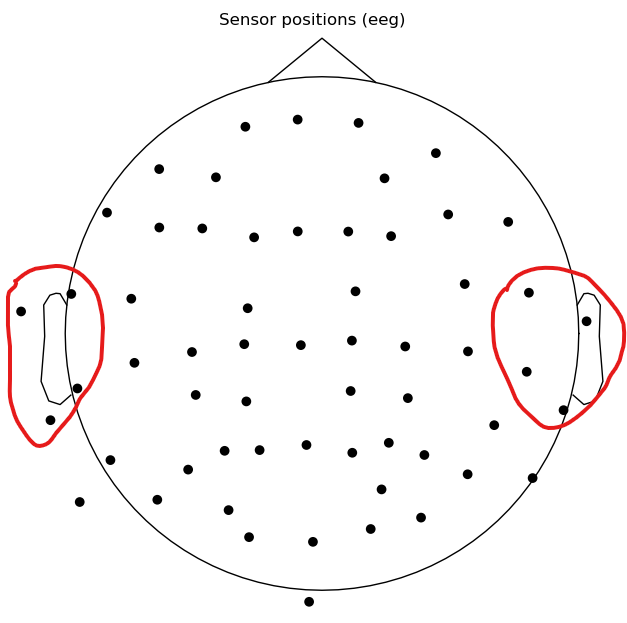
Yeah okay, I can select channels around the motor cortex left vs. right. EDIT: my bad, I forgot it was auditory, so maybe around T3 and T4. |
|
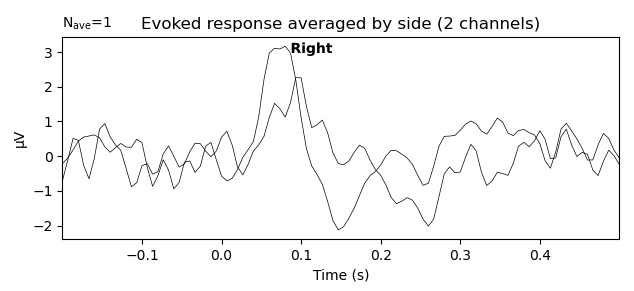
This is what I have when I average those sensors (left vs. right) for left auditory: |
|
That looks better. Thanks, and sorry for the last-minute change request... I didn't foresee (but should have) how strange the left half / right half ROI signals would look. |


|
thanks @HanBnrd! |
|
Thank you all for your support :) |

6 participants


Reference issue
Closes #7984
What does this implement/fix?
Implementation of a way to combine channels from Raw, Epochs, or Evoked. Channels can be combined with a callable as argument or with "mean", "median", or "std".
Additional information
mne/channels/channels.py, open to suggestions for a better location